Talk to an Expert

How to Develop a ChatGPT Plugin for Image Generation Using the Stable Diffusion Method?

ChatGPT Plugin for Image Generation

With its astounding 175 billion parameters, ChatGPT, OpenAI’s advanced language model based on GPT-3.5 architecture, has transformed the area of natural language processing by producing human-like prose and offering unique solutions across a wide range of domains.

Since ChatGPT was created by OpenAI, it can interpret and produce writing that is similar to that of a human being. As a result, it can have meaningful conversations, respond to inquiries, and even carry out a variety of jobs without any additional training. Using the ground-breaking Stable Diffusion Method, ChatGPT has discovered a new frontier in the field of image synthesis outside of language processing. 

This blog explores how to add plugins to chatGPT & other technicalities of developing a ChatGPT Plugin for image generation using the Stable Diffusion method.

Introducing ChatGPT and its NLP Capabilities

With the help of the extensive training data it uses, which is drawn from the internet, ChatGPT stands out as a ground-breaking language model. This massive model, which has billions of parameters, is trained on a wide variety of texts, including webpages, papers, books, and more. 

This thorough training gives ChatGPT a broad understanding of many subjects and helps it to recognize the subtleties of human language context. ChatGPT’s generative capabilities, which allow it to process language inputs and respond coherently with pertinent text, are what truly make it remarkable.

Engaging in conversations with ChatGPT feels remarkably human, making it a valuable tool for content drafting, language translation, code generation, and even tutoring. Its ability for zero-shot and few-shot learning is particularly astounding, as it can perform specific tasks without prior training on them. Users can now prompt the model with instructions, and it adapts swiftly to provide tailored responses.

ChatGPT Plugin Development -The Fusion of Language and Image Generation

Enter ChatGPT Plugins – the seamless fusion of ChatGPT’s natural language processing capabilities with the groundbreaking Stable Diffusion Method for image generation. This union of language and image generation opens up a universe of creative possibilities. The Stable Diffusion Method is a cutting-edge image synthesis technique that excels in creating visually appealing and realistic images.

At its core, the Stable Diffusion Method deploys a neural network to iteratively refine and improve images, allowing for a smooth transition from a rough draft to a refined masterpiece. By utilizing noise and diffusion, the method ensures the ChatGPT-generated images are not only visually stunning but also possess a level of controlled uncertainty, adding a touch of artistic flair to the creations.

Read Our Blog: Top 10 ChatGPT Development Companies In 2025

The Significance of Combining Language and Image Generation

The integration of ChatGPT Plugins elevates user experiences to unprecedented levels. Imagine initiating a conversation with ChatGPT, and upon receiving textual prompts, the Artificial Intelligence responds not only with insightful words but also with vividly generated images that complement the dialogue. This combination enriches the user experience, fostering a deeper understanding and emotional connection.

The potential applications of this amalgamation are vast. In the world of e-commerce, businesses can employ ChatGPT Plugins to provide interactive product descriptions with accompanying images. Customers can gain a comprehensive understanding of the product, leading to more informed purchasing decisions.

In education, this integration of ChatGPT could revolutionize learning materials. Imagine a virtual tutor that not only explains complex concepts in detail but also conjures up visual aids to illustrate the ideas better. This combination enhances comprehension and engagement, making learning an immersive and delightful journey.

Moreover, in creative industries like storytelling and gaming, ChatGPT Plugin development can breathe life into characters and worlds. Authors can interact with ChatGPT to explore plot twists, while game developers can introduce dynamic characters that respond with unique visuals.
Contact Us

The Stable Diffusion Method

Creating stunning, realistic chatGPT generate images has long been an artistic pursuit. With advancements in AI and deep learning, new image-generation techniques have emerged, one of which is the Stable Diffusion Method. In this article, we embark on an exciting journey into the world of image synthesis and uncover the secrets behind the Stable Diffusion Method.

At the heart of the Stable Diffusion Method lies the concept of diffusion, a fundamental process that governs how molecules spread and interact. Inspired by this principle, the Stable Diffusion Method applies diffusion equations to generate images gradually, unveiling a mesmerizing transformation of pixels.

But what sets the Stable Diffusion Method apart? Unlike traditional image generation AI models, which produce results in a single shot, this approach introduces multiple intermediate steps, creating a captivating “melt-and-recover” effect. The method brings forth a visual storytelling experience that captures the essence of each evolutionary stage in the image generation process.

The Artistry of Image Synthesis

The Stable Diffusion Method crafts images with an artist’s finesse, meticulously painting each pixel with a touch of AI magic. It starts with a randomly generated image, akin to a blank canvas. Gradually, the model unleashes the power of diffusion equations, allowing pixels to interact and evolve. At every step, the image refines itself, revealing exquisite details that emerge like brushstrokes on a canvas.

Each diffusion step serves as a portal to a new realm of possibilities, as the image transitions gracefully through various phases. The Stable Diffusion Method showcases a remarkable ability to maintain stability throughout the transformation, allowing for the smooth evolution of images, resembling a masterpiece in the making.

Advantages of the Stable Diffusion Method
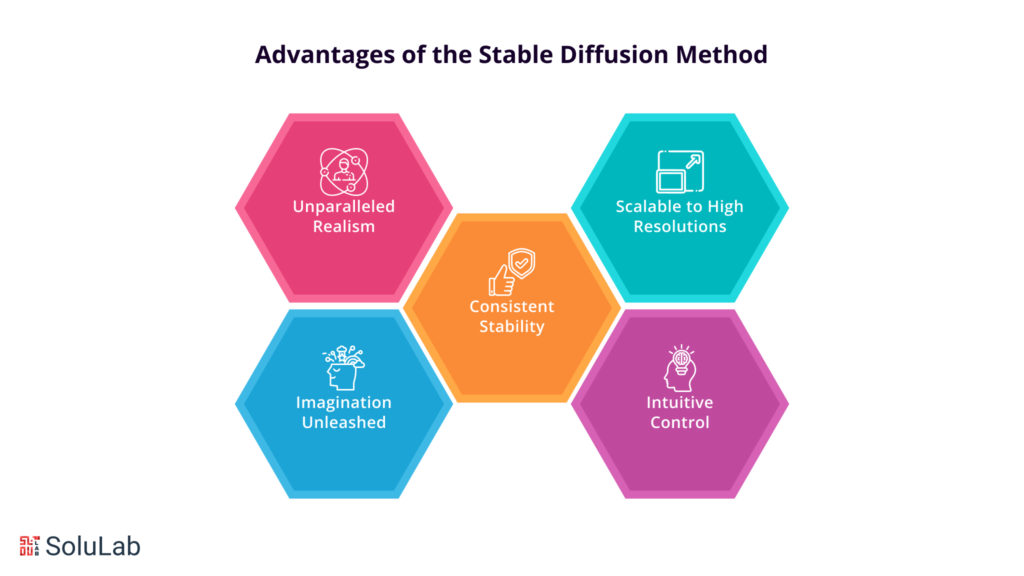
Advantages of the Stable Diffusion Method

While image generation techniques abound, the Stable Diffusion Method holds its own as a true visionary. Here are some of its remarkable advantages over traditional methods:

1. Unparalleled Realism: The gradual evolution of images ensures the Stable Diffusion Method produces remarkably realistic visuals. The model captures intricate details and textures, breathing life into digital canvases.

2. Imagination Unleashed: By embracing the fluidity of diffusion, the method taps into its boundless creativity, transcending the limitations of traditional approaches. This enables the generation of art that goes beyond the confines of human imagination.

3. Consistent Stability: Unlike some image generation models that might produce distorted or inconsistent results, the Stable Diffusion Method maintains stability and coherence throughout the synthesis process. Each step contributes seamlessly to the final artwork.

4. Scalable to High Resolutions: Scaling up image generation to high resolutions can often be challenging. However, the Stable Diffusion Method elegantly adapts to larger dimensions, making it suitable for various applications, from artistic endeavors to practical uses.

5. Intuitive Control: The method’s multi-step approach provides an intuitive means of controlling the creative process. Artists can influence the outcome by adjusting parameters at each diffusion step, fostering artistic expression and experimentation.

Read Our Blog: Google Gemini Vs ChatGPT

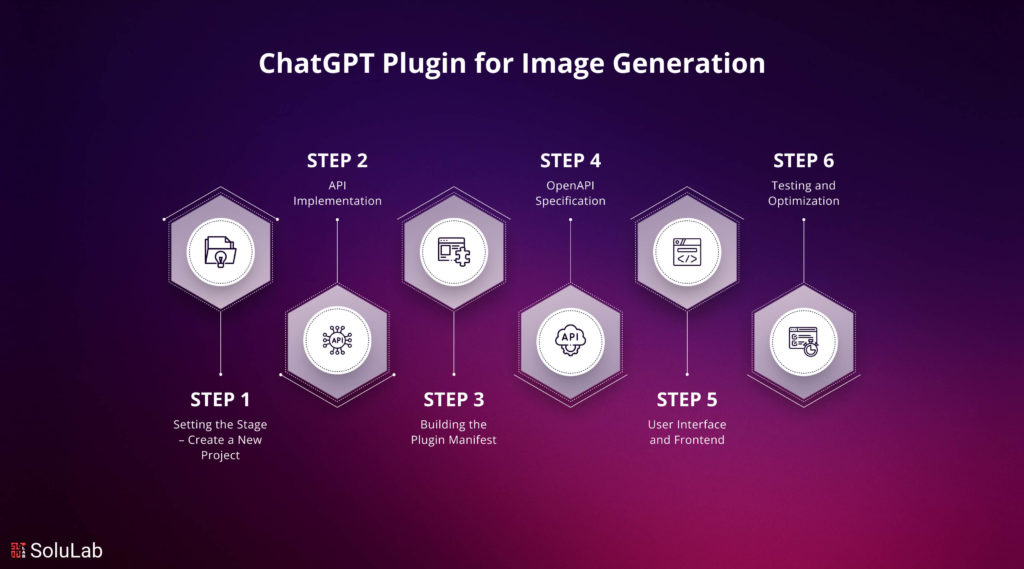
How to Create a ChatGPT Plugin via the Stable Diffusion Method?

Building a ChatGPT plugin for image generation with the enchanting Stable Diffusion Method is an exciting endeavor that merges art in AI. By following these steps, you can create an immersive user experience, empowering users to witness the artistry of AI in generating mesmerizing images, all while basking in the magic of Stable Diffusion. Embrace the artistic AI revolution and embark on a journey of boundless creativity.

Step 1: Setting the Stage – Create a New Project

  • Conceptualize the Vision:  Begin by envisioning the desired outcome of your ChatGPT plugin. Determine the goals and functionalities, defining how the Stable Diffusion Method will bring life to images.
  • Choose the Programming Language:  Select a programming language that aligns with your project’s requirements. Python is a popular choice for its robust libraries and AI capabilities.
  • Setup Environment and Dependencies:  Install essential libraries and tools, like TensorFlow or PyTorch, to handle image generation and AI computations efficiently.

Step 2: API Implementation

  • Explore OpenAI API: Familiarize yourself with OpenAI API documentation to understand how to access the powerful GPT model. Ensure you have the necessary API keys for authentication.
  • Implement Image Generation Functions: Integrate the Stable Diffusion Method within your API implementation. Develop functions that handle image synthesis and the gradual evolution of pixels.
  • Add User Interactivity: Enhance the user experience by allowing them to input parameters and guide the image generation process. Enable intuitive user control over the creative journey.

Read Also: Top 10 AI Development Companies in 2025

Step 3: Building the Plugin Manifest

  • Define the Plugin Manifest: Create a manifest file that outlines essential details about your ChatGPT plugin. This includes the plugin name, description, version, and dependencies.
  • Incorporate Image Generation: Clearly specify the Stable Diffusion Method as a key feature of your plugin. Describe its capabilities and the unique artistry it brings to image synthesis.

Step 4: OpenAPI Specification

  • Design the API Specification:   Craft a detailed OpenAPI specification that defines the endpoints and input/output formats for the ChatGPT plugin. This ensures seamless integration with the API.
  • Document the Image Generation Process: Include comprehensive documentation on how users can interact with the plugin and how the Stable Diffusion Method transforms pixels at each diffusion step.

Step 5: User Interface and Frontend

  • Intuitive User Interface (UI): Design a user-friendly interface that allows users to input prompts and parameters to initiate the image generation process. Ensure it complements the plugin’s artistic nature.
  • Real-time Image Preview: Implement a dynamic image preview that displays the evolving images at each diffusion step, creating an engaging experience for users.

Step 6: Testing and Optimization

  • Rigorous Testing: Thoroughly test your ChatGPT plugin to ensure stable and reliable performance. Address any bugs or issues that may arise during the testing phase.
  • Performance Optimization: Optimize the plugin’s image generation process for efficiency and scalability, enabling smooth operation even at higher resolutions.

Best Practices and Optimization
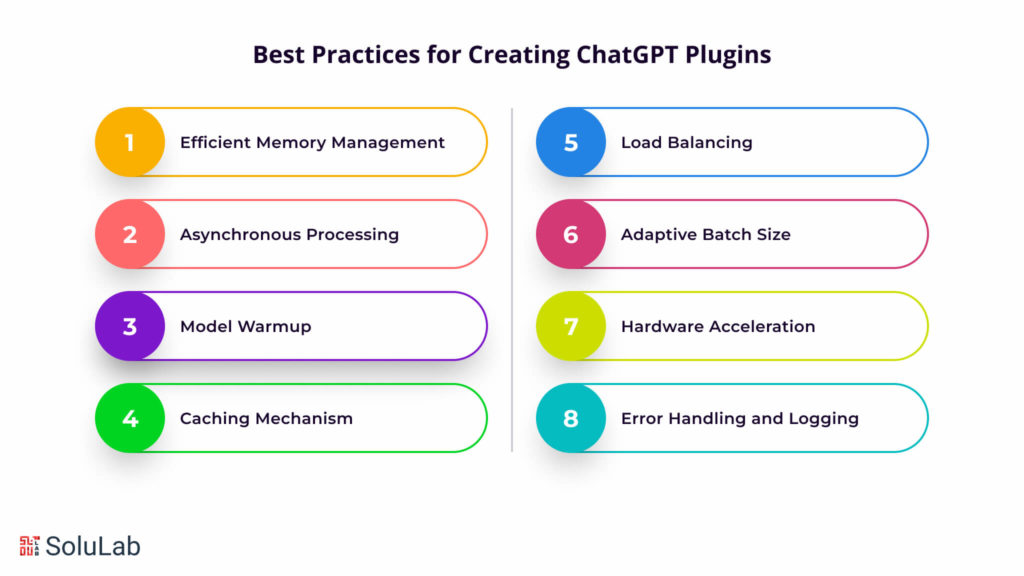
Best Practices for Creating ChatGPT Plugins

To craft a high-performance ChatGPT plugin that weaves magic into every pixel, consider implementing the following best practices:

1. Efficient Memory Management:

Optimize memory usage by minimizing unnecessary allocations and promptly releasing unused resources. Efficient memory management ensures seamless handling of large-scale image generation requests.

2. Asynchronous Processing:

Embrace asynchronous processing to handle concurrent user requests effectively. Asynchronous execution allows the plugin to serve multiple users simultaneously, avoiding delays during peak usage.

3. Model Warmup:

Initiate a model warmup during plugin initialization to accelerate the image generation process. By preloading the Stable Diffusion Model, the plugin responds faster to user prompts, enhancing the overall user experience.

4. Caching Mechanism:

Implement a caching mechanism to store intermediate results during the diffusion process. This intelligent caching reduces redundant computations for similar prompts, expediting image generation and reducing server load.

5. Load Balancing:

Ensure smooth performance by employing load-balancing techniques. Distributing user requests across multiple server instances optimizes resource utilization and prevents potential bottlenecks.

6. Adaptive Batch Size:

Fine-tune the batch size for image generation requests to optimize memory consumption and processing speed. An adaptive batch size approach ensures efficient resource usage while maintaining fast response times.

7. Hardware Acceleration:

Leverage the power of GPUs or TPUs for hardware acceleration, significantly speeding up AI computations. Hardware acceleration elevates the plugin’s performance to new heights, especially for complex image synthesis.

8. Error Handling and Logging:

Implement robust error handling mechanisms and comprehensive logging to efficiently diagnose and address any issues that arise. Effective error management ensures smooth operation and swift troubleshooting.

Exploring Real-World Applications of ChatGPT Plugins

The ChatGPT image generation plugin with the captivating Stable Diffusion Method unlocks an array of applications and creative pursuits:

  • Artistic Expression and Visual Storytelling: The plugin empowers artists and designers to embark on imaginative journeys, creating awe-inspiring artwork and captivating visual narratives, though users still may need to convert heic to png when working with ChatGPT since it sometimes has trouble accepting HEIC image formats.
  • Content Creation and Marketing: Content creators can enhance the visual appeal of their articles, blog posts, and social media content by generating eye-catching images that captivate audiences.
  • Graphic Design and Prototyping: Graphic designers can prototype designs, craft custom illustrations, and experiment with novel visual concepts, streamlining the creative design process.
  • Video Game Development and Game Assets: Game developers can breathe life into virtual worlds by generating unique character designs, game assets, and immersive environments.
  • Virtual and Augmented Reality (VR/AR): The plugin becomes a catalyst for realism in virtual and augmented reality applications, generating lifelike textures, objects, and environments.
ChatGPT Services

Concluding Remarks

Building a ChatGPT plugin for image generation using the Stable Diffusion Method ignites the fusion of art and AI, redefining creative boundaries. By embracing performance optimization and exploring diverse use cases, ChatGPT developers unlock a universe of artistic possibilities. ChatGPT plugins are designed to be scalable and secure. With proper implementation and testing, developers can ensure the plugin’s performance scales with user demand. Additionally, ChatGPT developers should prioritize security measures to protect user data and prevent potential vulnerabilities. Immerse yourself in the mesmerizing realm of Stable Diffusion, where pixels transform into captivating masterpieces, weaving the magic of art and AI into every creation. Embrace the journey of innovation and elevate the AI-driven creative experience to new heights.

SoluLab takes pride in its exceptional team of skilled and experienced professionals, wholly committed to tailoring customized ChatGPT clones that precisely cater to diverse business requirements. Positioned as a prominent ChatGPT development company, SoluLab continuously enhances its expertise, embracing the latest technologies to deliver innovative services. Their primary goal is to empower businesses with advanced AI chatbot solutions, guiding clients through the endless possibilities of leveraging ChatGPT. By harnessing the power of SoluLab’s talented ChatGPT developers, businesses can set themselves apart in the competitive AI development landscape, unlocking new possibilities and achieving unparalleled success. For cutting-edge AI development needs, businesses can confidently hire the leading ChatGPT developers from SoluLab today and experience the transformative difference they bring. Contact SoluLab now to explore the full potential of ChatGPT for your business.

FAQs

1. What is the Stable Diffusion method for image generation?

The Stable Diffusion method is an advanced technique used in AI Development Solutions for generating high-quality images from textual descriptions. It leverages deep learning models to create detailed and coherent images based on input prompts, making it useful for various applications, including Enterprise Chatbot Solutions.

2. How can I integrate the Stable Diffusion method into a ChatGPT plugin?

To integrate the Stable Diffusion method into a ChatGPT plugin, you need to connect the image generation model with the ChatGPT framework. This process is part of AI Development Solutions and involves setting up APIs or other communication protocols to handle requests and generate images based on text prompts, potentially enhancing Enterprise Chatbot Solutions.

3. What are the benefits of using AI Development Solutions for creating ChatGPT plugins?

AI Development Solutions offer specialized expertise in building and integrating advanced AI models into applications. Utilizing these solutions ensures high-quality development, efficient implementation of complex features like image generation, and robust support for your Enterprise Chatbot Solutions.

4. How can I Hire AI Developers for developing a ChatGPT plugin?

When looking to Hire AI Developers for developing a ChatGPT plugin, seek professionals with experience in AI model integration, particularly in natural language processing and image generation. Evaluating their portfolio and expertise will help ensure they can deliver high-quality AI Development Solutions tailored to your needs.

5. How does the Stable Diffusion method enhance image generation in ChatGPT plugins?

The Stable Diffusion method enhances image generation by providing a more stable and coherent approach to creating images from text. This method, as part of AI Development Solutions, ensures that the generated images are high-quality, accurate, and relevant, improving the overall effectiveness of Enterprise Chatbot Solutions.
How to Fine-Tune GPT Models for Specific Niche Domains?

How to Fine-Tune GPT Models for Specific Niche Domains?

As the boundaries of artificial intelligence continue to expand, the ability to tailor language models to suit particular industries or specialized areas of knowledge has become increasingly important. Fine-tune GPT models offer a remarkable opportunity to elevate the quality and relevance of the generated text in niche domains. Whether you’re working in finance, healthcare, law, or any other specialized field, customizing language models can significantly enhance their performance, ensuring they generate contextually appropriate and accurate content. 

This process involves training the GPT model on domain-specific data, allowing it to learn the intricacies and nuances of the particular subject matter. By following the steps outlined in this blog, you’ll gain the knowledge and skills needed to fine-tune GPT models for your chosen niche, unlocking their full potential and empowering your work. In this blog, we will guide you through the process of ChatGPT fine-tuning models, enabling you to leverage their immense potential and create powerful language models that are finely attuned to your specific domain.

Read Also: What is GPT?

What are the Advantages of the ChatGPT Fine-tuning analytics model?

What are the Advantages of the ChatGPT Fine-tuning analytics model?

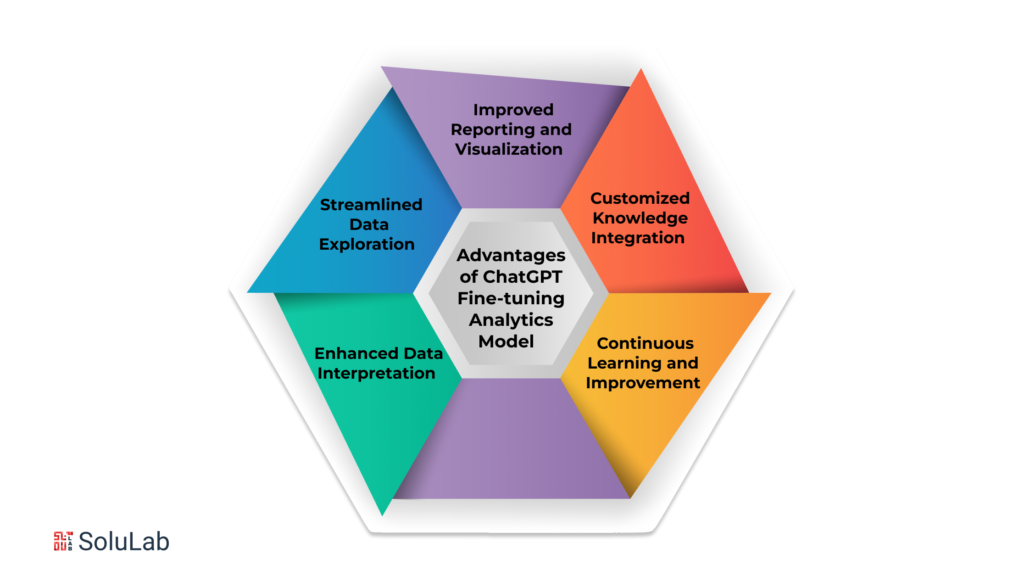
Fine-tune GPT model specifically for analytics is a game-changer in the world of data analysis and insights. By customizing these language models to understand and generate text in the context of analytics, professionals in the field can unlock a host of benefits. Let’s explore some of the advantages of ChatGPT fine-tuning models for analytics:

  • Enhanced Data Interpretation

Fine-tune GPT models can grasp the intricacies of data analysis terminologies, statistical concepts, and domain-specific jargon. This allows them to provide more accurate and insightful interpretations of complex data sets, helping analysts extract valuable information and draw meaningful conclusions. 

Whether it’s deciphering patterns, identifying trends, or explaining statistical relationships, a fine-tuned ChatGPT model can become an indispensable assistant in the analytics workflow.

  • Streamlined Data Exploration

Analyzing vast amounts of data often involves exploring different variables, dimensions, and relationships. Fine-tune GPT model can be trained to understand specific queries related to data exploration, enabling analysts to obtain quick and relevant insights. 

By asking questions or providing prompts, analysts can engage in a natural language conversation with the model, receiving instant responses that aid in data exploration, hypothesis testing, and decision-making.

  • Improved Reporting and Visualization

Generating comprehensive reports and creating visualizations that effectively communicate data-driven insights can be time-consuming. However, a fine-tuned ChatGPT model can assist in automating these tasks. 

By describing analysis results, summarizing key findings, and suggesting appropriate visualizations, the model can accelerate the reporting process, freeing up time for analysts to focus on higher-level tasks and strategic analysis.

Read Our Blog: Top 10 ChatGPT Development Companies

  • Customized Knowledge Integration

Fine-tune GPT model for analytics allows the incorporation of domain-specific knowledge into the language model’s understanding. This means that the model can be trained on data from specific industries or business domains, enabling it to provide tailored insights and recommendations. 

Whether it’s finance, marketing, healthcare, or any other analytics-driven field, a fine-tuned ChatGPT model can leverage the relevant expertise to deliver more accurate and contextually appropriate responses.

  • Continuous Learning and Improvement

Fine-tune GPT models can be updated and refined over time as new data becomes available or the analytics domain evolves. This iterative process ensures that the model stays updated with the latest trends and insights, continuously improving its performance. 

By ChatGPT fine-tuning regularly, analysts can maintain a cutting-edge language model that adapts to changing data landscapes and supports accurate decision-making.

CTA 1

How to Fine-tune GPT Models for Specific Domains?

How to Fine-tune GPT Models for Specific Domains?

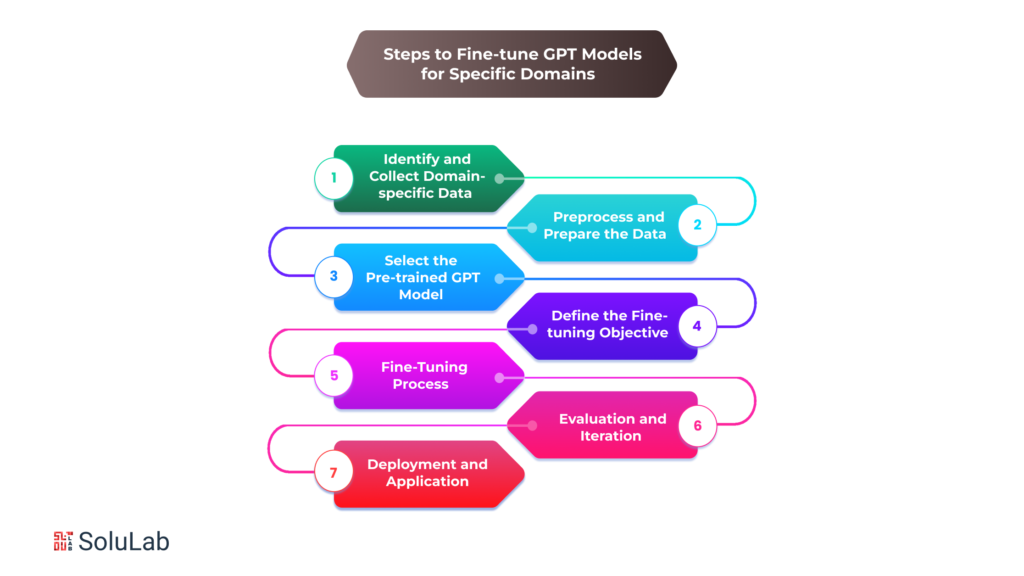
Fine-tune GPT model for specific domains is an invaluable technique that allows you to tailor the power of these language models to your specific needs. By training these models on domain-specific data, you can enhance their ability to generate contextually accurate and relevant content. In this article, we will walk you through the step-by-step process of fine-tuning the GPT model to ensure they perform optimally in your chosen domain.

1. Identify and Collect Domain-specific Data

The first step in fine tune GPT model is to gather a dataset that is specific to your target domain. This dataset should include text samples, documents, or any other relevant sources of information that capture the unique language and context of your domain. It is essential to have a diverse and representative dataset that encompasses the range of topics and scenarios encountered in your domain.

2. Preprocess and Prepare the Data

Once you have collected the domain-specific data, it’s crucial to preprocess and clean it before feeding it into the fine-tuning process. This involves removing any irrelevant or noisy data, correcting inconsistencies, and standardizing the format of the text. Additionally, you may need to annotate the data with labels or tags to assist the model in understanding the specific tasks or intents relevant to your domain.

3. Select the Pre-trained GPT Model

The next step is to choose an appropriate pre-trained GPT model as the starting point for fine-tuning. Several pre-trained models are available, such as GPT-3, GPT-2, or even the more recent GPT-4. Consider the size of the model, its performance on general language tasks, and its compatibility with the fine-tuning process. Selecting the right base model is crucial for achieving the desired results in your domain.

4. Define the Fine-tuning Objective

Before initiating the fine-tuning process, you need to define the specific objective or task you want the model to excel in your domain. This could be text generation, sentiment analysis, question answering, or any other specific task relevant to your use case. By clearly defining the objective, you can guide the fine-tuning process to optimize the model’s performance for that particular task.

Read Our Blog: How Does ChatGPT Help Custom Software Development?

5. Fine-tuning Process

The fine-tuning process involves training the selected pre-trained model on your domain-specific dataset. It’s important to strike a balance between underfitting and overfitting the model. Underfitting occurs when the model fails to capture the nuances of your domain while overfitting results in the model memorizing the training data and struggling with generalization.

During fine-tuning, you’ll typically use techniques such as gradient-based optimization, adjusting learning rates, and employing regularization strategies to achieve optimal results. Experiment with different hyperparameters, batch sizes, and training epochs to find the right balance for your specific domain.

6. Evaluation and Iteration

After fine-tuning the model, it’s crucial to evaluate its performance on a separate validation dataset or through other evaluation metrics specific to your domain. Analyze how well the model performs on the intended task, whether it captures the nuances of the domain-specific language, and whether it generates accurate and contextually appropriate outputs.

Based on the evaluation results, you may need to iterate and refine the fine-tuning process. This could involve tweaking hyperparameters, gathering additional data, or exploring alternative pre-trained models. The iterative process allows you to continually improve the model’s performance and align it more closely with the nuances and requirements of your domain.

7. Deployment and Application

Once you are satisfied with the fine-tuned model’s performance, it’s time to deploy and integrate it into your production systems or applications. Ensure that the infrastructure can handle the computational requirements of the model and that it is well-integrated into your workflow. Monitor the model’s performance and gather feedback from users to identify areas for further improvement or adaptation.

How to Choose the Appropriate Fine-tune GPT-3 Model Variant for Fine-tuning?

Choosing the appropriate fine-tune GPT-3 model variant is a crucial step in the process of customizing language models for specific domains. The GPT-3 model family offers several variants with different capabilities and sizes, each suited to different use cases and computational resources. To ensure the best results from fine-tuning, selecting the right model variant is essential. Here are some factors to consider when making this decision:

  • Model Size and Computational Resources

GPT-3 models come in various sizes, ranging from a few million to hundreds of billions of parameters. The size of the model affects both its computational requirements and its ability to capture complex relationships in the data. Smaller models may be more suitable for limited computational resources, such as CPUs or low-memory environments. In comparison, larger models can handle more extensive and diverse datasets, providing more nuanced insights.

  • Fine-tuning Objective

Consider the specific objective of fine-tuning. Are you aiming to generate coherent and contextually appropriate responses or extract detailed information from the text? For simpler tasks, a smaller GPT-3 variant may suffice, while more complex objectives may require a larger model with more parameters to capture intricate nuances and improve performance.

  • Domain Expertise and Vocabulary

Some GPT-3 variants are trained on specific domains, such as legal or medical texts, and are more adept at understanding and generating text in those domains. If your fine-tuning project focuses on a particular domain, selecting a variant that aligns with that domain can provide a head start in capturing relevant knowledge and understanding the specialized vocabulary.

  • Latency and Response Time

The size of the fine-tuned model affects the inference time required for generating responses. Larger models typically have longer response times due to their increased computational requirements. Consider the latency and response time constraints of your application or system, as this can impact the user experience and overall performance.

  • Data Availability and Task Complexity

Assess the availability and size of your domain-specific dataset. Larger models generally require more training data to generalize well. If you have a limited dataset, a smaller GPT-3 variant might be more appropriate to prevent overfitting. Conversely, if you have a substantial amount of diverse data, a larger variant can help capture a wider range of patterns and nuances.

  • Experimentation and Evaluation

It’s often beneficial to experiment with multiple GPT-3 variants to evaluate their performance on your specific task or domain. Test different models and compare their results in terms of text quality, coherence, and relevance to your domain. This empirical evaluation can provide valuable insights and help you make an informed decision.

How to Evaluate the Performance and Quality of the Fine-tuned Model?

How to Evaluate the Performance and Quality of the Fine-tuned Model?

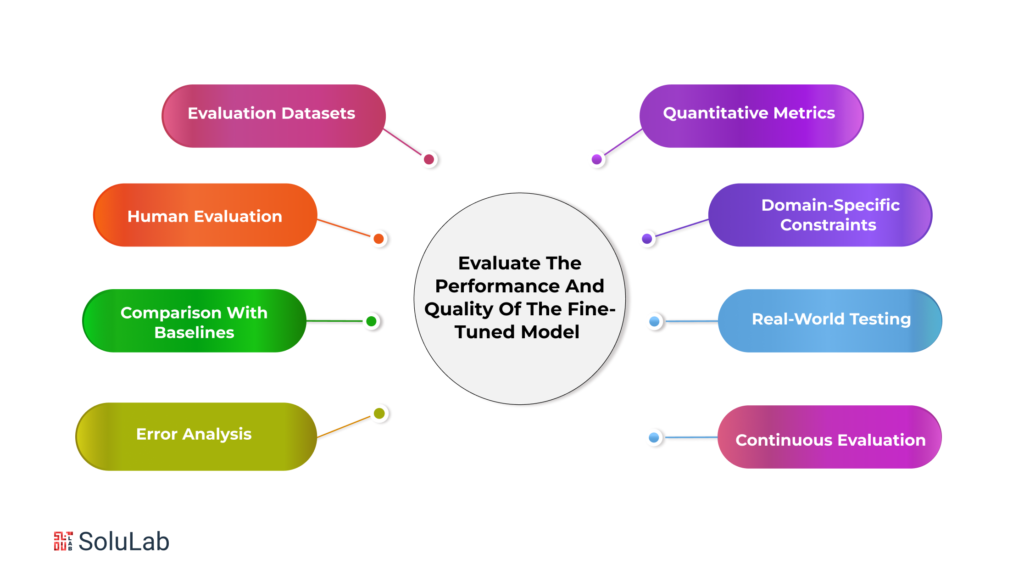
Evaluating the performance and quality of a fine-tuned model is a crucial step in assessing its effectiveness and determining its readiness for deployment. Here are some strategies and metrics to consider when evaluating the performance and quality of your fine-tuned model:

  • Evaluation Datasets

Prepare separate evaluation datasets that are distinct from the training data. These datasets should cover a wide range of scenarios and use cases within your domain. Ensure that the evaluation data represent the same distribution and characteristics as the real-world data the model will encounter during deployment.

  • Quantitative Metrics

Utilize quantitative evaluation metrics to measure the performance of your fine-tuned model. Common metrics include accuracy, precision, recall, F1 score, perplexity, or any domain-specific metrics relevant to your task. These metrics provide objective measures of the model’s performance and can help identify areas that require improvement.

  • Human Evaluation

Incorporate human evaluation to assess the quality and coherence of the generated text. Develop a standardized evaluation protocol and involve human evaluators who are knowledgeable in your domain. Provide them with specific criteria to evaluate the responses generated by the model, such as relevance, fluency, and coherence. This qualitative assessment adds valuable insights into the subjective aspects of the model’s performance.

  • Domain-specific Constraints

Consider any specific constraints or requirements in your domain and evaluate how well the fine-tuned model adheres to those constraints. For example, in legal or medical domains, compliance with regulations and ethical guidelines may be essential. Ensure the fine-tuned model generates outputs that align with these constraints and do not produce biased or sensitive content.

Read Also: Real-World Applications of Generative AI and GPT

  • Comparison with Baselines

Establish baselines by comparing the performance of your fine-tuned model with existing models or methods used in your domain. This comparison provides a benchmark and helps assess the improvement achieved through fine-tuning. Use appropriate statistical tests to determine if the performance difference is statistically significant.

  • Real-world Testing

Conduct real-world testing by integrating the fine-tuned model into relevant applications or workflows. Gather feedback from users or domain experts who interact with the model in practical scenarios. This feedback can provide valuable insights into the model’s effectiveness, usability, and performance in real-world settings.

  • Error Analysis

Perform a thorough error analysis to understand the weaknesses and limitations of the fine-tuned model. Identify common errors or failure cases and examine the patterns or causes behind them. This analysis helps guide further iterations of fine-tuning and improvement efforts.

  • Continuous Evaluation

Fine-tuned models should be continuously evaluated and monitored even after deployment. Collect user feedback, track performance metrics, and stay updated with the evolving needs and challenges of your domain. This allows you to make iterative improvements and ensure that the model remains effective over time.

CTA 2

Conclusion

Fine-tuning GPT models for specific niche domains offers a remarkable opportunity to create powerful language models finely attuned to the intricacies of specialized industries or areas of knowledge. The process involves training the GPT model on domain-specific data, allowing it to learn the nuances and context required for generating accurate and relevant content. 

To embark on this fine-tuning journey, start by identifying and selecting relevant data sources specific to your domain. This could include domain-specific datasets, research papers, online forums, or even subject matter experts who can provide valuable insights.

Once you have gathered the necessary data, the next step is to configure the model and define the fine-tuning objectives. Choosing the appropriate GPT model variant is essential, considering factors such as model size, computational resources, and the complexity of the task at hand. Configuration involves setting up the model architecture and hyperparameters to suit the specific domain. Training techniques, such as gradual unfreezing or learning rate scheduling, can further enhance the model’s performance.

SoluLab prides itself on having an exceptional team of experienced and skilled professionals dedicated to developing customized ChatGPT clones tailored to meet the unique business requirements of its clients. As a leading ChatGPT applications development company, SoluLab continuously enhances its expertise and innovates its services with the latest technologies, aiming to empower businesses with advanced AI chatbot solutions. With a focus on seamless integration, development, fine-tuning, and maintenance of custom AI solutions, SoluLab’s talented team leverages its expertise in ML, NLP, and Deep Learning to create captivating OpenAI experiences. Clients can experience the difference by hiring SoluLab’s top ChatGPT developers for their AI development needs.

In addition to ChatGPT, SoluLab’s Generative AI development services offer powerful models and solutions inspired by ChatGPT, DALL-E, and Midjurney. Their team of generative AI experts, well-versed in a wide range of AI technologies, enables businesses to leverage these tools and produce custom, high-quality content that sets them apart from competitors. If you’re seeking state-of-the-art generative AI development services tailored specifically to your company’s requirements, SoluLab is the right place to explore. Contact SoluLab today and discover how their team can help boost your company’s technical capabilities through advanced AI solutions.

FAQs

1. What is fine-tuning, and why is it important for GPT models in niche domains?

Fine-tuning is the process of customizing pre-trained language models, such as GPT models, to specific domains or industries. It allows models to learn domain-specific knowledge and generate contextually appropriate text. Fine-tuning is crucial in niche domains as it enhances the model’s understanding, relevance, and accuracy within a specific industry, making it a valuable tool for professionals, researchers, and enthusiasts.

2. How do I select relevant data sources for fine-tuning my GPT model?

To select relevant data sources, start by defining your domain and identifying specific topics or areas of knowledge within it. Explore existing domain-specific datasets, publications, online forums, and communities related to your niche.

3. How do I choose the appropriate GPT model variant for fine-tuning?

Choosing the right GPT model variant depends on factors like computational resources, fine-tuning objectives, domain expertise, vocabulary requirements, latency considerations, data availability, and task complexity. Assess the model’s size, its compatibility with available resources, its fine-tuning performance, and its domain-specific capabilities. 

4. What are the key steps in the fine-tuning process for GPT models?

Collect relevant data, preprocess it by cleaning and formatting, configure the model architecture, select appropriate hyperparameters, train the model on the domain-specific dataset, evaluate its performance using quantitative metrics and human evaluation, and refine the model based on the findings.


How Does ChatGPT Help Custom Software Development?


How Does ChatGPT Help Custom Software Development?

Chatbots have become common as companies look for methods to simplify processes, enhance customer service, and cut expenses. These AI-powered solutions may do various functions, such as generating reports and responding to consumer inquiries.

A recent survey found that companies using chatbots have an average 30% improvement in customer satisfaction and a 25% decrease in response times.

OpenAI ChatGPT is a high-level chatbot innovation that can create human text, offering another degree of complexity for organizations hoping to work on their computerized interchanges. This innovation can change how organizations interface with their clients, upgrading client assistance and helping efficiency.

Read Also: How to Fine-Tune GPT Models for Specific Niche Domains?

What Is ChatGPT?

The latest and most advanced traditional chatbot, ChatGPT, was created by OpenAI and will come on the market in November 2022. Unlike previous chatbots, a ChatGPT will benefit from machine learning advances known as transformers. A better knowledge of the documents on which it has been studied will be provided. It lets you produce answers that mimic human responses.

ChatGPT is unique compared to everything before. It can generate knowledgeable answers. You will receive something useful and convenient.

What Is The Significance Of Custom Software Development?

The meanings of the terms “custom,” “software,” and “development” are clear enough on their own. Custom software development is therefore defined as “any mechanism which is built to be convertible or modified at any time, in search of the user’s request.”

Read Also: What is Custom Software Development?

Many people have referred to this mechanism as bespoke software elsewhere. Software that has been specifically designed falls under this category as well. Both words refer to the potential for customization during the software development process.

ChatGPT Benefits For Businesses

ChatGPT Benefits For Businesses

1. Cost Savings

With GPT chat, assistance and customer service can be provided at a meager cost. Businesses can use Chat GPT to reduce the number of customer support agents required to handle client inquiries, which can help cut overhead expenses. Businesses can significantly reduce their operational costs by utilizing ChatGPT for assistance and customer service. The automation provided by ChatGPT allows companies to handle a large volume of customer inquiries without needing a large support team, resulting in lower overhead expenses.

2. Increased Efficiency

Chat GPT can help businesses deliver efficient and timely customer service. Companies may react to client inquiries immediately with Chat GPT without waiting for customer care agents. ChatGPT enables businesses to provide efficient and timely customer service. With ChatGPT, companies can respond to customer inquiries instantly, eliminating the need for customers to wait for a human customer care agent. This improves response times and overall customer satisfaction.

3. Good Customer Service

GPT Chat can provide customers with a more personalized experience than traditional customer service. Customer happiness can be raised by responding to customers’ inquiries more individually with ChatGPT. ChatGPT offers customers a more personalized experience than traditional customer service methods. ChatGPT can understand and respond to customer inquiries, providing tailored and relevant information. This customized approach enhances customer satisfaction and builds stronger relationships with customers.

Read Our Blog Post: Top 10 ChatGPT Development Companies In 2023

4. Enhanced Engagement

You can interact more with customers with the GPT chat feature. Businesses may offer customers a more engaging experience using Chat GPT, which can increase customer loyalty. The interactive nature of the GPT chat feature allows businesses to engage with their customers more effectively. By leveraging ChatGPT, companies can create interactive and engaging conversations, resulting in higher customer engagement and increased loyalty.

5. Quick Response Times

ChatGPT is well-suited for real-time chats because of its rapid response time to incoming messages. ChatGPT is designed to respond rapidly to incoming messages, making it well-suited for real-time chats. This quick response ensures that customers receive timely information and assistance, enhancing the overall customer experience.

6. Automated Conversation

ChatGPT can produce a dialog on its own with less manual work. ChatGPT can generate dialogues on its own with minimal manual intervention. This automation reduces the need for extensive manual work in developing conversations, saving time and effort for businesses.

7. Natural Language Processing

ChatGPT can comprehend natural language and give users meaningful responses. ChatGPT can understand and interpret human language effectively with its natural language processing capabilities. It can learn the context of customer inquiries and provide meaningful and relevant responses, creating a more natural and engaging conversation.

8. Scalability

ChatGPT can be deployed to large-scale applications, making it an ideal tool for enterprise-scale applications. ChatGPT is highly scalable and can be deployed in large-scale applications. This scalability makes it a perfect tool for businesses operating in enterprise-scale environments, allowing them to handle a high volume of customer inquiries efficiently and effectively.

CTA 1

How Does ChatGPT Expedite The Development Process?

With ChatGPT, developers can rapidly produce code without manually writing it themselves, dramatically accelerating the software development process. This can help developers save a lot of time and effort, freeing them up to work on more difficult and complex jobs.

But why use chatGPT for software developers? One benefit is that it can save a lot of time and effort. Developers can focus on more crucial activities by using chatGPT to produce the necessary code rapidly rather than spending hours creating and debugging code.

  • Rapid prototyping: Developers can quickly create prototypes of chat-based applications or features using ChatGPT as a foundation, saving time and resources.
  • Pre-trained language model: With its pre-training on a vast amount of text data, ChatGPT eliminates the need for developers to train language models from scratch, enabling them to start development immediately.
  • Natural language processing capabilities: ChatGPT’s ability to understand and generate human-like text simplifies the development process by removing the need for complex rule-based systems or manual scripting.
  • Interactive interface: The interactive mode in ChatGPT allows developers to have real-time conversations with the model, enabling rapid experimentation, testing, and refinement.
  • Community knowledge sharing: The strong developer community around ChatGPT facilitates knowledge sharing, providing valuable resources, code examples, and insights that can help developers overcome challenges and accelerate their development process.

Read Our Blog: How to Choose The Right Software Development Methodology For Your Business?

Rapid Prototyping: ChatGPT allows developers to create chat-based application prototypes or features quickly. Instead of starting from scratch and building complex conversational models, developers can leverage ChatGPT as a foundation and iterate upon it. This reduces development time and enables faster proof-of-concept testing.

Pre-trained Language Model: ChatGPT comes pre-trained on a vast amount of text data, which includes general knowledge and conversational patterns. Developers can use this pre-training to kickstart their projects without investing substantial resources in training language models from scratch. They can focus on fine-tuning the model for their specific use case, saving time and computational resources.

Natural Language Processing Capabilities: ChatGPT’s built-in natural language processing capabilities simplify development. It can understand and generate human-like text, allowing developers to interact with the model using natural language commands and responses. This eliminates the need for complex rule-based systems or manual scripting, reducing development complexity and time.

Interactive Interface: ChatGPT provides an interactive interface that enables developers to have a real-time conversation with the model. This interactive mode allows developers to experiment rapidly, test different conversational approaches, and refine their models iteratively. It facilitates faster iteration and fine-tuning of the model based on immediate feedback, leading to quicker development cycles.

Community Knowledge Sharing: OpenAI has fostered a strong community around ChatGPT, encouraging developers to share their experiences, techniques, and best practices. This community-driven knowledge-sharing accelerates the development process by providing access to valuable resources, code examples, and insights from fellow developers. Developers can leverage this collective wisdom to overcome challenges and make progress more efficiently.

Developers with less skill in a particular programming language could also benefit from chatGPT. They can quickly generate code and learn from it using chatGPT, which will help them develop their skills and work more effectively.

Read Also: How to Choose The Right Custom Software Development Company?

What Are The Benefits Of ChatGPT For App Development?

What Are The Benefits Of ChatGPT For App Development?

Developers can utilize this tool in numerous ways. To develop practical, creative, and interesting chatbots, ChatGPT can be used in a variety of scenarios and sectors. Use cases are generally in the following forms:

  • Chatbots: enabling regular human interaction
  • Translation: Language-to-language communication
  • summarise: can comprehend the basic ideas of any topic
  • Completion: for successfully concluding paraphrases and sentence
  • Generation: of new content

Chatbot development services move forward in a new path with ChatGPT functioning in its natural and conversational form. The ChatGPT may benefit the following business industries and sectors in a range of ways: –

1. Customer Assistance 

Businesses can use ChatGPT to build a chatbot that can comprehend and respond to user requests and questions easily and politely, offering a simpler and more efficient customer service experience. Saving resources and time in this way could be helpful to the user and the company.

2. eCommerce platforms 

These might be fascinating, interesting, and relevant. Chatbots that enable clients to find products, offer suggestions and execute transactions can be made via ChatGPT. As a result, customers may experience shopping in a more customized manner, and company sales might expand. Humor, joy, and appropriate verbal gestures that resemble genuine human contact make for an excellent buying experience.

3. Training or education purpose 

Students and employees can benefit from the personalized learning experience, materials, and evaluations. These are focused on the customer’s specifications and developmental level. This can be hugely useful in sectors like finance and healthcare that need continuous training.

Read Also: Top 10 reasons to get a Chatbot for your business right now!

4. Appointment booking and Scheduling

Customers can quickly book resources or schedule arrangements using chatbots rather than navigating a confusing or tedious system. This could be very useful for companies that depend on Scheduling, like healthcare or service providers.

5. Leisure Or Entertainment 

Chatbots could be used to create virtual assistants that make recommendations for music or movies or offer specialized workout or meditation programs. These programs gain from ChatGPT’s ability to understand and respond to user input in a natural, presentable manner.

6. Travel Industry

Chatbots can aid with reservations for tickets, hotels, and rental cars and suggest what to do and where to do it. Due to this, users may have a more convenient and efficient travel planning procedure.

7. Healthcare Industry

In the medical field, chatbots may offer information and help by addressing frequently asked queries or conducting symptom checks. Giving patients access to a more helpful site may help the work of healthcare providers. McKinsey succinctly states the business use cases:

  • Marketing and sales—Social media, technical sales content (including photos, text, and video), and crafting personalized. The development of assistants tailored to particular industries, such as retail
  • Operations– generating checklist to confirm a specific operation is completed
  • Engineering/ IT—Producing, explaining, and analyzing code
  • Legal and risk—addressing difficult issues, consulting voluminous legal records, and preparing and evaluating annual reports
  • R&D—increasing drug discovery through improved illness understanding and chemical structure discovery

Read Our Blog: 10 Ways Custom Software Development Can Transform Your Business

How To Utilize ChatGPT As A Developer?

ChatGPT can provide you with full code and plaintext as an AI chat helper for your request. You can maximize ChatGPT’s capabilities to become a 10X developer! Developers can use ChatGPT in a variety of ways, such as:

In many different programming languages, ChatGPT can create code snippets. Developers who need to create boilerplate code fast or individuals looking into alternative approaches to a particular issue can benefit from this.

You can enter code that needs debugging into ChatGPT along with information about what you expected versus what happened. You can pinpoint the issue with the model’s assistance.

  • Finding edge cases: You can use it to discover edge cases in your code. The model could provide edge scenarios where your code will fail that you won’t be able to spot right away because it has a lot of computational power.
  • Summarizing: ChatGPT can condense lengthy texts like code comments, pull request summaries, and bug reports. This can save developers time by allowing them to rapidly comprehend a code change’s intent or the nature of a bug without having to wade through a lot of text.
  • Natural Language Processing: ChatGPT can assist developers with natural language processing problems because it is built to comprehend and process natural language.
  • Utilize it to create test cases: You can use ChatGPT to generate test cases since it can comprehend a codebase and produce test cases based on the organization of the code and the behavior of its functions.
  • Compare technologies: You can compare different tools and inquire about their characteristics. Receive a brief overview of the technology because it is already familiar with several tools used in production.

Check Out Our Blog: Top Custom Software Development Companies in 2023

Limitations And The Upcoming Future

There are some restrictions on what ChatGPT can and cannot respond to because the knowledge base used to train it expires in 2021.

Additionally, as the prototype is still in its testing and early stages of user interaction and needs to provide details about how it gathers the necessary information to respond to queries, all of its responses can be partially trusted.

Numerous AI experts and businesspeople have shared their predictions for how Chat GPT will alter the future. These notable observations and anticipations include the following:

  • Search engine usage will change as a result of ChatGPT, according to experts, because it may provide knowledgeable explanations and solutions to issues.
  • The future version of ChatGPT will be more advanced, like a virtual assistant, because there are still many ongoing experiments and improvements to increase its effectiveness in assisting people. Currently, ChatGPT is a trial prototype.

CTA 2

Conclusion

In conclusion, ChatGPT has revolutionized the development process by enabling rapid code generation and leveraging the power of AI. This technology has the potential to save developers valuable time and effort, allowing them to focus on higher-level tasks and innovation. The future of software development looks promising as AI continues to evolve and transform the industry.

If you’re considering leveraging ChatGPT or AI chatbot development for your business, SoluLab is a leading provider of AI development services. They offer specialized services such as hiring ChatGPT developers and are well-equipped to assist you in creating a more streamlined and engaging customer experience. Their expertise in generative AI development and commitment to helping businesses achieve their goals make them valuable partners in harnessing the power of ChatGPT for your specific requirements.

To learn more about how SoluLab can assist you in unlocking the potential of ChatGPT and generative AI development, booking a free consultation with their team is recommended. By exploring their services and expertise, you can gain valuable insights into how AI technology can be applied to your business and drive your success in this rapidly evolving digital landscape.

FAQs

1. How can ChatGPT help with software development?

ChatGPT may be used to create natural language answers to user inputs, which can aid in developing conversational interfaces for software applications. Developers may include ChatGPT into their programme to deliver tailored suggestions or replies depending on user inputs, improving the user experience.

2. Is ChatGPT useful for software testing?

ChatGPT can help with software testing by creating test cases and automating testing. Developers may use ChatGPT to mimic user inputs and produce test cases based on various situations. This may aid in identifying any faults or problems in the programme, which can then be repaired before it is distributed.

3. How can ChatGPT increase software documentation accuracy?

ChatGPT can provide natural language descriptions of software functions, which may aid in the creation of accurate and extensive documentation. Developers may use ChatGPT to produce descriptions of various processes or features, which can subsequently be updated and incorporated into the programme documentation.

4. How might ChatGPT boost software development efficiency?

ChatGPT may be used to automate operations like producing code snippets and filling out form inputs. This may enhance software development efficiency by lowering the time and effort necessary to execute these activities. ChatGPT may also aid project management by delivering automatic updates or reminders, which can help guarantee that projects are finished on schedule and within budget.