GPT, short for Generative Pre-trained Transformer, changed how machines handle language. The thing writes text that reads like a person wrote it. It follows context, answers in a way that actually makes sense, and that alone is why it now sits behind chatbots, drafts marketing copy, translates between languages, and a hundred other jobs. Pre-trained versions are right there for the taking. So why build your own? Because a model shaped around your data, your domain, and your rules behaves in ways a general-purpose one never will.
Building one is not a weekend hobby. You need a plan, data that fits your problem, and real computing muscle. This blog walks through how to make your own GPT model, with the practical notes and gotchas most tutorials skip.
Follow what is laid out here and you can put GPT to work on the problems that are actually yours. AI enthusiast, dedicated developer, or researcher, it does not matter which. This step-by-step guide hands you the knowledge and the resources to figure out how to create a GPT model.
So. Let’s start with what GPT is made of, and why it’s worth the effort.
Overview of the GPT Model and Its Components
A GPT (Generative Pre-trained Transformer) model is a natural language processing (NLP) model that has pulled in a lot of attention over the last few years, and earned most of it. OpenAI built these models on the Transformer architecture. The results in language generation and comprehension have been hard to argue with.
Two parts make a GPT model work: a pre-training phase and a fine-tuning phase.
1. Pre-training Phase
In pre-training, you feed the GPT model a huge pile of unlabeled text. Nobody hands it the answers. Instead the model learns by guessing the missing words in a sentence, over and over, until it picks up how language is put together, what words mean, and how they relate. It’s language modeling at scale, and it’s where the model first grasps how messy and layered human language really is. If you want to create your own ChatGPT, this groundwork matters. Skip it and there’s nothing for fine-tuning to build on.
2. Fine-tuning Phase
Once pre-training is done, the GPT model moves on to fine-tuning with labeled or domain-specific data. This is supervised learning, and it’s where the model gets pointed at a real job: sorting text into categories, reading sentiment, holding a chatbot conversation, drafting content. Fine-tuning is what sharpens accuracy and keeps outputs on-topic. To really get how to train GPT, you have to understand attention. Attention lets the model zero in on the parts of the input that count while still holding onto relationships between words that sit far apart. That multi-head self-attention setup inside the Transformer is what lets GPT juggle long stretches of context and still come back with a coherent, relevant answer.
Advantages of Using GPT Models
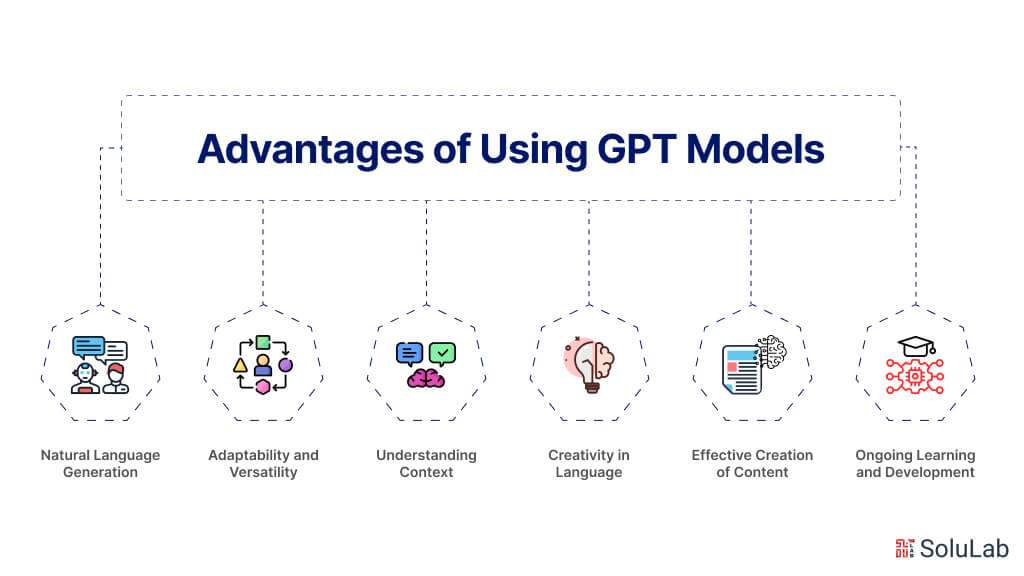
GPT (Generative Pre-trained Transformer) models earn their keep. They reshaped natural language processing (NLP) and pushed the quality and speed of language-generation work forward. Here are the wins that matter most:
- Natural Language Generation
GPT models write text that reads like a human wrote it. That’s what makes them useful for chatbots, content work, and creative writing. Because they track the context and meaning of what you give them, the replies come back coherent and on-point, and the whole experience feels less like talking to a machine. Learn how to train your own GPT and you can shape those models around your exact tasks, which is where they really start to pay off.
- Adaptability and Versatility
Tune a GPT model for a specific task or domain and it bends to fit. That flexibility is the point. Researchers and developers use the same base model for natural language processing (NLP) applications as different as sentiment analysis, text categorization, and language translation, with more added all the time.
- Understanding Context
GPT models train on enormous volumes of unlabeled data, and that’s why they read context so well. They catch the little shifts in meaning, so the reply fits the situation instead of just matching keywords. The output ends up more useful and more accurate. Curious how deep this goes? You could even dig into how to code GPT from scratch and see for yourself how training and fine-tuning these models actually work under the hood.
- Creativity in Language
GPT models can invent. Because they’ve seen such a wide range of language patterns and structures during pre-training, they produce text that’s original rather than recycled, which is exactly what you want for creative writing and content work.
- Effective Creation of Content
GPT models take the grind out of content work. Once you train your own GPT, you can lean on its writing ability to turn out solid, relevant, engaging material across formats: product descriptions, articles, social posts, and the rest. It keeps the tone consistent and the message intact, and it saves you both time and budget doing it.
- Ongoing Learning and Development
A GPT model is never really finished. When new labeled data shows up, you retrain and refine, and the model keeps pace with how language actually shifts over time. New trends, new phrasing, new situations, it adapts to all of it, which is what keeps it relevant and accurate instead of stale. Getting how to train GPT right is what keeps that performance from slipping.
Use Cases of GPT Models
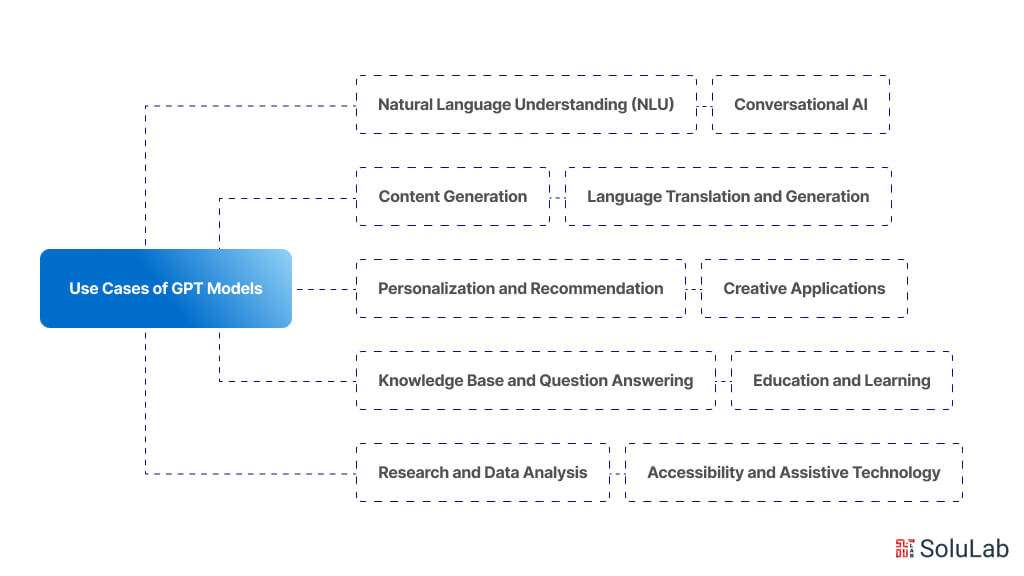
GPT (Generative Pre-trained Transformer) models show up in a lot of places, across a lot of industries. Here’s where they tend to land:
1. Natural Language Understanding (NLU):
- Text summarization: GPT models can summarize long documents or articles into concise summaries.
- Sentiment analysis: Analyzing the sentiment of text data, such as social media posts or customer reviews.
- Named Entity Recognition (NER): Identifying and classifying entities mentioned in the text, such as names of people, organizations, or locations.
2. Conversational AI:
- Chatbots: Creating intelligent AI-powered chatbots capable of engaging in natural conversations with users.
- Virtual assistants: Building virtual assistants that can perform tasks, answer questions, and provide assistance through text or voice interactions.
3. Content Generation:
- Article writing: Generating articles, blog posts, or news stories on various topics.
- Creative writing: Producing creative content such as poems, stories, or dialogues.
- Code generation: Writing code snippets or scripts based on specific requirements or tasks.
4. Language Translation and Generation:
- Language translation: Translating text between different languages with high accuracy.
- Language generation: Generating text in multiple languages for tasks like multilingual content creation or localization.
5. Personalization and Recommendation:
- Personalized content recommendation: Recommending articles, products, or media based on user preferences and behavior.
- Personalized marketing: Creating personalized marketing messages or campaigns tailored to individual customers.
6. Knowledge Base and Question Answering:
- Question answering: Providing accurate and relevant answers to questions posed in natural language.
- Knowledge base completion: Filling in missing information or completing incomplete sentences in a knowledge base.
7. Education and Learning:
- Automated tutoring: Assisting students with learning by providing explanations, answering questions, and generating practice exercises.
- Content generation for educational resources: Generating educational materials such as quizzes, worksheets, or lesson plans.
8. Creative Applications:
- Art and music generation: Creating artwork, music compositions, or other creative works based on input prompts.
- Storytelling and narrative generation: Generating story plots, characters, and dialogues for storytelling applications.
9. Research and Data Analysis:
- Data synthesis: Generating synthetic data for research purposes or augmenting existing datasets.
- Text analysis: Analyzing large volumes of text data to extract insights, trends, or patterns.
10. Accessibility and Assistive Technology:
- Text-to-speech synthesis: Converting text into natural-sounding speech for users with visual impairments or reading difficulties.
- Speech-to-text transcription: Converting spoken language into text, enabling accessibility for users who prefer speech input.
GPTs Distinctive Functionalities and Integration
Want more out of your GPT? Reach for the advanced features, and start with external APIs. You’ll find the option in your GPT preferences: open the “Configure” menu and click the “Actions” tab. Wire your GPT up to outside APIs and it stops being a static question-and-answer box. Here’s what that connection buys you.
1. Obtaining Real-Time Data
Hook your GPT into APIs and it can pull live information from the outside world. Latest headlines, stock movements, the current weather, whatever the source serves up. That makes it a dependable place to get real-time answers instead of stale ones.
2. Using Other Software
Your GPT can plug into the tools you already run: Google Calendar, your project management software, Slack. From there it books meetings, fires off reminders, and updates tasks without you touching them. Less busywork, more actual output.
3. Custom Applications
API connections let companies and developers build GPT-powered apps of their own. Picture an e-commerce chatbot wired into the store’s inventory API. It knows what’s in stock, so the suggestions it makes are ones the shopper can actually buy.
Related: Llama Vs. GPT
Custom GPT’s Privacy, Security, and Compliance
Custom GPTs are powerful. They also carry risk. When you build one and put it in front of users, you have to think hard about how it’s used and how it handles privacy.
A. Maintaining Safety and Privacy
Privacy and security come first, not last. Build in the safeguards that protect user data, keep every interaction with the GPT secure, and keep watching how it behaves so a surprising or unwanted output doesn’t slip through unnoticed.
B. Observance of Usage Guidelines
Stick to OpenAI’s usage guidelines. That’s not optional. Those rules exist to keep your use of GPT ethical, legal, and in line with what the tools are actually meant for. Read them, know them, and make sure your custom GPT stays inside the lines.
Requirements to Build Your Own GPT Model
Before you dive into building a GPT (Generative Pre-trained Transformer) model, get a few things in place. Miss these and the whole process turns painful. Here’s what you want lined up before you make your own GPT:
- Domain-specific Information
Pull together a serious amount of domain-specific data tied to whatever job the model has to do. Train a GPT model on a dataset that’s both varied and genuinely relevant, or the results won’t hold up in context.
- Computing Capabilities
Building a GPT model eats resources, especially memory and processing power. Line up a strong compute setup before you start, or plan to rent one in the cloud. Training these models is where hardware limits bite first.
- Preparing Data
Get the dataset ready before anything else. That means cleaning it, tokenizing it, and encoding it so the format actually fits GPT training. This is one of those steps in how to train GPT that quietly decides whether the model performs or flops.

- Framework for Training
Pick a deep learning framework, PyTorch or TensorFlow, to handle the setup and training of your GPT model. Then actually read its docs and get comfortable with its APIs. You’ll want that fluency once you sit down to create your own GPT model.
- GPU Intensification
Put GPUs to work and training speeds up, a lot. GPT models are big by design, and they gain hugely from the parallel processing GPUs offer, which cuts training time down sharply. If you want to train GPT models without waiting forever, GPU acceleration isn’t a nice-to-have. It’s how you survive the compute load.
- Optimizing Fine-tuning Approach
Work out a fine-tuning plan that reshapes the trained GPT model around your domain or task. Pick the right dataset for it, then decide which parameters and hyperparameters to adjust to squeeze out the best results.
- Metrics for Evaluation
Pick evaluation metrics that actually match what you want the GPT model to do. Perplexity, BLEU score, and custom domain-specific metrics are the usual ones, and they tell you whether the output text is coherent and any good. When you create own GPT model, these numbers are how you know it’s hitting the mark and doing the job it was built for.
- Proficiency in Deep Learning
Know your AI deep learning cold, especially the parts that touch transformer architectures, attention processes, and sequence-to-sequence models. Get a real grip on the ideas underneath before you try to build and fine-tune GPT models. That foundation is what carries you when you sit down to create your own GPT model.
- Proficiency in Deep Learning
Know your deep learning cold, especially the parts that touch transformer architectures, attention processes, and sequence-to-sequence models. Get a real grip on the ideas underneath before you try to build and fine-tune GPT models.
- Version Control and Monitoring of Experiments
Set up version control and an experiment-tracking system from day one. You’ll be running iterations, changing things, and juggling configs, hyperparameters, and results, and without a record of all of it you’ll lose track fast.
- Iteration and Patience
A strong GPT model gets built slowly, one iteration at a time. You’ll try different architectures, different hyperparameters, different training approaches, and keep circling back. Testing, assessing, refining. That loop never really stops, and in practice it’s exactly where teams either push the model to its best or give up too early. Keep at it, and you’ll train GPT models that actually earn their place.
How to Create a GPT Model?
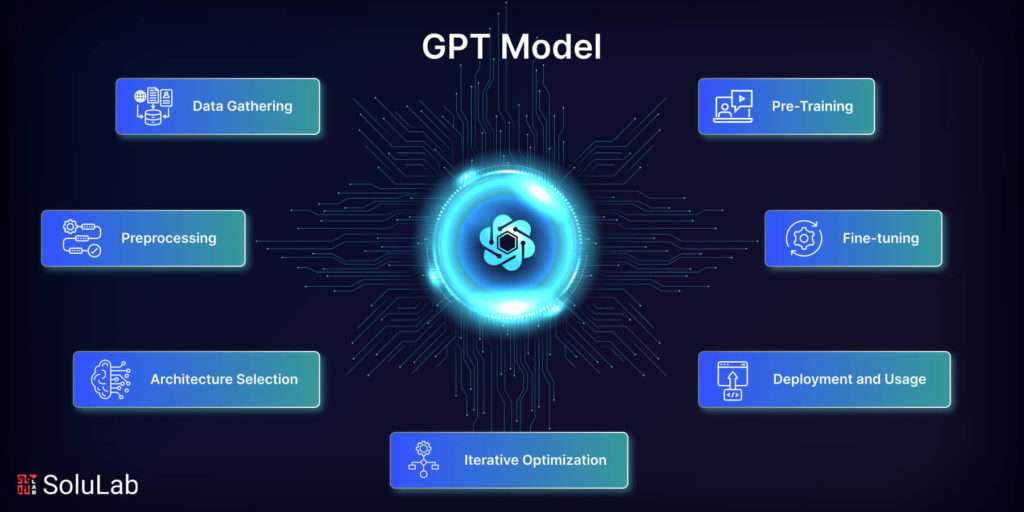
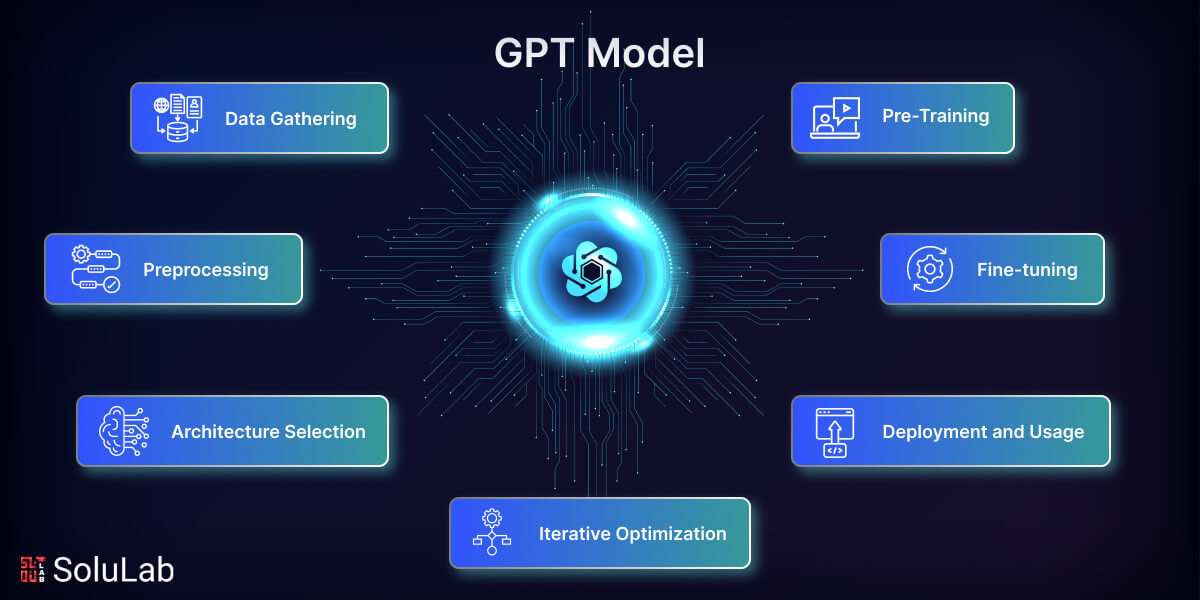
Building a GPT (Generative Pre-trained Transformer) model runs through a chain of steps: gathering data, preprocessing it, choosing an architecture, pre-training, fine-tuning, optimizing in loops, and finally deploying. Let’s take each one apart.
1. Data Gathering
It starts with data. Pull together a big corpus of text tied to your target topic or task. To create your own GPT, that dataset has to be varied and representative, because the model can only learn the language patterns and situations it actually sees.
2. Preprocessing
With the dataset in hand, you clean it up and put it into a shape the model can train on. Preprocessing usually covers encoding the data for input, dealing with punctuation, breaking text into words or subwords, and stripping out noise. Get this right when you set out to create your own GPT model, and training runs smoother and the model performs better for it.
3. Architecture Selection
The architecture you pick makes or breaks the model. GPT models lean on the Transformer for a reason: its attention and self-attention layers catch long-range relationships and hold context in a way older designs simply couldn’t.
4. Pre-Training
Pre-training is the heavy lift. You train the GPT model on a massive corpus of unlabeled text, and as it goes it soaks up language structure, context, and meaning until it can guess the missing words or tokens in a sentence. The usual approach is unsupervised, with something like a masked language modeling target doing the work. Want to see how the gears turn? Learning how to code GPT from scratch gives you a much closer look at the training and fine-tuning underneath.
5. Fine-tuning
After pre-training, you refine the GPT model on a smaller dataset, one that’s labeled and tailored to the exact task or topic you care about. Fine-tuning is where performance and relevance jump, because the model bends its broad knowledge toward the specific job. You’ll use supervised learning to train GPT here, often with a task-specific goal or loss function steering it.
6. Iterative Optimization
To build your own GPT you have to experiment, then experiment again. You’ll test and tune a spread of hyperparameters, architectures, and training approaches to push performance as far as it goes. Evaluation metrics, task-specific ones or perplexity, are how you compare one version of the model against the next.
7. Deployment and Usage
Once the GPT model is trained and refined, it’s ready for the real world. Deployment means folding it into whatever system or platform your users touch, so they can actually tap its language-generation ability. From there the model does its job, producing outputs, recommendations, or responses, depending on exactly what you trained it for.
Key Considerations for Building a GPT Model
Push a GPT (Generative Pre-trained Transformer) model toward better performance, fewer problems, and language output that’s both ethical and efficient, and a handful of factors demand real attention. Keep these in mind while you work out how to create a GPT model:
1. Eliminating Bias and Toxicity
Bias and toxicity are two of the ugliest problems in language generation. If a bias lives in your training set, the model will pick it up and repeat it, sometimes louder. So hunt for those biases and cut them down: vary the training data, run debiasing algorithms, fine-tune with fairness in mind. Add content moderation and filtering on top to catch offensive or harmful output before it ships. Deal with all of this when you set out to train your own GPT, because that’s what separates a safe, ethical deployment from a liability.
2. Improving Hallucination
Hallucination is when the model states something false or made up as if it were fact. To fight it, lean on external knowledge bases or fact repositories to check what the model produces, wire in fact-checking steps, and train on sources that are reputable and high quality. Then keep refining and keep evaluating, because that steady loop is what pushes accuracy up and hallucinations down. All of this matters when you create your own GPT model, since nobody trusts content the model quietly invents.
3. Stopping Data Exfiltration
Sometimes a GPT model memorizes chunks of its training data and coughs them back up later, which can leak private or sensitive information without anyone meaning to. Cut that risk with token masking during pre-training, careful choices about what goes into the dataset, and proper data sanitization. Lock this down when you create your own ChatGPT, so security and privacy hold from development straight through deployment.
4. Including Queries and Actions
Fold actions and queries into how the model generates language, and it turns from a passive text engine into something interactive and task-driven. That might mean reworking the model’s architecture or adding input paths that let users hand it precise commands or prompts, steering the output toward what they actually want. Build your own GPT model that reads a user’s request, understands the action behind it, and responds the way it should.
How to Build Your Own GPT App?
Building your own GPT (Generative Pre-trained Transformer) app takes a handful of steps and a few decisions along the way. Here’s a rundown to get you moving on how to make your own GPT app:
- Define the Use Case: Determine the purpose of your GPT app. Are you creating a chatbot, a content generator, a writing assistant, or something else? Your development approach will be guided by your understanding of the particular use case.
- Choose a Framework or Platform: Decide whether you want to build your app from scratch using deep learning frameworks like TensorFlow or PyTorch, or if you prefer to use existing platforms like Hugging Face’s Transformers library or OpenAI’s API. Using existing platforms can simplify development, but building from scratch offers more customization.
- Data Collection and Preprocessing: Gather and preprocess the data relevant to your use case. If you’re building a chatbot, you might need conversational data. For a content generator, you might need text from various sources. Clean and format the data properly first, before any training starts.
- Model Selection and Training: Choose the appropriate GPT model for your application. GPT-2 and GPT-3 are popular choices, but there are also smaller variants like GPT-2 small or DistilGPT for resource-constrained environments. Train your model on the collected and preprocessed data until it achieves satisfactory performance.
- Integration: Integrate the trained model into your app’s backend. This involves setting up APIs or libraries to interact with the model. Wire it so your app can hand inputs to the model and get outputs back cleanly.
- User Interface Design: Design the user interface (UI) of your app. Consider how users will interact with the GPT model. Will it be through a text-based interface, voice commands, or something else? Build a UI that’s intuitive and easy to live with. Get it right when you set out to create your own ChatGPT, and the back-and-forth between users and the model stays smooth and natural.
- Testing and Evaluation: Test your app thoroughly to identify and fix any bugs or issues. Put your GPT model through real-world scenarios and check that its responses come back accurate and relevant.
- Deployment: Deploy your app to your chosen platform or hosting service. Make sure it’s accessible to your target audience and can handle expected levels of traffic and usage.
- Feedback and Iteration: Gather feedback from users and stakeholders to continuously improve your app. Iterate on the design, functionality, and performance of both the app and the underlying GPT model based on this feedback.
- Ethical and Legal Considerations: Consider the ethical implications of deploying a GPT-powered app, such as bias in the training data or misuse of generated content. Stay compliant with the laws and regulations that apply, especially around data privacy and intellectual property rights.

Final Words
This guide walked the whole road of building a custom GPT (Generative Pre-trained Transformer) model. Data collection, preprocessing, choosing an architecture, pre-training, fine-tuning, and the loops of optimization: we went through each stage in detail. Along the way we dug into cutting bias and toxicity, taming hallucinations, shutting down data leaks, and wiring in queries and actions. Follow those steps, put the strengths of GPT models to work, and you’ve got a real shot at building something that generates language well. Aim for a GPT model whose output is responsible, fits its context, and reads naturally across whatever you point it at. And don’t stop there: keep assessing, keep improving, keep the biases in check, and keep the whole thing anchored to sound ethical principles.
SoluLab brings the depth and the hands-on support to help you build your own GPT (Generative Pre-trained Transformer) model, shaped to your exact needs and use cases. With a team of skilled AI engineers and developers, SoluLab handles the whole arc: data collection and preprocessing, model selection, training, and deployment. Working with current technologies and hard-won best practices, SoluLab delivers GPT models that are accurate, efficient, and built around what your business actually needs. Chatbot, content generator, or conversational AI solution, SoluLab’s team works shoulder to shoulder with you to ship something customized, scalable, and dependable. Get in touch and let’s talk through your project, and see what advanced AI can do for your business.
FAQs
Shipra Garg is a tech-focused content strategist and copywriter specializing in Web3, blockchain, and artificial intelligence. She has worked with startups and enterprise teams to craft high-conversion content that bridges deep tech with business impact. Her work translates complex innovations into clear, credible, and engaging narratives that drive growth and build trust in emerging tech markets.