Key Takeaways
- ERP used to tell you what already happened. With AI bolted in, it starts telling you what to do next, which is a very different job.
- Automation absorbs the grunt work in finance, supply chain, and day-to-day operations. Fewer hands on keyboards, fewer typos in the ledger.
- Data alone is not the prize. Forecasting demand, catching a risk two weeks early, planning against a scenario instead of a hunch: that is where the money is.
- None of this is theoretical. Inventory balancing, fraud flags, and personalized customer journeys are running in production right now.
- Buying a tool is the easy part. Your data readiness, your integrations, and a clear business goal decide the outcome.
- Firms putting money into AI-driven ERP today are buying a durable advantage, not a one-quarter efficiency bump.
ERP has held the middle of the business together for decades. It has also, honestly, been a rearview mirror: historical records, manual entry, reports that arrive after the decision was already made.
AI in ERP systems changes the posture. The software stops merely shepherding processes and starts predicting outcomes, deciding small things on its own, and adjusting while the day is still happening. Efficiency was the old ask. Companies now want a system that has an opinion about where growth comes from.
Demand forecasts, workflow automation, sharper customer handling: AI development is rewiring ERP from the inside, mostly without anyone announcing it. According to Gartner, by 2027, 62% of cloud ERP spending will go toward AI-enabled capabilities.
So here is what this guide covers: what AI-powered ERP actually means once you strip the marketing off it, where it is being used, what it returns, and how to start doing it properly in 2026.
What is AI in ERP Systems?
AI in ERP systems means folding artificial intelligence technologies into enterprise resource planning software so it can automate processes, chew through large volumes of business data, and produce predictive insights rather than static reports.
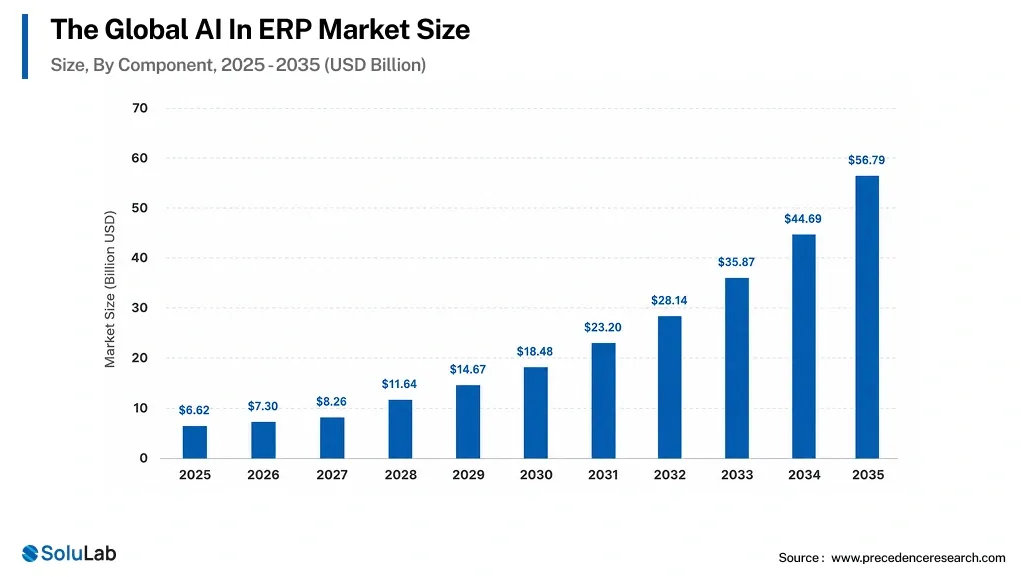
The payoff shows up as better decisions, tighter operations, and less friction between departments. Market-wise, AI in ERP is projected to climb from $7.3 billion in 2026 to nearly $58.7 billion by 2035.
Why AI in ERP matters in 2026?
Operations in 2026 run on shorter cycles than the ERP systems supporting them were designed for. That gap is the whole reason AI keeps showing up in these platforms.
- Lack of real-time decision-making: Legacy ERP chews data in batches, so the insight lands hours or days late. AI runs analytics live, which is the difference between reacting to a stockout and preventing one.
- Inefficient manual workflows: Older systems lean on people to move things along. People mistype, people go on holiday, queues back up. AI takes the repetitive layer off their plate and productivity climbs at scale.
- Limited predictive capabilities: Traditional systems focus on historical data, but AI predicts demand, risks, and trends, which lets you act early instead of writing an explanation afterward.
- Poor data utilization: Most organizations sit on far more data than they ever use. AI in ERP reads across those messy datasets and pulls out findings someone can actually act on.
- Scalability challenges: Growth breaks old ERP configurations. AI-enabled systems absorb the extra volume by automating what used to need another hire.
How to Implement AI in ERP for your Business?
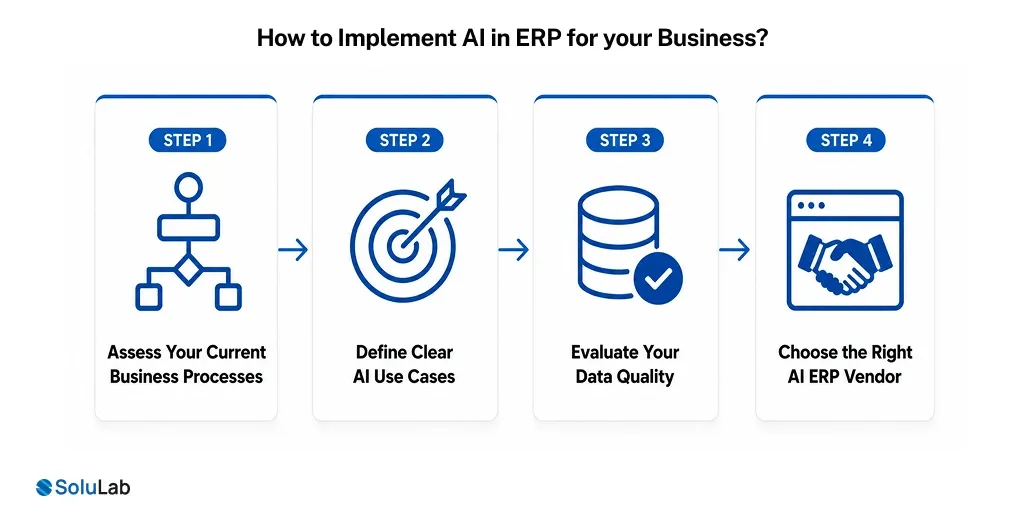
There is no switch to flip. Whether AI native startegy pays for itself or just adds another layer nobody trusts comes down to three unglamorous things: clarity on the problem, data that is fit to use, and a sane setup.
Step 1. Assess Your Current Business Processes
Map what your ERP actually does for each department today. Where do things stall? Which tasks does someone redo every Monday? Where does a decision wait on an email? Working through that with expert AI consultants shows you where AI earns its keep, and where automating would just make a bad process faster.
Step 2. Define Clear AI Use Cases
Resist the urge to do AI because the board asked about AI. Pick an outcome you can name: demand forecasting, invoice automation, predictive maintenance. Clear AI use cases keep the work tied to a business goal and give you a number to point at when someone asks what changed.
Step 3. Evaluate Your Data Quality
A model is only as good as what it was fed. Is your ERP data clean, structured, reachable? In practice this is where most projects stall, because nobody wants to own six years of duplicate vendor records. Standardize and organize first. Skipping it buys you confident, wrong answers.
Step 4. Choose the Right AI ERP Vendor
Pick a vendor or development partner who can describe your workflows back to you before they pitch anything, and who can integrate AI seamlessly into your ERP without a rebuild. Ask about flexibility, customization, and what support looks like in year three, not month one.
Benefits of AI in ERP
Automation was the first chapter. The point now is a business that reads its own situation faster and reacts without anyone adding a new process to manage.
- Improved decision-making: AI reads large volumes of ERP data as it lands, surfacing patterns a quarterly report would have buried, so calls get made sooner and on evidence.
- Process automation at scale: Invoicing, reporting, approvals. All of it runs itself, errors drop, and your people spend their hours on work that needs a human brain.
- Better demand forecasting: Past sales plus outside signals give a sharper forecast than gut feel ever did. Fewer stockouts. Less capital parked in a warehouse.
- Enhanced operational efficiency: By identifying bottlenecks and inefficiencies, AI helps streamline workflows, improve turnaround times, and keep handoffs between functions from turning into a queue.
- Personalized user experience: Dashboards, reports, and prompts reshape themselves around what each role actually does, so the warehouse lead is not staring at a CFO’s screen.
- Higher risk and fraud detection: Transactions get watched continuously, oddities get flagged in the moment, and a lot of financial risk dies before it grows.
How Does AI Integration Work in ERP Systems?
Integration is not a bolt-on automation script. It is data, workflows, and intelligence wired together across systems so the business stops reacting and starts predicting. Here is how the layers stack up.
1. Data Aggregation & Intelligence Layer
Finance, HR, supply chain, plus whatever external feeds matter to you, all land in one place. That single source of truth is what allows AI models to work on clean, consistent data instead of arguing with three versions of the same number.
- Data Unification – Pulls structured and unstructured data together across departments
- Real-Time Processing – Keeps the picture current instead of nightly
- Data Cleansing – Strips out duplicates and contradictions on its own
- Insight Generation – Turns raw records into something a person can act on
2. Predictive Analytics & Forecasting
Predictive analytics works off historical patterns and live inputs to project what happens next. Demand gets anticipated, risk gets priced in early, and decisions stop being archaeology performed on last month’s report.
- Demand Forecasting – Calls future sales and stock requirements ahead of time
- Revenue Projections – Estimates financial performance from observed trends
- Risk Prediction – Spots operational or financial trouble forming
- Scenario Planning – Runs the what-ifs before you commit budget to one
3. Process Automation & Workflow Optimization
AI powered solutions take over the ERP workflows nobody enjoys, which cuts manual effort and tightens operations. Tasks finish quicker, with fewer slips, and the team gets its attention back for work that matters.
- Task Automation – Runs the routine stuff like invoicing and approvals
- Workflow Optimization – Finds the choke points and reroutes around them
- Smart Approvals – Routes items using set rules plus what the model has learned
- Error Reduction – Takes human slips out of repetitive operations
4. Intelligent Decision Support Systems
Most ERP screens show you numbers and leave the rest to you. With AI in the loop, the system proposes a move, based on the patterns and predictions it is already tracking. You still decide. You just are not starting from a blank page.
- Actionable Insights – Suggests the next best action for the user in front of it
- KPI Monitoring – Watches performance metrics as they move
- Anomaly Detection – Flags the odd pattern the second it appears
- Decision Automation – Backs up, or simply makes, the routine calls
5. Natural Language & User Interaction Layer
Ask the system a question in plain English and get an answer. That is the whole idea. Pull a report, check a balance, trigger an action, without remembering which of eleven menus hides the thing you need.
- Chatbot Interfaces – Answers questions and walks users through tasks on the spot
- Voice Commands – Hands-free interaction, which matters more on a shop floor than at a desk
- Natural Language Queries – Lets people pull data by asking for it
- Personalized Dashboards – Shows each role the numbers that role owns
6. Continuous Learning & Optimization
The system gets better with use. New data and everyday corrections from users feed back in, so accuracy improves and the fit to how your business actually runs keeps tightening as things change.
- Adaptive Learning – Sharpens predictions as fresh data arrives
- Performance Optimization – Keeps refining workflows and outputs
- Feedback Loops – Learns from what users do and what they correct
- Scalability – Handles more data and more complexity without a rewrite
Compliance and Responsible AI in ERP (what to know in 2026)
Once AI sits inside the system of record, compliance stops being a legal department problem. Businesses in 2026 need real discipline around responsible AI practices, partly to stay out of regulatory trouble and partly because trust, once lost internally, is expensive to rebuild. Four habits carry most of the weight.
1. Govern: Someone owns every AI decision your ERP makes. Name that person. Write the policy, assign the roles, and keep leadership close enough to how the models behave that they could explain it out loud.
2. Map: List every point where AI touches your ERP data or workflows. Tedious work, and it is the step that catches compliance gaps while they are still cheap to close.
3. Measure: Pick metrics and hold to them: accuracy, bias rates, audit trails. Measure on a schedule, not when an auditor calls, so the AI parts of your ERP keep matching both your internal standards and whatever the regulator expects.
4. Manage: Watch the models in production, update them, and keep control of what runs where. Responsible management means reacting to anomalies fast, retraining when drift shows, and keeping documentation current enough to hand over on a day’s notice.
Top AI in ERP Use Cases
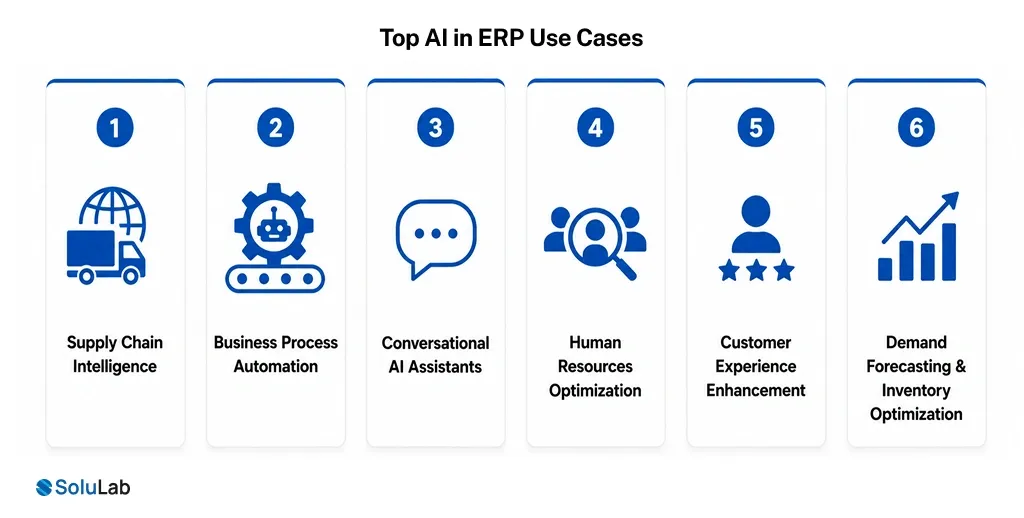
This is already happening in ordinary workflows at ordinary companies. Teams move quicker, make better calls, and stop doing the work a machine should have been doing.
1. Supply Chain Intelligence
AI strengthens supply chains by predicting disruptions, tuning inventory, and making logistics legible instead of guessy. You get more control, and you can answer a demand swing or a supplier problem in hours rather than after the fact.
- Demand Prediction – Reads historical and live data to forecast product demand with real accuracy
- Route Optimization – Finds the delivery paths that cost less and arrive sooner
- Supplier Risk Analysis – Catches a supplier going wobbly before it hits your line
- Inventory Balancing – Holds stock at the level that avoids both the shortage and the write-off
2. Business Process Automation
Repetitive workflows across every department get handed to the machine. Less manual effort, fewer mistakes, and teams left free for the strategic work they were hired to do.
- Invoice Processing – Reads an invoice and processes the data without a human retyping it
- Workflow Automation – Moves approvals and task assignments along across teams
- Data Entry Automation – Captures and updates records so fewer typos reach the ledger
- Exception Handling – Flags the outlier and kicks off the fix immediately
3. Conversational AI Assistants
AI-powered assistants let people talk to the ERP in normal language. No dashboard archaeology, no ticket to the analytics team for a number that took four minutes to produce.
- Smart Query Handling – Answers questions through natural language processing
- Task Execution – Generates a report or pulls data straight from a typed request
- Employee Self-Service – Gives people their HR, finance, or ops data without a middleman
- Guided Workflows – Reads intent and suggests the next step
4. Human Resources Optimization
AI enhances HR functions by sharpening hiring, workforce planning, and engagement. Stronger teams, and a lot less administrative sludge for the HR function to wade through.
- Resume Screening – Filters applicants against criteria the role actually requires
- Workforce Planning – Projects hiring needs from where the business is heading
- Performance Insights – Reads employee data to show where support is needed
- Employee Support – Handles routine HR questions and requests automatically
5. Customer Experience Enhancement
Behavior and engagement patterns tell you what a customer is likely to want next. Use that well and the experience stays personal and consistent, which shows up later as retention.
- Personalization Engines – Recommend products or services from how the customer behaves
- Customer Support Automation – Handles common queries through AI chatbots
- Sentiment Analysis – Reads feedback so service problems get fixed, not filed
- Omnichannel Engagement – Keeps the conversation the same across every channel
6. Demand Forecasting & Inventory Optimization
Predict demand more accurately, hold less inventory, and still have the product when someone orders it. That is the trade every operations lead has been trying to win for years.
- Predictive Forecasting – Reads trend data to anticipate what demand does next
- Stock Optimization – Keeps inventory right-sized across every location
- Replenishment Automation – Reorders off real demand signals, not a fixed calendar
- Waste Reduction – Cuts excess stock and the obsolescence that follows it
Top AI Trends in ERP for 2026
ERP is drifting past automation into something adaptive: platforms that predict, decide, and tune operations while the business day is still running. Five shifts are doing most of that work.
- Predictive analytics at scale: Models read history and live data together to forecast demand, revenue movement, and risk. The planning conversation changes from what went wrong to what to do about next quarter.
- Hyperautomation of workflows: RPA, machine learning, and decision engines get stitched together to run multi-step processes end to end. Manual effort drops, and so does the variance between how two people would have done it.
- Natural language ERP interfaces: NLP turns a conversational question into a data pull. Training time falls, and non-technical teams stop needing a translator to use their own system.
- AI-powered decision intelligence: Advanced AI led development solutions give leaders contextual recommendations from patterns and modeled scenarios, so the choice does not rest on a static dashboard somebody built two years ago.
- Real-time anomaly detection: Transactions and operations get watched without pause. Fraud signals, irregularities, and quiet inefficiencies surface right away, which is usually the difference between a small fix and a write-off.
Conclusion
AI is becoming a core part of ERP, not a feature sitting on top of it. Automated workflows, predictive calls, decisions the system can justify: that turns ERP from an administrative tool into something with strategic weight.
Companies running AI-driven ERP see more of their own operation, waste less of it, and grow without the system fighting back. But the advantage does not come from the model. It comes from pointing the model at a business goal you can state in one sentence, using data you actually trust.
If you are weighing up where to start, or you have a pilot that needs to become production, SoluLab, a #1 AI development company in USA, builds this kind of thing for a living.
FAQs
Neha is a curious content writer with a knack for breaking down complex technologies into meaningful, reader-friendly insights. With experience in blockchain, digital assets, and enterprise tech, she focuses on creating content that informs, connects, and supports strategic decision-making.

![Top 10 Examples of AI Being Integrated in the Real World [2026 Edition]](https://www.solulab.com/wp-content/uploads/2026/09/Examples-of-AI-Being-Integrated-in-the-Real-World.webp)