Key Takeaways
- Agentic RAG combines retrieval-augmented generation (RAG) with autonomous AI agents to deliver more context-aware customer service.
- It enables AI agents to retrieve relevant information, reason over customer queries, and take actions instead of simply generating responses.
- A successful Agentic RAG system requires a reliable knowledge base, retrieval pipeline, LLM, agent orchestration, and tool integrations.
- Deploying Agentic RAG can automate tasks such as customer query resolution, ticket classification, knowledge retrieval, order tracking, and escalation.
- Data quality, retrieval accuracy, access controls, and response validation are critical for reducing hallucinations and improving reliability.
- Organizations should monitor response accuracy, resolution rate, latency, escalation rate, and customer satisfaction after deployment.
- Start with a focused customer service use case, test the system with real queries, and scale gradually based on performance and business requirements.
To deploy agentic RAG for customer service automation, you build a retrieval pipeline over your support knowledge base, wrap it in an agent loop that can plan, call helpdesk tools, and verify answers against sources, then add guardrails, latency budgets, and a human handoff before you connect it to Zendesk or Salesforce Service Cloud and roll it out from pilot to production.
SoluLab builds these systems end to end. If you are scoping a support deployment and weighing build versus buy, our AI agent development company team designs the retrieval, orchestration, and guardrail layers around your existing helpdesk rather than bolting a generic bot onto it.
What is agentic RAG for customer service, in one paragraph?
Agentic RAG is retrieval augmented generation with an agent loop on top. Plain RAG retrieves documents and generates one answer. Agentic RAG lets the model plan a query, retrieve, check whether the result actually answers the customer, call a tool such as an order lookup, and retry or escalate if it is not confident. For a support use case, that means it can answer account-specific questions, not just repeat a help article. IBM notes that agentic customer service tools can handle simple tasks or complex workflows depending on how many tools they can access. SoluLab’s own agentic RAG breakdown frames it as a shift from single-step retrieval to iterative reasoning where the system can plan, retrieve, evaluate, and refine.
How is agentic RAG different from traditional RAG and a plain LLM chatbot?
The short version: a plain LLM chatbot answers from what it was trained on, traditional RAG grounds one answer in retrieved documents, and agentic RAG adds a reasoning loop that can take multiple steps and call tools. For customer service, that difference decides whether the bot can resolve “where is my refund” or only explain your refund policy.
| Capability | Agentic RAG | Traditional RAG | Plain LLM chatbot |
|---|---|---|---|
| Retrieves from your KB | Yes, iteratively | Yes, one pass | No |
| Multi-step reasoning | Yes | No | No |
| Calls tools / APIs (order, CRM) | Yes | No | No |
| Grounding guarantee | Strong | Moderate | Weak |
| Handles account-specific queries | Yes | Limited | No |
| Guardrail surface to manage | Larger | Medium | Small |
| Typical build effort | Higher | Medium | Low |
A plain chatbot is cheap and fast to stand up but hallucinates on anything outside its training. Traditional RAG fixes factual grounding for static questions. Agentic RAG is the pattern you want when a real fraction of tickets need a live lookup or a decision, which is most support queues.
What does an agentic RAG deployment for customer service look like?
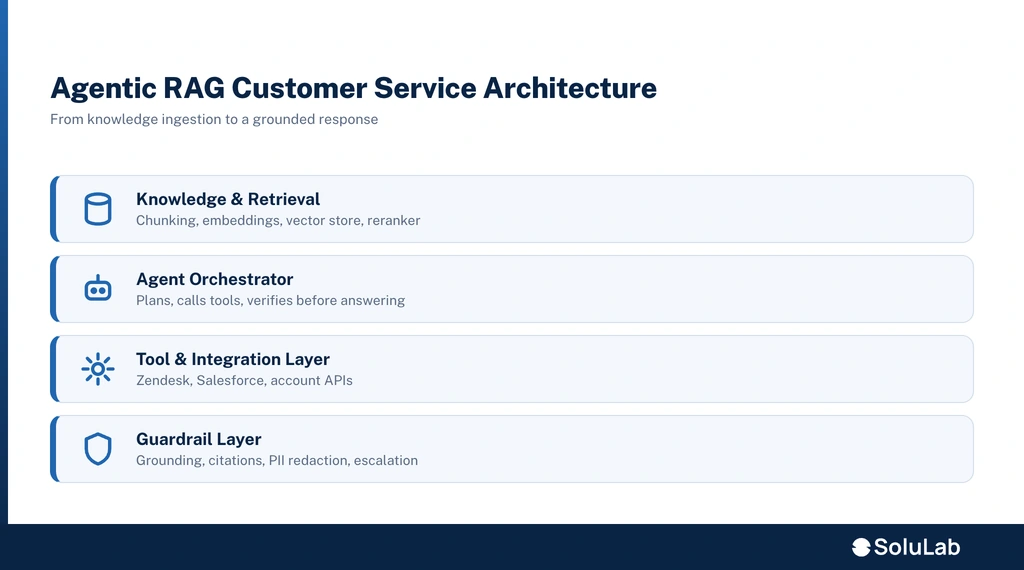
The architecture is a pipeline plus a control loop. Content flows in on the left, the agent reasons in the middle, and a guarded, streamed answer goes out to the customer on the right.
- Ingestion. Pull help articles, macros, past tickets, policy docs, and product data from your KB and helpdesk.
- Chunking. Split documents into passages sized for retrieval, keeping headings and metadata so the retriever knows what each chunk is.
- Embedding. Convert chunks to vectors with an embedding model and store them.
- Vector store. Index the vectors in a database such as Pinecone, Weaviate, or Chroma for semantic search.
- Retriever. On each query, fetch the top candidate passages by semantic similarity, often blended with keyword search.
- Reranker. Re-score those candidates with a cross-encoder or a service such as Cohere Rerank so the most relevant passages rise to the top. A reranker takes a query-and-document pair and outputs a relevance score, as Pinecone’s rerankers guide describes. This single step lifts answer quality more than most people expect.
- Agent/orchestrator. The reasoning core. It plans, decides whether it has enough to answer, calls tools, and loops if not. This is where LangGraph or LangChain lives.
- Tool layer. Functions the agent can call: order status, account lookup, refund eligibility, ticket creation, CRM read and write.
- Guardrail layer. Grounding checks, citation enforcement, confidence thresholds, PII redaction, and out-of-scope refusal before anything reaches the customer.
- Response streaming. Stream tokens back so the customer sees the answer forming instead of waiting for a full response.
Notes from a SoluLab RAG architect: the retriever and reranker do more for perceived quality than the model choice. Teams reach for a bigger LLM when their real problem is that the right passage never made it into the context window. Fix retrieval first, then tune the model.
Which tools and platforms should you use to build it?
Pick tools by layer, not by brand loyalty. Most production CS deployments mix an orchestration framework, a vector database, a reranker, and an observability tool.
- Orchestration: LangChain and LlamaIndex for retrieval and tool wiring; LangGraph when you need explicit, stateful agent graphs with retries and branching. A public customer-support agentic RAG reference implementation pairs LangGraph for workflow orchestration with LangChain, which is a common production shape. SoluLab’s comparison of LangChain, CrewAI, and AutoGen walks through when each orchestration choice fits.
- Vector database: Pinecone (managed, low-ops), Weaviate (open source with hybrid search), or Chroma (lightweight, good for early builds and self-hosting).
- Reranking: Cohere Rerank as a managed option, or a self-hosted cross-encoder when data residency rules out sending passages to a third party.
- Observability and eval: tracing for every retrieval and tool call so you can see why the agent answered the way it did. SoluLab’s take on AI observability covers why this matters once the system is live.
The AI tech stack guide SoluLab maintains lists these layers in one place if you want the full inventory.
How do you connect agentic RAG to Zendesk or Salesforce Service Cloud?
You connect through the helpdesk’s API layer, either as a webhook-triggered app or as middleware sitting between the customer channel and the desk. The agent needs read access to pull ticket context and write access to post replies or resolutions.
- Zendesk: trigger the agent on ticket creation or on a new customer message, inject the ticket subject, body, and requester history as context, then either draft a reply for an agent to approve or auto-respond and tag the ticket. Write the resolution back so reporting stays accurate.
- Salesforce Service Cloud: integrate through the platform’s API and flows so the agent reads the Case and related account records, calls your tools, and writes the resolution back to the Case. Salesforce’s own agentic RAG overview describes the same support tasks, resolving inquiries and providing technical assistance, that this integration targets. SoluLab’s Salesforce AI integration work covers the connection patterns here.
Two integration shapes dominate: a webhook app for lighter, event-driven responses, and middleware when you need to orchestrate multiple systems, enforce your own guardrails, and keep the LLM traffic off the helpdesk vendor’s rails. Middleware costs more to build but gives you control over context injection and write-back.
How do you keep it from hallucinating to a customer?
You constrain the agent so it can only answer from retrieved sources, and you make it refuse or escalate when it cannot. Grounding is not one switch, it is a stack of checks.
- Grounding to source. The agent answers only from retrieved passages, and you enforce it in the prompt and in a post-generation check.
- Citation enforcement. Require the answer to cite the passage it used. If it cannot cite, it does not send.
- Confidence thresholds. Score retrieval and answer confidence; below the threshold, the agent escalates instead of guessing.
- Refusal on out-of-scope. For questions outside the KB or the agent’s tools, it says it cannot help and routes to a human rather than improvising.
- PII redaction. Strip or mask personal data before it reaches the model and in logs.
- Eval set. A test bank of real tickets you run on every change, scoring groundedness, accuracy, and refusal behavior so a prompt tweak cannot quietly regress quality.
SoluLab’s AI assistants work on this same layering of grounding and controls for customer-facing deployments.
What latency should a customer service agent hit, and how do you get there?
Aim for a first token fast enough that the customer sees the answer forming, and a full resolution quick enough to beat waiting for a human. Exact targets depend on channel and query complexity. The levers that get you there:
- Streaming. Stream tokens so perceived latency drops even when total generation time is unchanged.
- Retrieval caching. Cache embeddings and frequent query results so repeat questions skip a round trip.
- Smaller routing models. Use a small, fast model to classify and route, and reserve the larger model for answers that need it.
- Parallel tool calls. Fire independent lookups (order status and account tier, say) at the same time instead of in sequence.
- Tight context. Reranking keeps the context window small and relevant, which speeds generation and cuts cost.
How do you measure ROI and cost per ticket?
Tie the system to support economics: containment (or deflection) rate, agent-minutes saved, and cost per ticket before versus after. The model is straightforward even if the numbers need your data.
- Containment rate. Share of tickets fully resolved without a human. This is the headline metric.
- Cost per ticket. Fully loaded human cost per ticket versus the marginal AI cost per resolved ticket.
- Agent-minutes saved. Time returned to human agents for complex work, whether the AI resolves or just drafts.
- CSAT on AI-handled tickets. Deflection is worthless if satisfaction drops, so track it alongside containment.
For a grounded cost baseline, SoluLab publishes a RAG development cost guide and a breakdown of what it costs to build an AI agent; use those for build-side budgeting and pair them with your own per-ticket economics for the ROI case. Any specific savings figure should be modeled on your volumes, not borrowed.
What are the deployment steps, start to finish?
A clean rollout goes KB first, pilot next, production last. Rushing to production before the knowledge base is clean is the most common way these projects stall.
- Audit the knowledge base. Fix stale, duplicate, and contradictory articles. The agent inherits your KB’s quality.
- Build the retrieval pipeline. Chunk, embed, index, and test retrieval quality on real questions before adding the agent.
- Add the agent loop and tools. Wire orchestration, tool calls, and the verify step.
- Install guardrails and an eval set. Grounding, refusal, PII redaction, and a test bank of real tickets.
- Pilot on a narrow queue. Start with one topic or one channel, agent-in-the-loop (drafts, not auto-send).
- Measure and tune. Track containment, accuracy, and CSAT; fix retrieval and prompts against the eval set.
- Expand and automate. Widen topics, move from draft to auto-send where confidence is high, and keep the human handoff live.
- Monitor in production. Trace every retrieval and tool call, watch for drift, and re-audit the KB on a schedule.
SoluLab’s AI deployment services cover this production hardening step, and the broader AI agent development architecture guide details the pipeline design decisions behind it.
When should you build vs buy?
Buy an off-the-shelf support bot when your questions are simple, your KB is small and static, and you can accept the vendor’s guardrails and data handling. Build a custom agentic RAG system when tickets need live lookups, your data has residency or privacy constraints, you want your own containment guarantees, or the integration to your specific helpdesk is non-trivial.
The tell is account-specific queries. If most of your volume is “how do I reset my password,” a packaged bot is fine. If it is “why was I charged twice,” you need tool calls, grounding, and a verify loop, which is the build case. This is where teams bring in a partner: SoluLab’s conversational AI consulting and AI chatbot development teams scope which path fits before any code is written, and the enterprise AI development practice handles the ones that touch core systems.
Common buyer objections worth routing to your sales and solution teams early: data residency, the cost of self-hosting versus managed vector databases, containment-rate guarantees, and integration effort for your specific helpdesk.
FAQs
Shipra Garg is a tech-focused content strategist and copywriter specializing in Web3, blockchain, and artificial intelligence. She has worked with startups and enterprise teams to craft high-conversion content that bridges deep tech with business impact. Her work translates complex innovations into clear, credible, and engaging narratives that drive growth and build trust in emerging tech markets.