Key Takeaways
- Claude Code helps developers build applications faster by automating coding, debugging, and documentation tasks.
- A production-ready app needs more than code; it requires security, testing, monitoring, and scalable infrastructure.
- Breaking development into smaller steps improves code quality and reduces costly mistakes.
- AI-powered development can reduce development time, but successful deployment still requires engineering best practices.
- Businesses that combine Claude Code with expert development support can launch secure, scalable, and production-ready applications more efficiently.
Building an application has never been faster than it is in 2026.
With AI-powered coding tools like Claude Code, developers can generate code, automate repetitive tasks, troubleshoot issues, and accelerate software delivery with unprecedented efficiency. What once took months can now be accomplished in weeks or even days.
However, speed alone doesn’t guarantee success.
A production-ready AI development must be secure, scalable, reliable, and capable of handling real-world users and business demands. Without proper architecture, testing, deployment strategies, and monitoring, even well-built applications can face performance and maintenance challenges.
This is where Claude Code can make a significant impact. When used correctly, it helps teams streamline development while maintaining quality standards. In this guide, you’ll learn how to build, test, deploy, and scale a production-ready app with Claude Code in 2026.
Why Businesses Are Using Claude Code for AI App Development?
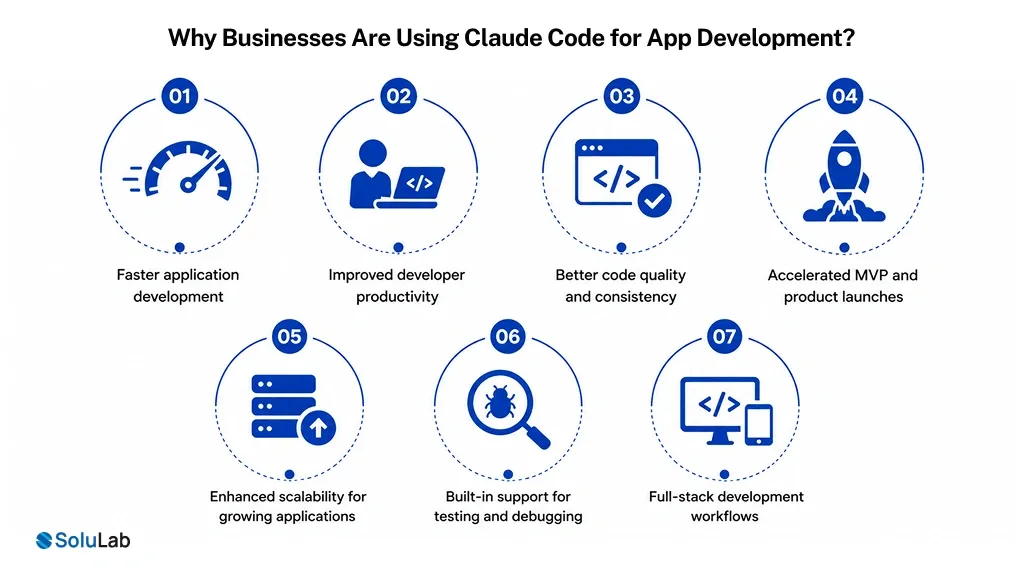
Businesses are adopting AI in software development to reduce engineering costs, improve code quality, and build scalable, production-ready applications faster while maintaining security, reliability, and development efficiency.
Nearly 90% of developers who use AI tools save at least one hour per week, while one in five save more than eight hours weekly.
Some of the major reasons that developers are inclined towards Claude code are:
- Faster application development: Claude Code helps development teams generate, refine, and deploy code quickly, reducing development cycles and enabling businesses to launch new products and features significantly faster.
- Improved developer productivity: Teams spend less time on boilerplate coding and troubleshooting, allowing AI developers to focus on innovation, architecture decisions, and delivering higher-value business outcomes.
- Better code quality and consistency: Through code suggestions, reviews, and documentation generation, Claude AI coding assistant development helps maintain coding standards and reduce technical debt across projects.
- Accelerated MVP and product launches: Startups and enterprises can prototype, validate ideas, and bring products to market without requiring large engineering teams or lengthy development timelines, making AI-first enterprise tech stack adoption a key driver of faster innovation, scalability, and business growth.
- Enhanced scalability for growing applications: Businesses leveraging Claude Code for production apps can build scalable architectures, optimize performance, and prepare applications for increasing user demands and workloads.
- Built-in support for testing and debugging: Claude Code assists with identifying bugs, generating test cases, and improving code reliability, helping teams maintain application stability throughout development and deployment.
- Full-stack development workflows: From frontend interfaces to backend APIs and databases, Claude Code AI app development streamlines the entire software development lifecycle through AI-assisted collaboration.

How to Build an App with Claude Code? Step-by-Step Guide
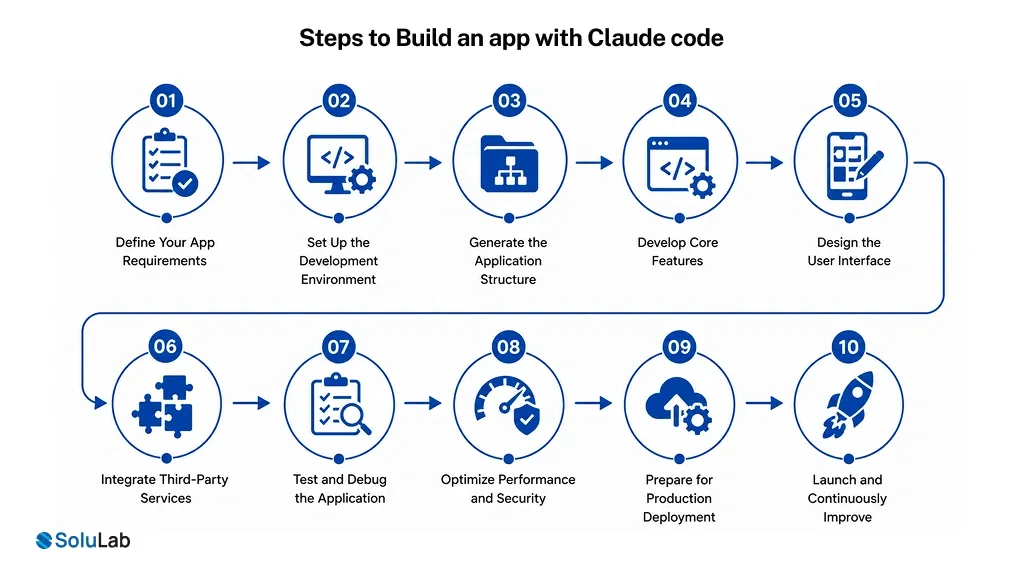
Building an AI app with Claude Code enables businesses to accelerate development, automate coding workflows, improve software quality, and launch scalable applications faster while reducing manual engineering effort and project complexity.
1. Define Your App Requirements
Start by outlining your app’s goals, target audience, core features, and business objectives. Clear requirements help Claude Code generate more accurate and relevant solutions. You can refer to expert AI consultants for bettr clarity.
- Identify business objectives
- Define target users
- Prioritize key features
2. Set Up the Development Environment
Configure your preferred tech stack, repositories, and development tools before beginning. A well-prepared environment ensures smoother AI-led development workflows.
- Install required dependencies
- Configure development tools
- Connect code repositories
3. Generate the Application Structure
Use Claude Code to create the initial architecture, project folders, APIs, and database models. This significantly reduces setup time and manual effort.
- Create project scaffolding
- Generate API structure
- Define database schema
4. Develop Core Features
Build the application’s primary functionalities, including authentication, user management, and business logic. Claude Code assists with coding and implementation.
- Implement user authentication
- Build business workflows
- Create application APIs
5. Design the User Interface
Develop responsive and intuitive interfaces that enhance user experience. Claude Code can accelerate component creation and frontend development.
- Create reusable components
- Optimize user experience
- Ensure mobile responsiveness
6. Integrate Third-Party Services
Connect payment gateways, cloud services, analytics platforms, and external APIs to extend your application’s capabilities and functionality.
- Add payment integrations
- Connect external APIs
- Enable analytics tracking
7. Test and Debug the Application
Perform comprehensive testing to identify bugs, improve stability, and validate functionality before deployment. Automated testing improves overall reliability.
- Run automated tests
- Fix identified issues
- Validate feature performance
8. Optimize Performance and Security
Enhance application speed, scalability, and protection against vulnerabilities. This step is essential for Claude Code for enterprise AI applications requiring high reliability.
- Improve application performance
- Strengthen security controls
- Optimize database queries
9. Prepare for Production Deployment
Configure hosting, monitoring, and CI/CD pipelines to ensure smooth releases. Proper planning simplifies Claude Code production, deployment, and long-term maintenance.
- Configure deployment pipelines
- Set up monitoring
- Prepare cloud infrastructure
10. Launch and Continuously Improve
Deploy the AI application, monitor user feedback, and release updates regularly. Continuous improvements help maintain performance and user satisfaction.
- Monitor application metrics
- Collect user feedback
- Release feature update
Best Tech Stacks to Use with Claude Code in 2026
The AI tech stack depends on your business goals, project complexity, and long-term growth requirements. Whether you’re following a Claude Code tutorial or planning enterprise-grade software, pairing the right technologies with AI-assisted development.
Modern frameworks, cloud-native architectures, and robust databases help streamline Claude Code app development while ensuring applications remain maintainable and future-ready. The following tech stacks are widely recommended for successful Claude Code development projects in 2026.
| Application Type | Recommended Stack |
| SaaS Platform | Next.js, Node.js, PostgreSQL |
| AI Application | Next.js, Python, Vector Database |
| Enterprise App | React, .NET, Azure |
| Mobile App | Flutter, Firebase |
Claude Code Best Practices for Production Development
Here are a few practices you should follow for smooth Claude code AI app development:
- Write detailed prompts and specifications: Clear instructions improve code accuracy, relevance, and development efficiency.
- Use iterative development workflows: Incremental development reduces errors and improves project outcomes.
- Establish human review processes: Human oversight ensures quality, security, and business alignment.
- Maintain strong testing standards: Thorough testing improves reliability and prevents production issues.
- Version control every AI change: Tracking changes simplifies collaboration, auditing, and rollback processes.
- Monitor performance continuously: Continuous monitoring helps identify issues before they impact users.
- Leverage Claude Code strategically: Combining Claude Code for software development with best practices strengthens AI-powered development and supports scalable Claude Code development architecture.
How Much Does It Cost to Build an App with Claude Code in 2026?
The cost of building an AI app with Claude Code depends on project complexity, features, integrations, development timeline, team size, infrastructure requirements, and the level of AI-assisted automation utilized.
| App Type | Estimated Cost (USD) | Development Timeline | Key Features |
| Basic MVP App | $10,000–$25,000 | 1–3 Months | User authentication, core functionality, basic UI |
| Startup SaaS Application | $25,000–$30,000 | 2–5 Months | Subscription management, dashboards, APIs |
| AI-Powered Application | $40,000–$50,000+ | 3–6 Months | AI integrations, automation, analytics |
| Enterprise Application | $50,000+ | 6–12 Months | Advanced workflows, security, compliance |
| Custom Industry Solution | $50,000+ | 4–10 Months | Industry-specific features and integrations |
Future Trends in Claude Code Development
As AI-powered coding tools continue to evolve, Claude Code is expected to play a larger role across the software development lifecycle. These emerging trends will help businesses build applications faster, improve reliability, and reduce manual engineering effort.
1. Autonomous Software Engineering
AI systems are becoming capable of handling larger portions of the development process with minimal human intervention. From generating code to fixing bugs, autonomous AI agents will accelerate software delivery.
- Reduced manual coding effort
- Faster development cycles
- Improved engineering productivity
2. Multi-Agent Development Teams
In multi agent system, multiple AI agents will collaborate on specialized tasks such as coding, testing, documentation, and security analysis. This approach improves efficiency while maintaining higher software quality.
- Specialized AI agent collaboration
- Parallel task execution
- Enhanced development efficiency
3. AI-Driven Testing and Deployment
AI-powered tools will automate testing, quality assurance, and deployment workflows. This helps teams identify issues earlier and release software more confidently.
- Automated test generation
- Faster release management
- Improved deployment reliability
4. Self-Healing Applications
Future applications will automatically detect, diagnose, and resolve issues without requiring immediate human intervention. This minimizes downtime and enhances user experience.
- Automatic issue detection
- Real-time performance optimization
- Reduced application downtime
Why Partner with SoluLab for Claude Code Projects?
SoluLab, an AI native company, combines AI expertise, proven development processes, and scalable engineering capabilities to help businesses accelerate Claude Code-powered application development while ensuring quality, security, performance, and long-term success.
- Claude Code App Development
- Full-Stack Application Development
- Enterprise Software Development
- SaaS Product Development
- MVP Development Services
- Cloud Application Development
- API Development and Integration
- AI-Powered Product Engineering
- DevOps and CI/CD Implementation
SoluLab provides comprehensive AI consulting services to help businesses identify, plan, and implement successful AI-driven initiatives. As an experienced Artificial intelligence integration company, SoluLab delivers scalable, secure, and innovative AI-powered software solutions.
Conclusion
Building a production-ready app with Claude Code in 2026 is no longer just about generating code faster. It’s about creating scalable, secure, and high-performing applications that can support real business growth.
Claude Code helps teams streamline workflows, reduce manual effort, and bring products to market faster. Whether you’re developing an MVP, an enterprise platform, or an AI-powered solution, the right implementation strategy is crucial.
SoluLab, an AI development company, can help your business successfully build, deploy, and scale Claude Code-powered applications. Let’s connect for more discussion!
FAQs
Neha is a curious content writer with a knack for breaking down complex technologies into meaningful, reader-friendly insights. With experience in blockchain, digital assets, and enterprise tech, she focuses on creating content that informs, connects, and supports strategic decision-making.