Key Takeaways
- RPA follows rules, AI makes judgments. A bot does the same clicks every time; a model decides what something is. Most real automation needs both, and picking the wrong one for a step is the usual cause of failure.
- Classic RPA stalled on unstructured input. Bots needed templates, and every document that did not match the template broke the bot. Maintenance consumed the savings.
- Language models removed the template requirement, which is the single most consequential change in this field and the reason RPA programmes are being revived rather than retired.
- The cost is in maintenance, not the licence. A bot that works on day one and breaks every time a vendor changes a form layout has a negative return.
- Automating a decision creates an accountability question. Someone owns the outcome, and governance is the part most programmes bolt on after an auditor asks.
Automation has had two distinct eras. The global robotic process automation market size is estimated to reach USD 35.84 billion by 2033, registering a CAGR of 29.0% from 2026 to 2033, according to a new report by Grand View Research,
Gartner, meanwhile, forecasts worldwide AI spending reaching $2.59 trillion in 2026, a 47% increase, with AI services alone at $585.5 billion. Those two markets used to be separate purchases solving separate problems, bought by different teams with different budgets.
They have converged because the one thing that limited RPA for a decade turned out to be solvable with a language model. This guide covers what RPA AI means in practice, how the two technologies genuinely differ, why so many classic RPA programmes stalled, what changed to revive them, and what a combined build actually costs to build and maintain.

What Is AI and RPA?
RPA, or robotic process automation, is software that performs rule-based digital tasks the way a person would: opening applications, copying fields, filling forms and moving files. AI is software that interprets, classifies or predicts, handling inputs that have no fixed structure. RPA does the clicking. AI decides what the thing in front of it actually is. Combined, they automate processes that neither can finish alone.
The distinction is practical rather than academic, because it determines which tool each step of a process needs.
1. What RPA Actually Does
A bot reads a screen or an API, follows a scripted sequence and produces a deterministic result. Give it the same input twice and you get the same output twice. It never improvises, which is both its strength and its ceiling. Depth on this sits in our guide to robotic process automation.
2. What AI Contributes
A model takes an input it has not seen before and produces a judgment: this is an invoice, this field is the total, this email is a complaint, this claim looks fraudulent. It is probabilistic, which means it is occasionally wrong and always needs a confidence threshold.
3. Why Processes Need Both
Most business processes are a chain of judgments and actions. Reading an emailed invoice is a judgment. Keying it into the ERP is an action. A model cannot click, and a bot cannot read a layout it was not told about. AI and RPA automation works by assigning each step to whichever tool suits it.
4. What People Mean by Intelligent Automation
The umbrella term for combining the two, usually alongside process mining and workflow orchestration. Our work on intelligent automation for document-heavy processes is where most of these programmes begin.
AI vs RPA: What Actually Separates Them
| Dimension | RPA | AI | Which to use |
| Input it handles | Structured, predictable, same every time | Unstructured, variable, unseen before | Fixed form layout, use RPA; varied documents, use AI |
| How it decides | Follows rules a developer wrote | Infers from patterns in training data | Deterministic rule, use RPA; judgment call, use AI |
| Output reliability | Identical every run | Probabilistic, needs a confidence threshold | Where exactness is required, keep RPA |
| Failure mode | Breaks visibly when the screen changes | Fails quietly with a confident wrong answer | AI failures need review gates; RPA failures need alerts |
| Setup effort | Days to weeks per process | Weeks to months, plus data preparation | Quick wins start with RPA |
| Maintenance burden | High, every interface change breaks it | Moderate, drift monitoring rather than rework | Budget maintenance for both, more for RPA |
| Scales by | Adding more bot licences | Adding compute, same model | High volume favours AI-led design |
| Auditability | Fully traceable, every step logged | Needs explicit logging of inputs and reasoning | Regulated processes need both logged |
Why Classic RPA Programmes Stalled, and What Changed
This is the part most explanations skip, and it is why the field looks different now than it did in 2022.
1. Bots Needed Templates, and Reality Does Not Supply Them
A bot extracting invoice data needed to know where each field sat. Suppliers send invoices in hundreds of layouts, so every new format meant new development. Processes that looked 90% automatable in a demo ran at a far lower rate in production because the exceptions kept arriving.
2. Maintenance Consumed the Savings
Every vendor portal redesign, every ERP update, every changed field label broke a bot. Teams that automated fifty processes found themselves running a maintenance operation rather than an automation one, which is the single most common reason these programmes were quietly shelved.
3. Exception Handling Fell Back to Humans Anyway
The 20% of cases a bot could not handle were routed to a person, and because they were the hard cases they took longer than the whole process used to. Net benefit shrank.
4. Language Models Removed the Template Requirement
A model reading an invoice does not need to know the layout. It reads the document the way a person does, extracts the fields and hands structured output to the bot. That single change turns the exception pile into ordinary throughput, and it is why AI-powered RPA is a genuine category rather than rebranding.
5. The Agentic Shift Is Arriving on Top of That
Gartner expects task-specific AI agents to appear in 40% of enterprise applications during 2026, up from under 5% in 2025. Where RPA executes a fixed sequence, an agent decides the sequence. Our overview of AI agents covers how that differs architecturally.
6. What Has Not Changed
Interface fragility. A model still cannot click a button that moved, so screen-scraping bots remain brittle regardless of how clever the reasoning layer is. API-based automation ages far better than UI-based automation, and that was true before AI and remains true now.
How AI and RPA Work Together: Four Patterns
1. AI Reads, RPA Acts
The most common and most reliable arrangement. A model classifies and extracts from an unstructured input; a bot takes the structured result and performs the system updates.
2. RPA Collects, AI Decides
A bot gathers data from several systems that have no integration between them, and a model evaluates the assembled picture: a credit decision, a fraud score, a priority ranking.
3. AI Monitors, RPA Remediates
A model watches for anomalies in transactions or system behaviour, and a bot executes the fixed remediation steps when one appears. RPA and artificial intelligence working this way is how much of IT operations automation is now built.
4. Agent Orchestrates, Both Execute
A newer pattern where an agent plans the sequence and calls bots and models as tools, escalating anything outside its mandate. Powerful, less proven, and requiring far more control design than the first three.
Top 8 AI and RPA Use Cases in Business Operations
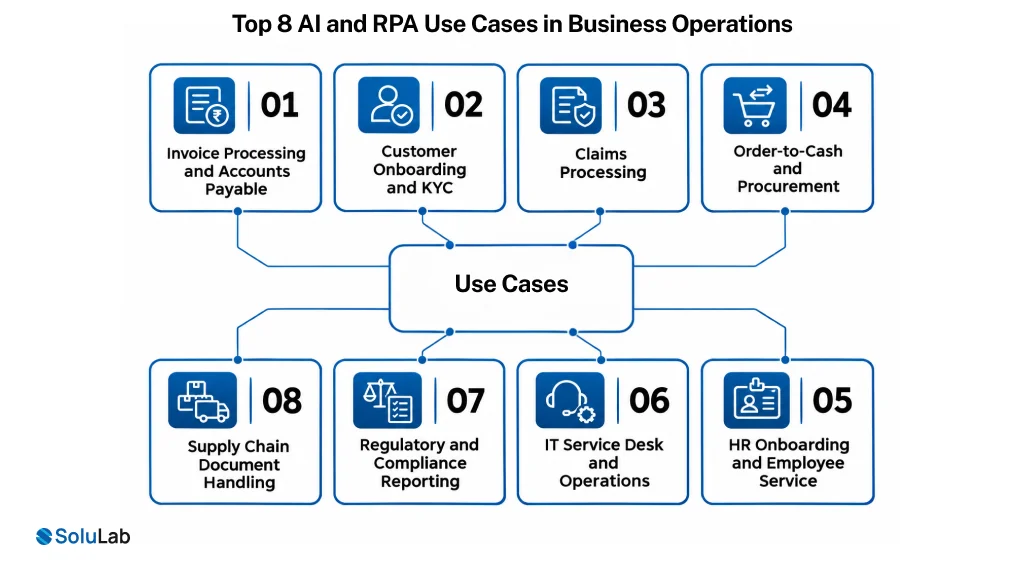
Here are top 8 RPA and AI use cases for businesses:
1. Invoice Processing and Accounts Payable
The flagship case. Models extract from any layout, bots post to the ERP, exceptions route by confidence score rather than by format. This is where most organisations see the clearest payback.
2. Customer Onboarding and KYC
Document classification and data extraction by model, identity verification and system provisioning by bot, with a review queue for anything below threshold.
3. Claims Processing
Models read submitted documents and assess completeness and plausibility; bots update the claims system, trigger payments and generate correspondence.
4. Order-to-Cash and Procurement
Purchase order matching, exception handling on three-way match failures, and automated dunning correspondence. AI and RPA in business operations tends to start here because the processes are high volume and already measured.
5. HR Onboarding and Employee Service
Document collection, system account provisioning across many tools, and policy question answering by a retrieval model rather than a ticket.
6. IT Service Desk and Operations
Ticket classification and routing by model, password resets and provisioning by bot, with anomaly-triggered remediation on infrastructure.
7. Regulatory and Compliance Reporting
Data assembly across systems by bot, narrative drafting and anomaly flagging by model, with every step logged for audit. Related patterns sit in business process automation.
8. Supply Chain Document Handling
Bills of lading, customs paperwork and delivery confirmation read by model and reconciled against orders by bot, with discrepancies escalated.
Key Benefits of AI RPA Automation
1. Exception Rates Fall Rather Than Move
The real benefit of adding AI is not speed, it is that the pile of cases a human has to handle shrinks instead of being relabelled. That is what changes the economics.
2. Throughput Without Proportional Headcount
Volume increases are absorbed into compute rather than hiring, which matters most in processes with seasonal peaks.
3. Fewer Transcription Errors
Keying data between systems is where errors originate. Removing the manual keystroke removes the error class, not just its frequency.
4. Faster Cycle Times on Document-Heavy Work
Processes that waited on someone opening an email and reading an attachment compress to minutes, because nothing waits in a queue for attention.
5. Staff Redirected to Judgment Work
The work that disappears is mechanical. The work that remains needs discretion, which is a better use of a trained person and generally a more defensible business case than headcount reduction.
6. Audit Trails as a By-Product
Every automated step is logged by default. For regulated processes this is a real advantage over manual handling, where the record depends on someone writing it down.
AI and RPA Platforms: What to Compare
Named tools matter here, and most articles on this topic avoid them. These are the comparison criteria that stay useful.
| Criterion | What to ask | Why it decides the outcome |
| Automation approach | API-first, UI automation, or both | API automation survives interface changes; UI automation does not |
| Document AI quality | Accuracy on your own documents, not vendor benchmarks | Published accuracy on clean datasets tells you almost nothing about your supplier invoices |
| Model flexibility | Can you bring your own model, or is it locked to the vendor’s | Model pricing and capability move fast; lock-in ages badly |
| Exception routing | Confidence thresholds, review queues, and who tunes them | This is where the human cost sits, so the tooling matters |
| Licensing model | Per bot, per process, per transaction, or consumption | The metric that scales with your volume determines real cost at scale |
| Audit and logging depth | Inputs, outputs, model version, reviewer, timestamp | Regulated processes need this and retrofitting it is expensive |
| Integration breadth | Named connectors for your ERP, CRM and core systems | Custom connector work is where timelines slip |
| Maintenance tooling | Change detection, self-healing selectors, version control on bots | Maintenance is the dominant lifetime cost, so tooling for it is not a minor feature |
What AI and RPA Implementation Costs
Cost tracks process count, integration difficulty and compliance load rather than licence price.
| Engagement | Typical range | What it covers | Timeline |
| Process assessment and automation roadmap | $6,000 to $15,000 | Process mining, candidate ranking, pattern selection per step, build estimate | 2 to 4 weeks |
| Single process pilot | $15,000 to $45,000 | One process end to end, document AI, bot build, exception routing, baseline measurement | 5 to 9 weeks |
| Multi-process programme | $60,000 to $80,000 | Three to eight processes, shared document AI layer, orchestration, governance framework | 12 to 24 weeks |
| Enterprise intelligent automation platform | $80,000+ | Centre of excellence setup, reusable components, full audit layer, multi-system integration | 24 weeks+ |
| Ongoing maintenance and optimisation retainer | Monthly, scoped to bot and process count | Change detection, bot repair, model retraining, threshold tuning, reporting | Rolling |
1. Why the Maintenance Line Is Not Optional
Classic RPA programmes failed on this. Budget maintenance from the start at a meaningful share of build cost, because interface changes arrive whether or not you planned for them.
2. Licence Cost Is the Smaller Half
Platform licences are visible and predictable. Integration work, document AI tuning and exception handling design are where the money actually goes, and they are the lines most proposals understate.
Governance: Who Is Accountable for an Automated Decision
Almost nothing written on this topic addresses it, and it is the question an auditor asks first.
1. Name an Owner per Automated Process
Not the automation team. The business owner of the outcome, who signs off the confidence thresholds and carries the consequence when a decision is wrong.
2. Log Enough to Reconstruct a Decision
Input received, model version, extracted values, confidence score, threshold applied, reviewer if any, final action. Without this you cannot explain a decision months later, which in a regulated process is a finding.
3. Define What the Automation May Never Do Unreviewed
Payment above a threshold, a claim denial, an account closure, anything affecting a customer adversely. Write the list down before go-live rather than after an incident.
4. Review Thresholds on a Schedule
A confidence threshold set at launch drifts out of calibration as inputs change. Quarterly review with the business owner is the minimum.
5. Keep a Manual Fallback Path Tested
Processes that cannot run manually any more have a single point of failure. Test the fallback rather than assuming it works.
What to Measure
Most programmes report activity. These are the metrics that tell you whether it worked.
1. Straight-Through Processing Rate
The share of cases completing with no human touch. This is the headline number and the one that exposes whether AI genuinely reduced exceptions.
2. Exception Rate and Exception Handling Time
Both, separately. A falling exception rate with rising handling time means the easy cases automated and the hard ones got harder.
3. Cycle Time, End to End
Measured from the original trigger, not from when the bot started. Queue time before automation is often where the delay actually was.
4. Cost per Transaction
Including licence, compute, maintenance and the human review time that remains. This is the number that makes the business case honest.
5. Bot Break Rate and Mean Time to Repair
The leading indicator of whether maintenance will overwhelm the programme. Rising break rates predict stalling long before the savings disappear.
6. Model Accuracy Against a Live Sample
Not the accuracy measured at launch. A rolling sample reviewed by a human, because drift is silent otherwise.
Challenges and Risks Worth Naming
1. Automating a Broken Process Faster
The most common and most expensive mistake. If the process is wrong, automation produces wrong outcomes at scale. Fix the process first, which is frequently the whole value of the assessment phase.
2. Programme Abandonment
Gartner expects more than 40% of agentic AI projects to be cancelled by the end of 2027, mostly for unclear business value and inadequate risk controls. Automation programmes have failed this way for a decade and the pattern has not changed.
3. Confident Wrong Extraction
A model that misreads a total produces a payment that is wrong and plausible. Confidence thresholds and sampling are the controls; accuracy claims alone are not.
4. Integration Debt
Every custom connector built against a system with no proper API becomes something to maintain. Prefer API-based automation even where UI automation looks faster to deliver.
5. Data Quality Upstream
Automation exposes data problems rather than solving them. Processes with inconsistent master data produce inconsistent automated results.
6. Staff Resistance Is Usually Rational
People who have seen an automation programme eliminate roles respond accordingly. Programmes framed around capacity and judgment work meet less resistance than ones framed around headcount, and the framing has to be true.
How to Get Started With AI and RPA
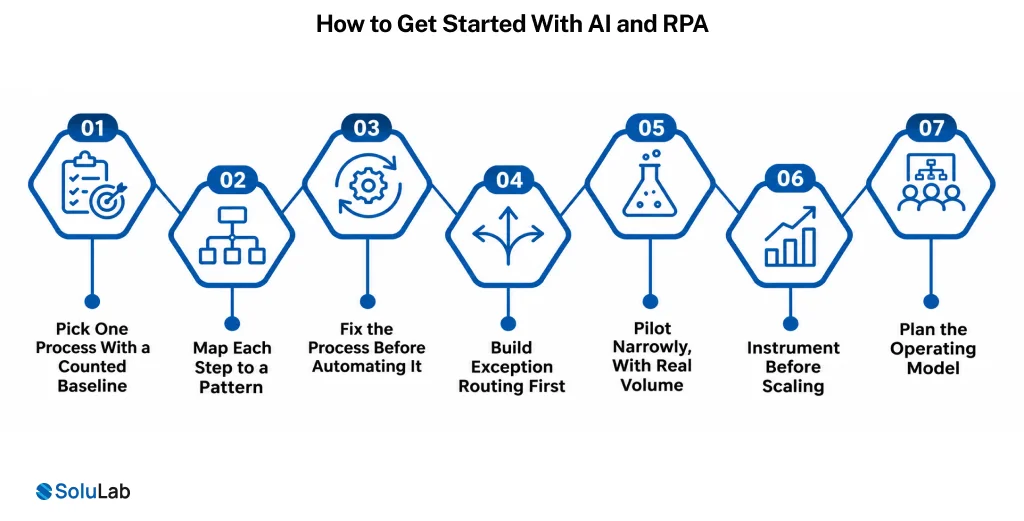
Here a complete step-by-step guide to implement AI and RPA:
1. Pick One Process With a Counted Baseline
Volume, cycle time, error rate and cost per transaction as they are today. If you cannot count it, you cannot prove improvement.
2. Map Each Step to a Pattern
Judgment steps to a model, deterministic steps to a bot, and be explicit about which is which. This mapping is the design.
3. Fix the Process Before Automating It
Remove steps that exist for historical reasons. Automating waste makes it permanent.
4. Build Exception Routing First
Decide what happens to low-confidence cases before building the happy path, because the exception design is what determines real savings.
5. Pilot Narrowly, With Real Volume
One process, real inputs, real users, measured against the baseline for at least a month.
6. Instrument Before Scaling
Straight-through rate, break rate and cost per transaction reporting in place before process two. Scaling without measurement is how programmes stall invisibly.
7. Plan the Operating Model
Who owns bots, who tunes thresholds, who repairs breaks. Teams that leave this undefined end up with the automation team owning business outcomes they cannot control. Strategy work of this kind sits with our AI implementation practice.
How SoluLab Can Help
We build automation that combines rules and models, and we have delivered 500+ projects since 2014 across both.
1. Process Assessment and Pattern Design
We map which steps need a bot, which need a model, and which should be removed, producing a ranked roadmap with a baseline for each candidate.
2. Document AI and Extraction Builds
Models tuned on your documents with measured accuracy, confidence thresholds set with your team, and exception routing designed before the happy path.
3. Bot Development and Orchestration
API-first wherever possible, UI automation where it is not, with version control, change detection and maintenance tooling as deliverables rather than extras.
4. Enterprise Integration
Connecting automation to the ERP, CRM and core systems you already run, including legacy platforms without modern APIs. Covered further under AI integration and artificial intelligence development.
5. Governance and Measurement Frameworks
Audit logging, ownership models, threshold review cadence and the reporting that makes the business case defensible. Related context in AI in business and digital transformation.
6. Generative AI Layers on Existing Automation
Where an RPA estate already exists and is struggling with exceptions, adding a model layer is usually cheaper than rebuilding. Our generative AI practice handles that retrofit, and AI solutions for enterprises covers the orchestration side at scale.

Conclusion
The honest summary of AI and RPA in 2026 is that RPA was never really the problem and was never quite the solution either. Bots did exactly what they were told, which worked on structured input and fell apart everywhere else, and the maintenance burden of patching that gap is what killed a generation of automation programmes.
Language models closed the gap by handling the inputs bots could not read, which is why organisations that shelved RPA are now revisiting it rather than replacing it.
What has not changed is the unglamorous part: automating a broken process makes it worse, maintenance is the dominant lifetime cost, and somebody has to own the outcome of every automated decision. Programmes that get those three right work. The rest join Gartner’s cancellation statistic.
SoluLab, an AI development company, can help your business scope it properly. Book an assessment, and we will map the first process with you.
FAQs
Neha is a curious content writer with a knack for breaking down complex technologies into meaningful, reader-friendly insights. With experience in blockchain, digital assets, and enterprise tech, she focuses on creating content that informs, connects, and supports strategic decision-making.