Key Takeaways
- MVP mapping helps teams identify the essential features needed to launch a viable product quickly.
- User Story Mapping organizes user activities, tasks, and features around the customer journey.
- A well-defined MVP focuses on solving the core user problem rather than including every planned feature.
- Prioritizing user stories helps teams decide what to build first, later, or leave out.
- MVP mapping reduces development risks by aligning business goals, user needs, and product priorities.
- Teams can use frameworks such as MoSCoW prioritization, impact-effort analysis, and release slicing to define MVP scope.
- A clear MVP roadmap makes it easier to validate assumptions, collect user feedback, and plan future iterations.
MVP mapping is the practice of using a user story map to define the smallest product release that delivers real user value. You lay out the user journey as a backbone, break each step into tasks, then draw a horizontal slice across the map to pick only the stories a first working release needs. Everything below the line waits.
SoluLab scopes and builds MVPs for founders and product teams as a SaaS product development partner, running the mapping workshop, estimating the slice, and shipping the first release with the same team. This guide covers the method, the trade-offs, and how a story map turns into a sprint plan.
What is MVP mapping?
MVP mapping is a scoping method that uses a user story map to decide which slice of a product ships first. Instead of ranking a flat list of features, you arrange the work along the user’s journey and cut a horizontal line through it. Stories above the line form the minimum viable product. Stories below it become the roadmap.
The method borrows from two ideas. The first is the user story map, a technique Jeff Patton popularized, in which activities run left to right in the order a user does them and the tasks under each activity run top to bottom by priority (Jeff Patton, The New User Story Backlog is a Map). The second is the minimum viable product itself, which Eric Ries defined as the version of a new product that lets a team collect the maximum amount of validated learning about customers with the least effort. Draft.io’s story-mapping example puts it in product terms: the smallest release that lets users reach their most basic desired outcome while giving them a chance to weigh in on what comes next (Draft.io, user story mapping example).
Put together, MVP mapping answers one question: what is the thinnest end-to-end path through the product that a real user can complete and that teaches us something we do not already know?
Definition box: the four parts of an MVP map
| Part | What it is | Example (invoice SaaS) |
|---|---|---|
| Backbone | The user activities, left to right, in journey order | Sign up, add client, create invoice, send, get paid |
| Walking skeleton | The single top task under each activity, wired end to end | Email signup, one client form, one invoice template, send by email, mark paid |
| Release slice | The horizontal line that separates release one from later work | Everything in the skeleton plus PDF export |
| Deferred stories | Tasks below the slice, kept on the map, not deleted | Recurring invoices, Stripe payments, multi-currency |
Why map an MVP instead of listing features?
A story map beats a feature list because it keeps the user journey visible while you cut scope. A ranked list lets you drop item 14 without noticing it was the only way a user could finish the flow. A map makes that gap obvious, because the missing task leaves a hole in the backbone.
Three practical benefits show up in nearly every mapping workshop:
- Journey context. Each story sits under the activity it serves, so “export to PDF” is judged by whether invoicing works without it, not by its standalone appeal.
- Honest slicing. You cannot ship “sign up” and “create invoice” while leaving “send invoice” for later and still call it viable.
- Shared understanding. Founders, designers, and engineers stand in front of the same wall. Patton’s original point was that the map is a conversation tool first and a planning artifact second, and that you prioritize the stories hanging from the backbone, never the backbone itself.
The cost of skipping this step is real. Erin Hanlon’s account of a story-mapping session in UX Collective describes a team that scrapped the system it had been building and chose a much simpler one once the map exposed how little of the journey the original plan covered (UX Collective, how user story mapping changed our MVP). A feature list does not protect you from that outcome. A map that ends in a testable release gives you an answer within weeks instead of quarters.
What is the difference between an MVP, a prototype, and a PoC?
An MVP is a working product that real users can adopt; a prototype is a model that tests design or flow; a proof of concept (PoC) is a technical experiment that tests whether something can be built at all. They answer different questions, cost different amounts, and belong at different points in product discovery.
| Artifact | Question it answers | Who uses it | Typical form | Ships to customers? |
|---|---|---|---|---|
| Proof of concept (PoC) | Can this be built with our stack, data, or model? | Engineers, CTO | Script, notebook, throwaway service | No |
| Prototype | Will users understand and want this flow? | Designers, PMs, test users | Figma clickable mockup, low-fidelity build | No |
| Minimum viable product (MVP) | Will real users adopt and pay for the smallest complete journey? | Real customers | Deployed software with auth, data, and support | Yes |
| Minimum awesome product (MAP) | Will users love the first release enough to recommend it? | Real customers | MVP plus polish on the core path | Yes |
SoluLab’s own guide for founders draws the same line: an MVP is a store-submitted, working app on a real device, while a clickable mockup is a prototype that tests navigation with stakeholders SoluLab, MVP app development services guide.
Story mapping applies to all three, but the slice means something different in each. For a PoC it is one risky task. For a prototype it is the happy-path screens. For an MVP it is the full backbone at minimum depth.
How do you build a user story map for an MVP?
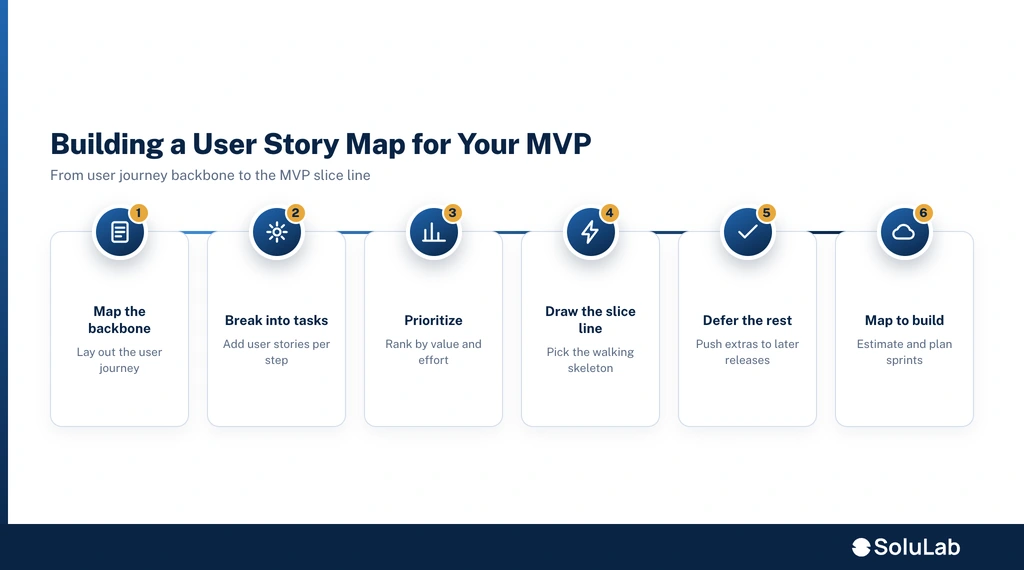
You build an MVP story map in five steps: frame the user and outcome, lay the backbone, fill in tasks, prioritize vertically, then draw the slice. A good session takes half a day with three to seven people, including at least one senior engineer who can flag technical dependencies as the map forms (Christian Strunk, how to define an MVP with user story mapping).
Step 1: Frame the user and the outcome
Write the target user and the outcome they want at the top of the wall. “A freelance designer who wants to get paid within 14 days of finishing a job” is specific enough to argue with. “Small businesses that need invoicing” is not.
Step 2: Lay the backbone
List the activities the user performs in order, left to right, as verbs a user would recognize: sign up, set up a client, create an invoice, send it, track payment. Five to nine activities is typical. If you have twenty, some of them are tasks.
Step 3: Fill in the tasks
Under each activity, add the tasks that make it possible. “Create an invoice” might contain: pick a client, add line items, set due date, apply tax, save as draft. Do not filter yet. The goal is to see the whole product, including the parts you will defer.
Step 4: Prioritize vertically
Within each column, move the task the user cannot do without to the top and continue down in order of necessity. MoSCoW language helps here. The DSDM method defines Must Have as the items without which the release fails, Should Have as important but survivable, Could Have as desirable, and Won’t Have (this time) as explicitly out of scope. Only Must Haves belong above your first slice.
Step 5: Draw the slice
Run a horizontal line across the map. Everything above it is release one. Check it against three tests:
- Complete: a user can travel the whole backbone without a dead end.
- Thin: each column contains the fewest tasks that still pass the first test.
- Learnable: the release produces evidence about the riskiest assumption in step 1.
If any test fails, move the line, not the backbone.
What belongs in your MVP (and what doesn’t)?
An MVP contains every task needed to complete the core loop once, and nothing whose removal leaves the loop intact. That is the whole rule. SoluLab’s product team phrases it the same way in its mobile app guidance: scope the MVP around one core loop, not a feature list, and treat a feature as must-have only if removing it breaks the loop entirely (SoluLab, mobile app development tips).
Usually above the slice
- Authentication, because nothing else works without a user.
- The one input path that creates the core object (one invoice template, one listing form).
- The one output path that delivers value (send the invoice, publish the listing).
- Basic state tracking and enough error handling that a failed step does not lose data.
Usually below the slice
- Alternate paths that do the same job (CSV import when manual entry exists).
- Integrations that speed up a task the user can already finish by hand.
- Admin dashboards, role management, bulk actions, themes, and localization.
- Anything justified by “investors will ask about it.”
The walking skeleton test. Alistair Cockburn described a walking skeleton as a tiny implementation that performs a small end-to-end function, not necessarily using the final architecture, but linking the main components so the system can grow from there. If your slice cannot be described as a walking skeleton, it is either too fat (extra tasks) or too thin (a column is missing).
Value versus effort. When two tasks compete for the same column, score each on the value it adds to the outcome from step 1 and the engineering effort to build it. High value and low effort wins. High value and high effort gets a cheaper substitute above the line, with the full version parked below it. A concierge or Wizard of Oz format, where a person completes the task behind the interface, is a legitimate way to keep a high-effort task above the slice.
How do you map an MVP for an AI product?
Mapping an AI MVP follows the same backbone, with three additions: data readiness, evaluation, and fallback. The uncertainty in an AI feature is not whether you can build the button, it is whether the model output is good enough for the user to trust. The slice has to prove that first.
- Add data readiness as a backbone activity. Before “get an answer,” the user journey usually includes “connect the data the model needs.” Tasks under that activity include ingestion, cleaning, and access controls. SoluLab’s own AI MVP guidance notes that clean, structured, accessible business data often matters more to the outcome than the choice of model (SoluLab, how to build an AI MVP in 90 days).
- Treat evaluation as a slice, not a chore. Put an “eval” task above the line for every AI feature in release one: a small labeled set of 50 to 200 examples, a pass threshold, and a way to compare prompt or model versions. Without it you cannot tell whether a user complaint is a bug or a capability limit.
- Map the fallback. Every AI task above the slice needs a path around the model: a human review queue, a “regenerate” button, or manual entry. A Wizard of Oz setup earns its keep here, because a person behind the interface handles the hard cases while the model catches up.
- Estimate uncertainty honestly. Model-backed tasks carry more variance than CRUD tasks, so give them wider ranges and schedule them first. A dedicated AI development team will usually run a short spike on the riskiest model task before committing the full slice to a timeline.
- Stat callout: where AI MVP budgets go. SoluLab’s pricing guide reports typical AI MVP costs of $10,000 to $35,000 for an API-based build and $80,000 to $300,000 or more for a custom, compliance-heavy, or agentic build, with most of the spend going to data pipelines, evaluation, prompt engineering, and infrastructure rather than the model itself (SoluLab, AI MVP development cost).
How do you go from map to build?
You turn a story map into a build plan by estimating the slice, ordering it into sprints along the backbone, and shipping the walking skeleton first. The map is the plan. Do not transcribe it into a 40-page requirements document.
Estimating the slice
Estimate each story above the line as a range, not a point. Relative sizing (story points or T-shirt sizes) works in the workshop because the team can compare stories side by side on the wall. Convert to calendar time using a velocity you have observed, not one you hope for. The Agile Manifesto’s principle that working software is the primary measure of progress applies directly here: an estimate the team cannot validate with a shipped increment in the first sprint is a guess.
Sprint planning from the backbone
Order sprints so that the walking skeleton lands first:
- Sprint 1: the thinnest path through every column, even if some steps are stubbed or manual. The goal is one real user completing one real journey.
- Sprint 2: the remaining Must Have tasks above the slice, starting with the column that carries the most risk.
- Sprint 3 onward: hardening, analytics, and the first stories from below the slice, chosen by what the release taught you.
For an enterprise software build, the same order holds, but the walking skeleton usually includes integration with an existing system of record, so that column moves to sprint 1 rather than sprint 3.
Cost from the map
The cost of an MVP is the sum of estimated stories above the slice, multiplied by a loaded team rate, plus contingency for stories that touch unknowns (new integrations, new models, new compliance rules). A map makes that arithmetic transparent: if the number is too high, you can point at the exact stories driving it and ask whether they belong above the line.
Infrastructure choices
Choose infrastructure that lets the slice ship without a platform project: a managed cloud application stack with hosted auth, a managed database, and one deployment pipeline. Kubernetes, multi-region, and event sourcing belong below the slice unless the backbone demands them.
How does SoluLab help teams scope and build MVPs?
SoluLab runs the MVP mapping workshop, estimates the slice, and builds the first release with one accountable team, so the people who drew the line are the people who ship it. Scope cuts made in a workshop tend to creep back when a different team picks up the build.
What a SoluLab engagement covers
| Phase | Output | Typical duration |
|---|---|---|
| Discovery and mapping | User story map, release slice, riskiest-assumption list | discovery duration |
| Estimation | Ranged estimates per story, sprint order, cost band | Ongoing |
| Build | Walking skeleton, then the full slice, with weekly demos | MVP build duration |
| Launch and learn | Analytics, feedback loop, next-slice recommendation | Ongoing |
Teams that want to keep the build in-house but need capacity can also hire a high-performance remote team from SoluLab to execute the slice under their own product lead.
FAQs
Shipra Garg is a tech-focused content strategist and copywriter specializing in Web3, blockchain, and artificial intelligence. She has worked with startups and enterprise teams to craft high-conversion content that bridges deep tech with business impact. Her work translates complex innovations into clear, credible, and engaging narratives that drive growth and build trust in emerging tech markets.