Ever wondered how to build your own AI app but had no idea where to even start? AI now touches nearly every industry, healthcare, finance, entertainment, you name it. So it’s no surprise everyone wants a piece of it.
But here’s the thing: building an AI app has nothing to do with dropping buzzwords like machine learning or neural networks into a slide deck. It comes down to solving a real problem with technology that’s actually smart enough to help.
This guide breaks the whole thing down, step by step. Startup founder, product manager, or just an AI-curious reader, it doesn’t matter. We’ll walk through building an AI app from scratch.
From picking the right use case to choosing a tech stack to testing the model before launch, it’s all here. Let’s get into it.
What is an AI App?
An AI app is software that leans on artificial intelligence to do things that used to require a human brain in the loop. Think understanding language, recognizing images, spotting patterns in data, predicting what happens next, and making calls on its own.
Here are some real-life examples of popular AI Apps:
- ChatGPT: built on natural language processing to understand what you type and answer like a person would.
- Amazon & Flipkart: recommend products by watching what you browse and buy.
- Grammarly: checks grammar and tone, then nudges your writing toward something clearer.
Benefits of AI App Development for Businesses
Bring AI into your business and the payoffs show up fast: better customer service, more trust in your brand, and a few surprises along the way. Here are five benefits worth knowing before you start building:
1. Improved Efficiency: AI apps take over the repetitive stuff, freeing people in support, HR, and operations from busywork. Much like rpa robotic process automation speeds up workflows, AI-powered tools give teams back hours they’d otherwise spend on tasks that don’t need a human touch.
2. Smarter Decision-Making: AI apps chew through huge datasets in real time, which means faster calls backed by actual numbers instead of gut feeling.
3. Personalized User Experience: AI lets you shape content and features around how each user actually behaves, not a guess about the “average” one. Engagement climbs. So does satisfaction.
4. Cost Savings Over Time: Setup isn’t cheap, no argument there. But over time, AI apps cut costs by trimming errors and speeding up workflows that used to eat hours.
5. Competitive Advantage: Move early and you’re ahead of the trend curve instead of chasing it, with solutions that actually stand out in a crowded market.
Read Blog: Cost To Build An App In Australia
Must-Have Features of AI Applications for Business
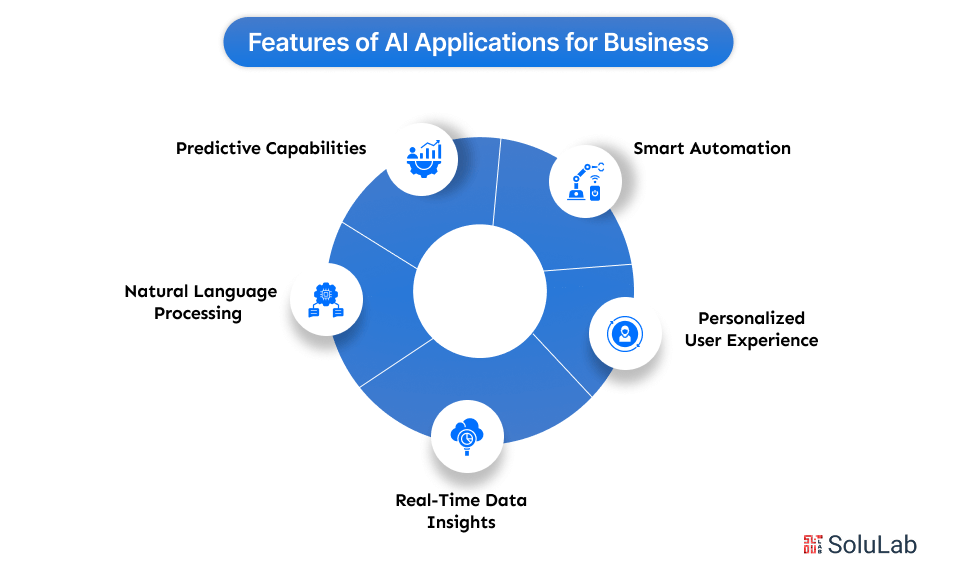
Build in the market-tested features from artificial intelligence (AI) applications and the resulting app can handle a wider range of problems while still paying off. Here are five features that modern business apps genuinely need:
1. Smart Automation: Data entry, basic support tickets, scheduling, an AI app can absorb all of it, handing time back to people who’d rather not do that work anyway.
2. Personalized User Experience: By reading user behavior, AI can surface the right product, content, or service at the right moment, which tends to lift both engagement and conversions.
3. Real-Time Data Insights: Dashboards powered by AI hand you analytics the moment they matter, not next quarter’s report, so decisions get faster and more accurate.
4. Natural Language Processing (NLP): NLP is what lets an app actually understand what you typed or said, not just match keywords. It’s the difference between a clunky chatbot and one people don’t mind talking to.
5. Predictive Capabilities: Forecasting demand, flagging customers who are about to churn, AI apps mine past data to guess what’s coming next, and often guess right.
How to Build an AI App- A Step-by-Step Process
Think of this as the walkthrough itself: how you actually build and ship an AI app, whether you’re a researcher, a business owner, or just someone who can’t stop thinking about AI. Follow the steps below and you’ll have a real shot at building something that changes how your industry runs.
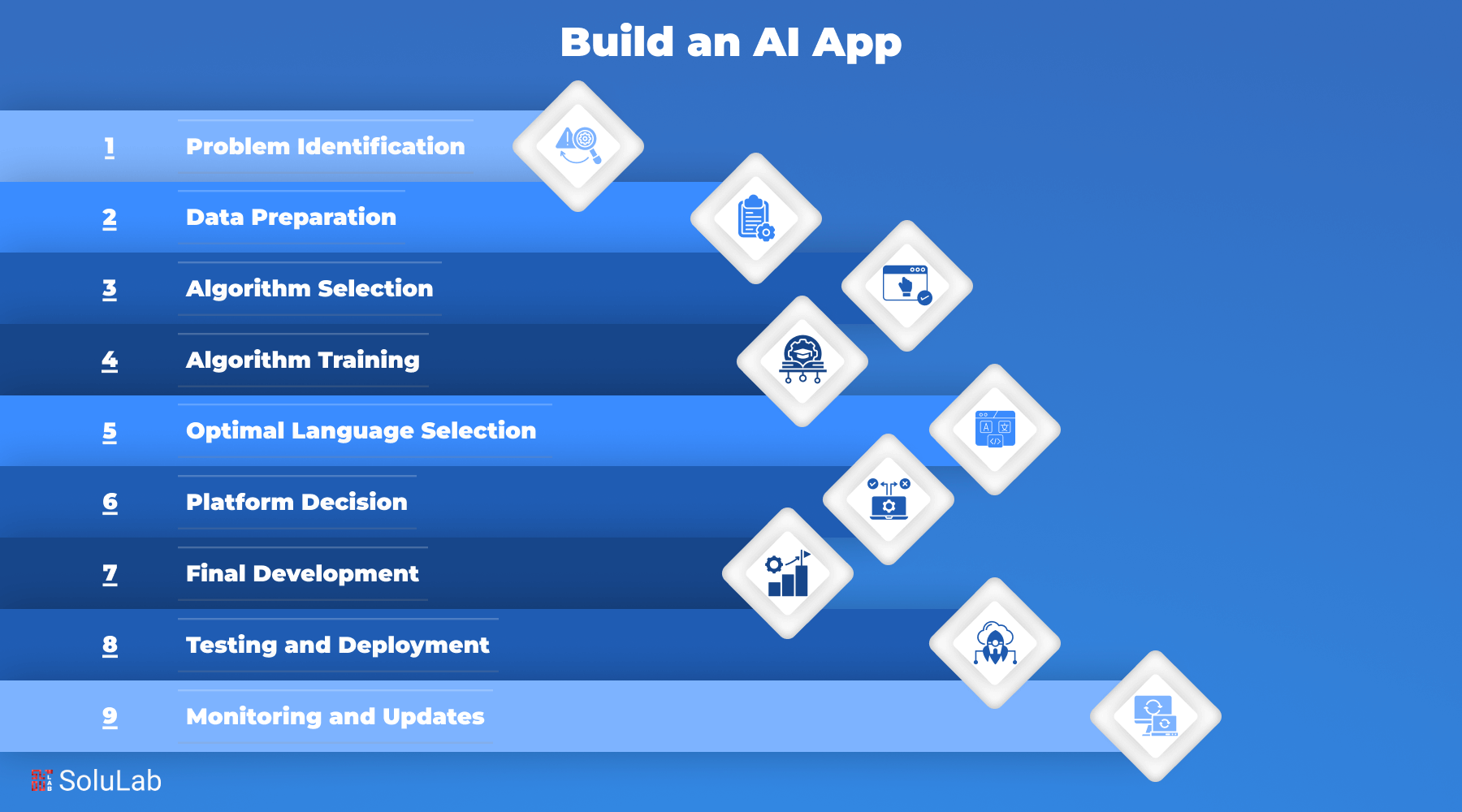
Step 1: Problem Identification
Start by nailing down the actual problem you’re building an AI app to solve. Look hard at what the app needs to do and how AI genuinely improves that, not just because AI is trendy. Write down what success looks like and what the payoff is. Once the problem and the idea are locked in, turn them into product requirements. That requirement analysis is what tells developers why the project exists in the first place, and it’s what points them toward the right tools and tech later.
In practice, the planning stage covers three things:
- Team Composition: Who’s actually on this, project managers, business analysts, data engineers, backend developers, and which of them are technical versus not.
- Work Schedule Discussion: Sit down with the people doing the work and set timelines that are realistic, not aspirational.
- Data Exploration: Start digging into whatever data the AI/ML model will need. This groundwork saves headaches later.
Step 2: Data Preparation
AI apps run on data, and usually a lot of it. Before any of that data gets used, it needs careful collecting and cleaning, because a shaky data model wrecks everything downstream. Specialists who live and breathe AI/ML label the data by hand, checking sources and inputs line by line before anything moves forward. Many teams lean on a known framework here, like the Cross-Industry Standard Process for Data Mining (CRISP-DM), to keep the process from turning into chaos.
Next comes scrutiny: hunting for errors, missing values, mislabeled entries. Data prep breaks down into these steps.
A. Uploading and Raw Data Selection
- Upload the raw data first.
- Then filter it down to the subsets that actually matter.
B. Annotation Tool Selection
- Pick annotation tools that fit what this particular dataset needs, not whatever’s popular.
C. Data Labeling and Highlighting
- Label the data, flagging the elements that matter most.
D. Processed Data Selection and File Saving
- Save the processed data somewhere organized, ready for whatever comes next.
Step 3: Algorithm Selection
Now for arguably the single most important decision in the whole build: picking the algorithm. The technical details get messy fast, but the core idea is simple enough to grasp without a PhD. Algorithms differ mainly by how they learn.
Two main types exist: supervised learning and unsupervised learning.
- Supervised Learning
You feed the machine a labeled training set, and it learns to hit the right answer on a test set it hasn’t seen yet. SVM (Support Vector Machine), Logistic Regression, Random Forest, and Naive Bayes all sit in this bucket. Some handle classification, say, will this borrower default, while others handle regression, like estimating how much you’d lose if they did.
Read More: Best Practices to Avoid AI Project Failures
- Unsupervised Learning
Unsupervised learning skips the labels entirely. It’s good at clustering (grouping similar things together), association (finding links between items), and dimensionality reduction (trimming variables so noise doesn’t drown the signal).
Get the algorithm choice wrong and everything downstream suffers for it. Know the difference between supervised and unsupervised approaches, know a handful of algorithms well, and the system stands a real chance of solving the problem you actually built it for.
Step 4: Algorithm Training
Once the algorithm’s picked, it needs training, and testing, to prove it’s actually accurate. There’s no universal accuracy threshold that fits every project. What matters is retraining it, again and again if needed, until it performs the way the framework demands.
AI systems live and die by their data. A narrow, homogenous dataset produces a model that only works in narrow, homogenous conditions, so diversity in the training data matters more than most people expect. Spending real time and budget on training isn’t optional if you want the payoff: better efficiency, lower costs down the line, and an edge over whoever skipped this step. Anyone learning how to build an AI app needs to internalize that early.
Step 5: Optimal Language Selection
A tight, precise set of requirements makes or breaks an effective AI app. Just as important: which programming language you build it in. That single choice shapes how intuitive the final system feels to actual users. Dozens of languages could theoretically work, each with its own tradeoffs, so the real task is matching the language to what your specific project needs.
Some languages are built for crunching huge datasets and heavy numerical work. Others shine at natural language tasks instead. Picking the right one means actually knowing each language’s strengths and where it falls short. Here’s a shortlist worth considering when you start building an app with AI:
- Python
- Java
- C++
- R
- Prolog
- Lisp
- Haskell
- Smalltalk
- Rust
Step 6: Platform Decision
Building the app itself usually means leaning on a stack of frameworks and APIs rather than writing every algorithm from scratch. Most of these come with deep learning, neural network, and NLP applications support baked in. The major AI cloud platforms bundle pre-built solutions for speech, image, and language recognition too, so you’re not reinventing machine learning from first principles.
A handful of factors decide which APIs and platforms actually fit your project:
A. Cloud Preference:
- Which cloud environment you want, including whether a hybrid setup makes sense.
B. Data Storage Logistics:
- Where your data physically lives, and who owns it once it’s there.
C. Language Constraints:
- Whatever limitations your chosen language brings along.
D. API Accessibility:
- Whether the APIs you need are even available in your region.
E. Cost Considerations:
- The total cost across the entire development lifecycle, not just the sticker price upfront.
Step 7: Final Development
Building an AI-powered app follows much the same path as conventional software development, just with CRISP-DM folded in. The steps below make up the core of that process:
A. Solution Architecture Design
- Sketch out the architecture the whole solution will run on.
B. User Interface Design
- Design how users will actually interact with it.
C. Frontend and Backend Development
- Build both sides: what users see and the server-side machinery behind it.
All the way through development, keep an eye on performance, keep adding functionality where it earns its place, and build in room for updates you haven’t thought of yet.
Step 8: Testing and Deployment
Test hard before launch. Catch the bugs, check that the model actually performs, make sure using the thing doesn’t feel clunky. Once it holds up, ship it, web, mobile, cloud, wherever it belongs.
Step 9: Monitoring and Updates
Launch isn’t the finish line. Keep watching how the app performs, what users say, and how accurate the AI model stays over time. Feed that back into regular updates, retrain the model when it drifts, and keep shaping the app around what the business actually needs.
Read Also: How Much Does It Cost to Build an AI App in 2026?
How Different Sectors Benefit from AI App Development?
AI apps aren’t confined to one industry. They reshape processes, sharpen the customer experience, and push growth across sectors that look nothing alike. Here are five industries getting real value out of building AI apps:
1. Healthcare: AI-powered apps help diagnose disease, predict how a patient’s condition will progress, and take administrative busywork off staff’s plates. Ada and Babylon, for instance, use it for symptom checks and virtual consultations.
2. Finance: Fraud detection, automated support, real-time insight into your finances, AI covers all three here. Cleo and Upstox use it to guide spending and investing decisions while tightening security around online transactions.
3. Retail and E-commerce: AI enhances shopping experiences through personalized recommendations, tighter inventory management, and pricing that shifts with demand. Amazon and Flipkart lean on AI-driven features to drive sales and keep customers satisfied.
4. Education: Duolingo and BYJU’S personalize the learning path itself, automate grading, and layer in interactive tutoring, making education feel less like a lecture and more accessible across skill levels.
5. Logistics and Supply Chain: FedEx and Delhivery run AI for route optimization, demand forecasting, and real-time tracking, which shows up as faster deliveries and a better experience on the customer’s end.
Read More: Create Quora Like App With AI
Future Trends of AI Apps for Businesses
Hyper-personalization is one trend worth watching, AI apps reading behavior in real time and tailoring the experience even further than they do now. We’re also seeing more AI copilots, tools that help employees write, design, code, or dig through data.
Voice interfaces and chatbots keep getting less robotic and more like talking to an actual person, which means better support without a bigger headcount. Generative AI is also creeping into everyday tools now, spitting out content, reports, and insights in the time it takes to make coffee.
And as regulation catches up, privacy, transparency, and ethical use will matter more, not less. So if you’re planning an AI app, don’t stop at automation. Build something that learns, adapts, and grows alongside its users. That’s where business is actually heading.

Conclusion
Building an AI app sounds intimidating right up until you break it into steps. Then it’s just doable, honestly kind of fun. Define the problem, gather solid data, pick the right tools, test the model. Each stage gets you closer to something that actually works.
Beginner or seasoned tech enthusiast, the approach is the same: start small, stay curious, keep iterating. So go ahead, turn that idea into something real. Your AI app might end up a bigger part of the future than you expect.
Digital Quest, a travel business, teamed up with SoluLab to build an AI-powered chatbot delivering real-time, personalized travel recommendations. Running on Generative AI, it handles hassle-free reservations, support around the clock, and conversations in multiple languages. The result: stronger customer engagement, a better user experience, and solid ROI without a massive spend.
SoluLab, an AI development company based in the USA, can help build the AI app your business needs, cutting manual work along the way. Reach out and let’s talk specifics.
FAQs
Shipra Garg is a tech-focused content strategist and copywriter specializing in Web3, blockchain, and artificial intelligence. She has worked with startups and enterprise teams to craft high-conversion content that bridges deep tech with business impact. Her work translates complex innovations into clear, credible, and engaging narratives that drive growth and build trust in emerging tech markets.