Key Takeaways
- An AI-powered helpdesk resolves routine tickets on its own and routes only the hard ones to human agents.
- The build depends on four layers: clean knowledge, retrieval, an action layer that can execute inside your systems, and escalation rules.
- Feature scope matters less than data quality. Most failed projects fail on messy knowledge bases, not on model choice.
- Retrieval-augmented generation handles answers. Agents handle actions like password resets and refunds. You usually need both.
- Deflection rate is the wrong first metric. Track resolution accuracy and escalation quality before you chase automation percentages.
- Budget for integration work. Connecting Zendesk, Jira, Okta, and your CRM typically costs more than the AI layer itself.
- Governance is not optional. Autonomous ticket actions need audit logs, permission scopes, and a human override path from day one.
An AI-powered helpdesk is a support system where AI reads, classifies, and resolves tickets instead of pushing every request into a human queue. Building one takes four things: a clean knowledge base, a retrieval layer, an action layer that can execute tasks inside your systems, and escalation rules that hand hard cases to people.
The pressure to build one is real. Gartner predicts that by 2029, agentic AI will autonomously resolve 80% of common customer service issues without human intervention, cutting service operating costs by 30%. That number is doing a lot of work in boardroom decks right now.
What it doesn’t tell you is how to get there. This guide covers the architecture, build sequence, realistic costs, and the failure modes we see most often when teams move from AI customer-service pilots into production.
What is an AI-powered helpdesk?
An AI-powered helpdesk is support software that uses language models, retrieval, and workflow automation to understand a ticket, find the right answer, and either resolve it or route it. Traditional helpdesks store and assign tickets. An AI helpdesk closes them.
Strip away the marketing and there are three capabilities. It reads unstructured input (email, chat, voice transcripts, forms). It grounds its answer in your own documentation rather than general web knowledge. And it can take an action inside another system, not just reply with text.
Miss any one of those and you have something else. Reading plus grounding, with no action layer, is a smart search box. Action without grounding is an automation script that occasionally invents policy.

2. How it differs from a chatbot
A chatbot answers. A helpdesk resolves. That distinction sounds like semantics until you look at ticket data. In most B2B support queues, a large share of volume is not “what is your refund policy”. It’s “reset my access to the reporting dashboard” or “this invoice is wrong, fix it”. Those need write access to Okta, Workday, or your billing system.
Scripted chatbot development handles the first category well. The second needs AI agents in customer service with tool access and permission scopes.
3. Where it sits in your stack
It rarely replaces Zendesk, Freshdesk, or Jira Service Management. It sits in front of them. The ticketing system stays the system of record. The AI layer intercepts incoming requests, resolves what it can, writes back to the ticket, and escalates the rest with context attached.
AI helpdesk vs traditional helpdesk: what actually changes?
The difference is where work happens. A traditional helpdesk moves work to people faster. An AI helpdesk removes work from the queue entirely, then gives agents better context on what’s left.
Adoption has moved quickly. AI use in customer service departments rose from 46% in 2023 to 61% in 2025 . Most of that is assistive, though. Full autonomous resolution is still the minority case.
| Dimension | Traditional helpdesk | AI powered helpdesk |
| Ticket triage | Manual or rule-based routing | Intent and priority classified on arrival |
| First response | Queue-dependent, hours to days | Seconds, grounded in your documentation |
| Knowledge use | Agent searches the KB manually | Retrieval pulls the passage into the answer |
| Routine actions | Agent executes each one | Agent tools execute with permission scopes |
| Scaling cost | Roughly linear with headcount | Mostly fixed, plus per-resolution inference cost |
| Failure mode | Backlog and slow SLAs | Confident wrong answers if grounding is weak |
| Reporting | Volume, AHT, CSAT | Same, plus resolution accuracy and escalation quality |
That last row is the one teams underinvest in. If you can’t measure whether an autonomous resolution was actually correct, you cannot safely raise the automation rate. This is where broader customer service automation programs stall.
What features does an AI-powered helpdesk need?
Seven features cover most production deployments. Scope beyond these only when a specific workflow demands it.
1. Multichannel ticket ingestion
Email, web chat, in-app widget, Slack or Teams, and voice transcripts land in one normalized ticket object. Normalization matters more than channel count. If a Slack thread and an email produce different schemas, every downstream component needs branching logic.
2. Intent classification and priority scoring
Every incoming ticket gets an intent label, a priority score, and a confidence value. Confidence is the control knob for how much autonomy you grant. Low confidence routes to a human without attempting resolution.
3. Retrieval-grounded answering
The model answers from your documentation, past resolved tickets, and product docs. Not from memory. This is the single largest driver of answer accuracy, and it’s why building a RAG platform usually comes before agent work in the build sequence.
4. Action execution with scoped permissions
Password resets, license provisioning, refund initiation, subscription changes, shipping updates. Each action is a tool with an explicit permission scope, an audit log entry, and a rollback path where possible.
5. Escalation with context handoff
When the system escalates, the human agent should receive a summary, the retrieved sources, the actions already attempted, and the confidence score. Escalating a bare ticket wastes the automation entirely.
6. Knowledge base generation
Resolved tickets become draft knowledge articles for human review. This is how the system’s coverage improves over time without a documentation sprint every quarter. Internal-facing deployments benefit from this even more than customer-facing ones, because internal policy changes constantly and nobody updates the wiki.
7. Analytics and quality review
Sampled review of autonomous resolutions, drift monitoring on classification accuracy, and a feedback loop from agent corrections. For larger deployments this is where enterprise AI chatbot development work tends to concentrate after launch.
How does an AI helpdesk work?
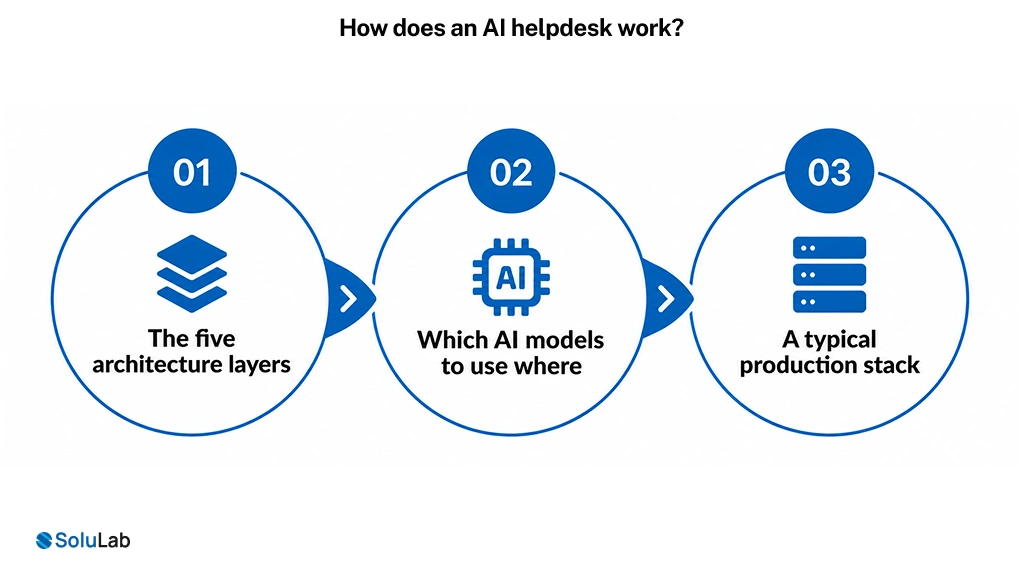
An AI helpdesk runs on five layers: ingestion, understanding, retrieval, action, and escalation. A ticket passes through them in sequence, and each layer can hand off to a human at any point.
1. The five architecture layers
Ingestion normalizes input from every channel into one ticket schema. Understanding classifies intent, extracts entities such as account IDs and order numbers, and scores urgency. Retrieval searches your indexed knowledge and returns ranked passages with source references. Action calls tools in your connected systems. Escalation packages everything for a human when confidence drops below threshold.
2. Which AI models to use where
Don’t use one model for everything. Classification runs fine on a small fine-tuned model or an embedding classifier, and running it there keeps latency and cost down. Answer generation needs a stronger general model. Action planning needs a model with reliable tool-calling behavior.
For multi-step tickets that require chained lookups, agentic RAG patterns work better than single-shot retrieval, because the agent can reformulate its own query when the first retrieval comes back thin.
3. A typical production stack
On recent service-desk builds our teams have shipped with OpenAI Agents SDK and LangGraph for orchestration, a GPT-4-class model for generation, FastAPI services, PostgreSQL with a vector extension for the knowledge index, React for the agent console, and connectors into Jira Service Management, ServiceNow, Microsoft Intune, and Azure AD for identity and device actions.
Nothing exotic there. The engineering difficulty is in the connectors and the permission model, not the model layer. If you want the reasoning behind orchestration choices, our breakdown of AI agent development architecture covers the trade-offs between graph-based and single-loop agents.
How Do You Build an AI-powered Helpdesk Step by Step?
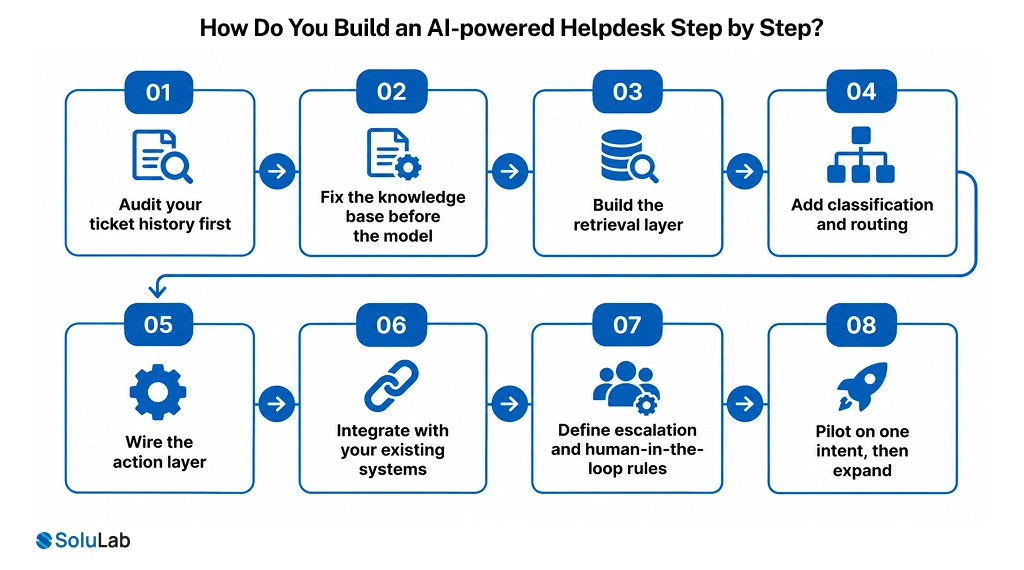
Eight steps, in this order. The sequence matters. Teams that start at step five and work backwards usually rebuild.
1. Audit your ticket history first
Pull twelve months of resolved tickets. Cluster them by intent. You’re looking for the top 20 intents by volume and how many of them have a deterministic resolution path. That list is your automation scope. Everything else waits.
2. Fix the knowledge base before the model
Retrieval quality is capped by document quality. Outdated articles, duplicated policies, and PDFs with no headings all degrade answers. Budget real time here. On most engagements this is the longest unglamorous phase, and skipping it is the most common reason accuracy plateaus around 60%.
3. Build the retrieval layer
Chunk documents semantically rather than by fixed token count. Store source metadata so every answer can cite its origin. Set up an evaluation set of 100 to 200 real questions with known correct answers before you tune anything.
4. Add classification and routing
Now classify incoming tickets against the intent list from step one. Route only the automatable intents into the AI path. Everything else goes to the existing human queue, unchanged. This limits blast radius during early rollout.
5. Wire the action layer
Each action gets its own tool definition, permission scope, and audit trail. Start read-only. Let the system look up order status and account state before you let it change anything. Promoting a tool from read to write should be a deliberate decision with a test plan attached, not a config flag someone flips.
6. Integrate with your existing systems
Zendesk or Jira for tickets, Okta or Entra ID for identity, your CRM for account context, and your billing platform for anything financial. Integration is usually where timelines slip, because every system has different rate limits, auth models, and sandbox availability. This is the bulk of the work in most AI integration services engagements.
7. Define escalation and human-in-the-loop rules
Set a confidence threshold. Define which intents can never be fully autonomous regardless of confidence, such as billing disputes, security incidents, or anything touching regulated data. Give agents a one-click override that also logs a training signal.
8. Pilot on one intent, then expand
Launch with a single high-volume, low-risk intent. Run it for two to three weeks. Review every autonomous resolution manually. Only then add the second intent. Teams that launch twenty intents at once cannot diagnose what’s failing.
If you need the build team, our AI agent development company practice runs this sequence as a fixed-scope engagement.
What does an AI helpdesk cost and how long does it take?
A production AI helpdesk typically costs between $60,000 and $80,000 to build, depending on integration count and autonomy level, and takes 10 to 24 weeks. A scoped pilot on two or three intents lands well below that range and is the right first commitment for most teams.
1. What drives the cost
| Cost driver | Typical effect on budget | Notes |
| Number of system integrations | Highest single driver | Each connector adds auth, error handling, and sandbox setup |
| Knowledge base condition | High when documentation is stale | Cleanup effort is often underestimated by half |
| Autonomy level | Moderate to high | Write actions need audit, rollback, and stricter testing |
| Channel coverage | Moderate | Voice adds transcription and latency engineering |
| Compliance scope | High in regulated sectors | HIPAA, SOC 2, or GDPR handling changes the data architecture |
| Ongoing inference | Recurring, not one-time | Scales with resolved ticket volume |
2. Where the money actually goes
Most buyers assume the model layer is the expensive part. It usually isn’t. On the service-desk projects our teams have delivered, integration and permission work consistently consumed more engineering hours than retrieval and generation combined. Plan accordingly.
3. Build versus buy
If your top intents are generic and your systems are mainstream SaaS, an off-the-shelf AI helpdesk product may be cheaper. Custom builds earn their cost when your workflows are unusual, your data can’t leave your environment, or you need actions in systems no vendor supports. Be honest about which situation you’re in. For smaller teams with standard stacks, a custom build is often overkill.
Teams that need capacity rather than a full engagement can hire AI developers for defined build phases.
Not sure whether to build or buy? Get a feasibility review of your top ten ticket intents. Request a Feasibility Review
Why do AI helpdesk projects fail, and how do you avoid it?
Most AI helpdesk projects fail on scoping, data, and governance, not on model capability. Gartner predicts that over 40% of agentic AI projects will be canceled by the end of 2027 because of escalating costs, unclear business value, or inadequate risk controls (Gartner, June 2025).
1. The governance gap
Oversight is lagging deployment. In Deloitte’s State of AI in the Enterprise research, only about one in five companies reported a mature governance model for autonomous AI agents (Deloitte). For a helpdesk with write access to identity and billing systems, that gap is a real operational risk, not a paperwork problem.
What to do: define permission scopes per tool, log every autonomous action with the reasoning trace, and review a sample weekly.
2. Confident wrong answers
The dangerous failure isn’t the ticket the system can’t answer. It’s the one it answers wrongly with high confidence. Weak retrieval is usually the cause. Test with an evaluation set that includes questions your documentation does not cover, and confirm the system says so rather than improvising.
3. Optimizing the wrong metric
Deflection rate is easy to game. A system that closes tickets without resolving them looks excellent on a dashboard and terrible in CSAT three weeks later. Track resolution accuracy on a sampled basis, reopen rate, and escalation quality first. Raise the automation target only after those hold steady.
4. No operational ownership
Retrieval quality drifts as documentation changes. Classification accuracy drifts as product language changes. Without an owner and a monitoring pipeline, performance decays quietly. This is standard MLOps consulting territory and it belongs in the original budget, not in a later phase.
How do you deploy, measure, and scale it in production?
Deploy in three stages: shadow mode, assisted mode, then autonomous mode on a limited intent set. Each stage has an exit criterion, and you don’t advance until the numbers hold for at least two weeks.
1. Shadow mode
The system processes live tickets and generates proposed resolutions that no customer sees. Compare its output against what agents actually did. This gives you a real accuracy baseline before anything is at stake. Exit criterion: proposed resolutions match agent resolutions on your target intents at an agreed threshold.
2. Assisted mode
Agents see the proposed answer and the retrieved sources, then approve, edit, or discard. Every edit is a labeled training signal. Exit criterion: approval rate holds steady and edit volume falls.
3. Autonomous mode, one intent at a time
Release full autonomy for the highest-confidence intent only. Monitor reopen rate and CSAT for that intent specifically, not in aggregate, because aggregate numbers hide intent-level regressions.
4. What the results can look like
On an anonymized engagement for an IT managed-services provider, our team built an autonomous service desk using OpenAI Agents SDK, LangGraph, FastAPI, PostgreSQL, and connectors into Jira Service Management, ServiceNow, Microsoft Intune, and Azure AD. Agents classified tickets, handled password resets, provisioned access, drafted knowledge articles, and escalated anything outside scope.
Reported outcomes: 74% automated ticket resolution, 57% faster resolution time, and 46% reduction in support workload.
A parallel internal-facing build for an enterprise employer reached 76% automated HR enquiry resolution and 58% faster HR response. Both numbers came after phased rollout, not at launch. Similar patterns show up across generative AI in customer service deployments: the first four weeks look mediocre, and the curve steepens once knowledge coverage catches up.

Conclusion
Building an AI powered helpdesk is less an AI problem than a data and integration problem wearing an AI hat. The teams that succeed spend their first month on ticket analysis and knowledge cleanup, wire a read-only action layer before a write-capable one, and expand intent by intent instead of launching everything at once. The ones that struggle start with the model.
If you’re evaluating this for your own support operation, start small. Pick your two highest-volume intents, check whether they have deterministic resolution paths, and pilot there. You’ll learn more in three weeks of shadow mode than in three months of vendor demos.
SoluLab, an AI development company, can help your business scope, build, and deploy an AI helpdesk that fits your existing systems and risk tolerance. Our teams have shipped autonomous service desks across IT operations, HR, and customer support, and we’ll tell you honestly when an off-the-shelf product is the better call.
FAQs
Neha is a curious content writer with a knack for breaking down complex technologies into meaningful, reader-friendly insights. With experience in blockchain, digital assets, and enterprise tech, she focuses on creating content that informs, connects, and supports strategic decision-making.