Key Takeaways
- Choosing between the Single-Agent vs Multi-Agent Systems depends on workflow scope, tool usage, data access, risk, and expected business outcome.
- A single-agent system is best when one assistant can complete the task with clear instructions, whereas a multi-agent system is best to execute the complex workflows that need specialized roles.
- Deploying the right AI agent architecture is crucial to unlock the expected business outcomes.
- SoluLab helps businesses build the right architecture through AI agent development services and multi-agent AI development, depending on the business requirements and process complexities.
One question comes up when a business starts building with AI agents- Should one powerful agent handle the workflow, or should multiple specialized agents work together? Well! The answer depends on the process.
As AI agent development continues to evolve, businesses must choose an architecture that aligns with their operational goals, scalability requirements, and automation needs.
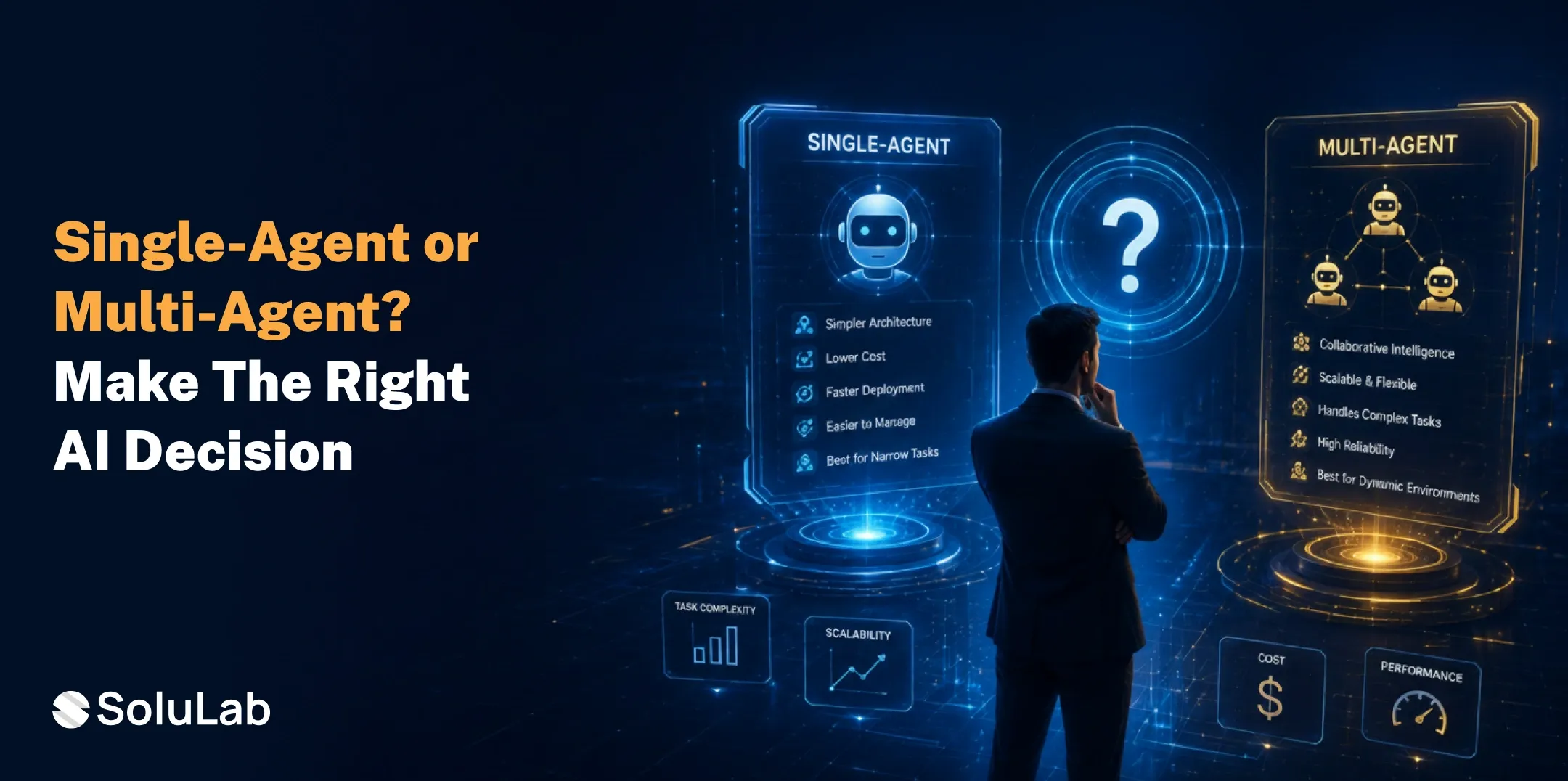
A single-agent system works well when the task is focused, predictable, and easy to control. It gives teams a faster way to launch, test, and prove value. On the other hand, A multi-agent system makes sense when the workflow has multiple roles, tools, checks, approvals, or business functions. It gives complex processes a better structure, but it also adds orchestration, cost, monitoring, and governance.
In this guide, we explore the difference between single-agent and multi-agent systems to choose the right one for business.
What Is AI Agent Architecture?
AI agent architecture is the design behind how an agent receives instructions, reasons through a task, uses tools, accesses data, stores context, and delivers output. A basic agent can answer questions. A stronger business agent can complete work.
It may connect with documents, APIs, databases, CRMs, ERPs, ticketing systems, analytics tools, or internal applications. A strong architecture usually includes five parts.
- Model: The reasoning layer that understands the task, plans the next move, and decides how to respond.
- Tools: The connectors that let the agent search documents, call APIs, write files, retrieve records, or update systems.
- Memory: The context layer that helps the agent remember session details, user preferences, previous steps, or workflow state.
- Guardrails: The rules that control access, reduce unsafe actions, validate outputs, and define when human review is required.
- Orchestration: The workflow layer that decides which action, tool, user, or agent should handle the next step.
A single-agent setup may use all five elements in one compact design. A multi-agent setup spreads responsibilities across specialized agents and coordinates them through orchestration.
What Is a Single-Agent AI System?
A single-agent AI system uses one agent to complete a defined task from start to finish. The agent receives the request, understands the goal, retrieves data, uses tools, prepares the output, and completes the workflow.
This architecture is simple, fast to build, easier to debug, and more cost-efficient. It is often the right starting point for custom AI agent development because teams can test one use case before expanding into a larger system.
Single-agent architecture works best for:
- Internal knowledge search
- Customer support drafting
- Invoice data extraction
- CRM update assistance
- Report summarization
What Is a Multi-Agent AI System?
A multi-agent AI system uses several specialized agents that work together inside one workflow. Each agent has a specific role. One may collect data. Another may analyze it. A third may verify the result. A coordinator may decide the next step.
The multi-agent AI development structure is useful when one agent becomes overloaded. Instead of forcing a single assistant to manage every responsibility, the system divides work into smaller parts. It creates role clarity, improves workflow coverage, and supports more advanced AI business process automation.
Multi-agent architecture is useful for:
- Claims processing
- Sales operations automation
- Compliance review
- Software development workflows
- Supply chain intelligence
Single-Agent vs Multi-Agent Systems: Comparison Table
| Factor | Single-Agent System | Multi-Agent System |
| Best Fit | Focused workflow with one clear goal | Complex process with several responsibilities |
| Build Speed | Faster to design, test, and launch | Slower due to orchestration and coordination |
| Cost | Lower initial development and runtime cost | Higher cost because multiple agents run together |
| Context | Stored inside one agent | Shared across specialized agents |
| Tool Access | Works well with limited integrations | Handles multiple tools across systems |
| Reliability | Strong when the scope stays narrow | Strong when roles are well designed |
| Debugging | Easier because logic sits in one place | Harder because failures may span handoffs |
| Governance | Simpler access control and review | Requires role-based permissions and audit trails |
| Scalability | Good for one process or department | Better for multi-team workflow expansion |
| Best Example | Internal knowledge assistant | Claims processing or sales operations network |
Single-Agent vs Multi-Agent Systems: The Detailed Difference
The main difference is how responsibility gets managed. This directly affects development effort, accuracy, cost, security, monitoring, and long-term scalability.
- Scope and Responsibility
A single-agent system works best when the task has one clear outcome.
For example, “summarize this contract,” “answer this HR question,” or “draft a ticket reply” can often be handled by one agent.
A multi-agent system becomes useful when the workflow includes several responsibilities.
For example, a contract review workflow may need one agent to extract clauses, another to compare terms, another to flag risk, and another to prepare a recommendation.
- Context and Memory
A single-agent system keeps context in one place. This helps the conversation flow naturally. It also makes debugging easier because the AI development team can trace the logic inside one agent. But the same design can create problems when the context becomes too large. One agent may receive too much information, too many tools, or too many instructions.
A multi-agent system reduces this pressure by giving each agent a smaller context. The researcher only handles research. The validator only checks quality. The orchestrator only manages flow. This improves clarity but creates a new challenge: agents must share the right context at the right moment.
- Tool Usage and Integrations
A single-agent system works well when tool usage is limited. For example, one agent may access a knowledge base, CRM, ticketing system, or invoice database.
A multi-agent system is stronger when the workflow needs several tools across different domains. For example, a finance automation system may need ERP access, invoice extraction, vendor verification, fraud scoring, approval routing, and reporting.
Each agent can receive only the tools it needs. This improves security and reduces accidental misuse. However, every integration adds engineering effort.
- Speed and Cost
Single-agent systems are usually faster to build and cheaper to run. There are fewer prompts, fewer tool calls, fewer handoffs, and less orchestration overhead.
Multi-agent systems often cost more because multiple agents may process context, call tools, exchange messages, and run validation steps.
- Governance and Control
Single-agent systems are easier to govern when the task is narrow. The business can define access rules, approval points, output checks, and review flows in one place.
Multi-agent systems need stronger governance because more components are involved. Each agent may require separate permissions, audit logs, tool limits, escalation rules, and monitoring.
Should You Use a Single-Agent or Multi-Agent AI System?
A smart approach is to start with the smallest architecture that can deliver the required business outcome, then expand only when testing proves the need.
Choose single-agent architecture when:
- The task has one clear outcome, such as answering policy questions, drafting ticket replies, extracting invoice data, or updating CRM notes.
- The workflow uses limited tools, so the agent can complete work without complex routing, multiple permissions, or separate domain ownership.
- The business needs fast validation, lower cost, easier debugging, and quicker user feedback before scaling into broader automation.
- The output can be reviewed by one person or approved through a simple human-in-the-loop step.
- The goal is to prove value before investing in multi-agent system development or advanced orchestration.
Choose a multi-agent architecture when:
- The process needs different roles, such as researcher, planner, executor, validator, reviewer, or coordinator.
- The workflow crosses systems, departments, data sources, or compliance boundaries that require separate permissions.
- The business needs stronger validation before output reaches customers, employees, regulators, or internal decision-makers.
- The process benefits from parallel execution, especially when multiple agents can work at the same time.
- The solution will expand across teams, AI use cases, regions, or business units over time.
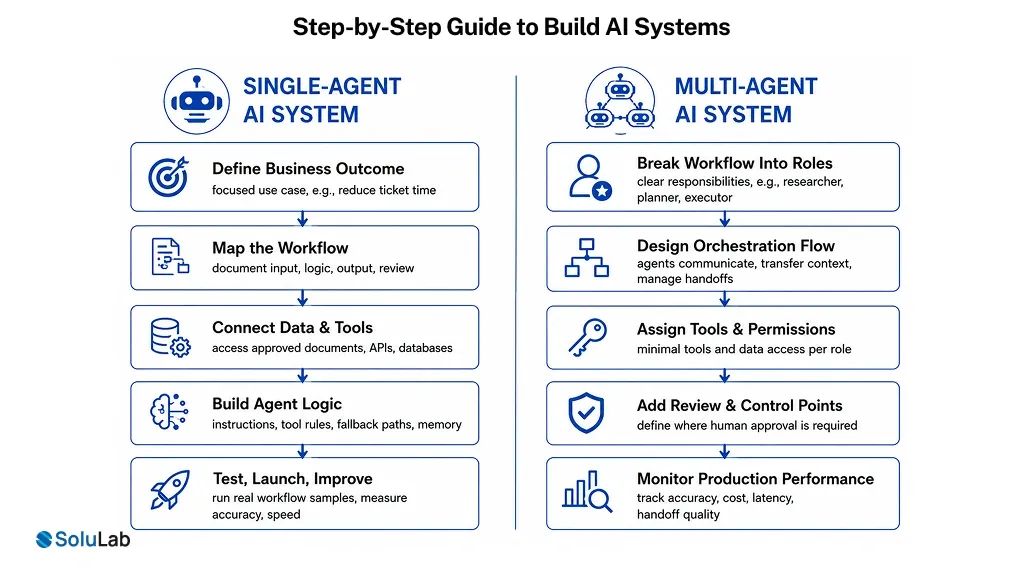
Step-By-Step Guide to Build a Single-Agent AI System
A single-agent system should start with one focused use case. Start with a workflow that is valuable, repeatable, and easy to validate.
Step 1: Define the Business Outcome
Choose one measurable goal. Reduce ticket response time, speed up invoice review, improve knowledge access, or automate CRM updates. A clear outcome keeps AI led development services focused on value.
Step 2: Map the Workflow
Document the input, required data, tool access, decision logic, output format, and review step. This helps the team design a reliable AI agent architecture.
Step 3: Connect Data and Tools
Give the agent access to approved documents, APIs, databases, or applications. Clean data improves accuracy, while controlled permissions reduce business risk.
Step 4: Build the Agent Logic
Define instructions, tool rules, fallback paths, memory needs, and response structure. Strong logic helps the agent stay focused and predictable during real usage.
Step 5: Test, Launch, and Improve
Run the agent with real workflow samples. Measure accuracy, speed, user adoption, and failure cases before expanding the solution.
Step-By-Step Guide to Build a Multi-Agent AI System
A multi-agent system needs careful planning before development.
Step 1: Break the Workflow Into Roles
Identify the core responsibilities. Common roles include researcher, planner, executor, validator, reviewer, and orchestrator. Clear roles improve multi-agent AI development outcomes.
Step 2: Design the Orchestration Flow
Decide how agents communicate, transfer context, use call tools, and escalate issues. Strong orchestration prevents loops, delays, conflicting outputs, and incomplete handoffs.
Step 3: Assign Tools and Permissions
Give each agent only the tools, data, and actions required for its role. This supports safer AI for business processes and cleaner governance.
Step 4: Add Review and Control Points
Define where human approval is required. Finance, legal, healthcare, insurance, and customer-facing workflows need validation before actions affect real users.
Step 5: Monitor Performance in Production
Track accuracy, cost, latency, handoff quality, exception rates, and user adoption. Monitoring turns multi-agent system development into a reliable operating capability.
Common Use Cases Of Single-Agent AI
Single-agent systems work well when the task is narrow and repeatable. They help businesses launch faster without the overhead of a larger architecture.
Internal Knowledge Assistant
Employees ask questions and receive answers from approved policies, SOPs, training material, and product documents. This improves knowledge access and reduces manual search time.
Customer Support Assistant
The AI assistant classifies tickets, drafts responses, summarizes conversations, and recommends next actions. Support teams respond faster while keeping human review available.
Finance Document Processor
The agent extracts invoice fields, checks missing values, validates totals, and prepares structured data for review. Finance teams reduce repetitive manual effort.
Sales Follow-Up Assistant
The Sales AI agent summarizes calls, drafts emails, updates CRM notes, and suggests next steps. Sales teams save time after every customer interaction.
HR Query Assistant
The agent answers common employee questions about onboarding, leave, payroll, policies, and benefits. HR teams reduce repetitive requests without losing control.
Common Use Cases Of Multi-Agent AI
Multi-agent systems work best when the workflow needs coordination, specialization, and stronger review. These systems are useful when the business wants deeper AI business process automation across functions.
Sales Operations Automation
A research agent collects account data, a scoring agent ranks leads, an email agent drafts outreach, and a CRM agent updates records. Sales execution becomes more structured.
Insurance Claims Processing
One agent reads claim documents, another checks policy coverage, another flags risk, and a reviewer prepares recommendations. This improves speed, accuracy, and audit readiness.
Software Development Workflow
A planner defines tasks, a developer writes code, a tester checks quality, and a reviewer validates output. This supports faster delivery for an AI app development company.
Compliance Review System
Agents classify documents, compare policies, detect risk, escalate exceptions, and maintain logs. Compliance teams gain stronger control over high-volume reviews.
Supply Chain Intelligence
Agents forecast demand, monitor shipments, check supplier risk, optimize routes, and trigger alerts. Operations teams respond faster to disruption.
What Is The Role of AI Orchestration Platforms?
AI orchestration platforms control how agents work together.
They decide which agent acts first, which tool gets called, where context moves, when approval is needed, and how errors are handled.
In a single-agent system, orchestration may be simple. The workflow may route output to email, CRM, ERP, or a dashboard. In a multi-agent system, AI orchestration becomes critical. Without it, agents may repeat work, lose context, send conflicting outputs, or create delays.
A reliable orchestration layer should manage five functions:
- Routing tasks to the right agent based on workflow rules, user input, system status, or business priority.
- Maintaining the state so that each agent receives the right context without exposing unnecessary data.
- Managing approvals when human review is required before final action or customer-facing output.
- Tracking logs for debugging, compliance, performance review, and production monitoring.
- Controlling cost by limiting tool calls, reducing repeated context, and preventing unnecessary agent activity.
Good orchestration makes agentic systems safer, faster, and easier to scale.
What Is The Cost of Building a Multi-Agent AI System?
The cost of building an AI agent system depends on the workflow.
A simple internal prototype may need fewer agents, limited integrations, and basic monitoring. A production-grade system needs deeper architecture, orchestration, security, permissions, testing, cloud deployment, and continuous improvement.
The main cost drivers are:
- Number of agents and how often they interact during the workflow.
- Complexity of tools, APIs, databases, CRMs, ERPs, or internal platforms.
- Data preparation, retrieval design, memory setup, and access control.
- Security, compliance, audit logs, and human approval requirements.
- Post-launch monitoring, optimization, support, and model usage cost.
How Long Does It Take to Develop a Multi-Agent System?
Timeline depends on scope, data readiness, workflow depth, integration complexity, and governance needs. An AI proof of concept can move faster when the business process is clear and the data is ready. A production-ready system takes longer because it requires orchestration, testing, permissions, user validation, monitoring, and deployment planning.
A phased approach works best:
- Start with discovery – Define the use case, expected outcome, systems involved, risk level, and success metrics.
- Build a controlled prototype – Test the agent flow with real examples, identify gaps, and measure output quality.
- After validation, move into production – Add AI integrations, monitoring, governance, user training, and support.
This approach reduces wasted development and improves adoption.
Common Mistakes to Avoid While Building a Custom AI Solution
The architecture decision becomes expensive when teams skip process clarity. Avoid these mistakes before starting custom AI agent development.
- Building a multi-agent system before testing whether one agent can solve the use case.
- Giving one agent too many tools, permissions, instructions, and responsibilities.
- Ignoring orchestration, monitoring, access control, and human review until production.
- Measuring only technical output instead of business value, adoption, cost, and risk.
- Treating agent development as a one-time build instead of an ongoing operating capability.
How SoluLab Helps With AI Agent Development?
SoluLab helps businesses design, build, integrate, and scale AI agents around real workflows.
As a leading AI development company, SoluLab supports both single-agent and multi-agent systems with a business-first engineering approach. Our core capabilities include:
- AI agent development services for workflow automation, internal assistants, decision support, and enterprise productivity.
- Custom AI agent development for tools, data, permissions, and approval flows specific to each business.
- Multi-agent AI development for complex workflows that require role separation, orchestration, validation, and scale.
- Agentic AI development services for systems that can reason, act, retrieve data, trigger workflows, and support users.
- AI integration with CRMs, ERPs, HRMS platforms, support tools, databases, cloud systems, analytics platforms, and internal applications.

Conclusion
The right choice between a single-agent and multi-agent system comes down to workflow reality, not technical ambition. Use a single agent when the process is focused, predictable, and quick to validate. Move to a multi-agent setup when the business needs specialization, coordination, review, or secure handoffs across teams and tools.
Start small, prove the outcome, then scale only where added complexity creates measurable value. This approach helps control cost, reduce risk, and build AI systems that support real operations.
Have a unique idea in mind? Let’s connect now!
FAQs
Shipra Garg is a tech-focused content strategist and copywriter specializing in Web3, blockchain, and artificial intelligence. She has worked with startups and enterprise teams to craft high-conversion content that bridges deep tech with business impact. Her work translates complex innovations into clear, credible, and engaging narratives that drive growth and build trust in emerging tech markets.