![How To Build Your Claude Cowork Alternatives? [2026 Guide]](https://www.solulab.com/wp-content/uploads/2026/04/Create-Smarter-AI-Workspaces-Like-Claude-Cowork.webp)
Key Takeaways
- The problem: Many businesses struggle with rising operational complexity, repetitive digital tasks, disconnected tools, and limited control over how AI fits into their workflows.
- The solution: Building a Claude Cowork alternative helps businesses automate tasks, improve team productivity, centralize workflows, and create secure AI systems tailored to their operational needs.
- How SoluLab helps: SoluLab is an AI-native company that uses AI across its own delivery workflows to build faster, reduce development costs, and create scalable AI cowork platforms tailored to each business.
Claude Cowork has redefined how non-developers interact with AI, automating files, tasks, and desktop workflows without writing a single line of code. But what if you need something more tailored, more scalable, or simply more affordable?
Building a Claude Cowork alternative gives you full control over features, integrations, and pricing, whether you’re a startup, SaaS founder, or enterprise team looking for AI agent development solutions.
From drag-and-drop automation to AI-powered task management, the right tech stack, backed by LLM development, workflow automation tools, and enterprise AI integration services, can replicate and even surpass what Cowork offers out of the box.
In this guide, we break down the development process, technology stack, and cost involved in building a scalable AI cowork alternative for your business.
What Is an AI Claude Cowork?
Claude Cowork is Anthropic’s AI “teammate” built into the Claude desktop app that can handle multi-step work on your behalf, not just answer prompts. It’s designed to act more like a delegated coworker than an AI-powered chatbot.
What it actually does?
Instead of chatting back and forth for every step, you can give it a goal, such as:
- organizing files and folders
- turning rough notes into a report
- summarizing meetings and emails
- preparing spreadsheets or presentations
- researching and drafting first versions of content
Why Are Businesses Investing in AI Cowork Platforms?
Businesses are investing in AI co-work platforms to reduce manual workload, improve execution speed, and create more responsive teams that can handle growing operational complexity without adding unnecessary overhead.
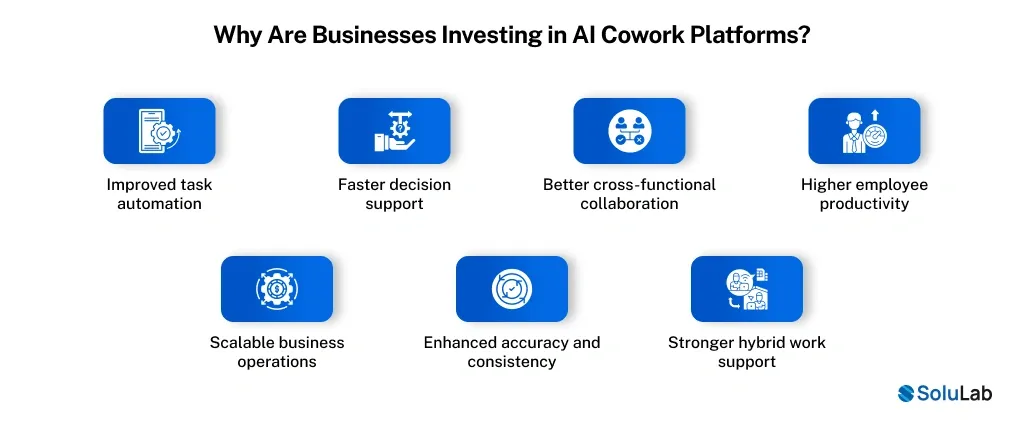
- Improved task automation: A Claude Cowork Platform helps automate repetitive tasks like scheduling, documentation, follow-ups, and reporting, reducing employee workload and freeing teams to focus on strategic priorities.
- Faster decision support: AI coworkers analyze data, summarize key insights, and surface relevant context quickly, helping teams make faster, better-informed decisions without waiting on manual inputs.
- Better cross-functional collaboration: AI platforms centralize communication, meeting notes, action items, and project updates, improving alignment across departments and reducing gaps caused by siloed workflows.
- Higher employee productivity: By handling routine operational work, AI coworkers allow employees to spend more time on creative problem-solving, customer engagement, and high-value business initiatives.
- Scalable business operations: As organizations grow, a Claude cowork alternative can support larger teams, more workflows, and higher task volumes without proportionally increasing operational costs.
- Enhanced accuracy and consistency: AI coworkers reduce human errors in repetitive processes, maintain standardized outputs, and ensure important tasks are completed on time and with greater reliability.
- Stronger hybrid work support: AI cowork platforms improve remote collaboration through smart summaries, task tracking, shared knowledge access, and seamless coordination across distributed teams.
Step-by-Step Process to Build a Claude Cowork Alternative
Building a Claude Cowork alternative requires more than adding an LLM to a dashboard. A reliable product needs clear workflows, secure integrations, strong memory, and an enterprise-grade user experience from day one.
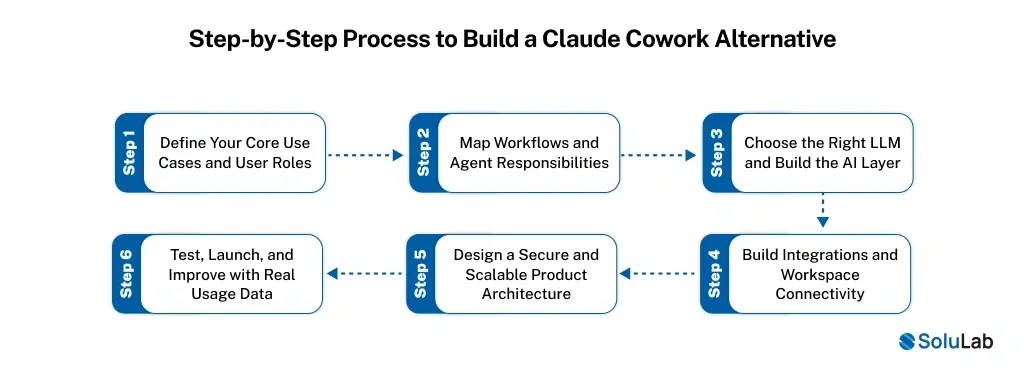
1. Define Your Core Use Cases and User Roles
Start by identifying where your AI coworker will create the most value with strategic AI consulting, such as task automation, meeting summaries, customer support, or internal knowledge access. Clear use cases reduce development waste and improve product-market fit.
2. Map Workflows and Agent Responsibilities
Design how the AI should handle tasks from start to finish, including triggers, approvals, escalations, and fallback paths. Strong workflow planning is the foundation of effective AI cowork platform development for real business operations.
3. Choose the Right LLM and Build the AI Layer
Select the best language model based on accuracy, cost, speed, and privacy needs. Add prompt orchestration, memory, retrieval, and context handling to ensure the system can perform consistently across complex tasks.
4. Build Integrations and Workspace Connectivity
Connect your platform with tools like email, calendars, CRMs, cloud storage, and team chat systems. To successfully build AI coworking platform products, seamless integrations are essential for real productivity gains.
5. Design a Secure and Scalable Product Architecture
Create a backend that supports user management, permissions, audit logs, encryption, and scalable infrastructure. Security and reliability are critical for long-term AI platform development for collaboration , especially in enterprise environments.
6. Test, Launch, and Improve with Real Usage Data
Run pilot programs, collect user feedback, monitor errors, and refine agent behavior over time. Continuous testing helps improve trust, reduce AI mistakes, and make the platform more useful as adoption grows.

Technologies Required to Build the Claude Cowork Platform
Building a Claude Cowork-style system requires a connected AI technology stack that supports intelligent automation, real-time collaboration, secure data handling, and scalable enterprise performance.
| Technology Layer | Tools / Technologies |
|---|---|
| Frontend | React.js, Next.js, TypeScript |
| Backend | Node.js, Python (FastAPI) |
| LLMs | Anthropic Claude API, OpenAI GPT APIs, Google Gemini |
| Agent Frameworks | LangGraph, CrewAI, AutoGen |
| Vector Database | Pinecone, Weaviate, ChromaDB |
| Database | PostgreSQL, MongoDB |
| Integrations | Slack API, Google Workspace API, Microsoft 365 Graph API |
| Real-Time Layer | WebSockets, Socket.io |
| Cloud / DevOps | Amazon Web Services, Microsoft Azure, Docker, Kubernetes |
| Security | OAuth 2.0, JWT, SSO, encryption |
How Much Does It Cost to Build a Claude Cowork Alternative?
The cost of building a Claude Cowork alternative depends on product depth, integrations, security, and workflow complexity. AI app development costs vary widely based on whether you’re launching a basic MVP or a full enterprise AI workspace.
| Development Stage | Estimated Cost | What’s Included |
|---|---|---|
| MVP Version | $20,000–$30,000 | Core AI assistant features, task automation, basic integrations, simple dashboard, and limited memory/context support |
| Mid-Level SaaS Product | $30,000–$40,000 | Advanced workflows, multi-tool integrations, user management, analytics, better UI/UX, and stronger security |
| Enterprise-Grade Platform | $50,000+ | Custom AI agents, private deployment, compliance features, role-based access, audit logs, scalable infrastructure, and dedicated support |
How SoluLab Can Help Build Your AI Cowork Platform?
Building an AI cowork platform requires more than AI model integration. It requires product strategy, secure architecture, workflow intelligence, and long-term scalability to deliver measurable business value across teams.
- AI-native product strategy: As an AI-native strategy expert, SoluLab helps define the right use cases, user journeys, and automation opportunities to build a practical, scalable AI cowork platform.
- Custom AI-driven architecture: SoluLab designs secure AI-driven systems with agent orchestration, memory layers, APIs, and integrations tailored to your business workflows and compliance needs.
- Enterprise-grade development: From frontend interfaces to backend infrastructure, SoluLab builds reliable platforms with role-based access, audit logs, and cloud-ready deployment capabilities.
- Workflow automation expertise: SoluLab creates intelligent workflows with AI-led development for task delegation, meeting summaries, approvals, scheduling, and internal collaboration to improve team productivity.
- LLM integration and optimization: The team helps you choose the right large language models, optimize prompts, reduce hallucinations, and improve response accuracy over time.
- Ongoing support and scaling: SoluLab supports testing, monitoring, model updates, and feature expansion so your AI cowork platform keeps improving as your business grows.
For example, SoluLab built CyberHulk, anAI-powered marketing SaaS platform built to help teams plan, automate, and optimize campaigns from a single dashboard by combining real-time analytics, multi-channel integration, and intelligent workflow automation.
- 50% Faster Campaign Execution
- 35% Improved Marketing ROI
- 40% Reduction In Manual Effort
Contact us to build a similar platform for your business.

Conclusion
Building a Claude Cowork alternative in 2026 is about creating a secure, scalable AI workspace that fits your business workflows, data policies, and team needs.
From task automation and memory to integrations and enterprise security, every layer impacts long-term usability and ROI. The right product can improve collaboration, reduce manual work, and help teams move faster with better context.
A strong foundation in Custom AI Development also ensures flexibility as your needs evolve. SoluLab, an AI development company, can help your business design and build a reliable AI coworker platform tailored to your goals.
FAQs
Core features include task automation, AI chat, meeting summaries, workflow triggers, tool integrations, memory retention, analytics, and role-based access.
An MVP can take 3–5 months, while a fully scalable enterprise solution may require 6–12 months or longer.
Industries such as healthcare, finance, SaaS, legal, customer support, and HR benefit most from high volumes of repetitive workflows.
Yes, businesses can build private AI assistants with custom workflows, internal knowledge access, and secure deployment options.
Integrations allow the AI to connect with email, calendars, CRMs, chats, and documents, making it more useful for real workflows.
Neha is a curious content writer with a knack for breaking down complex technologies into meaningful, reader-friendly insights. With experience in blockchain, digital assets, and enterprise tech, she focuses on creating content that informs, connects, and supports strategic decision-making.