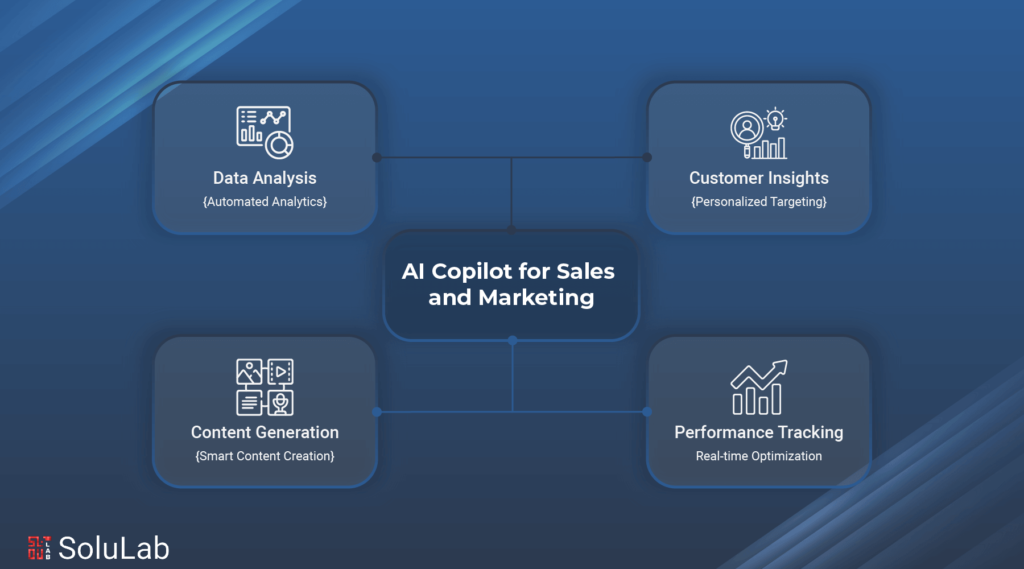
Tired of your team burning hours on research and analysis that never seems to end? That kind of manual work eats time and kills momentum. AI Copilot changes the math: draft marketing emails, dig through customer data, or put together a personalized sales pitch in seconds instead of hours. This AI assistant tool is built to make your business connect with customers, and run, more smoothly.
Researching market trends and turning them into actionable insight used to be a job in itself. Now it’s more about watching what’s working, for competitors or in the market generally, and adjusting your own approach accordingly.
Copilot handles the routine stuff and even kicks off campaign ideas, which frees your team up to spend time where it actually counts: building relationships with customers that last.
A survey found 64% users reported that Copilot cuts down the time spent processing emails and speeds up how fast they get to a solid first draft. 87% of respondents said it just makes starting that first draft easier, period.
This blog walks through how Copilot is reshaping sales and marketing strategy. Startup or established enterprise, understanding what it can automate is worth your time if you want fewer manual tasks eating your day.
What is an AI Sales Copilot?
An AI sales copilot is, at its core, a generative responsible AI built to produce content for you. Emails, follow-up recaps after a meeting, summaries of a back-and-forth thread, it handles all of that.
Here’s a rundown of what one can actually do:
- Recommendation: You can edit the generated content further, so your email responses end up matching exactly what the recipient needs and expects.
- Recognize the Data Sources: Hover over highlighted text to see exactly what data source it came from, useful when you want to double-check against your CRM.
- Recap the Most Recent Meeting: One click generates a recap: the conversation, the action items, the next steps. Review it, tweak what needs tweaking, and send it straight to everyone who was in the room.
- Summary of an Email Exchange: Get a quick synopsis of a back-and-forth thread and save it directly as a note against the opportunity in your CRM.
- Opportunity Summary: Before a customer meeting, pull a summary of the most recent notes on that opportunity so you’re walking in current, not catching up.
How Does AI Copilot Works for Sales and Marketing?
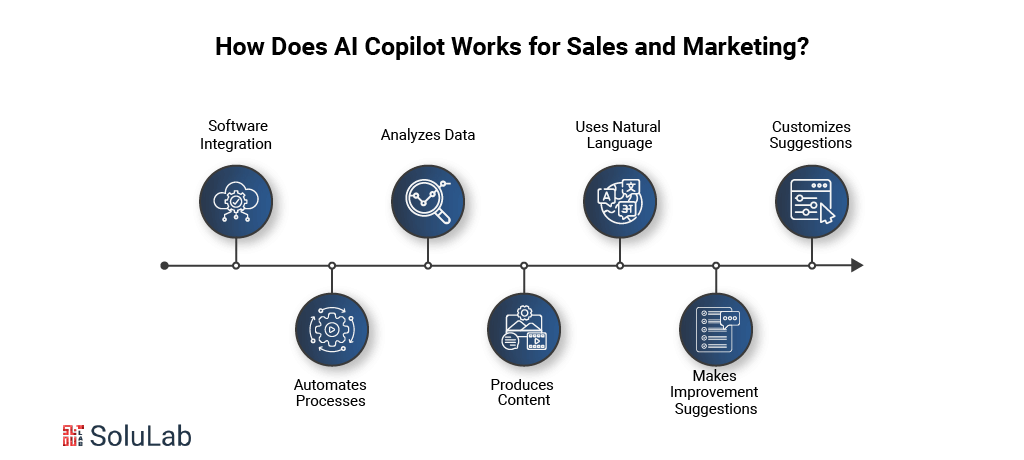
Here’s how AI copilot actually works, and where it saves you the most time: the repetitive, everyday stuff.
1. Software Integration: Copilot slots into the tools you’re already using, Word, PowerPoint, Excel, your CRM, without a painful setup process.
2. Automates processes: Scheduling, data entry, drafting emails, the repetitive processes that eat up a day, Copilot takes those off your plate and saves hours of manual work in the process.
3. Analyzes Data: Large volumes of data aren’t a problem, in Excel, for instance, it looks at your historical sales data and forecasts where things are headed.
4. Produces Content: Copilot assists in producing written materials such as emails, reports, and presentations. Ask for a sales proposal, a report, an email, and it writes based on the context you give it and whatever specifics you ask for.
5. Uses Natural Language: You talk to it the way you’d talk to an assistant, plain language, no special syntax required. That’s what makes it usable regardless of how technical you are.
6. Makes Improvement Suggestions: Grammar, structure, style, it’ll flag what could be tightened up so the final draft actually reads well.
7. Customizes Suggestions: The more you use it, the better it gets at reading your preferences and working style, and the more its recommendations start to actually fit how you work.

Benefits of AI Copilot for Sales and Marketing
A few of the bigger benefits worth knowing about:
- Enhanced Sales Performance: Data-driven insight plus automated workflows means a tighter sales process, and that tends to show up directly in revenue.
- Heightened Efficiency: frees your team to spend time on high-value work instead of getting stuck on customer service automation tasks.
- Improved Decision-Making: Decisions backed by real insight and analysis, instead of gut instinct, tend to close more profitable deals.
- Increased Visibility: automatically prepared executive summaries give you an immediate read on where every deal has been and where it stands now.
Read Also: AI In Marketing
Features of AI Copilot for Sales
AI Copilot for Sales comes loaded with features aimed at one thing: getting your team more done, faster, with better results at the end.
- Data-Driven: Chewing through huge amounts of prospect and client data is core to what an AI Sales Copilot does. It looks at demographics, past interactions, purchase history, and turns that into recommendations specific to that one person.
Say you sell software. Copilot might push one feature to a lead in finance and something completely different to a physician, because that’s what actually matters to each of them. That kind of tailoring is what closes deals and builds real rapport with a prospect.
- Predictive Analytics: Reading patterns and trends lets it predict which leads are actually likely to convert and anticipate what existing clients will need next. Weighing variables like company size, sector, and past interactions, it can point you toward the leads most likely to buy, so your time and outreach go where they’ll actually pay off.
- Automation of Tasks: Repetitive duties are where sales copilots really earn their keep, scheduling follow-up emails, updating the CRM after a call, the stuff that would otherwise chew through your day.
Wrap up a call, and Copilot can transcribe it, pull out what matters, and update the right CRM record automatically. Based on how the lead has interacted before, it can even schedule the follow-up email. All of that admin work stops eating into the time you’d rather spend on the next call.
AI is also changing how businesses talk to leads in the first place. Chatbots answer instantly, messaging gets tailored to the person, and Copilot can even kick off a conversation when a lead does something specific, say, visits your pricing page for the third time.
Read Also: Voice AI Agents In Conversions and Sales
What Are the Use Cases of AI Copilot for Sales?
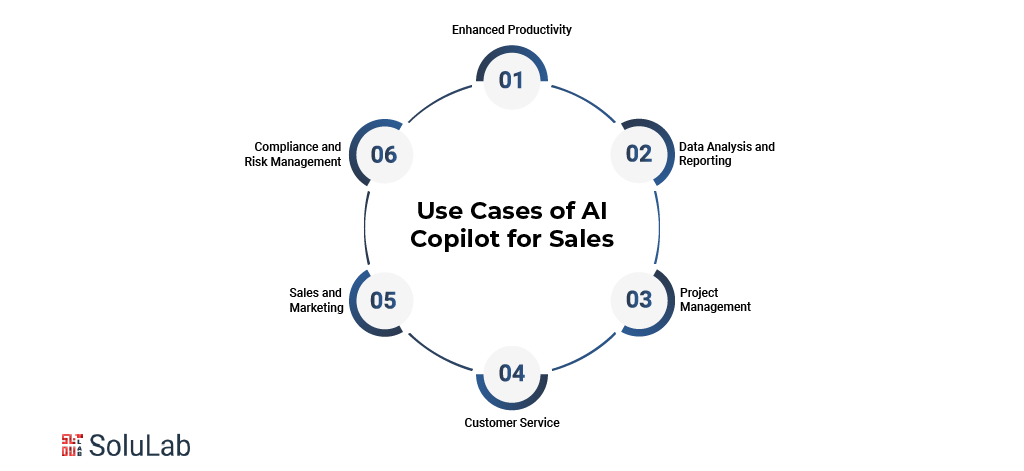
AI Copilot shows up across plenty of industries and departments. Here’s a handful of ways it gets used:
1. Enhanced Productivity
Drafting emails, summarizing long documents, chewing through the tedious repetitive stuff, Copilot handles it. The payoff is simple: more gets done in less time.
2. Data Analysis and Reporting
Large datasets get turned around fast, into visualizations that actually make sense and insights that speed up decision-making.
3. Project Management `
Project management gets easier too. Copilot keeps updates current, manages the schedule, and suggests what to do next based on the progress it’s actually tracking.
4. Customer Service
Customer queries are another place it earns its keep. Need to respond to Gen AI in customer service faster? Copilot suggests accurate responses and pulls the right info from your knowledge base in seconds.
5. Sales and Marketing `
Think of it as a marketing strategist that never sleeps. It reads customer data for trends, helps write personalized messages, and hands sales teams the insight they need to sharpen engagement. That extends to channels like sms marketing too, where timely, personal messages keep the conversation with customers going in real time.
6. Compliance and Risk Management
Compliance keeping you up at night? Copilot flags potential issues, whether that’s an internal policy conflict or an external regulation, and suggests practical ways to reduce credit risk models with machine learning before it turns into a real problem.
Real-World Examples of AI Copilot for Sales Managers
A few concrete examples of how sales managers, businesses, and solopreneurs are actually using Microsoft Copilot:
1. Forecasting sales: Excel’s Copilot reads your sales data for future trends and can cut forecasting time by up to 50%. A prompt as simple as “Generate a sales forecast for the next quarter” gets a sales manager to an accurate projection fast.
2. Relationship management with customers (CRM): Copilot plugs into CRM platforms like Salesmate, Salesforce, or HubSpot to automate data entry and keep client info current. A prompt like “Update CRM records with the latest interaction details” saves 30 to 40 percent of the time normally spent on CRM upkeep, no manual re-entry required.
Read Also: Generative AI CRM Systems
3. Campaigns using Email: In HubSpot or Mailchimp, Copilot helps put together customized email campaigns. A prompt like “Create an email campaign for our new product launch” can save up to 4 hours per campaign, letting marketing teams move faster without sacrificing personalization.
To keep that deliverability high, tools like DNS MX Record Lookup verify recipient mail servers before an email even goes out. Paired with SPF validation and blacklist monitoring, these checks stop your AI Copilot from wasting effort on addresses that were never going to receive the email, which keeps campaigns efficient and your sender reputation intact.
4. Creation of Leads: Paired with tools like ZoomInfo and LinkedIn Sales Navigator, Copilot finds and qualifies leads on a prompt like “Generate a list of potential leads from our website visitors,” cutting lead-creation time in half. For sales managers, that’s a steady, automatic pipeline of qualified prospects instead of a manual grind.
5. Presentations for Sales: Copilot in PowerPoint makes it easier to create engaging presentations using AI. A prompt like “Design a presentation for our quarterly sales meeting” can cut presentation time by up to 60%, with templates and suggested content doing most of the heavy lifting.
6. Evaluation of Competition: Pair Copilot with research tools like SimilarWeb or Crayon, and competitive analysis gets 40% faster with a prompt like “Conduct a competitive analysis for product XYZ.” Market analysts get a clearer read on what rivals are actually doing, and can plan accordingly.
7. Writing Proposals and Contracts: In DocuSign or PandaDoc, Copilot speeds up drafting proposals and contracts, saving 3 to 4 hours per document with a prompt like “Create a sales proposal for client ABC.” That means sales executives can put out bids that are both faster and more consistent.
8. Development of Sales Training Materials: In PowerPoint or training software like Lessonly, Copilot cuts material development time in half with a prompt like “Develop a training module on negotiation skills,” letting trainers put together thorough, well-organized programs faster.
9. Developing a Sales Strategy: On platforms like Asana or Monday.com, Copilot cuts strategy formulation time by 40% with a prompt like “Outline a sales strategy for the upcoming fiscal year,” helping sales directors cover every angle without missing something important.
10. Monitoring Performance: Using Tableau or Salesforce, Copilot can track sales team performance and save around 5 hours on analysis with a prompt like “Generate a report on the monthly performance of the sales team.” Automated data collection means managers get clear insight without pulling the report themselves.
11. Research on the Market: In tools like Mintel or IBISWorld, Copilot speeds up market research by roughly 50% with a prompt like “Research the latest trends in our target market,” giving researchers the kind of comprehensive market insight that actually informs strategy.
What are the Risks Associated With AI Copilot for Sales?
It’s not all upside, though. A few risks worth weighing before you roll this out:
- Data Privacy and Security: Copilot handles sensitive data, which means breaches, unauthorized access, or misuse are always a real possibility. Organizations need Security Token Offerings and genuinely strong security protocols to keep that information safe.
- Inaccurate Outputs: It gets things wrong sometimes. Flawed or misread input data can produce output that’s misleading or flat-out inaccurate, and that can lead to bad decisions downstream.
- Over-Reliance on AI: Lean on it too heavily and employees’ own critical thinking can start to atrophy. A human still needs to be checking the AI’s recommendations, not just rubber-stamping them.
- Compliance Risks: Tools like Copilot can put an organization at odds with local laws or industry regulations without anyone intending it, particularly around data storage and handling. Staying on top of compliance isn’t optional.
- Bias in Decision-Making: Copilot can reflect whatever biases exist in its training data. If that data is skewed or incomplete, the decisions it informs can end up skewed too.
Challenges of AI Copilot for Sales and Marketing
There’s a real set of challenges too, everything from data integration to figuring out how humans and AI actually work together well.
1. Data Security Risks and Precautions
Let’s start with the big one: data security. Copilot’s capabilities come from being trained on huge amounts of text and code, and that’s great for functionality but it opens up real security questions. Any tool processing that much information means you need to be careful, deliberately, about what goes in and what comes out.
The hard part is staying ahead of where the weak spots actually are. Nobody wants company secrets, employee data, or private messages ending up somewhere they shouldn’t. And a slip-up isn’t just embarrassing, it can cost real money, damage your reputation, and in some cases land you in legal trouble.
2. Content Management and Data Governance
Content sharing and data governance is the other thing keeping IT managers up at night. Without a solid handle on your data, things get messy fast, sensitive information ends up where it shouldn’t, and staying compliant turns into guesswork. The right CMS features helps here, streamlining content management, enforcing access controls, and keeping governance on track so sensitive data actually stays protected.
3. Ethical Usage of Copilot
The legal side deserves a real look too. As adaptive AI gets better at generating content, companies need to actually understand copyright law and what’s fair game with AI-generated material. Skip the homework here and you could end up in court over it.
Keep an eye on how the rules are shifting, because they are, constantly. New laws and court rulings show up regularly, and any one of them could change what’s allowed overnight.
4. Access Control and Cost Management
At $30 per user per month for Copilot in Microsoft 365, access and cost management aren’t optional extras. It’s a genuinely powerful productivity tool, but you still need to know who’s using it and how.
Set up real ground rules: strong authentication, clear role-based permissions, and regular checks on who’s accessing what. Think of it like running the door at a private club, you want to know exactly who’s coming and going.
5. Infrastructure Requirements for Proper Copilot Functioning
Before rolling Copilot out, there’s some infrastructure homework: the right Microsoft subscription (Business/Business Premium or E3/E5), OneDrive access, an Entra ID, and compatibility with the new Outlook client. Skip the foundation and the rest doesn’t hold up.
6. Employee Training for Copilot Integration in Microsoft 365
Getting real value out of Copilot means your team actually knows how to use it. It’s a bit like a new phone, you can muddle through the basics on your own, but training is what surfaces the features you’d otherwise never find.
Hands-on practice with real examples beats a slide deck every time. And make sure there’s somewhere to turn when questions come up, because they will.
7. Developing Skills for Extending the Line of Business and External Data Connectivity
Here’s where it gets more involved. Getting Copilot to actually work with your business apps and external data takes real technical skill, this is custom development territory, not a plug-and-play setup.
Your developers need to be comfortable across several languages and tools for this. It’s part engineering, part craft, combining APIs, security protocols, and data structures into something that actually fits how your organization works.
8. Troubleshooting Errors to Support Copilot Users
Nobody wants to get stuck with no way out. Set up help channels, train IT, and put together guides people can actually follow. It’s a safety net, you hope nobody needs it, but it needs to be there.
FAQs and video tutorials that are actually easy to follow let users solve their own problems half the time. Sometimes all someone needs is a map back to where they were.

Conclusion
Between automating tasks, personalizing customer contact, and surfacing data-driven insight, AI Sales Copilots are genuinely changing how selling works. The result is marketing strategy that’s both more accurate and more efficient.
Sales teams end up better equipped to hit high engagement and service standards. At this point, AI Sales Copilots aren’t a nice-to-have, they’re becoming a core part of how the whole sales ecosystem runs.
SoluLab helped Digital Quest improve customer engagement with an AI-powered chatbot built specifically for travel recommendations. Powered by Generative AI, the chatbot delivers personalized suggestions and reservations while collecting user feedback to keep improving. Multi-language support and 24/7 availability mean it can serve a genuinely global audience. SoluLab, an AI Copilot development company, can help transform your business with the right expert solutions, contact us today!
FAQs
Shipra Garg is a tech-focused content strategist and copywriter specializing in Web3, blockchain, and artificial intelligence. She has worked with startups and enterprise teams to craft high-conversion content that bridges deep tech with business impact. Her work translates complex innovations into clear, credible, and engaging narratives that drive growth and build trust in emerging tech markets.

![10+ AI Copilot Use Cases to Drive Business Growth [2026]](https://www.solulab.com/wp-content/uploads/2025/01/AI-Copilot-Use-Cases-300x149.png)