AI agents now show up in 3876 business references. That number tells you something. So why the attention? Because an agent can chew through far more data than any analyst, and that changes what analytics looks like day to day. Work that people used to grind through by hand gets picked up by software, and it comes back quicker, more accurate, and open to people who never learned SQL.
Point an agent at your data and it can surface trends, make forecasts, and flag problems before they grow teeth. And it does this across the whole business, not one team’s spreadsheet. Globally, the market for AI agents is expected to grow 43.88% a year, reaching USD 139.12 billion by 2033.
Speed is the obvious win. The quieter one is that your experts stop babysitting reports and get back to the thinking only they can do. AI assistants help companies keep pace with rivals by making fast calls on good information. Below, we cover how these agents work, where they fit, what they do well, and where they trip up.
What is an AI Agent for Data Analysis?
Picture a digital assistant whose whole job is your data. That’s roughly what an AI agent for data analysis is. Machine learning and related techniques let it handle huge volumes of information and work out what that information actually means. What you get at the end is the handful of insights worth acting on. Raw data goes in; a plain explanation comes out. The work it replaces used to eat hours, sometimes days, of someone’s week.
A good one is as careful as a researcher and as strategic as a seasoned analyst. They run under AI-powered chatbots, which is why they spot patterns, trends, and odd outliers that a tired human eye skips right past. Fast and correct is a rare combination. For business decisions, it’s the one you want.
Banks use them. So do hospitals and online stores. In each case the agent watches live data and speaks up when the timing matters. The daily payoff is simple: more work gets done, choices get better, and you hold your ground in a hard market.
How do AI Agents for Data Analysis Work?
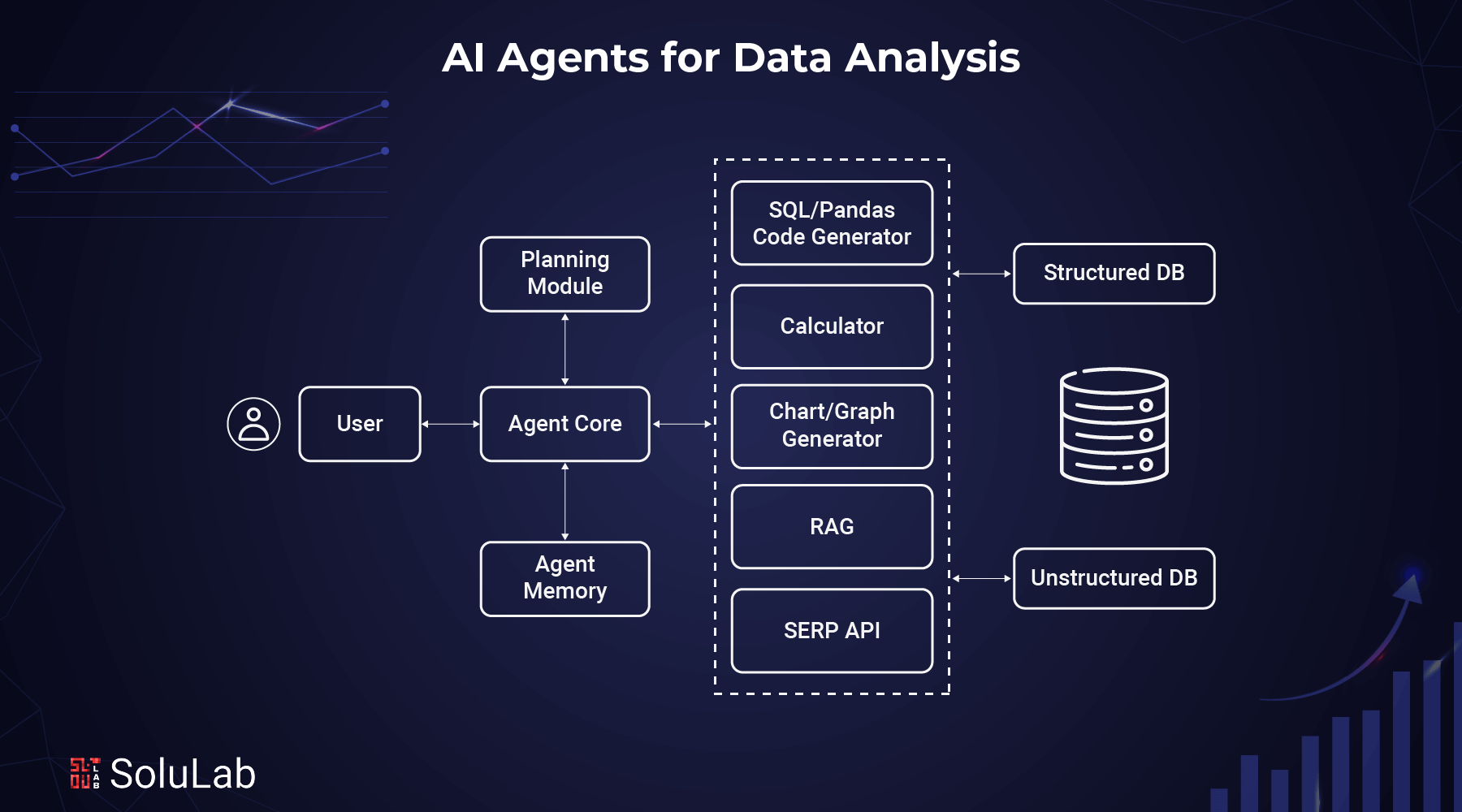
Under the hood, a data analysis agent is a set of parts that handle large amounts of information without breaking a sweat. Each part has one job: take data in, make sense of it, or hand back an answer. Here’s how the pieces fit, one at a time:
1. Agent Core
Think of the core as the brain. It’s the command center that runs the analysis and keeps it organized:
- Setting Goals: You give it a clear goal, something like “Keep an eye on last year’s sales trends” or “Find out why customers are leaving.”
- Coordination of Tools: It calls on several tools to finish the job, from SQL queries to charting software. The strategic part is timing: knowing when to fetch data, when to crunch numbers, and when to plan the next move.
- Memory usage: draws on earlier analyses so it isn’t starting from zero each time.
- Adopting the Role: Behaves like a skilled data analyst, with precise language and sound methods.
2. Planning Module
This is where a big, messy project gets cut into tasks the agent can actually finish:
Putting it in pieces: Say you want to know whether a marketing campaign worked. The agent might split that into:
Pulling business data from before and after the campaign
- Tracking how customer growth shifted
- Checking what happened to revenue
- Reviewing social media engagement numbers
Changing strategies: The plan bends as the work goes. If seasonal swings in sales turn out to matter, the agent adjusts so that detail doesn’t slip through.
3. Agent Memory (RAG)
For Retrieval-Augmented Generation (RAG), memory is what separates a useful agent from a forgetful one. Because it remembers, its analysis carries context from one step to the next. Three levels of memory do the work:
- Short-term memory: Holds the recent data points and calculations it’s working with right now.
- Long-term memory: Keeps the durable stuff: data structures, go-to methods, and lessons from past projects.
Then there’s hybrid memory. It blends what the agent is doing now with what it learned before, so each finding lands with context attached.
4. Tools for Data Analysis
To do the actual research, AI agents reach for a small toolkit:
- SQL/Pandas generator: writes the queries that pull the right data out of your databases.
- Calculator: Handles the heavier statistics, from simple averages up to regression models.
- Makers of charts and graphs: Turns raw numbers into visuals such as scatter plots and trend lines.
- RAG system: Fetches relevant references, like past reports or internal benchmarks.
- SERP API: Brings in outside information for context and comparison.
5. Databases
Last piece. The agent pulls what it needs from two kinds of databases:
- Structured databases: Tidy, organized data such as sales figures or customer profiles.
- Unstructured databases: The messier material: social posts, customer feedback, call logs.
Types of AI Agents for Data Analysis Tasks
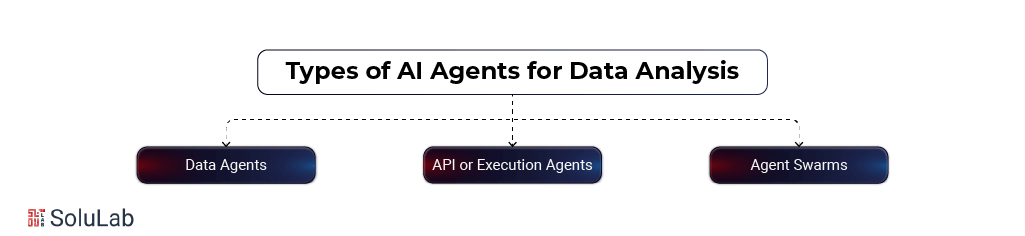
AI agents have changed how much of data work gets automated. Most of them fall into three groups: data agents, API (or execution) agents, and agent swarms. Here’s what makes each one tick.
1. Data Agents
Data agents are the specialists in finding, analyzing, and managing data. Scattered unstructured text or neatly filed records, it doesn’t matter much to them. Automate those steps and you get to the insight faster, with hours handed back to you.
Their main job? Getting useful information out. Suppose a financial analyst asks, “Which quarters got cash flow this year?” A data agent digs through the records, reasons its way to an answer, and shows how it got there.
What they excel at:
- Pulling data from lots of sources (databases, APIs, and so on).
- Working through tricky, logic-heavy questions.
- Combing huge datasets for trends.
- Taking over the repetitive data housekeeping.
2. API or Execution Agents
These are the doers. Looking at information isn’t enough for them; they act on it. Hooked up to APIs, they fetch data, finish jobs, and run whole workflows.
Everything from a single API call to a long, multi-step workflow sits with them. A financial analyst, for example, could have an API agent build the complicated Excel formulas that organize stock prices, with no manual work at all.
Their standout skills:
- Making API calls that get real work done.
- Cutting the drudgery out of repetitive tasks.
- Juggling several API interactions to carry out a plan.
3. Agent Swarms
Now it gets interesting. A swarm is a team of agents tackling a problem too big and hairy for any one of them. The idea borrows from swarms in nature, and it pairs data agents with API agents so they solve the thing together.
Take a marketing manager planning a campaign. A swarm could:
- Gather sales data.
- Analyze customer demographics.
- Research market trends.
- Store insights in one central database.
- Perform sentiment analysis on social media.
- Segment customers into groups.
- Develop personalized marketing strategies.
- Generate campaign content.
- Execute the campaign.
- Track performance metrics.
- Create visual reports.
- Present findings to stakeholders.
Every agent sticks to its specialty. No single boss, and the whole thing runs remarkably efficiently.
Key benefits of swarms:
- Splitting complex workflows across a team.
- Mixing and matching agent skills to fit the goal.
- Chopping massive tasks into pieces that can be handled.
The trend has moved away from one super-smart AI and toward smaller, focused agents. Why? They’re easier to customize, quicker to ship, and better at their one task. Group them into a swarm and you get something that scales, flexes, and performs.
So the way data analysis gets done is shifting. Solo or in a team, these agents make hard problems easier to handle, with precision and speed.
Applications and Use Cases of AI Agents for Data Analysis Across Industries
Big datasets, analyzed fast. That’s the common thread. You’ll often see agents used to catch problems in AI use cases machinery before they happen, or to keep quality control tight on a production line.
They might act as data agents or as API execution agents, and they bend to fit a surprising range of analysis work.
Here’s how different industries put them to use, with plain examples.
1. Manufacturing
Agents read machine data to predict when equipment is likely to fail, which gives you a window to fix it before it causes trouble. Picture a car plant where an AI watches the machines. One starts overheating. The AI flags it and recommends maintenance before anything breaks, so the line keeps running without a delay. Agents also inspect products on the assembly line so only good units reach customers. For example:
A smartphone factory has AI scan screens for scratches. Thousands get checked every day. Flawed ones never ship, the brand’s reputation holds, and buyers stay happy.
Read Also: AI Agents for Manufacturing
2. Legal
An agent can read a legal document in seconds and hand lawyers the parts that matter. At a law firm, it might go through contracts and pull out key terms like dates and names. That’s hours back for the lawyers, who can then take on more cases. Agents also study past cases to help predict how current ones may turn out. For example,
a firm runs AI across similar earlier cases. Lawyers use what it finds to shape a stronger strategy and improve their odds of winning.
3. Retail
Agents study how people shop and suggest things they’ll probably like. An online clothing store tracks purchases with AI. Someone buys jeans, and the AI suggests tops to go with them. Shopping gets nicer; sales go up. Agents also forecast which products will be hot, so stores stock sensibly. For example:
A grocery shop uses AI to predict demand for holiday items like candy canes. It orders about the right amount, avoids both empty shelves and waste, and keeps profits steady.
4. E-commerce
Recommendations come from what a customer has already bought. Buy one mystery novel on a book site and you’ll be shown more. Small personal touch, more sales. Agents can also catch suspicious activity, such as unauthorized transactions, and help stop fraud. For example:
A payment app uses AI to spot unusual behavior, say a large purchase made abroad. Catching that early stops fraud and saves everyone money.
5. Healthcare
Agents work through medical data so doctors can diagnose faster and more accurately. In a hospital, AI might scan check-up results for early signs of diabetes. Treatment starts sooner, and patients do better for it. Agents also follow data from wearables to keep patients safe. For example:
A smartwatch linked to AI monitors heartbeats. The moment an unusual spike shows up, doctors hear about it. No lost time.
Related: AI Agents In Healthcare
6. Finance and Banking
In finance, agents watch trends for risk and suggest what to do about it. An investment bank might have AI monitor the stock market; when a risky pattern appears, analysts get an alert and can adjust before losses pile up. Agents also read financial history to judge whether someone is creditworthy. For example:
A digital bank uses AI to decide if an applicant qualifies for a loan. It looks at income and spending habits, assigns a fair credit score, and approval moves faster.
7. Hospitality and Tourism
Reviews are a gold mine if you actually read them all. Agents do. A hotel chain runs its online reviews through AI, and if guests keep grumbling about slow check-ins, management hears about it and fixes the process. For example:
A beach resort uses AI to forecast busy stretches like summer. It adjusts room prices, brings on extra staff, and guests get a smooth stay.
8. Logistics and Supply Chain
AI reads traffic patterns and sends delivery trucks down the fastest roads, which saves time and fuel. Imagine a delivery service that takes route suggestions from AI based on live traffic. Deliveries get quicker. Fuel bills shrink. The whole operation runs faster and cheaper.
Then there’s inventory. AI looks at past sales to predict how much stock a store should carry, so customers don’t find bare shelves.
Think of an electronics retailer gearing up for the holiday rush. With AI, it can forecast how many gadgets to order: enough for every customer, not so many that cash sits in a warehouse.
How Do Multi-agents Help in Qualitative Data Analysis?
Think of a multi-agent setup as a team of specialized AI models that together analyze and interpret non-numerical data: text, audio, video. Compared with doing it by hand, it’s a big jump in efficiency, scale, and precision on messy datasets. Here’s how these agents make qualitative analysis smarter and faster, method by method:
- Thematic Analysis: This is about finding patterns or themes in text. It used to mean manual coding, which was slow and easy to get wrong. Agents make it quicker and more accurate.
- Analyzer Agent: Summarizes the text, keeps the key points, drops the noise.
- Coder Agent: Spots repeated patterns or phrases in the summaries, then groups those codes into broad themes, with each agent owning certain aspects.
The teamwork speeds things up and takes the grunt work off researchers, who can then spend their time interpreting the results in generative AI chatbots.
Narrative Analysis: Here the focus is personal stories and how people make sense of what happened to them. It used to take careful reading and manual coding, which was slow and, honestly, pretty subjective. Agents simplify it:
- Summarizer Agent: Pulls out the main plot points and key elements of the story.
- Coder Agent: Creates first-pass codes from the summary, naming key themes or emotions.
- Sub-Categorization Agents: Split those codes into finer subcategories so the structure is clearer.
Faster, yes. But the bigger gain is that AI catches patterns a manual read would miss.
Content Analysis: This one looks at text for themes, patterns, or trends, and it has always meant heavy manual coding. Multi-agent systems make it easier and more consistent:
- Summarization Agent: Boils the text down to its essence.
- Coding Agent: Tags keywords, phrases, or concepts.
- Pattern Extraction Agent: Surfaces trends or recurring themes in the coded data.
Researchers can then work through very large datasets quickly without giving up accuracy.
Discourse Analysis: How does language shape meaning and social interaction? That’s the question here. It takes a fine-grained read of context and communication, and agents handle it well:
- Pattern Identification Agent: Picks out key statements and rhetorical devices.
- Language Analysis Agent: Studies syntax and communication patterns for deeper meaning.
- Contextual Interpretation Agent: Weighs socio-cultural and situational factors to give the wider picture.
With the tedious parts automated, you can study discourse across many contexts in real depth.
Grounded Theory: Grounded theory lets theories grow straight out of the data instead of from assumptions you walked in with. Agents help through:
- Code Generation Agent: Finds the first concepts or events in the data.
- Categorization Agent: Sorts them into broader themes or clusters.
- Pattern and Theme Agents: Point out trends or relationships in the data.
- Core Concept Agent: Pins down the central idea a theoretical framework can be built around.
The result: fresh insights, sturdier theories, and raw data that finally tells a story.
How Do Build LLM-Based AI Agents For Data Analysis?
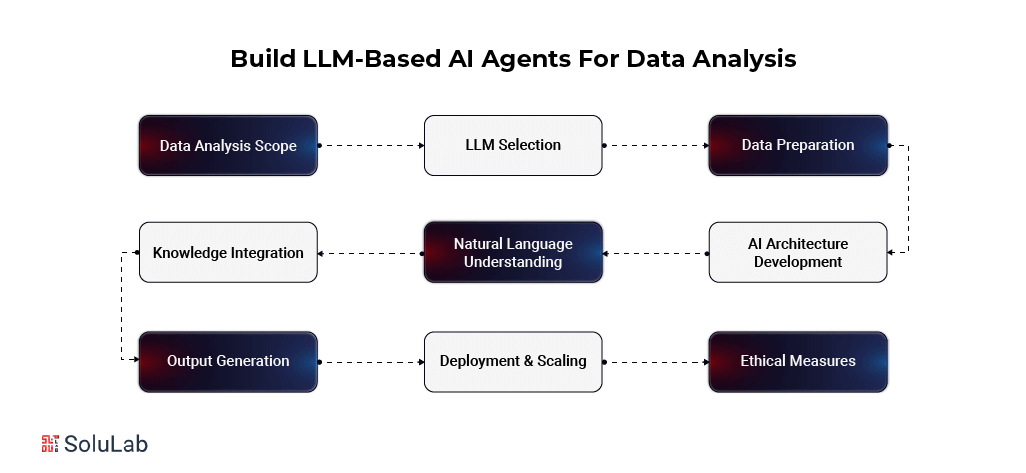
LLMs are changing how whole industries approach data analysis. With AI agents by building private LLMs, a business can modernize its data processing, find trends hiding in plain sight, and get to usable insight much faster. Below is the build process for your own LLM-powered data analysis agent, step by step.
1. Define the Data Analysis Scope and Objectives
Start with clarity: Pin down the domain and the kind of data you care about, whether that’s healthcare, finance, or customer behavior. Then name the specific problems the AI is supposed to solve. Vague scope is where most of these projects stall.
Focus on tasks: Choose the core jobs the agent will own, such as:
- Data cleaning: Fixing errors in the datasets.
- Pattern recognition: Spotting trends in the data.
- Predictive analysis: Using past data to forecast what comes next.
- Anomaly detection: Catching outliers and irregularities.
- Reporting: Summarizing insights and turning them into visuals.
2. Select an Appropriate LLM
Find the best fit: Pick a base LLM that matches your analysis needs. Common picks include:
- OpenAI’s GPT Family: Strong at summarizing data and writing reports.
- Google’s PaLM 2: A good match for multilingual work and complex analysis.
- Meta’s LLaMA: Flexible across tasks, with solid text processing.
- BLOOM: A strong option for open-access, multilingual analysis.
- Hugging Face Transformers: Lots of pre-trained models to experiment with.
What to weigh:
- Model size: Bigger models often do better, but they cost more to run.
- Performance: Test each candidate on tasks that look like yours.
- Licensing: Make sure the license fits your budget and requirements.
3. Data Collection and Preparation
Garbage in, garbage out. Good sources include:
- Public datasets such as Kaggle or government data portals.
- Industry reports from market research firms or publications.
- Your own internal data.
Then get it ready:
- Clean: Fix errors, strip out what’s irrelevant, and deal with gaps.
- Format: Keep it structured and consistent (CSV, JSON, and so on).
4. Train the LLM for Data Analysis
- Adaptation: Train the LLM on data from your own industry or domain.
- Prompt engineering: Try different ways of asking and steering, and keep what gives the most accurate answers.
5. Develop the AI Agent Architecture
Keep it modular. Typical pieces:
- Input processing: Takes in user questions.
- LLM interaction: Talks to the model to get the analysis.
- Output generation: Shows results in a clear form.
- Memory: Remembers earlier exchanges so the conversation holds together.
6. Implement Natural Language Understanding (NLU)
Teach the agent to:
- Understand what users are asking.
- Recognize intent (predict a trend? summarize data?).
- Pull out key details like dates and numbers.
7. Create Knowledge Integration Systems
Hook the agent up to outside data sources to widen what it knows. Fact-check what comes in so the information stays reliable, and build in a way for it to keep learning.
8. Develop Reasoning and Analysis Capabilities
- Add algorithms for statistics, pattern recognition, and prediction.
- Give it logical reasoning so its conclusions actually follow from the data.
9. Design Output Generation and Summarization
A great finding nobody understands is worthless. So:
- Natural language generation (NLG): Write summaries a human can read without a decoder ring.
- Visualization: Build charts and graphs that make insights easy to see.
10. Implement Ethical and Bias Mitigation Measures
- Find and reduce bias in the data and the outputs.
- Make the AI’s decisions transparent.
- Stick to ethical guidelines and data protection law.
11. Create User Interface and Interaction Design
Build an interface people will actually use, one that:
- Makes talking to the agent easy.
- Lets users refine a question to sharpen the answer.
- Invites real back-and-forth between users and the AI.
12. Testing and Validation
- Test it hard, across every task.
- Check its outputs against human analysis.
- Keep watching performance.
13. Deployment and Scaling
Stand up the infrastructure, put security first, and plan for scale before demand shows up, not after.
14. Continuous Improvement and Updating
- Run feedback loops so it keeps getting better.
- Keep the knowledge base fed with fresh data.
- Put changes under version control.
15. Documentation and Training
Write detailed guides and run training so users know what the AI can do, and just as important, what it can’t. Frameworks worth a look:
- Autoren: Microsoft’s tool for building conversational AI agents.
- Crewai: A no-code platform for building and shipping AI systems.
What is the Difference Between AI Assistants, Copilots, and Agents For Data Analysis?
People toss these three terms around as if they mean the same thing. They don’t. Assistants, copilots, and agents sit at different levels of autonomy and capability, and if you’re picking technology for data analysis, the difference matters. Below, we compare AI agent use cases along those lines: autonomy, functionality, capabilities, and business value.
1. AI Assistants: Assistants, copilots, and agents each do a different job and hit the business differently. Start with assistants. People use them to build skills, learn, and handle simple jobs. They follow instructions and have little freedom of their own. Where they shine: documentation, smart search, SQL translation, debugging, and automating the same task for the hundredth time. They suit companies that want data-savvy staff to get more done while a human still makes the decisions.
2. AI copilots: They analyze and suggest, helping you decide. They converse with users, share information, and act with moderate freedom. Typical work includes analyzing data, recommending visualizations, and proposing the next best action from the numbers. They learn a fair amount from data and user feedback. AI copilots plug into business systems, which makes them a strong fit for decision support and teamwork.
3. AI agents: This is the top rung. Agents decide and learn on their own. With predictive analytics and optimization, they go through huge datasets, work out what it means, and act on it. They adapt, and they learn to run hard, multi-step jobs with no one looking over their shoulder. Wire them into many systems and they can take on company-wide work and drive data projects. The upshot is proactive, self-directed decisions, supply chain optimization being a classic case, that go straight to the bottom line. Education is a good parallel: tools like online math lessons use adaptive AI agents to personalize learning paths from each student’s data.
Benefits of Using AI Agents for Data Analysis
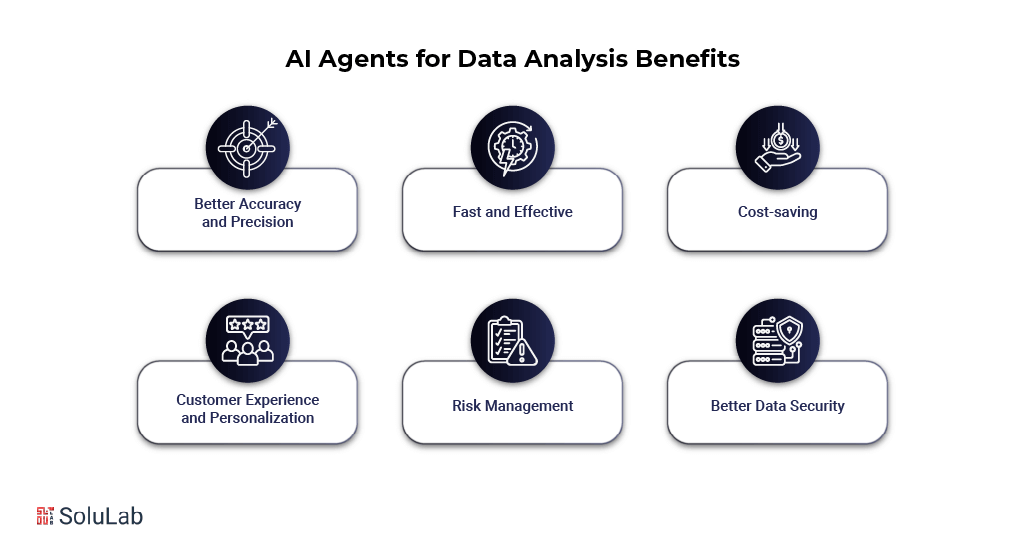
Agents make data analysis both faster and better. Here’s what they can change in your data processes for top AI development companies:
1. Better Accuracy and Precision: Agents handle massive datasets with precision. Fewer processing errors means results you can trust, and decisions built on them are sounder.
2. Fast and Effective: AI gets through big datasets far faster than people can. In finance, healthcare, and retail, where real-time data drives quick calls, that speed counts.
3. Cost-saving: Analysis gets cheaper. Automate the repetitive work and labor costs fall, while people and budget go where they’re needed. There’s a quality angle too: agents that analyze data and predict trends give leadership better footing for strategic decisions.
4. Customer Experience and Personalization: Happier customers, basically. When you understand preferences and habits, you can shape products and services around them. Agents personalize marketing and offers from real behavior, and engagement and loyalty rise with it.
5. Risk Management: Agents find risks, including sector-wide ones, and help reduce them. They flag anomalies in the data so organizations can act early. Running in real time, they catch fraud and save money. They also size up operational risks and help keep the business running.
6. Better Data Security: Agents help protect data for privacy and compliance. They notice unusual patterns that could point to data problems or a breach. They keep handling in line with industry standards. Fewer penalties, too.
Challenges and Considerations for Implementing AI Agents for Data Analysis
- Management of Data Quality: Your data has to be in good shape. That means filling gaps, removing outliers, merging related datasets, and correcting sampling bias. The point? Insights you can actually rely on.
- Scalability: Huge data volumes are hard. One fix is a middle Agentic RAG step, which helps pick the best tools and keeps the process efficient as it scales.
- Routing database queries: With several databases, every query has to land in the right one. Topical routers send queries where they belong, so retrieval is faster and everything runs smoother.
- Implementation Planning: Hard jobs need a smart plan. Skip basic linear solvers and use task decomposition modules or plan compilers to split work into smaller parts. Execution gets smoother and faster.
- Choice of Analytics Techniques: Match the AI method to your goals and your data. Right tool, right problem. And stay practical. Whether you lean on in-house AI experts or outside advisers, don’t make it harder than it has to be.
- Explainability and Interpretability: If nobody can follow the AI’s reasoning, nobody will trust it. Explainable AI (XAI) shows which factors drove a decision, which builds trust in the system and its output.
- Data Security: Non-negotiable. Use anomaly detection to catch possible threats, and follow rules such as GDPR and CCPA.
- Making moral choices and being responsible: The AI has to act fairly and responsibly. Keep decisions ethical, guard against misuse, and leave the big calls under human supervision.
Conclusion
Data analytics looks different once agents are in the loop. The process gets faster, more accurate, and cheaper. And the quick, data-backed decisions that follow touch everything from security to customer service.
Expect more of them as the technology matures, and expect interpreting data to keep getting simpler. The companies that stay competitive won’t be the ones that merely adopt agents. They’ll be the ones that use them well.
One example from our own work: SoluLab helped InfuseNet get past three hard problems: AI model integration, intuitive interface design, and data security. We combined multiple AI models, including GPT-4 and GPT-NeoX, into one unified system, which improved InfuseNet’s ability to import and process data securely. The result? Its business users make data-driven decisions and get more done. SoluLab, an AI agent development company, has a team of experts ready to take on yours. Contact us today!
FAQs
Shipra Garg is a tech-focused content strategist and copywriter specializing in Web3, blockchain, and artificial intelligence. She has worked with startups and enterprise teams to craft high-conversion content that bridges deep tech with business impact. Her work translates complex innovations into clear, credible, and engaging narratives that drive growth and build trust in emerging tech markets.