Key Takeaways
- HubSpot AI integration connects generative and predictive AI models to your CRM data, automating lead qualification, follow-ups, content creation, and campaign personalization without manual handoffs.
- HubSpot’s Breeze Agents (Prospecting, Content, and Customer agents) run autonomously inside the CRM, researching accounts, drafting outreach, and resolving support tickets around the clock.
- On the marketing side, McKinsey’s research on AI-driven personalization links strong customer data to a real revenue premium, which is exactly why HubSpot ties its AI features to unified CRM records rather than to a standalone content tool.
- The biggest failure point isn’t the AI itself. It’s messy CRM data and workflows nobody actually mapped out first, which is why an audit always comes before automation.
If you’ve ever watched a sales rep manually score fifty leads at the end of a Friday, you already understand the problem AI integration solves. HubSpot was built as a CRM first, which means it already has years of contact history, deal stages, and engagement data sitting inside it.
It’s arguably the most natural place for AI to reside, because the model has actual context to work with, rather than a blank prompt box.
Gartner found that sales organizations giving reps AI-generated next-best-action guidance are 2.6 times more likely to hit their commercial growth targets and predicts that 95% of sellers’ research workflows will start with AI by 2027, up from under 20% in 2024.
This post breaks down what HubSpot AI integration services actually do, how it works technically, and how to roll them out without breaking the workflows your team already depends on.
Why Are Businesses Integrating AI with HubSpot?
Here’s the honest answer: most teams don’t wake up wanting “Artificial Intelligence.” They’re trying to fix a specific, annoying bottleneck, and AI happens to be the tool that fixes it well. A few of those bottlenecks show up again and again:
- Manual lead qualification. Reps spend hours scoring leads by hand, cross-checking firmographic data, and guessing at intent, when a model trained on your closed-won deals can do it in seconds and get more consistent results.
- Slow sales follow-ups. A lead that doesn’t hear back within five minutes is dramatically less likely to convert, and no sales team can realistically staff for instant, 24/7 replies without automation.
- Poor personalization. Generic templates don’t move the needle anymore. Buyers expect messaging that reflects what they’ve actually looked at, downloaded, or asked about.
- Marketing inefficiencies. Writing, testing, and re-writing campaign copy for every segment eats an enormous amount of a marketing team’s week, time that could go toward strategy instead of production.

How Does HubSpot AI Integration Work?
HubSpot’s AI layer (branded as Breeze) sits on top of the same CRM object model you already use: contacts, companies, deals, and tickets. That matters more than it sounds like it should, because it means the AI powered solution isn’t working from a cold prompt. It’s pulling from the actual deal stage, email engagement, website behavior, and past conversation history when it drafts a follow-up or scores a lead.
- Breeze breaks down into three connected pieces. Breeze Copilot acts as an assistant inside the CRM, drafting emails, summarizing records, and prepping reps for calls. Breeze Agents are the autonomous layer.
- A Prospecting Agent that finds in-market accounts and builds outreach, a Content Agent that turns one asset into emails, social posts, and blog drafts in your brand voice, and a Customer Agent that resolves support tickets on its own.
- Breeze Intelligence handles the unglamorous but critical work of data enrichment, filling in missing contact and company details so the rest of the system has something accurate to work with.
- For businesses that need something more specific than what’s built in, HubSpot AI solutions also support custom integrations through its API and app marketplace, which is where a lot of the real customization happens (custom lead-scoring models, connections to internal tools, industry-specific workflows that HubSpot’s out-of-the-box agents weren’t designed for).
How does HubSpot AI improve sales and Marketing Automation?
Marketing automation existed long before AI development services. What’s changed is how fast and how personalized that automation can now be, without a marketer manually building ten versions of the same asset.
- On the content side, Breeze’s Content Agent can take a single blog post or webinar recording and generate email copy, social captions, and ad variations that stay on-brand, cutting the production cycle from days to hours.
- On the targeting side, AI models built into HubSpot’s marketing hub can segment audiences based on real-time behavior instead of static lists that go stale within weeks.
- The personalization piece is where the real revenue impact shows up. McKinsey’s research on personalization has consistently found that companies that get this right generate more revenue than the average player in their category meaningfully, and the reason is straightforward: personalization only works when it’s built on accurate, unified customer data.
- That’s exactly what a CRM-native AI layer like Breeze is positioned to do that a standalone content tool isn’t, because it’s reading from the same record the sales team is working from.
- None of this replaces a marketing strategist. It removes the repetitive production work sitting between the strategy and the campaign actually going live.
How to Integrate AI with HubSpot: Step-by-Step Process
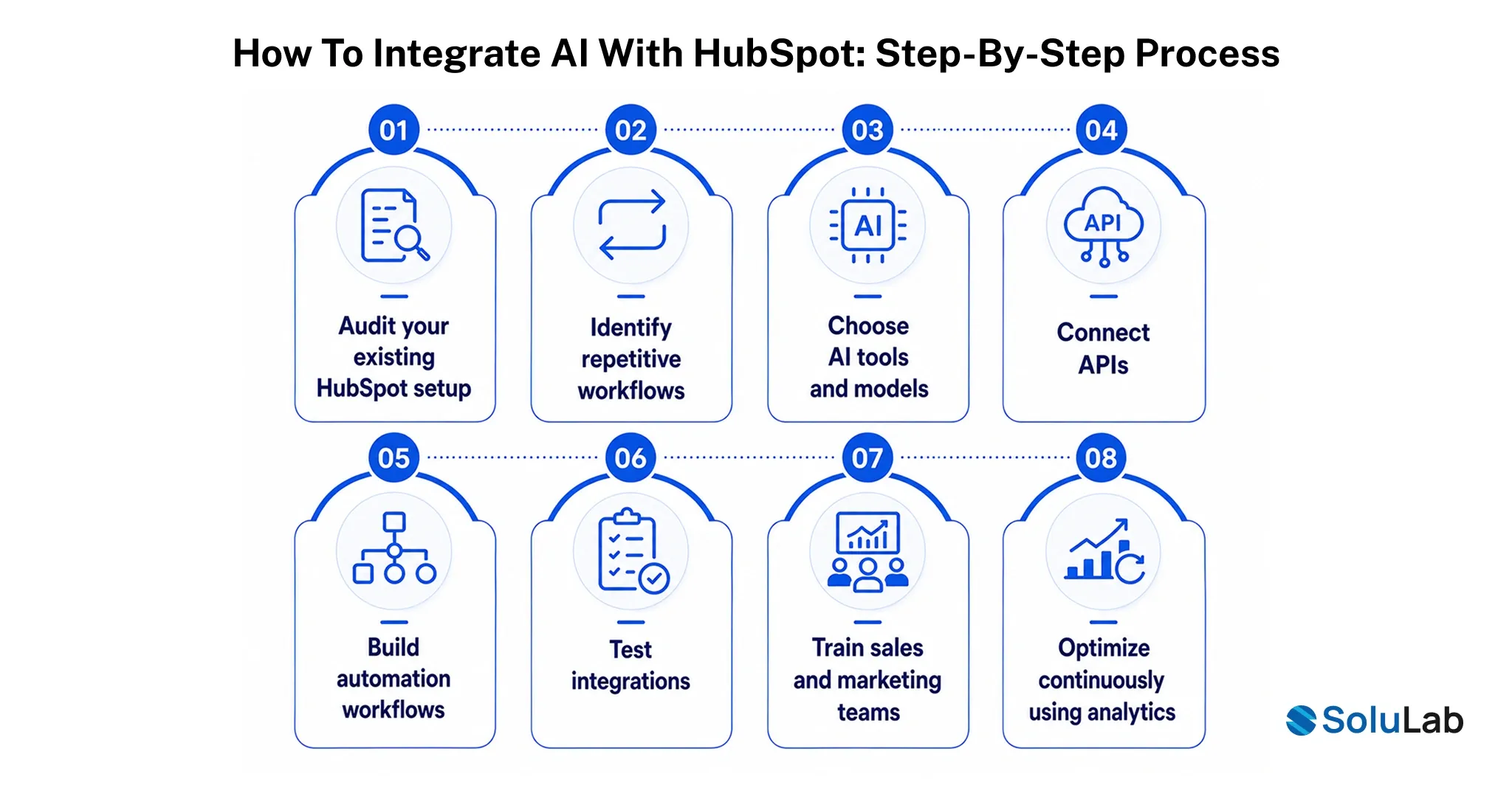
A lot of AI integrations fail for a boring reason: nobody mapped the actual workflow before turning the AI on. Here’s how AI integration with HubSpot tends to hold up in practice.
1. Audit your existing HubSpot setup
Look at how contacts, deals, and workflows are actually structured today, not how they’re supposed to be structured. Data quality issues surface here, and they need fixing before AI touches anything.
2. Identify repetitive workflows
Lead scoring, follow-up sequences, and reporting are usually the highest-leverage places to start, since they’re high-volume and rules-based enough for AI to handle reliably.
3. Choose AI tools and models
Decide what HubSpot’s native Breeze tools already cover well, and where you need a custom model or a third-party integration for something more specialized.
4. Connect APIs
This is where HubSpot’s CRM data actually links up with whatever AI models or external tools you’re bringing in, whether that’s a custom scoring model or a data enrichment service.
5. Build automation workflows
Translate the repetitive tasks you identified into actual HubSpot workflows, with the AI-powered automation component doing the heavy lifting at the specific step it’s suited for.
6. Test integrations
Run the automation against real (or realistic sample) data before it touches live leads, and check for edge cases the model handles badly.
7. Train sales and marketing teams
An AI tool nobody trusts or understands doesn’t get used, no matter how good it is. Show reps and marketers exactly how it fits into their day, not just what it does in theory.
8. Optimize continuously using analytics
Treat the first version as a starting point. Review performance monthly and adjust scoring models, prompts, and workflows as new data comes in.
Businesses that need help mapping this out, or building anything beyond what HubSpot ships natively, often bring in a partner for AI integration consulting rather than trying to reverse-engineer it from documentation alone.
Real-World Use Cases Across Industries
The shape of “AI in HubSpot” looks pretty different depending on what industry you’re in. A few patterns worth knowing:
- SaaS: Automated onboarding sequences that adjust based on how a new user actually behaves in-app, plus lead qualification that scores trial signups against your historical conversion data instead of a generic template.
- Healthcare: Appointment automation that handles scheduling and reminders without staff manually calling every patient, and patient engagement workflows that follow up on care plans and check-ins.
(Any patient data involved here needs to be handled within HIPAA-compliant boundaries, which is worth confirming with your AI in healthcare partner before anything goes live.)
- Real estate: Property recommendation engines that match buyer criteria against active listings automatically, paired with lead nurturing sequences that keep long sales cycles warm without a human checking in every week. This is a common use case in AI in real estate deployments.
- E-commerce: Product recommendations personalized to browsing and purchase history, and cart recovery sequences triggered the moment someone abandons checkout, both areas where AI agents in retail and e-commerce tend to show fast ROI.
- Finance: Customer onboarding that reduces manual document review, plus compliance reminder workflows that keep client accounts current without a compliance team tracking every deadline by hand, both relevant if your business touches fintech software.
Common Challenges and How to Overcome Them
None of this is plug-and-play, and it’s worth saying that plainly. The most common failure point is messy CRM data. AI led development is only as good as what it’s trained and triggered on, and duplicate contacts or incomplete deal records will produce bad recommendations no matter how good the underlying model is. Fixing this means doing the unglamorous data cleanup work before automation, not after.
The second common problem is adoption, not capability. Teams roll out an AI tool, announce it once, and then wonder why usage drops off within a month. That usually comes down to training that wasn’t role-specific enough, and incentive structures that still reward the old manual activity instead of the outcomes AI is supposed to free people up to chase. The third is scope creep: trying to automate everything on day one instead of starting with the two or three workflows that actually move revenue, then expanding from there.
How SoluLab Helps Businesses Build Custom HubSpot AI Integrations?
Off-the-shelf Breeze features cover a lot of ground, but they don’t cover everything, especially for businesses with workflows that don’t fit HubSpot’s default templates or that need AI connected to internal systems HubSpot doesn’t natively support.
SoluLab works with businesses on the pieces that usually require custom engineering rather than a settings toggle:
- AI consulting to map which workflows actually justify automation and which don’t, before any development starts.
- HubSpot CRM customization for data structures, custom properties, and workflows that go beyond HubSpot’s default setup.
- AI agent development for teams that need something more specialized than HubSpot’s built-in Breeze Agents, tailored to a specific industry or process.
- Workflow automation connects HubSpot to the other tools already running a business, from ERPs to internal support systems.
- GPT-powered CRM assistants trained on a company’s own data and tone, for teams that want something closer to a dedicated in-house assistant than a generic model.
If your team is evaluating whether native Breeze tools are enough or whether you need something custom-built, that’s usually the first conversation worth having with an AI consulting partner before committing engineering time either way.
Conclusion
The businesses getting real value out of HubSpot AI aren’t the ones that flipped every toggle on launch day. They’re the ones that started with one genuinely painful bottleneck (usually lead follow-up speed or content production), fixed the data feeding it, and expanded from there once the first workflow actually worked.
HubSpot suite gives most teams a strong starting point, but the businesses seeing the biggest gains tend to be the ones willing to go beyond the default setup and build something that matches how they actually sell and market, not just how HubSpot assumed they would.
If you’re trying to figure out where AI actually fits into your HubSpot setup, and where it doesn’t, SoluLab’s AI development services can walk through your current workflows and tell you honestly what’s worth automating first.
FAQs
Neha is a curious content writer with a knack for breaking down complex technologies into meaningful, reader-friendly insights. With experience in blockchain, digital assets, and enterprise tech, she focuses on creating content that informs, connects, and supports strategic decision-making.