Right now, nearly every tech company is sprinting to plant its flag in AI-powered app development.
Notion shipped AI. So did ClickUp, HubSpot and Salesforce. Most companies, though, are still at the whiteboard stage, sketching out where artificial intelligence might fit inside the apps their staff and their customers actually use every day.
The turning point has a date on it. In November 2022, OpenAI, a San Francisco research and deployment firm, released ChatGPT, and the public idea of what AI was good for shifted almost overnight. Calling the launch successful undersells it. One million users in the opening week became roughly 100 million weekly users by November 2023. Everybody else watched that curve and started asking the same question: how do we put this inside our own product?
Smarter defaults, interactions that feel personal instead of canned: that is how artificial intelligence (AI) is rewriting the way people touch software. Done well, adding AI makes your app more useful, pulls users back more often, and opens doors to features you could not have shipped two years ago. This guide walks through the process end to end, the tools worth knowing, and the practices that keep the whole thing from falling over.
What are AI Integrations?
An AI integration means bolting intelligence onto something that already exists: a system, an app, a platform you have been running for years. The point is better performance, easier use, and functions the old build could not handle. Bring in computer vision, machine learning and natural language processing.
What changes is the feedback loop. The app watches what people do, adjusts its own internals, and starts making suggestions grounded in data rather than a product manager’s hunch. That is why AI integration in mobile applications keeps climbing in healthcare, retail and finance. Recommendations that fit, voice input that works, forecasts that arrive before the user asks: those features move engagement numbers in a way a redesigned settings screen never will.
Frameworks and APIs have gotten good enough that dropping a model into a mobile build is no longer a research project. chatbot development, image recognition, recommendation engines, fraud detection: these are ordinary features now. And the business relationship shifts with them. conversational AI can carry a support queue overnight. A fitness app can read your history and tell you to take the day off. Companies that want to stay competitive are building this in, not debating it.
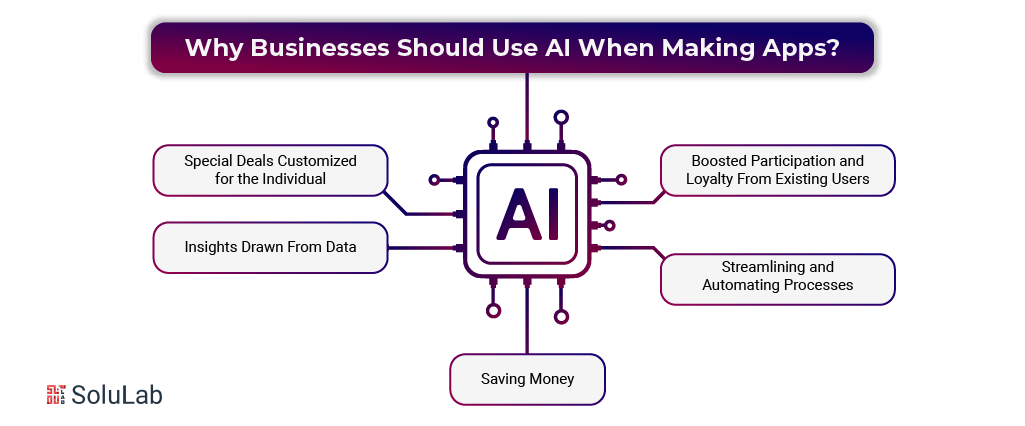
Reasons Why Businesses Should Use AI When Making Apps?
The 2023 State of AI Report by McKinsey & Company reported that 79% of respondents had used generative AI at work or at home, and 22% reach for it regularly on the job. If a number like that leaves you unmoved, here is the practical case for building AI into software, especially if you are a startup with a short runway.
- Offers That Actually Fit the Person
Accenture’s Personalization Pulse Check put the figure at 91%. That is the share of shoppers more likely to buy from a brand that recognizes them, remembers their preferences, and suggests things worth looking at.
AI lets you deliver that inside your own app. Recommendations shift with behavior. The interface starts to feel like it is paying attention. One catch, and it is a real one: none of it works unless your app can collect clean user data and do something with it.
- People Stick Around Longer
HubSpot puts the cost of winning a new customer at five times the cost of keeping one you already have. There is a second figure that argues the same point harder: lift retention by 5% and revenue can climb somewhere between 25% and 95%.
Personalization feeds straight into that. People engage more. They are happier with what they get. Suggestions and promotions that land correctly push conversion up and churn down, which is the whole game.
- Automating the Repetitive Work
The obvious win. Hand the dull, repeating jobs to an algorithm: chatbot-led support, content suggestions, summarizing long text. Almost no part of an operation is immune to it.
Speed is only half of it. AI automation also cuts down on human slips, and it frees your people for the work that genuinely needs a brain in the room.
- What the Data Was Hiding
AI use cases and applications chew through volumes of data no analyst could read in a lifetime, and they surface patterns a human eye slides right past. Those patterns sharpen decisions, point at growth you had not costed, and occasionally rewrite the strategy deck.
Consider protein folding. Science circled that problem for close to fifty years without cracking it. Then DeepMind released AlphaFold, which predicted protein structures accurately and, more to the point, proved that a model can reach conclusions that sit beyond what human analysis can manage.
- Spending Less
Costs drop. Put AI in product behind support and maintenance and the savings compound as the system learns: better resource allocation, failures predicted before the repair bill arrives, energy use trimmed. On top of that, AI opens revenue paths that were closed before, like reliable image and speech recognition or translation that happens live, and both of those buy back serious time.
That list is not exhaustive. Not close. But each item on it deserves a proper look before you commit budget.

Why Should You Think About Using AI in Your App?
In 2025, AI integration in mobile apps stopped being a differentiator and became table stakes. Automated operations, tighter efficiency, room to scale: AI-powered apps hit the expectations customers now carry into every product they open. Integrating AI Into an App is what makes an interaction feel alive rather than scripted.
machine learning sits at the center of this, because it lets the app keep learning from data patterns and user behavior instead of freezing at launch. Real-time decisions, content that adjusts itself, predictions worth trusting. Look at e-commerce: past purchases feed the recommendation model. Or fitness apps, where the training plan bends around how the last four weeks actually went.
There is a security dividend too. Adding artificial intelligence to apps brings sharper fraud detection, image recognition for visual search, and NLP applications behind voice assistants. Processes get tighter, repetitive jobs disappear, and enormous datasets finally give up something useful, all while app performance improves rather than degrades.
AI frameworks are moving fast enough that waiting has a cost. Building AI into your app in 2025 is the defensive move as much as the ambitious one: it keeps you current, keeps you ready for whatever ships next quarter, and keeps you able to answer what customers now consider basic.
Read Also: AI Integration Cost For Your Business
How to Integrate AI Into Your App?
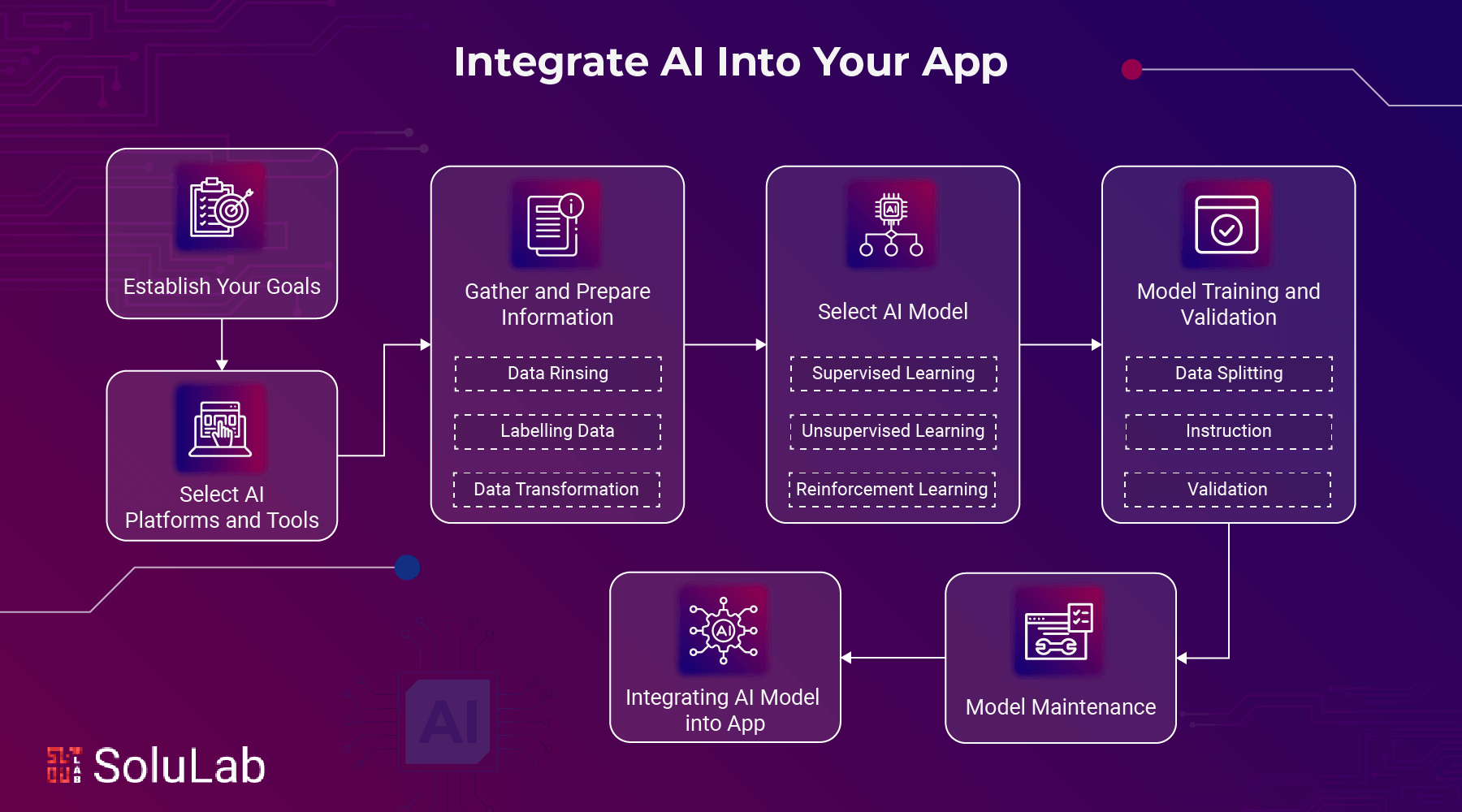
Here is how the work actually breaks down, step by step:
- Establish Your Goals
Name the goal first. Everything downstream, every tool choice and every model decision, traces back to whichever problem or opening you decided AI should handle inside your app. Skip this and you will build something clever that solves nothing.
Goals do two jobs: they rank the work, and they point it at results you can measure. Maybe you want better analysis feeding your decisions. Maybe it is repetitive operations you want gone, or engagement you want lifted through recommendations that fit the individual. Whichever it is, defining it up front is what keeps the integration on course and keeps both your users and the people funding this satisfied at the end.
- Select Appropriate AI Platforms and Tools
Tooling comes next, and it has to follow from the goals you just wrote down. Judge each option against three things: what your stack technically requires, what your budget will bear, and what the platform can actually do.
The familiar names cover most ground. Amazon Web Services, Google Cloud AI, IBM Watson and Microsoft Azure all offer machine learning models, natural language processing, computer vision and more.
Each one hands you trained models, APIs and frameworks that hold up in production, which shortens the build considerably. When you compare them, weigh custom model support, training options, how painfully they plug into the stack you already run, regulatory compliance, and whether support exists after the contract is signed. In practice, this is where teams get stuck: the platform that demos best is not always the one your compliance team will sign off on.
Read More: Create Quora Like App With AI
Gather and Prepare Information
No data, no model. AI app development and AI algorithms learn and forecast from what you feed them, so pull the relevant data out of your application and get it organized, clean and labeled. Preparation looks like this:
- Data Cleaning: Fill the gaps, correct the errors, throw out the duplicates.
- Labelling Data: Tag it so the model knows what it is looking at.
- Transformation of Data: Normalize and standardize, or inconsistency will poison the training run.
1. Select the Appropriate AI Model
Which model you need depends entirely on what you set out to do. The usual suspects:
- Supervised Learning: Labeled data trains the model. Classification and regression algorithms are the two you will meet most.
- Unsupervised Learning: Patterns pulled from unlabeled data. Clustering and association algorithms are the common examples.
- Reinforcement Learning: The model learns by acting, getting feedback, and trying again. Trial and error, formalized.
Pre-trained models sit ready on most AI platforms. Prefer to build your own? Scikit-learn, PyTorch and TensorFlow are where you start.
2. Model Training and Validation
Training means handing the system data and letting it find the structure inside. Three moves:
- Data Splitting: Carve your data into a training set and a testing set.
- Instruction: Teach the model on the training set.
- Validation: Judge how it performs against the testing set it has never seen.
Then do it again. Accuracy improves across rounds of fine-tuning, rarely on the first pass. TensorBoard is worth wiring up early, since it shows you the training curves and helps you spot what is going wrong before you waste another run.
3. Integrating AI Model into the App
Trained and validated? Now the AI features in mobile applications get wired in. Three pieces:
- Deployment: host the model on a server or a cloud platform.
- API integration: expose the model through an API your application can call.
- App changes: update the app so it can talk to the model and handle what comes back. Expect new interface elements, and expect backend work to process the predictions.
4. Keeping an Eye on and Maintaining Model
Shipping is not the finish line. AI models drift, so accuracy and efficiency need watching. Track performance over time, feed in fresh data on a regular schedule, and retrain often enough that the model keeps up with patterns it has never encountered.
Read More: AI x Web3 Execution Playbook
Real-World Examples of AI in Apps
Theory only carries you so far. Here are three sectors where AI integration has already paid off.
1. Safety
Security is where AI has real teeth. Cybersecurity firms and law enforcement agencies use it for:
- Facial recognition
- Monitoring
- Threat identification
Flagging a risk the moment it appears does two things at once: it protects the public and it puts pressure on cybercrime. Engineers have also built advanced biometric authentication on the back of this, covering voice, iris and fingerprint.
Biology is hard to counterfeit, which is exactly why these systems beat access cards and passwords on security. Clearview AI is one working example: its visual recognition software is used by law enforcement to identify suspects and move investigations along faster than manual review allows.
2. Retail
Retailers already run AI for targeted marketing and stock control. It also powers AI-powered chatbots on the support side and the recommendation engines that decide what you see first.
Ever wanted to photograph a product and just find it? Retailers heard you. Visual search now ships in plenty of online stores. Snap a photo, upload it, skip the guessing game of describing a shade of green in a search box.
The engine reads your image and puts comparable products in front of you. Amazon is the scale version of this, running AI through nearly every function it has, from Alexa-powered support to the recommendations that follow you around the site.
3. Transportation
Self-driving cars and trucks are taking over routes from human drivers, and the argument is simple: fewer human errors, fewer crashes. Intelligent traffic management aims at the same target from another angle, cutting congestion and giving back fuel and hours to everyone stuck in it. Drone delivery is not a science fiction prop any more either. It is fast, and it is easier on the environment than a van doing the same drop.
Public transit benefits too, with demand forecasting and smarter scheduling making the daily commute less of an ordeal. Waymo is the clearest example of where this goes: its autonomous vehicles sit at the front of the field, aimed at safer roads and transit that more people can actually use.
Challenges Faced when Integrating AI in Apps
Expect friction. Building an AI-enhanced app runs into the same kind of trouble any software project does, plus a few problems that belong to AI alone. These are the ones teams hit most:
1. Dependence on Outside Services: Most AI work leans on somebody else’s platform, OpenAI’s GPT models being the obvious case. Their outage becomes your outage. When the upstream service degrades, your AI features degrade with it, and your users will not care whose fault it was.
2. Data Issues: Enough data, of high enough quality, decides whether any of this works. Come up short and you face a choice: go get more, or pay people to annotate what you have so the model can train on it. Sensitive records add another layer, because encryption and anonymization are work nobody budgets for until it is due.
3. Cost and Resources: Training a foundation model burns resources at a scale most companies cannot absorb. OpenAI reportedly spent roughly $4.6 million training GPT, which it then refined into ChatGPT. For nearly every business case, taking an existing pre-trained model and tuning it to your specific needs is the cheaper and saner route than starting from an empty weights file.

How Can SoluLab Assist Your Business with AI Integration?
So the case is not exactly new. Putting artificial intelligence into your application sharpens decisions, lifts productivity, and gives customers an experience worth returning for. Costs come down. Products ship faster. Security tightens. The range runs from automating chores nobody wants to do all the way up to surfacing insight you could not have bought.
None of that happens by accident, though. Success takes careful preparation and a deliberate plan. You have to nail down high-quality data, settle the legal and ethical questions honestly, and work through compatibility problems with the systems you already run. Budget control and a team that knows what it is doing are what separate a working integration from an expensive pilot.
Take one project. SoluLab, an AI development company, worked with AI-Build, a construction technology company looking to push its product forward in computer-aided design, using GenAI and machine learning models. Automating CAD design is genuinely hard: the system had to generate intelligent, optimal designs while respecting a set of predefined parameters and constraints. Getting the AI models in to handle the repetitive passes, and cutting manual intervention without breaking the design flow, was the core of the problem.
FAQs
Shipra Garg is a tech-focused content strategist and copywriter specializing in Web3, blockchain, and artificial intelligence. She has worked with startups and enterprise teams to craft high-conversion content that bridges deep tech with business impact. Her work translates complex innovations into clear, credible, and engaging narratives that drive growth and build trust in emerging tech markets.