Key Takeaways
- Real-time AP data is what separates generative AI invoice processing that’s actually accurate from AI that reads text well but still gets payments wrong.
- Traditional invoice processing struggles with inconsistent formats, duplicate payments, and delayed ERP syncs. Problems AP teams have lived with for years without a real fix.
- Grounding AI invoice automation in live purchase orders and vendor records cuts down on hallucinated fields and false approvals, since the model is checking against real data instead of pattern-matching alone.
- Duplicate invoices aren’t rare, honestly. SAP Concur research puts the duplicate rate at roughly 1.29% of processed invoices, averaging about $2,034 each. That adds up fast at enterprise volume.
- Applications of generative AI in invoice processing go well past OCR capture, into general ledger coding, approver prediction, and supplier tax validation.
- Gartner forecasts 40% of enterprise applications will embed task-specific AI agents by the end of 2026, up from under 5% a year earlier. Agentic AP automation included.
Ask any AP team what actually slows them down, and OCR accuracy usually isn’t the top answer anymore. Most invoice-scanning tools read text fine at this point. What still breaks is everything downstream of extraction, matching an invoice to the right purchase order, catching a duplicate before it pays out, and routing exceptions to a human without burying whoever’s on duty.
Generative AI solutions for invoice processing are supposed to fix this. But here’s the catch: an AI model without live data behind it is still just guessing at plausible-looking answers, and a plausible-looking answer isn’t the same as a correct one.
This blog looks at what actually changes when generative AI in AP automation is grounded in real-time data instead of working off whatever was true the last time the system synced overnight.
Why Does Traditional Invoice Processing Struggle with Accuracy?
Before getting into what generative AI changes, worth being honest about why the old process breaks down in the first place. It’s rarely one big failure. It’s five smaller ones stacked on top of each other.
- Inconsistent invoice formats. Every vendor formats invoices differently, and rule-based extraction tools that work fine on one template fall apart the second a new vendor sends something slightly different.
- Duplicate invoices and payment fraud. Duplicate payments average around 1.29% of processed invoices at roughly $2,034 each, and manual review catches only a fraction before the money’s already out the door.
- Delayed ERP synchronization. If AP data only refreshes overnight, a system can happily approve a payment against a purchase order balance that changed hours earlier.
- Missing purchase order information. Invoices without a clean PO match get kicked into manual review, and that queue is usually where invoice processing automation quietly grinds to a halt.
- Manual exception handling. Every invoice that doesn’t fit the standard pattern ends up on someone’s desk. And that someone is usually already behind on everything else.
None of these are new problems. What’s changed is that AP teams finally have a way to fix them that doesn’t involve hiring their way out of the backlog.
What Generative AI Actually Does in Invoice Automation?
Generative AI for invoice processing goes further than traditional OCR. Instead of just extracting fields, it interprets context. It can tell the difference between a shipping charge and a line-item cost, flag an invoice that looks structurally off compared to a vendor’s usual pattern, and draft a plain-language explanation of why an exception got kicked to review instead of just tagging it “error” and moving on.
That said, generative AI on its own has a well-known weak spot. It can produce a confident, wrong answer if nobody’s checking it against real data. This is exactly where most invoice processing automation projects, built through solid AI-led development, either succeed or quietly fail.
A model grounded in your actual AP records behaves very differently than one that’s just pattern-matching against what invoices generally tend to look like.
How Real-Time AP Data Makes Generative AI Invoice Processing More Accurate?
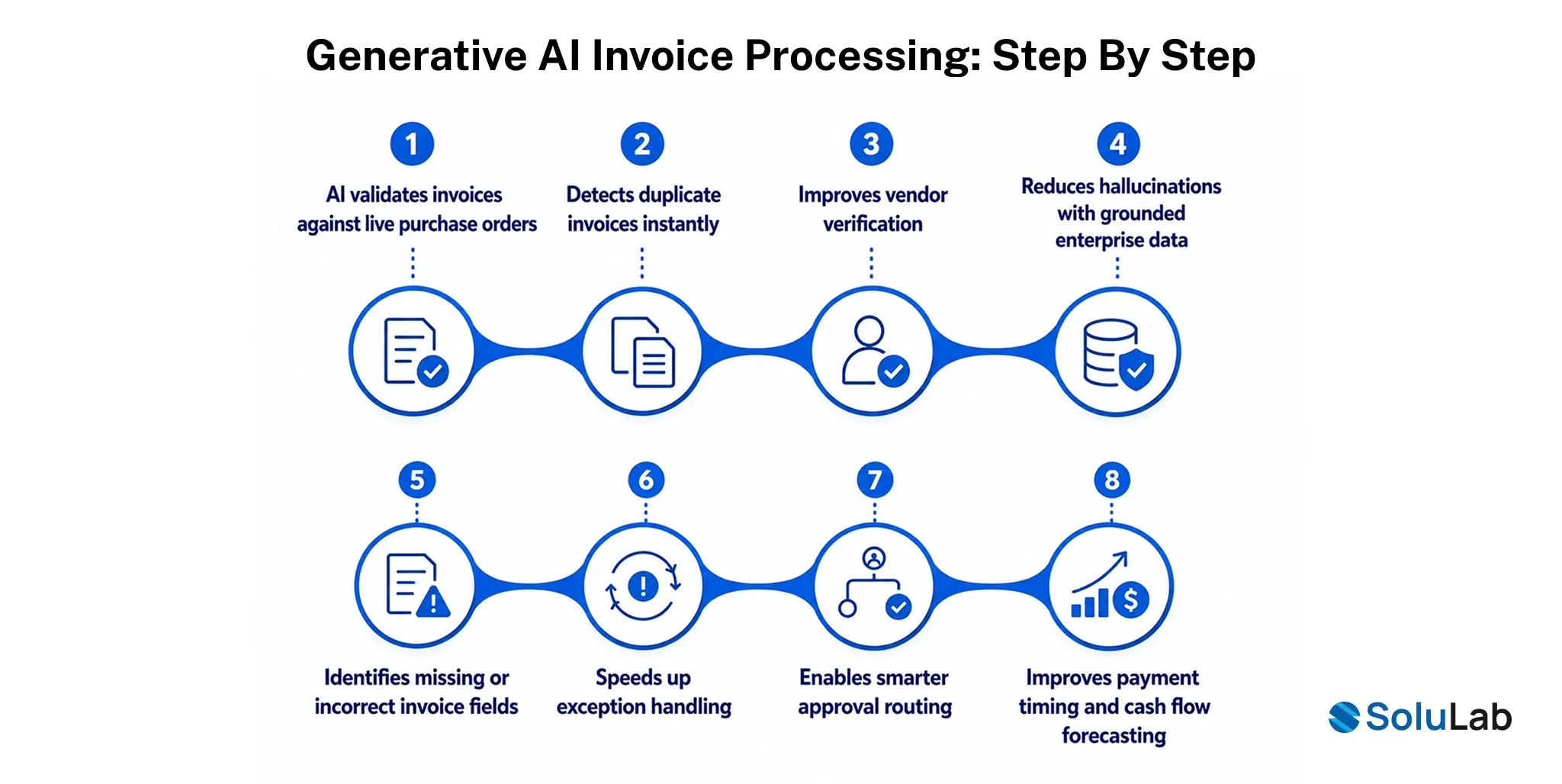
Grounding a generative AI system in live AP data, not last week’s export, is what actually closes the gap between a demo that looks impressive and a system that survives production. Here’s what changes when the data behind the model is current instead of stale.
1. AI validates invoices against live purchase orders
An invoice can only be confirmed accurate if it’s checked against the purchase order as it exists right now, not as it existed when the last overnight batch job ran.
Real-time PO access means the AI catches a mismatch immediately, instead of approving something fine yesterday but isn’t anymore.
- Matches invoice lines to current POs
- Flags amount and quantity mismatches
- Confirms PO status before approval
2. Detects duplicate invoices instantly
Duplicate detection only works if the AI is comparing against every invoice already sitting in the system, including one submitted an hour ago.
A real-time feed closes the window where a duplicate slips through simply because the check ran against yesterday’s data.
- Cross-checks against live invoice history
- Flags near-identical submissions instantly
- Prevents same-day duplicate approvals
3. Improves vendor verification
Vendor fraud often hinges on small changes. A new bank account, a slightly altered company name, that a stale vendor master file just won’t catch.
Live vendor data lets the AI compare incoming invoices against records that reflect whatever changed that same day.
- Verifies vendor details in real time
- Flags recent bank account changes
- Reduces vendor impersonation risk
4. Reduces hallucinations with grounded enterprise data
A generative model without live data to check against will still produce a confident, structured-looking answer, even when it’s wrong. That’s the core hallucination risk in AP, and it’s not a small one.
Grounding responses in real enterprise records forces the model to answer from what’s actually true, not just what sounds statistically plausible.
- Anchors answer to real records
- Reduces fabricated field values
- Improves auditability of AI decisions
5. Identifies missing or incorrect invoice fields
Incomplete invoices used to mean an automatic trip to manual review, no matter how small the gap actually was.
With live access to vendor and PO data, the AI can often fill or verify a missing field on its own instead of stalling the whole invoice.
- Cross-references missing fields automatically
- Reduces unnecessary manual review kickouts
- Improves first-pass processing accuracy
6. Speeds up exception handling
Exceptions used to sit in a queue until someone finally had time to dig through the context by hand.
Real-time data means the AI can hand over a fuller picture upfront, exactly why something got flagged, so the human reviewing it isn’t starting from zero.
- Surfaces exception context automatically
- Prioritizes exceptions by dollar impact
- Cuts average review time significantly
7. Enables smarter approval routing
Static routing rules send every invoice over a certain dollar amount to the same approver, whether or not that’s actually the right person anymore.
Live data lets routing account for current approver workload, project ownership, and department budget status, not just a fixed dollar threshold someone set two years ago.
- Routes based on live approver capacity
- Matches invoices to correct department owner
- Adapts routing as thresholds change
8. Improves payment timing and cash flow forecasting
Payment timing decisions are only as good as the cash position they’re based on. And that position changes daily, sometimes hourly.
Real-time AP data lets the AI factor in early-payment discounts, current cash availability, and upcoming obligations before it recommends when to actually pay.
- Times payments against live cash position
- Flags early-payment discount opportunities
- Improves short-term forecast accuracy

Cash Flow Optimization Across the AP Cycle
When an AP system runs on real-time data, it can time payments strategically instead of just processing them as they land, grabbing early-payment discounts when cash allows and holding off when it doesn’t, without someone running that math by hand every week.
This is also where generative AI for payments earns its keep beyond just getting invoices right. A system with live visibility into cash position, upcoming AP obligations, and vendor payment terms can recommend a payment schedule that actually protects working capital, instead of defaulting to “pay everything on the due date”.
Because that’s the easiest rule to automate. Given that 76% of organizations reported experiencing attempted or actual payment fraud in 2025, according to the AFP’s 2026 survey, tighter real-time visibility across the AP cycle isn’t just a cash flow win. It’s a fraud control too.
Applications of Generative AI for Invoice Processing
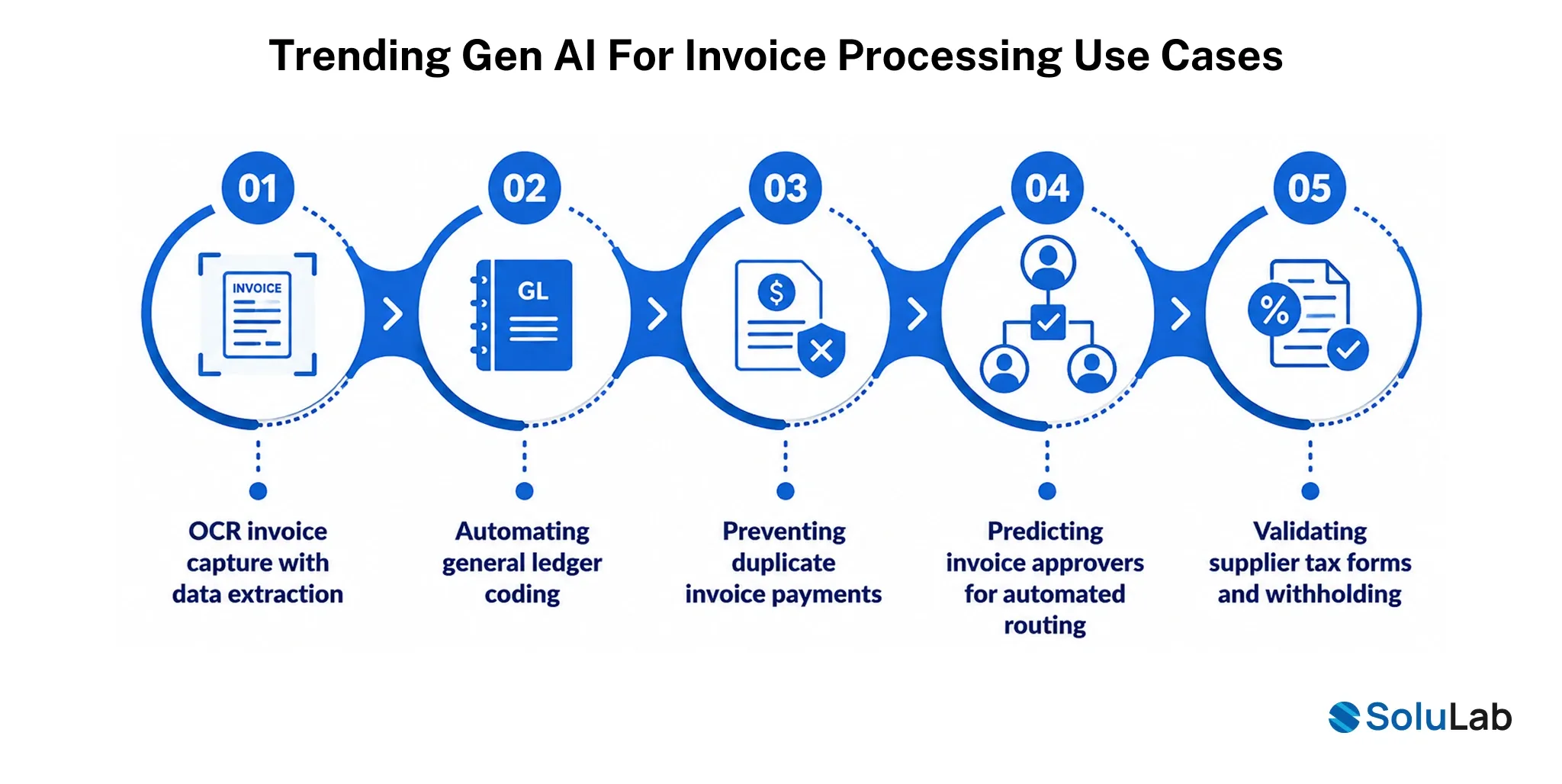
Invoice capture is the most visible use case, sure, but it’s far from the only place generative AI is doing real work in AP right now. Gartner’s 2025 AI in Finance Survey found 59% of finance leaders already use AI in their finance function, with accounts payable among the most common use cases.
1. OCR invoice capture with data extraction
This is the foundation most AP automation is built on, turning a scanned or emailed invoice into structured, usable data without someone typing it in by hand.
Generative AI extends basic OCR by interpreting context, not just characters, so it handles inconsistent vendor formats without needing a separate template for every single one.
- Extracts line-item and header data
- Handles varied vendor invoice formats
- Reduces manual data entry significantly
2. Automating general ledger coding
GL coding used to depend on institutional knowledge someone who just knew, from years of doing it, which invoices went to which account.
An AI trained on historical coding patterns can predict the right GL code on its own, learning from how your team has coded similar invoices before.
- Predicts GL codes from history
- Reduces miscoded transaction errors
- Speeds up month-end close prep
3. Preventing duplicate invoice payments
Even with automation in place, plenty of AP software still catches only a portion of duplicates without a strong detection layer behind it. This is exactly where generative AI in AP automation earns its keep.
AI-driven duplicate detection compares new invoices against the full transaction history in real time, not just against a limited recent batch someone remembered to pull.
- Scans the full invoice history instantly
- Flags near-duplicate submissions automatically
- Reduces duplicate payment losses substantially
4. Predicting invoice approvers for automated routing
Manually assigning every invoice to the right approver stops scaling past a certain volume, especially across departments where ownership keeps shifting.
AI can learn approval patterns over time and route new invoices to the correct approver on its own, adjusting as the org chart changes.
- Learns historical approval patterns
- Routes to correct the department automatically
- Adapts as org structure shifts
5. Validating supplier tax forms and withholding
Tax compliance errors on vendor payments (a missing W-9, incorrect withholding) are easy to miss manually and expensive to fix after the fact.
Generative AI can cross-check supplier tax documentation against payment records automatically, flagging gaps before a payment goes out, not after.
- Verifies tax forms are current
- Flags missing withholding documentation
- Reduces compliance risk on payments
How SoluLab Approaches AI Invoice Automation?
Every AP team’s setup looks a little different, which is exactly why a generic invoice-scanning tool rarely solves the whole problem. SoluLab builds AI invoice processing systems around the specific ERP, vendor base, and approval structure a business is already running on, not a template that assumes everyone’s setup looks the same.
- Custom AI invoice processing solutions built around your actual invoice formats and approval workflows, not a one-size-fits-all template.
- RAG-powered finance assistants that answer AP questions grounded in your real transaction history, built on our LLM and RAG development work.
- AI agent development for AP workflows for teams ready to move toward agentic AP automation, through dedicated AI agent development.
- ERP and accounting software integration so the AI is working from live data, not a nightly export, is handled through our AI integration services.
- Intelligent document processing that goes beyond OCR into contextual field extraction and validation.
- Secure enterprise AI deployment built with the access controls and audit trails finance teams actually need, not the ones a vendor assumes are optional.
- Ongoing optimization and support so the system keeps getting better as invoice volume and vendor mix change over time.
Businesses figuring out where generative AI consulting fits into their AP roadmap usually start with a conversation about their current ERP setup and where the manual bottlenecks actually live, not a generic product demo.
That’s a conversation our AI consulting team has pretty regularly, and it’s often the fastest way to see where generative AI automation would genuinely move the needle in a specific AP workflow, whether that’s broad AI in finance work or something narrowly focused on invoice processing itself.
Conclusion
The accuracy question in generative AI invoice processing was never really about how well the model reads a PDF. It’s about what the model is checking that reading against.
Real-time AP data is what turns a plausible-looking extraction into a verified one, and that difference is exactly what separates an AI-native AP system that teams actually trust from one that still needs a human quietly double-checking everything behind the scenes.
If your AP team is looking at generative AI and wondering whether it’ll actually hold up against your real invoice volume and vendor mess, SoluLab, a AI development company can walk through what a real-time, grounded setup would look like for your specific ERP and workflows.
FAQs
Neha is a curious content writer with a knack for breaking down complex technologies into meaningful, reader-friendly insights. With experience in blockchain, digital assets, and enterprise tech, she focuses on creating content that informs, connects, and supports strategic decision-making.