Key Takeaways
- Custom means you own the data model, not just the screens. A template gives you fixed screens. A custom build lets you define the data model, integrations, security posture and user flows, and the codebase is yours to extend.
- Native iOS wins on performance, new APIs and on-device AI; cross-platform wins on dual-platform speed and budget. Choose native when the app is iOS-first and leans on hardware, AR or the latest Apple frameworks. Choose cross-platform when one budget-friendly codebase on both stores matters more.
- The Apple ecosystem is four platforms, not one. iPhone, iPad, Apple Watch and Apple TV each have their own interaction model. An iPad app is not a stretched iPhone app, and watchOS is built for glanceable moments.
- Decide where your AI runs before you scope the feature. Core ML keeps inference and data on the device and works offline. Cloud AI gives you larger models and easier updates but adds latency and sends data off-device.
- Most iOS apps need a backend, and scoping it late is the common failure. Data model, API layer, admin panel and cloud infrastructure should be scoped alongside the app so a finished build is not sitting idle waiting on infrastructure.
- Security and App Store compliance are architecture decisions, not launch-week tasks. Keychain and Secure Enclave for sensitive data, App Transport Security for traffic, and clear permission usage descriptions. Most rejections trace back to metadata, privacy disclosures or an untestable login.
- Cost follows scope, integrations and whether you also need Android or a backend. An MVP on one platform and an enterprise app with AI, compliance and real-time features cannot share a published price. A scoped estimate against your feature list is the only reliable number.
Custom iOS app development services cover the full build of a tailored app for Apple devices: strategy, UI/UX design, Swift or SwiftUI engineering, QA, App Store launch, and ongoing maintenance. Unlike template or off-the-shelf apps, a custom build is shaped around your users, your data, and your business logic rather than a generic feature set.
SoluLab builds native iOS and iPhone apps across the Apple ecosystem, from iPhone and iPad to Apple Watch and Apple TV, with a team that has shipped software since 2014 and delivered more than 1,500 projects.
On this page: what iOS application development services include, the native versus cross-platform decision, the Apple technology stack, how AI features and backend systems fit an iOS build, our delivery process, engagement models, what drives cost, and the questions buyers ask most before hiring an iOS app development company.
What are custom iOS app development services?
Custom iOS app development services are the end-to-end design, build, testing, launch, and maintenance of software written specifically for Apple platforms. The work spans iPhone, iPad, Apple Watch (watchOS), and Apple TV (tvOS), and it is built with Apple’s own languages and frameworks so the app behaves the way iOS users expect.
The difference from off-the-shelf or template apps is control. A template gives you a fixed set of screens and features. A custom iPhone app development engagement lets you define the data model, the integrations, the security posture, and the user flows. You own the codebase, and you can extend it as your product grows. That matters most for products where performance, a specific workflow, or a tight tie to existing systems is the reason the app exists at all.
For buyers comparing vendors, custom iOS application development company work usually includes product strategy, design against Apple’s Human Interface Guidelines, native engineering, QA, App Store submission, and a support agreement after launch. If your roadmap covers Android as well, our mobile app development company hub covers the dual-platform engagement model.
Custom iOS app vs off-the-shelf or template app
| Dimension | Custom iOS app | Off-the-shelf / template |
|---|---|---|
| Fit to your workflow | Built exactly to your process and data model | Generic; you adapt to it |
| Integrations | Any system or API, including legacy backends | Limited to supported connectors |
| Scalability | Scales on your terms | Capped by vendor tiers |
| Ownership / IP | You own the codebase | Vendor-owned |
| Upfront cost | Higher | Lower |
| Long-term cost | Lower; no per-seat stacking | Recurring, grows with users |
| Competitive edge | Differentiating | Same app as competitors |
Our iOS application development services
We work as a single team across the whole Apple ecosystem, so one group owns the product from the first workshop to post-launch releases. Each service below can be engaged on its own or as part of an end-to-end build.
iOS consulting and product strategy
Before any code, we map the product: target users, the core job the app does, the MVP feature set, and the platforms that matter (iPhone first, or iPhone plus iPad and Apple Watch). This is where we decide native versus cross-platform and where we flag technical risk early.
Custom iPhone app development
The core of most engagements. We build native iPhone apps in Swift and SwiftUI, tuned for the current iOS version and the range of iPhone screen sizes your users carry.
iPad app development
iPad apps are not stretched iPhone apps. We use size classes, multi-column layouts, drag and drop, and Apple Pencil support where it fits, so the app uses the larger canvas properly.
Apple Watch (watchOS) app development
For fitness, health, payments, and glanceable notification use cases, we build companion or standalone watchOS apps, including complications and HealthKit data where relevant.
Apple TV (tvOS) app development
For media, OTT, and large-screen experiences, we build tvOS apps with the focus-based navigation model and AVKit playback the platform expects.
UI/UX design for iOS (Human Interface Guidelines)
Our designers work to Apple’s Human Interface Guidelines so the app feels native, passes App Store review more predictably, and matches the interaction patterns iOS users already know. We also design for CarPlay and forward-looking platforms such as visionOS (Vision Pro) when a product roadmap calls for it. For products where the core experience is spatial or camera-driven, see our AR app development and AR/VR app development work.
iOS QA, testing, and TestFlight beta
We test on real devices and OS versions, run automated and manual passes, and distribute release candidates through TestFlight so stakeholders and beta users can try builds before public launch.
App integration and migration (CRM, ERP, legacy modernization)
We connect iOS apps to the systems you already run, including CRM and ERP platforms and custom backends, and we modernize older apps, for example migrating Objective-C and UIKit code toward Swift and SwiftUI.
App Store submission and ongoing maintenance
We handle App Store Connect setup, submission, and the review process, then support the app after launch with OS-version updates, bug fixes, and new features.
Native iOS vs cross-platform: which should you choose?
There is no single right answer. The choice depends on whether iOS is your primary platform, how performance-sensitive the app is, and your budget and timeline. Native iOS (Swift and SwiftUI) gives you the deepest access to Apple hardware and the newest APIs. Cross-platform (Flutter or React Native) can get one codebase onto both iOS and Android faster.
| Dimension | Native iOS (Swift/SwiftUI) | Cross-platform (Flutter / React Native) |
|---|---|---|
| Performance | Highest, including GPU, AR, and on-device AI | Good, though heavy graphics and AR are weaker |
| Time to first launch | Longer if you also need Android | Faster dual-platform launch |
| Access to newest iOS APIs | Day one | Lags behind Apple releases |
| Long-term maintainability | Strong for iOS-first products | Single codebase, but platform edge cases appear |
| Best for | iOS-first, performance or UX-critical apps | MVPs, budget-conscious dual-platform launches |
In short, choose native iOS when the app is iOS-first and leans on performance, AR, or the latest Apple frameworks. Choose cross-platform when the priority is one budget-friendly codebase on both stores, and the feature set is not pushing the hardware.
Our iOS app development technology stack
We build primarily in Swift and SwiftUI, with Objective-C and UIKit for legacy code and mixed codebases. Development happens in Xcode.
On top of the core languages, we work with Apple’s frameworks based on what the product needs:
- AR and graphics: ARKit, Metal
- AI and machine learning: Core ML for on-device AI and inference
- Health and home: HealthKit, HomeKit
- Commerce: StoreKit for in-app purchases and subscriptions
- Cloud and data sync: CloudKit
- Maps and media: MapKit, AVKit and AVFoundation
For data and persistence we use Core Data, SwiftData, Realm, and SQLite depending on the app’s needs. We structure apps with proven architecture patterns, most often MVVM, and MVC or VIPER where a project calls for it.
AI features in iOS apps: on-device or cloud?
An increasing share of iOS briefs now include an AI feature, and the first decision is where the model runs. Core ML runs inference on the device itself, which keeps data local, works without a network connection, and adds no per-call cost. Cloud AI gives you far larger models and easier updates, at the cost of latency, connectivity, and data leaving the device.
- Use on-device Core ML for image classification, on-device personalisation, offline capability, and anything where sending user data off-device is a privacy or compliance problem.
- Use cloud AI for large language model features, retrieval over a knowledge base, and anything needing a model too large to ship inside an app bundle.
- Use both where a small on-device model handles the common path and a cloud call handles the hard cases.
Build a custom model, or call an existing one?
The same build-versus-buy fork applies inside an app. Buy when the task is common and generic accuracy is fine. Build when the task depends on your proprietary data, when data cannot leave your environment, or when accuracy on your domain is a competitive differentiator rather than a commodity.
If you do need a tuned model behind the app, the practical spectrum runs from cheapest to most expensive: prompt engineering, retrieval-augmented generation, fine-tuning, and full training from scratch. Start at the cheapest option that meets your accuracy bar.
| Factor | RAG | Fine-tuning | Train from scratch |
|---|---|---|---|
| Data needed | Documents / knowledge base | Thousands of examples | Millions to billions |
| Typical timeline | Days | Days to weeks | Weeks to months |
| Relative cost | Lowest | Low to moderate | Highest |
| Best when | Answers must cite current internal docs | Behaviour, format, or tone must change | No suitable base model exists |
Most teams should not train from scratch. Adapting a foundation model is almost always better value for a mobile use case. SoluLab covers this scope through AI development, generative AI development, large language model development, and RAG development, so the model work and the app work sit with one team.
Backend, web companion, and API integration
Very few iOS apps ship alone. Most need a backend to hold the data, an API layer to move it, and often a web companion for admin users or desktop workflows. Scoping these alongside the app avoids the common failure where a finished app waits months on a backend nobody scoped.
- Custom backend development. Business logic, data model, and APIs built to the app’s needs, in Node.js, Python, PHP, .NET, or Java, on PostgreSQL, MySQL, MongoDB, or MS SQL.
- API and third-party integration. Payment gateways, ERPs, CRMs, identity providers, and any external system, including custom API development where no connector exists.
- Web portals and admin panels. Role-specific dashboards so your own team can manage content, users, and orders behind the app.
- Progressive Web App (PWA) companion. Where a lightweight browser experience should sit beside the native app rather than replace it.
- Cloud and DevOps. AWS, Azure, or Google Cloud with CI/CD pipelines, Docker, and Kubernetes, so releases are repeatable rather than manual.
Teams that need the web side built to the same standard can work from our custom software development and enterprise software development practices, with DevOps consulting and cloud computing support where infrastructure is the constraint. For subscription products, our SaaS application development work covers multi-tenancy, billing, and usage metering.
How does our iOS app development process work?
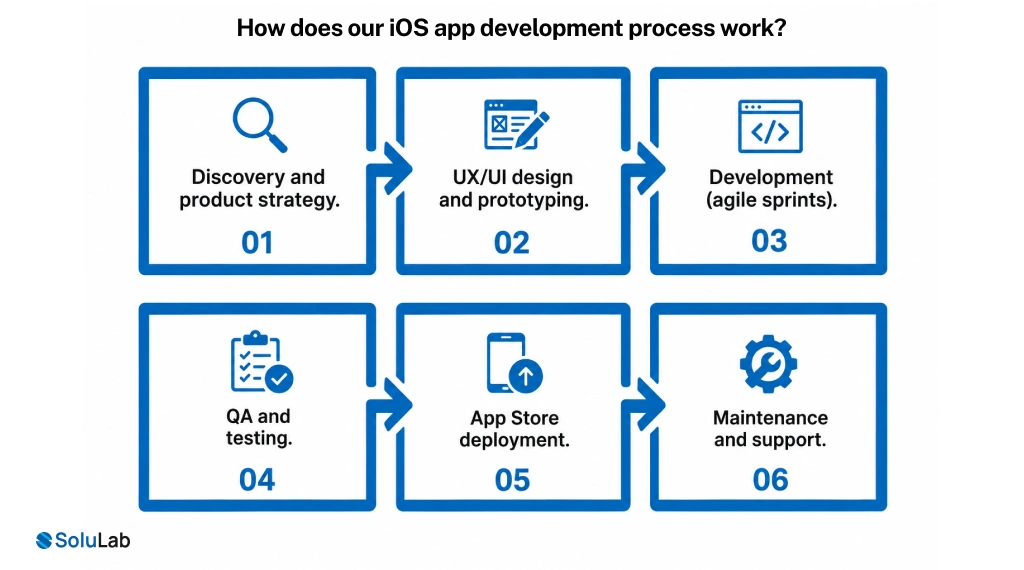
We run in agile software development sprints so you see working builds early and can adjust as the product takes shape.
- Discovery and product strategy. We define users, scope the MVP, choose the platforms and stack, and produce a plan with milestones.
- UX/UI design and prototyping. We design screens and flows to the Human Interface Guidelines and produce clickable prototypes to validate before engineering.
- Development (agile sprints). Native engineering in Swift and SwiftUI, broken into sprints with regular demos and integration work as we go.
- QA and testing. Automated and manual testing on real devices, plus TestFlight beta distribution for stakeholder and user feedback.
- App Store deployment. App Store Connect setup, metadata, submission, and shepherding the app through Apple’s review.
- Maintenance and support. Post-launch releases: OS-version updates, fixes, monitoring, and new features on a support agreement.
Industries we build custom iOS apps for
We have built or can build iOS apps across sectors, including:
- Fintech: secure transactions, biometric login, in-app payments
- Healthcare: HealthKit integration and compliance-aware design
- Retail and eCommerce: storefronts, loyalty, StoreKit purchases
- Logistics: tracking, routing, and field workflows
- On-demand: booking, real-time status, and location features
- Media and OTT: streaming across iPhone, iPad, and Apple TV
- Enterprise productivity: tools tied into CRM, ERP, and internal systems
- IoT and wearables: HomeKit and Apple Watch experiences, backed by our IoT development practice
See delivered work across these sectors in the SoluLab case studies library: https://www.solulab.com/case-studies
iOS app development engagement models
We offer several ways to work together so the model fits your team and stage.
| Engagement model | How you pay | Best fit when |
|---|---|---|
| Fixed-scope project | Agreed price for a defined scope | Requirements are clear and stable |
| Time and materials | Pay for time and resources used | Scope will evolve as you learn |
| Dedicated team | Monthly rate for a committed iOS squad | Long-running product with ongoing work |
| Staff augmentation | Add SoluLab engineers to your team | You have a team but need extra capacity |
If you want to hire iOS app developers to extend your own team, the staff augmentation model is usually the fastest path. The same applies on the model side, where you can hire AI developers for the machine learning work alone.
How much do iOS app development services cost?
Cost depends on scope, not a single sticker price. The main drivers are feature complexity, the depth of custom design, the number and difficulty of integrations, whether you also need Android, whether the app needs a custom backend, the team’s location and seniority, and the ongoing maintenance you want after launch.
| Complexity tier | What it covers | Indicative timeline | Indicative cost |
|---|---|---|---|
| MVP / simple iOS app | One core feature set, limited integrations, no custom backend | Shortest of the three; confirmed at discovery | Lowest; quoted against your feature list |
| Mid-size iOS app | Several modules, custom backend, multiple integrations, custom UX | Driven by backend build and integration count | Mid-range; scoped per module and integration |
| Enterprise iOS platform | Many modules, heavy integrations, AI or real-time features, compliance scope | Driven by compliance and integration scope | Highest; quoted after a scoping workshop |
The most reliable number comes from a scoped estimate. Share your feature list and target platforms, and we can give you a range tied to your actual build.
Security and compliance
Security is built in, not bolted on. We use the Apple Keychain and the Secure Enclave for sensitive data, enforce SSL/TLS and App Transport Security for network traffic, write clear permission usage descriptions, and design to HIPAA and GDPR requirements where the industry demands it. SoluLab is ISO 9001 and SOC 2 certified. On the backend side we build with encryption in transit and at rest and role-based access control.
We also build to Apple’s App Store guidelines from the start, which is what reduces review friction: most rejections trace back to incomplete metadata, missing privacy disclosures, or a login the reviewer cannot test.
Why choose SoluLab for custom iOS app development?
- Track record since 2014, with 1,500+ projects delivered by a 250+ person team
- Native and cross-platform depth, so we recommend the right approach rather than the one we happen to sell
- AI and data engineering in-house, so a Core ML feature or a tuned model is built by the same team, not subcontracted
- Backend and cloud under one roof, so the app and the systems behind it are scoped together
- Security-first engineering using Keychain, Secure Enclave, and compliance-aware design
- Full Apple ecosystem coverage across iPhone, iPad, Apple Watch, and Apple TV
- Post-launch support so the app keeps up with new iOS releases
11 years in business, 1,500+ projects delivered, 250+ specialists, 500+ clients across 5 offices, ISO 9001 and SOC 2 certified.
You can see SoluLab’s full iOS and iPhone service scope on our best iOS and iPhone app development company page.
Frequently asked questions
Neha is a curious content writer with a knack for breaking down complex technologies into meaningful, reader-friendly insights. With experience in blockchain, digital assets, and enterprise tech, she focuses on creating content that informs, connects, and supports strategic decision-making.