


Long before anyone called it “digital transformation,” businesses already knew the problem: people spending their days on tasks that a well-designed system could do faster, cheaper, and without fatigue. Manual, repetitive work kills morale, invites mistakes, and slows down everything that actually matters. The companies that saw this early moved to automation. The ones that didn’t fell behind.
Today, roughly 60% of companies use workflow automation for analytics and business process work. That number keeps climbing. And the reason most of them are accelerating isn’t just efficiency. It’s that AI has made automation far more capable than the old rule-based scripts ever were.
AI workflow automation is now reshaping how businesses of every size actually operate. This piece walks through what it is, which types matter, where it creates real value, and how to approach the implementation without getting stuck in the common traps.
What is AI Workflow Automation?
AI workflow automation takes existing business processes, many of which still rely heavily on humans doing the same steps over and over, and replaces or augments those steps with AI-driven systems that can run independently.
Here’s what that means in practice. More processes can now be encoded into systems that operate on their own. That used to mean simple if-then logic. Now it means systems that can read documents, understand context, make judgment calls, and hand off to a human only when something genuinely needs human attention.
COVID accelerated all of this considerably. Companies that had been putting off automation decisions suddenly had no choice. With reduced teams, disrupted supply chains, and pressure to cut costs fast, businesses found they could move much quicker on automation than they had previously thought possible. Many never went back.
The result: AI workflow automation has gone from a forward-looking initiative to a standard operating decision. It makes your existing processes more effective. That’s the starting point.
And the data piece matters a lot here. Running optimised workflows requires accurate, current data at scale. That’s not something you can collect manually. AI and machine learning are now the only practical paths to getting automated data pipelines that actually work.
Types of AI Workflow Automation
Artificial Intelligence workflow automation covers a range of technologies, each suited to different kinds of business problems. Using AI and machine learning, organisations can automate complex tasks, sharpen decision-making, and get ahead of trends before they become problems. Here are the key types businesses are actually deploying:
1. Predictive Analytics Automation
Around 52% of organisations use predictive analytics to improve profitability, optimise operations, forecast sales, and grow their customer base. The approach examines statistical algorithms and historical data, using machine learning to project future outcomes. Predictive analytics automation brings together artificial intelligence (AI) with machine learning (ML) to process and analyse large datasets at a scale no manual team could match.
2. Cognitive Automation
Cognitive automation pairs AI with process automation to improve business outcomes. It uses multiple techniques to gather data, automate decisions, and scale automation efforts across an organisation. Unlike deep learning or standard machine learning, cognitive automation tools are specifically designed to replicate human thought processes. That distinction matters when the task involves judgment, not just pattern matching.
3. Rules-Based Automation
Rules-based automation, also called Robotic Process Automation (RPA), works from predefined rules to manage and manipulate data. It mimics human action on highly repetitive tasks, cutting labour time significantly across industries. Teams often use RPA tools for form-filling, data extraction, and similar high-volume, low-variation work.
Key Features of Automated AI Workflows
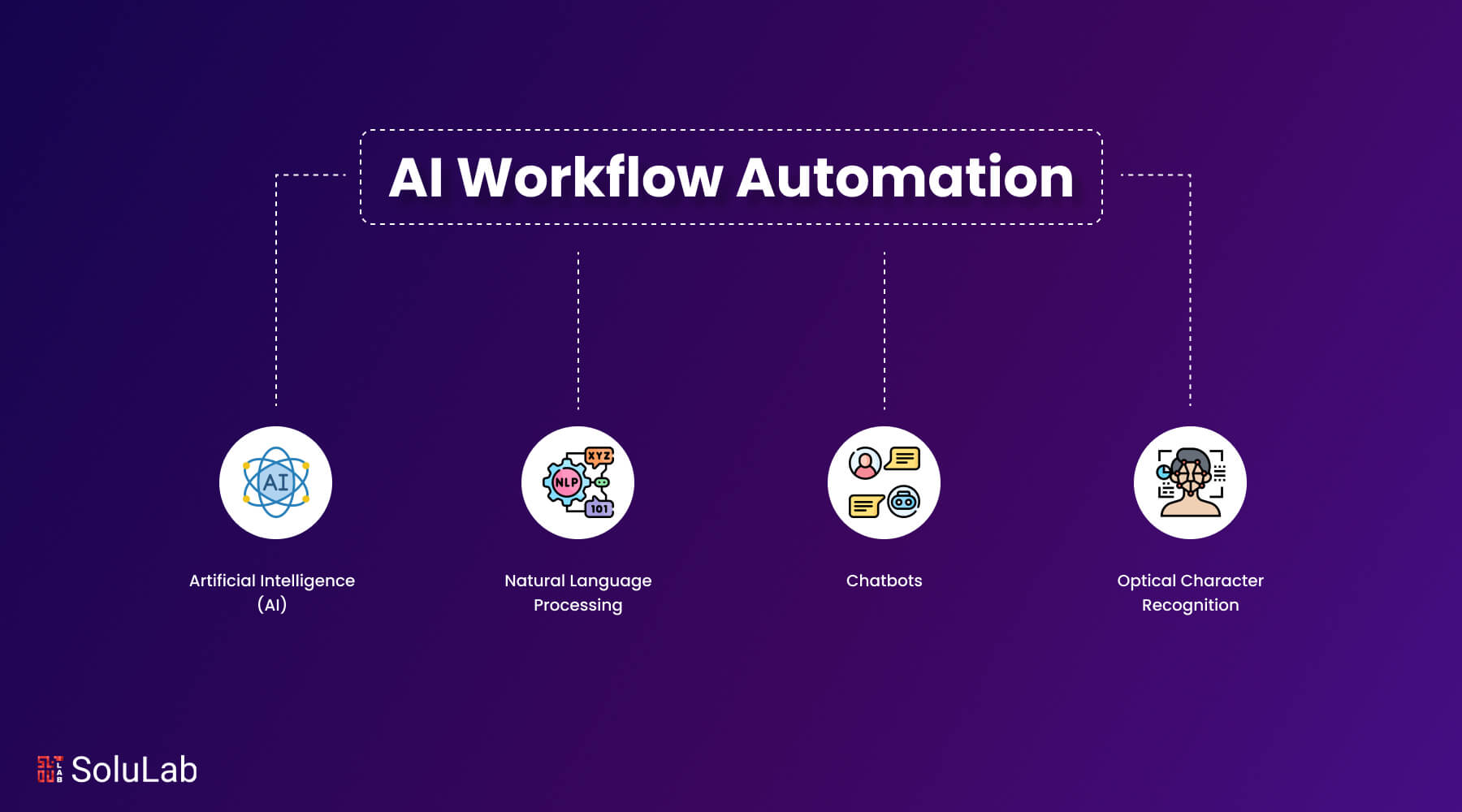
AI covers several sub-disciplines: machine learning, natural language processing, chatbots, and optical character recognition, among others. generative AI can also learn and replicate coding languages. Each of these plays a distinct role in how automated workflows actually function.
- Artificial Intelligence (AI)
Machine learning sits at the core of every AI application covered here. It uses algorithms built for structured and unstructured data alike to replicate how humans process information. Short version: ML doesn’t just follow rules, it learns from data.
- Natural Language Processing (NLP)
Natural language processing (NLP) is the branch of AI that combines machine learning with computational linguistics to understand and respond to human speech and text. It’s what lets AI read a support ticket, understand what the customer actually means, and route it correctly. You likely use it every day, in GPS apps, digital assistants, search engines.
- Chatbots
Chatbots are among the most widely used examples of NLP in production today. A user types a question; the bot responds based on:
- An AI model trained on large volumes of structured and unstructured data from multiple sources.
- ML that scans the data quickly to find the most relevant response.
- Reference sources such as encyclopedias, code libraries, and scraped web content. ChatGPT, for instance, draws heavily on these.
- Optical Character Recognition
OCR converts handwritten or printed text into machine-readable format. Traditional OCR systems, even the best ones, top out around 80% accuracy after decades of refinement. Apply a machine learning model to the same problem and accuracy climbs substantially, without requiring extra human input.
Here’s a concrete example of how this works. A bot scans an email inbox for attachments containing images of handwritten text. When it finds one, an ML model converts the handwriting to typed text. That text then gets turned into an invoice and uploaded directly to the ERP system. No human touches it.
Benefits of AI Workflow Automation
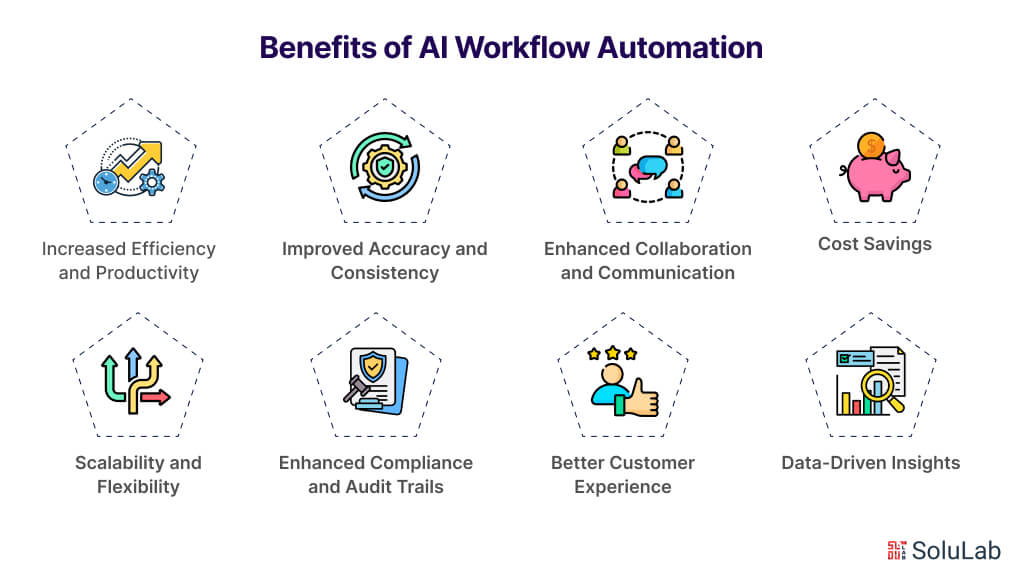
Putting an automated workflow system in place changes how a business operates at a fundamental level. Fewer manual handoffs, less time spent on low-value tasks, and better data flowing through every decision. Here are the benefits worth paying attention to when evaluating AI workflow tools:
1. Increased Efficiency and Productivity
Automated workflow systems handle repetitive tasks so your team doesn’t have to. That frees people to work on things that actually need human judgment. Workflow AI processes large volumes of data quickly and accurately, cutting task completion time and reducing the kind of errors that come from doing the same thing manually, all day, every day.
2. Improved Accuracy and Consistency
Manual processes drift. People interpret rules differently, skip steps when rushed, and make errors that compound over time. Automated workflows don’t. They follow the same rules every time, which means your data processing and reporting becomes reliable enough to actually base decisions on. That consistency also matters a lot for compliance.
3. Enhanced Collaboration and Communication
Automated systems give teams a shared view of what’s happening. Real-time updates, automatic notifications, centralised information: everyone works from the same data. In practice, this is where a lot of the hidden value shows up. Fewer “where does this stand?” conversations. Fewer things falling through the cracks between teams.
4. Cost Savings
Fewer manual hours plus fewer errors equals lower operating costs. When you automate workflow properly, you’re not just cutting headcount. You’re freeing up your existing team to do higher-value work, which means you get more output without adding resources.
5. Scalability and Flexibility
As a business grows, its processes get messier. An automated workflow system scales with you. Increased workload doesn’t require a proportional increase in staff or spending. And when the business changes, workflow AI can adapt. You modify the process, not the headcount.
6. Enhanced Compliance and Audit Trails
Workflow automation keeps processes consistent with regulations by enforcing the same procedures every time and logging every action taken. For regulated industries, this is significant: you can actually show auditors what happened, when, and who (or what) made each decision. That kind of traceability is nearly impossible to maintain manually at scale.
7. Better Customer Experience
Faster processes, fewer errors, quicker responses. Customers don’t care how your back office works. But they absolutely notice when they get a faster answer or when an order goes wrong and gets fixed quickly. Automation makes that consistency possible at volume.
8. Data-Driven Insights
Workflow AI surfaces patterns in data that manual analysis would miss entirely. For teams using spreadsheets, tools like AI for Google Sheets make it straightforward to pull data from multiple sources into Google Sheets, speeding up analysis and making data-driven decisions something that happens in hours, not days.
Use Cases for AI Workflow Automation
AI workflow automation has found real footholds across industries. The common thread isn’t the technology. It’s the problem: complex, repetitive work that was costing too much time, creating too many errors, or simply couldn’t scale. Here’s where teams are putting it to work:
1. Customer Service and Support
AI handles the volume work in customer service: routing tickets, answering common questions, tracking orders. That keeps your human agents free for the issues that actually need them. AI-driven chatbots can walk a customer through a troubleshooting flow or process a straightforward account update without any human involvement at all.
2. Human Resources and Recruitment
Recruitment is a good example of where AI workflow automation does well. Screening hundreds of resumes against predefined criteria, scheduling interviews, ranking candidates by fit based on historical data: the AI handles it. Hiring still requires human judgment at the final stage, but the hours of groundwork that used to precede that decision get compressed dramatically. As a side benefit, removing manual screening also reduces certain kinds of selection bias.
3. Finance and Accounting
AI in finance departments use automation for invoice processing, expense management, and financial reporting. AI extracts data from invoices, validates it against purchase orders, and routes payment approvals. It also monitors transaction patterns for anomalies, which is one of the more practical applications of machine learning in finance: flagging potentially fraudulent activity before it becomes a costly problem.
4. Marketing and Sales
In marketing, AI handles lead scoring, personalised content delivery, and campaign management. It analyses customer behaviour to rank leads by conversion likelihood and delivers targeted content to different audience segments automatically. On the sales side, it takes care of follow-up emails, meeting scheduling, and surfacing data about customer preferences and buying patterns. Sales teams that have this in place tend to spend more time actually selling.
5. Supply Chain and Logistics
AI workflow automation handles inventory management by predicting demand and triggering restocking before shortages occur. AI In logistics can optimise delivery routes, cutting transportation costs and improving delivery times. It also monitors the supply chain for early warning signs of disruption and suggests measures to address them before they become operational crises.
6. Healthcare and Medical Administration
Healthcare administration involves a lot of paperwork that doesn’t benefit from being done manually. Patient scheduling, billing, and claims processing are all good candidates for automation. Beyond admin, AI assists in diagnostic processes by analysing medical images and patient data to identify potential issues. Radiology is one example: AI algorithms can review images for abnormalities, giving doctors a more complete picture to work from when making decisions.
Read Also: AI Agents in Healthcare
7. Manufacturing and Production
AI workflow automation in manufacturing focuses on three things: predictive maintenance, quality control, and production optimisation. Predictive maintenance means flagging equipment issues before they cause downtime, not after. Quality monitoring catches defects in real time on the production line. And production scheduling gets adjusted automatically based on current demand forecasts and available resources. The cumulative effect on operational costs is substantial.
8. Legal and Compliance
Legal teams deal with large volumes of documents where the cost of missing something is high. AI workflow automation handles document review, contract analysis, and compliance monitoring by quickly reading and categorising legal documents, surfacing relevant clauses, and checking for regulatory compliance. The time savings on legal research and document management are real, and the risk reduction is the point.
How to Choose the Right AI Workflow Tool?
Picking the wrong tool at this stage costs you twice: once to implement it, and again when you have to replace it. Here are the factors that actually matter:
- Determine Your Needs
Start by mapping which tasks inside your company need automation. Focus first on the repetitive, high-volume work that creates bottlenecks or errors. Being specific about what you’re trying to fix makes tool selection much more straightforward.
- Check the Features
Since the AI workflow automation tool will sit at the centre of multiple processes, you need to know exactly what it does before you commit. A low-code or no-code interface matters if non-technical people will be building workflows. Look for a visual editor with drag-and-drop functionality so teams can launch new workflows without waiting on IT for every change.
- Integration Capabilities
Any tool you pick has to connect with what you already use. Check for native integrations, a solid API, or middleware options. Without this, you end up with automation that creates new data silos rather than solving the old ones.
- Simple Navigation
The whole point of workflow automation is to make things simpler. If the tool requires extensive training before anyone can use it, you’ve created a different kind of problem. Process owners should be able to build, test, and deploy workflows themselves. That’s the standard to hold the tool to.
How to Integrate AI into Your Workflow?
AI integration done well changes how work actually gets done. Done badly, it creates expensive technical debt and a sceptical team. Here’s how to approach it properly:
1. Assess Current Workflows
Start with a clear-eyed look at what you’re currently doing. Which tasks are repetitive and time-consuming? Where do errors tend to appear? Where do processes slow down? This audit tells you where an automated workflow system can make a genuine difference, and where it won’t.
2. Define Clear Objectives
Decide what success looks like before you start building. Fewer manual errors? Faster processing times? Better data quality? Specific goals make implementation cleaner and give you a way to measure whether the AI integration is actually working.
3. Choose the Right AI Tools
Selecting the right AI tools matters more than the implementation itself. Look for AI workflow solutions that fit your business model and offer low-code or no-code interfaces, visual editors, and solid integration capabilities. The tools need to connect with your existing systems without requiring a complete re-architecture of your tech stack.
4. Develop and Train AI Models
For more advanced integrations, you may need to develop and train machine learning models from scratch. That means gathering and preparing data, selecting the right algorithms, and running ongoing training cycles to keep accuracy up. Many AI workflow platforms offer pre-built models you can customise. Start there if you can.
5. Test and Validate
Before going live, test the AI workflow in a controlled environment. Validate that it performs as expected against your predefined objectives. This is where you catch the gaps between what the system was supposed to do and what it actually does. Don’t skip this step. The problems you find here are cheap to fix. The ones you find in production are not.
6. Implement and Monitor
Once validated, roll out the AI-powered automated workflow system. Then watch it. Regular monitoring tells you whether it’s still meeting your goals and flags where processes are drifting or where new optimisation opportunities have appeared. Implementation is not the end of the project.
7. Train Employees
Your team needs to know how to use the new systems. Run proper training sessions with real documentation, not just a quick demo. The AI tools handle the repetitive work; your people need to handle everything else, which means they need to understand the system well enough to work with it, not around it.
8. Evaluate and Iterate
Regularly evaluate the impact of AI integration on your workflow. Gather feedback from users. Analyse the performance metrics. Find what’s working and what isn’t, then fix the second category. AI solutions improve with iteration, and the businesses that get the most value from them treat them as ongoing systems, not one-time projects.
These steps aren’t complicated. But in practice, skipping any one of them is usually where implementations go sideways.
Challenges and Factors for AI Workflow Automation
Investment in RPA, AI, and automation technology has improved what teams can do. But many IT leaders find they still lack the tools to coordinate end-to-end process automation across the entire enterprise. Large organisations in particular run into problems with disconnected automation islands, each one managed separately, with no unified view. Maintaining those systems is hard for several concrete reasons:
- IT upkeep costs more
- Automation tool management requires skilled workers.
- Connecting automation technologies requires complex integration work.
- Technology updates create conflicts between systems.
- Tool overlap and governance gaps compound over time.
These problems add up to costly inefficiencies that cancel out what the automation was supposed to save. The answer is a platform approach. If your AI workflow automation data is bad, or your tools don’t talk to each other, the automation doesn’t deliver. Integrating AI, automation, and well-managed data isn’t optional. It’s what actually makes the tech stack work for the business rather than against it.

Conclusion
The businesses getting the most from AI workflow automation aren’t the ones with the biggest budgets. They’re the ones that started with a clear problem, chose tools that fit what they actually needed, and treated implementation as a process rather than a one-time event. The efficiency gains are real. So are the compliance benefits, the cost savings, and the improvement in decision quality. But none of that happens without the groundwork.
As an experienced AI development company, SoluLab works with companies at every stage of AI integration. Our team builds customised AI solutions matched to specific business needs, from initial scoping through full deployment. Contact us today to talk through what AI workflow automation could look like for your organisation.
FAQs
Shipra Garg is a tech-focused content strategist and copywriter specializing in Web3, blockchain, and artificial intelligence. She has worked with startups and enterprise teams to craft high-conversion content that bridges deep tech with business impact. Her work translates complex innovations into clear, credible, and engaging narratives that drive growth and build trust in emerging tech markets.

![Top 10 Examples of AI Being Integrated in the Real World [2026 Edition]](https://www.solulab.com/wp-content/uploads/2026/09/Examples-of-AI-Being-Integrated-in-the-Real-World.webp)