Running a business means dealing with a hundred moving parts at once. AI Copilots cut through that noise. Used properly, they take on the repetitive workload and give your team real-time support through Generative AI — across almost every function you can name.
You don’t have to do everything manually. Not anymore. When Presidio deployed Copilot, their workers saved an average of 1,200 hours per month — time they put back into customer interaction instead of admin. And for software developers, the numbers are stark: those working with AI Copilots complete tasks up to 55.8% faster than those working without.
Think of an AI Copilot as a tireless assistant. It answers questions, digs into data, and handles tasks that used to eat hours. This post walks through the specific use cases — in healthcare, finance, retail, insurance, supply chain, and more — where Copilots are actually making a difference.
What Does an AI Copilot Do?
A Copilot is an AI assistant that works alongside customers or employees through smart conversation. It draws on generative AI and machine learning to answer questions, summarize documents, and surface useful references. It plugs into your existing business tools and runs around the clock — one language or many, simple queries or complex ones. The most capable Copilots don’t just respond. They act.
Two things make AI Copilots tick: the intelligence layer and the integration layer.
The intelligence comes from AI algorithms built on natural language processing, context awareness, and machine learning — they let the Copilot anticipate what you need and give you something useful, not just technically correct. The integration layer connects that intelligence to your actual systems: CRMs, databases, ticketing tools, whatever you run on. That’s what makes it a single, connected interface instead of just another chatbot.
In customer service, for instance, a Copilot handles the routine questions so your team can spend time on things that actually need a human. That said, deployment takes thought. Pick a Copilot that puts trust, security, and data privacy at the center. Getting that wrong is expensive.

How Do AI Copilots Work?
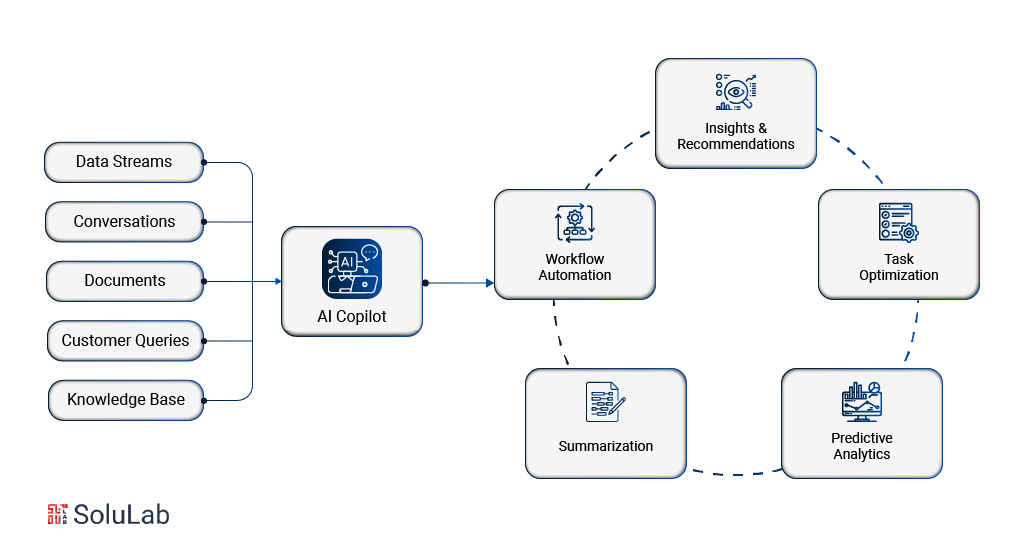
AI Copilots run on natural language processing (NLP) and machine learning (ML). They take what you type or say, make sense of it, pull the relevant data, and hand back a response that’s fast, accurate, and actually fits your context. By using large language models (LLMs), these Copilots read user requests in plain language and find precise answers without you needing to know the right query syntax.
Here’s a plain breakdown of what happens under the hood:
1. Data Ingestion
The Copilot starts by pulling data from wherever it lives — emails, databases, documents, internal systems. All of it flows into one unified knowledge base. Mixing structured and unstructured data is the point here. That breadth is what lets the Copilot give answers grounded in your actual business, not a generic approximation of it.
2. Understanding User Intent
NLP does the heavy lifting on intent. The Copilot reads what someone typed, figures out what they actually mean, and accounts for context. A vague question gets a clarifying follow-up. A precise one gets a direct answer. The goal is to match response quality to question complexity, not just pattern-match on keywords.
3. Contextual Response Generation
Once intent is clear, the Copilot reaches into large language models and your company’s own data to build a response. The better ones track prior exchanges in a session and factor in your organization’s specific knowledge — so the answer you get is timely, grounded, and actually useful rather than recycled from somewhere generic.
4. Task Automation
Answering questions is only part of it. AI Copilots can also do things. Password resets, expense report processing, scheduling — these get handled directly by the Copilot, not routed to a person. That frees employees from context-switching between a dozen tools every hour.
5. Continuous Learning and Adaptation
Copilots get better over time. Machine learning lets them analyze past interactions, spot patterns, and sharpen their responses. The more your team uses it, the more it calibrates to how your organization actually works. It’s not a static tool you deploy once and forget.
Benefits of AI Copilot
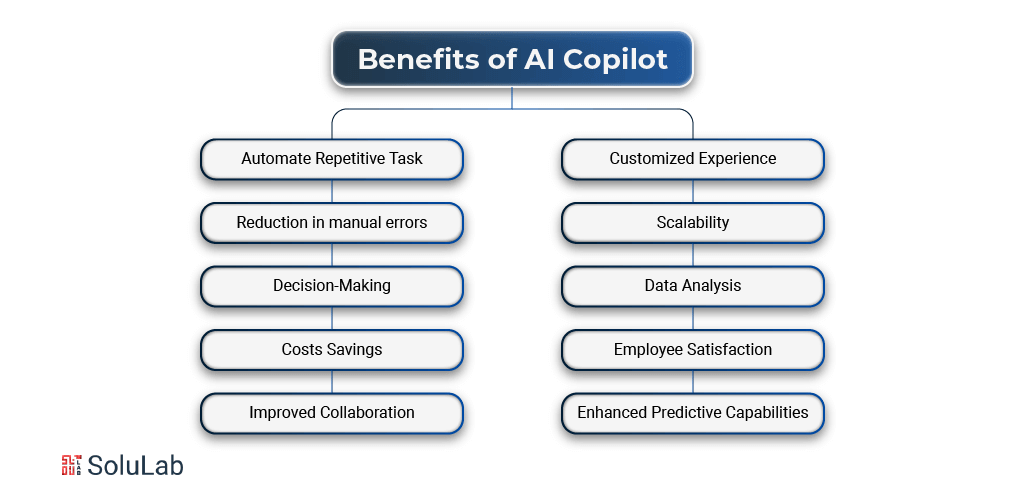
AI Copilots shift how work gets done by pairing intelligence with automation. The result is a faster, more accurate operation with less grunt work clogging everyone’s day. Here’s what that looks like in practice.
1. Automate Repetitive Task
Data entry. Schedule management. Report generation. These tasks aren’t strategic, but they eat a real chunk of the workday. AI Copilots take them off the plate entirely, which means your team spends less time on busywork and more time on work that actually requires judgment.
2. Reduction in manual errors
Manual processes break. Someone fat-fingers a number, misses a field, or copies the wrong row. AI Copilots bring consistency to tasks that used to depend entirely on human attention. Fewer errors means more reliable output — and it protects the organization’s credibility in ways that are easy to overlook until something goes wrong.
3. Decision-Making
Speed matters when markets shift. AI Copilots scan large volumes of data and surface what decision-makers actually need, fast. Real-time data-driven suggestions mean you’re not waiting on a weekly report to know something has changed. You can react while it still matters.
4. Costs Savings
Automating tasks that previously needed a person reduces labor costs directly. But the savings extend further: fewer errors, fewer delays, less operational friction. The ROI case for AI Copilots tends to be cleaner than most software investments because the cost reduction shows up in multiple places at once.
5. Improved Collaboration
Shared context is what makes teams work well together. AI Copilots centralize information and push real-time updates to everyone who needs them. Instead of five people maintaining five different versions of a document, the Copilot keeps one source of truth and makes it accessible — which makes working together a lot less painful.
6. A Customized Experience for Users
AI Copilots learn usage patterns over time. The suggestions get more relevant. The responses get sharper. It’s a tool that adapts to how each person works rather than requiring them to adapt to it — which is actually the harder problem most software never solves.
7. Scalability
As your business grows, your AI Copilot grows with it. More volume, more teams, more complexity — it handles the added load without needing proportional headcount increases. That’s not nothing when you’re trying to scale without your operational costs scaling at the same rate.
8. Data Analysis
Large datasets are only useful if someone can read them fast enough to act. AI Copilots process and analyze data at a speed no human team can match, surfacing patterns and insights on demand. This Generative AI for Data Analysis and Modeling gives businesses the full picture they need before making a call, not a partial one assembled from different spreadsheets after a two-hour meeting.
9. Employee Satisfaction
Nobody went into their career hoping to spend four hours a day on data entry. Take the tedious work away and people actually start enjoying what they do again. AI Copilots that handle the repetitive tasks and show up when employees are stuck end up improving workplace morale in a way that’s hard to manufacture any other way.
10. Enhanced Predictive Capabilities
AI Copilots use predictive analytics to flag risks, spot opportunities, and identify trends before they become obvious. That kind of forward visibility lets businesses plan strategically rather than react constantly. Staying ahead of a problem costs far less than cleaning it up after.
Types of AI Copilots
AI Copilots aren’t one thing. They come in different forms depending on how broad or narrow a job they’re built for. Three main types cover most of what businesses actually deploy.
1. General Purpose AI Copilot
These do a bit of everything. Writing assistance, coding help, research, summarizing meetings, answering open-ended questions. They’re the Swiss army knife of AI tooling.
ChatGPT, Apple’s Siri, Google Bard, and Bing AI all fall here. Whether you’re a student, a developer, or a business analyst, a general purpose Copilot can handle most tasks you’d throw at an assistant.
- Writing assistance: Blogs, emails, summaries, etc.
- Coding help: Generating scripts, debugging, and suggesting optimizations.
- Research support: Gathering and summarizing data.
- Conversational AI: Providing answers and guidance on diverse topics.
2. Industry-specific AI Copilot
These are built for a specific sector, with domain knowledge baked in. A general purpose tool can answer a finance question. An industry-specific Copilot actually understands the regulatory context, the workflows, and the edge cases.
- Finance: Analysis that used to take hours now runs in minutes. AI Agents for Finance handle fraud detection and automated reporting on top of that.
- Healthcare: AI in healthcare patient data is stored and managed digitally, not manually. Diagnostic support is built in.
- Manufacturing: Quality control, defect detection, packaging oversight — the Copilot tracks all of it so problems surface before products ship.
The payoff here is specificity. You get a system that fits your processes rather than something generic you have to work around.
3. Function specific AI Copilot
Function-specific Copilots do exactly one thing, and they do it well. GitHub Copilot is for software development. That’s it. You won’t use it to write a marketing email.
Canva handles visual content. Jasper and similar tools handle copywriting and content marketing. Zendesk AI manages customer queries. In HR, function-specific Copilots screen resumes, schedule interviews, and cut the manual overhead from hiring. The trade-off is narrow scope for genuine depth in that one area.
AI Copilot Use Cases for Businesses
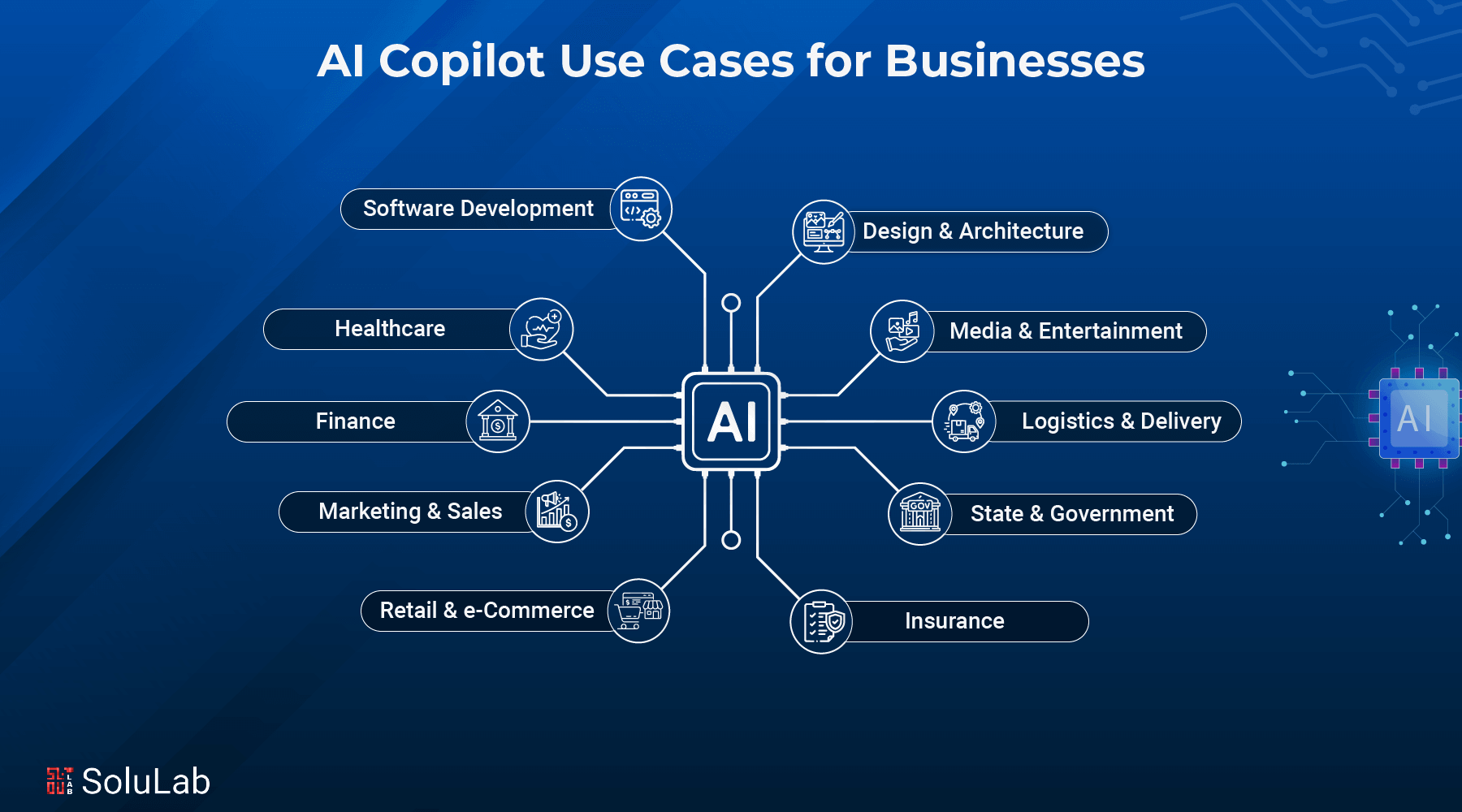
1. Healthcare
Healthcare has always been buried in documentation. Record-keeping, diagnostics, patient management — each one is complex on its own. Together, they create a workload that consumes clinical staff time that should be going to patients. AI Copilots change that equation. Tasks that used to take hours now take minutes. Errors that used to creep in from manual work get cut.
On the clinical side, AI Copilots organize and analyze patient data so diagnoses come faster and treatment plans are grounded in the full picture, not whatever the clinician can recall. Appointment scheduling, patient reminders, and schedule optimization for healthcare blockchain companies providers are all handled automatically. Copilot 365 can also run comprehensive research across large medical datasets, pulling out patterns in patient care that individual review would miss entirely.
2. Finance
AI in Finance handles credit, market, and operational risk by scanning massive datasets and flagging problems before they land on someone’s desk as a crisis. Financial reporting gets automated and stays in compliance without someone manually checking every figure against regulatory standards. The artificial intelligence algorithms inside Copilot 365 watch transaction patterns and catch anomalies that point to fraud — making the whole financial operation harder to exploit.
3. Marketing and Sales
Most marketing campaigns underperform because the targeting is off. AI Copilots read customer data and build campaigns around what people actually respond to, not assumptions about what they might.
Content management gets more consistent across channels. Customer behavior analysis informs strategy before campaigns go live rather than after they fail. Teams managing social channels can use social engagement tools to keep engagement high across platforms without spreading thin. The Copilot handles the monitoring and the scheduling; the team handles the creative decisions.
4. Human Resources
Hiring at scale is a grind. AI Copilots screen resumes fast and surface the candidates who actually match the criteria — which means hiring managers spend time on real decisions, not on filtering. Once someone’s hired, AI personalizes onboarding and training to that individual’s role, making the ramp-up quicker and less chaotic. Performance reviews get grounded in actual data: patterns, training gaps, readiness for the next role. All of it tracked and surfaced when it’s needed.
5. Retail and e-Commerce
AI agents in Retail and e-commerce businesses use Copilot 365 to understand who their customers actually are: what they browse, what they buy, what they ignore. That analysis feeds directly into the shopping experience and into marketing strategy, making both sharper. On the inventory side, Copilot 365 predicts demand, which means you’re not stuck with dead stock in one warehouse while another runs dry. And for sales forecasting, it reads market trends alongside historical data to tell you where things are headed — giving strategic planning something real to work from.
6. Insurance
Claims processing is slow by default. Too much paper, too many handoffs, too many manual checks. AI Copilots cut through that by analyzing large datasets quickly to produce accurate risk assessments without the delay. They also personalize policies based on individual history, which is a better experience than the one-size approach. And chatbots powered by Generative AI in insurance handle the steady stream of customer queries that would otherwise tie up staff on both sides.
7. State & Government
Government agencies deal with scale that most private organizations never face. AI Copilots bring structure to that: citizen services get faster, documentation gets automated, and resource allocation improves because the data backing those decisions is actually being analyzed. Monitoring public infrastructure, supporting policy work with real data analysis, cutting bureaucratic delay — all of it becomes more tractable. Transparency improves too, which matters when public trust is on the line.
8. Logistics and Delivery Services
Route optimization, delay prediction, fleet management — all three are data problems at their core. AI Copilots handle them well. Fuel costs come down, shipment tracking becomes real-time, and demand forecasting tells warehouse teams what to stock before the demand spike arrives rather than after. In practice, this is where logistics companies find some of their fastest ROI from AI.
9 Media & Entertainment
Production timelines are tight, and content teams are often stretched. AI Copilots take on video editing assistance, script drafts, and content recommendations based on what each viewer actually watches. That personalization layer improves engagement in ways generic recommendations never do. On the advertising side, AI optimizes placement and reach — which is where a lot of the revenue actually comes from.
10 Content Creation
Tools like Jasper and Copy.ai have become standard for writers and marketers across industries. They generate article drafts, headlines, and ad copy at a pace no human team matches. But the real gain isn’t speed — it’s that the hours saved on first drafts go into strategy and research, where humans do work machines can’t. The output improves because the inputs are better thought-through.
11. Digital Marketing
Digital marketing campaigns need constant adjustment. AI Copilots read campaign data and tell you what’s working, what isn’t, and where to put more budget. Audience targeting sharpens. Content strategy gets grounded in real engagement data rather than intuition. The result is a feedback loop that improves campaign ROI over time instead of starting from scratch every quarter.
12. Design and Architecture
Architects and designers spend a lot of time on iteration. AI Copilots speed that up by offering real-time suggestions and automating the more mechanical design tasks, which clears space for the decisions that actually require expertise.
What changes most is the client presentation layer. Exploring five different design directions in the time it used to take to render one means you walk into a meeting with options rather than a single answer to defend. Every use case here points to the same outcome: Copilots handle the work that slows professionals down so the professional can do the work only they can do.
13. Software Development
This is where Copilot tools have arguably the most obvious track record. Engineers use them to write routines, complete partial code, and debug — the kind of work that’s intellectually dull but time-consuming. GitHub Copilot is the clearest example. Many developers now treat it as a required part of their setup, not an optional add-on.
Cut the time spent on repetitive coding and developers concentrate on the harder problems: architecture decisions, edge cases, performance tradeoffs. The work that actually needs them.
How to Build an AI Copilot for Businesses?
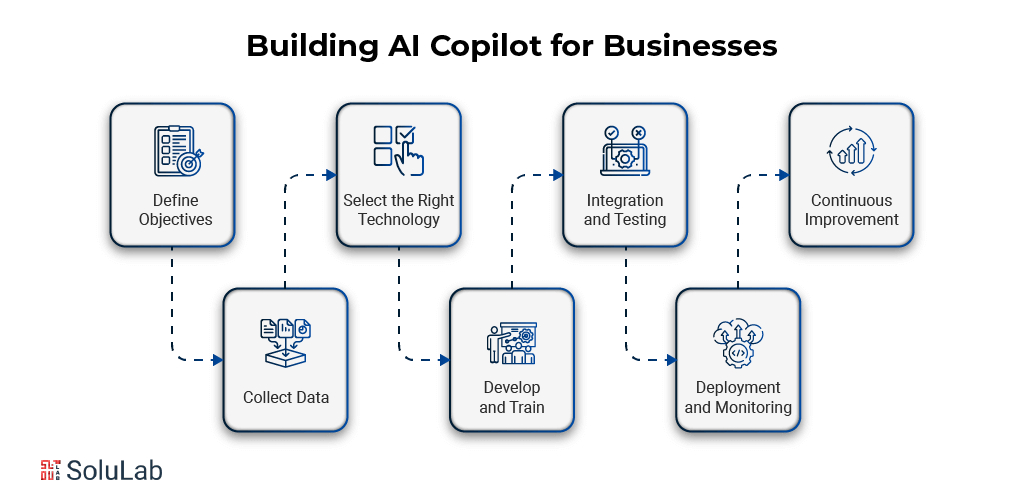
Here’s a step-by-step breakdown of how to actually build an AI Copilot for your business:
1. Define Objectives
Start here. Not with technology — with the problem. Is this about customer service speed? Internal process efficiency? Something more specific? Pin down exactly what you want the Copilot to do before choosing any tools. The clearer the objective, the cleaner the implementation, and the easier it is to measure whether it worked.
2. Collect Data
Data is what makes a Copilot useful instead of generic. Pull from customer behavior records, historical data, and real-time inputs — whatever your specific use case requires. Quality and accuracy matter here. Bad data produces bad answers, and the Copilot will sound confident while being wrong. Get the data organized and secured before you train anything.
3. Select the Right Technology
Choosing poorly here costs you twice: once upfront and again when you have to switch. Assess your current systems and your future direction before committing to a platform. The right choice fits what you already have and doesn’t create a migration problem in two years. Compatibility with existing tools isn’t a secondary concern — it’s the main one.
4. Develop and Train
Training the system on your data is where a generic AI becomes a business-specific one. Feed it the right inputs, run tests throughout the process, and expect iteration. The first version won’t be the best version. Build the expectation of refinement into the project plan so it doesn’t feel like failure when the initial outputs need work.
5. Integration and Testing
Connecting the Copilot to existing workflows is where most deployments actually get complicated. It needs to work alongside the tools people already use — not replace their entire stack on day one. Test early and fix problems before they reach users. Issues caught here are cheap. Issues caught in production are not.
6. Deployment and Monitoring
Going live is the beginning, not the finish line. After deployment, watch the metrics. Where is the Copilot delivering results? Where is it falling short? The monitoring phase is where you learn what the testing phase didn’t tell you — and where the second round of improvements comes from.
7. Continuous Improvement
A Copilot that isn’t updated starts to drift from reality. Business needs shift. New data comes in. User behavior changes. Treat the system as a living product that needs regular attention, not a one-time deployment. The teams that get the most from AI Copilots are the ones that treat improvement as ongoing work, not a phase with an end date.
Challenges and Practices During AI Copilots Implementation
Before you build, understand where things go sideways. These are the real blockers:
1. Implementation Barriers
Getting AI into a business isn’t just a technology problem — it’s a people problem. There’s a real financial investment. There’s a learning curve. And getting the right outputs requires good prompts, which means someone has to actually learn how to use the tool properly rather than blame it when it produces garbage.
There’s also the job security fear, and pretending it doesn’t exist doesn’t make it go away. The right approach is encouraging your team to experiment with the tools, double down on what works, and see the Copilot as something that makes their day better rather than shorter. That requires active communication from leadership, not an all-hands announcement and then silence.
2. Ethical and Security Concerns
AI implementation raises ethical and security token offering issues that need to be addressed before they become incidents, not after. Data misuse, privacy violations, and biased outputs are real risks when AI systems aren’t actively monitored. Businesses need security protocols, clear ethical standards, and regular audits. Not as a compliance checkbox — as actual operating practice.
3. Skill Requirements
AI Copilots demand new skills. Knowing how to write a good prompt. Understanding what the output means. Recognizing when the Copilot is wrong. These aren’t optional skills for power users — they’re baseline requirements for getting value from the tool. Invest in training, build upskilling into the rollout plan, and make clear that learning to use AI well is part of the job now. Teams that adapt to that shift do better. The ones that resist it don’t.

Conclusion
AI Copilots aren’t a silver bullet. Financial investment, skill gaps, and ethical questions are real obstacles, and businesses that gloss over them end up with expensive tools that nobody trusts. But the businesses that do the groundwork — clear objectives, good data, proper training, consistent monitoring — end up with something that genuinely changes how work gets done.
For architects and product teams in particular, the design and build workflow is shifting fast. Copilot tools now allow real-time iteration and automated design steps that used to eat weeks of a project timeline. That’s not a marginal improvement — it changes what’s possible in a client engagement.
SoluLab helped AI-Build, a construction tech company, apply generative AI and machine learning to advanced product development in the CAD space. The goal was automating design processes, improving productivity, and cutting down manual work — while keeping accuracy and scalability intact. SoluLab’s AI Copilot Development Company expertise drove the AI integration, improving efficiency and performance in a domain where precision matters. If you’re working through a similar challenge, SoluLab’s team is ready to work through it with you — contact us today.
FAQs
Shipra Garg is a tech-focused content strategist and copywriter specializing in Web3, blockchain, and artificial intelligence. She has worked with startups and enterprise teams to craft high-conversion content that bridges deep tech with business impact. Her work translates complex innovations into clear, credible, and engaging narratives that drive growth and build trust in emerging tech markets.
![AI Copilot for Sales and Marketing: A Comprehensive Guide [2026]](https://www.solulab.com/wp-content/uploads/2025/01/AI-Copilot-for-Sales-300x149.png)