


Reduced Operational Costs
Minimize manual effort, repetitive work, and avoidable errors to make better use of business resources.

Workflow automation services design and build software that moves tasks, data, and approvals between people and systems without manual handoffs. SoluLab delivers them for funded startups, founders, and SMBs, combining RPA, AI agents, and system integrations that cut repetitive tasks and errors. Find your top 5 automation opportunities with a free assessment.












AI workflow automation adds machine learning and large language models to rule-based workflows, so the automation can read documents, classify requests, and make judgment calls that fixed rules can't. A rule-based workflow routes an invoice. An AI workflow reads it, checks it against the purchase order, and flags mismatches for a person to review. Our AI workflow automation guide covers the concepts in more depth.
Our workflow automation services help businesses streamline operations, reduce manual work, and improve productivity through intelligent automation solutions.
Automate repetitive business tasks, standardize workflows, and improve operational efficiency. Explore our business process automation services to streamline your operations.
.svg)
Automate rule-based tasks such as data entry, document handling, and system updates using software bots. Learn more about our RPA development services and robotic process automation solutions.

Use AI to automate complex workflows, support decision-making, and handle tasks that require data analysis. Discover how AI enhances business process automation.
Connect applications, platforms, and business systems to enable seamless data exchange and coordinated workflows across your organization.
Automate document extraction, data entry, validation, and processing to reduce manual effort, minimize errors, and accelerate information handling.

Streamline customer support workflows, automate ticket routing, and improve response times with consistent, efficient service processes.
Automate approval chains, enforce business rules, and maintain consistent compliance workflows with improved visibility and accountability.
Monitor workflow performance, identify bottlenecks, and continuously optimize processes to improve efficiency and support business growth.
Workflow automation services help businesses eliminate repetitive tasks, connect disconnected systems, and improve operational efficiency without increasing manual workloads. Key benefits include:
Minimize manual effort, repetitive work, and avoidable errors to make better use of business resources.

Automate routine activities so employees can focus on strategic planning, customer relationships, and higher-value tasks.
Apply standardized business rules to reduce data-entry mistakes and maintain consistent process execution.
Connect CRMs, ERPs, accounting platforms, and other business applications to improve information flow across teams.
Monitor workflow progress, identify bottlenecks, track performance, and maintain clearer accountability across operations.
Handle growing transaction volumes and expanding workloads without proportionally increasing administrative effort.
Introduce controlled approvals, access permissions, audit trails, and consistent documentation to support governance requirements.

Tell us which tasks eat your team's week. Our free assessment scores your workflows and shows the five worth automating first, with estimated hours saved.
Get My Free Automation AssessmentSoluLab's workflow automation projects show measurable gains: UpdateIA cut manual workflows by 80% and runs tasks 3x faster with 14 coordinated AI agents, and Amanbank cut average onboarding time by 60% and support workload by 50% with AI chatbots and voice agents.
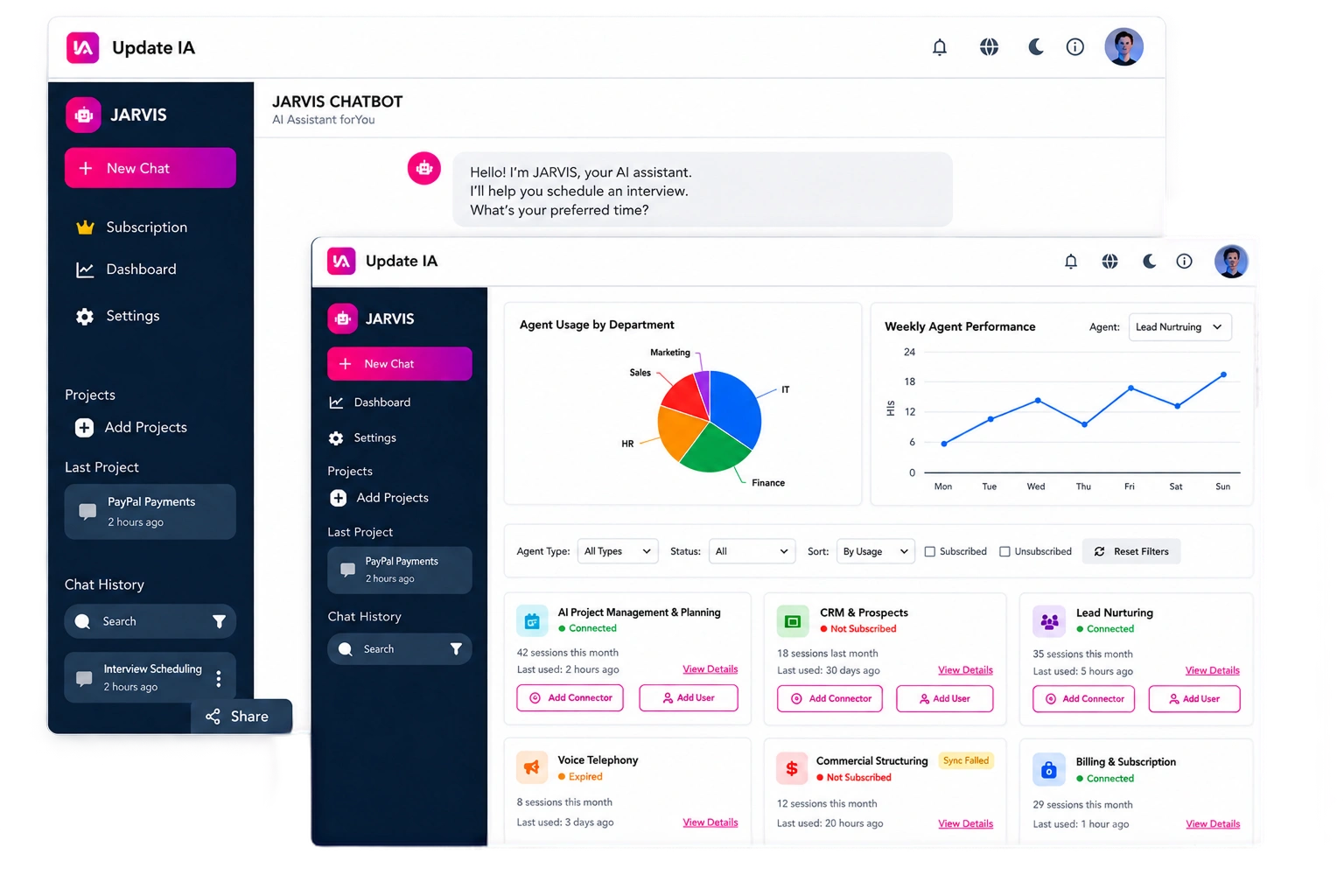
AI Agents Transforming Enterprise Workflows
A French AI startup needed one platform to replace separate HR, CRM, finance, and legal tools that slowed work down. SoluLab built UpdateIA, where a central orchestrator agent coordinates 14 specialist agents that handle data entry, billing, lead nurturing, and compliance checks, with a no-code workflow builder and human review triggers. The platform meets GDPR and EU AI Act requirements and connects to Google Workspace, Microsoft 365, Salesforce and HubSpot.
Read the full UpdateIA case study ➥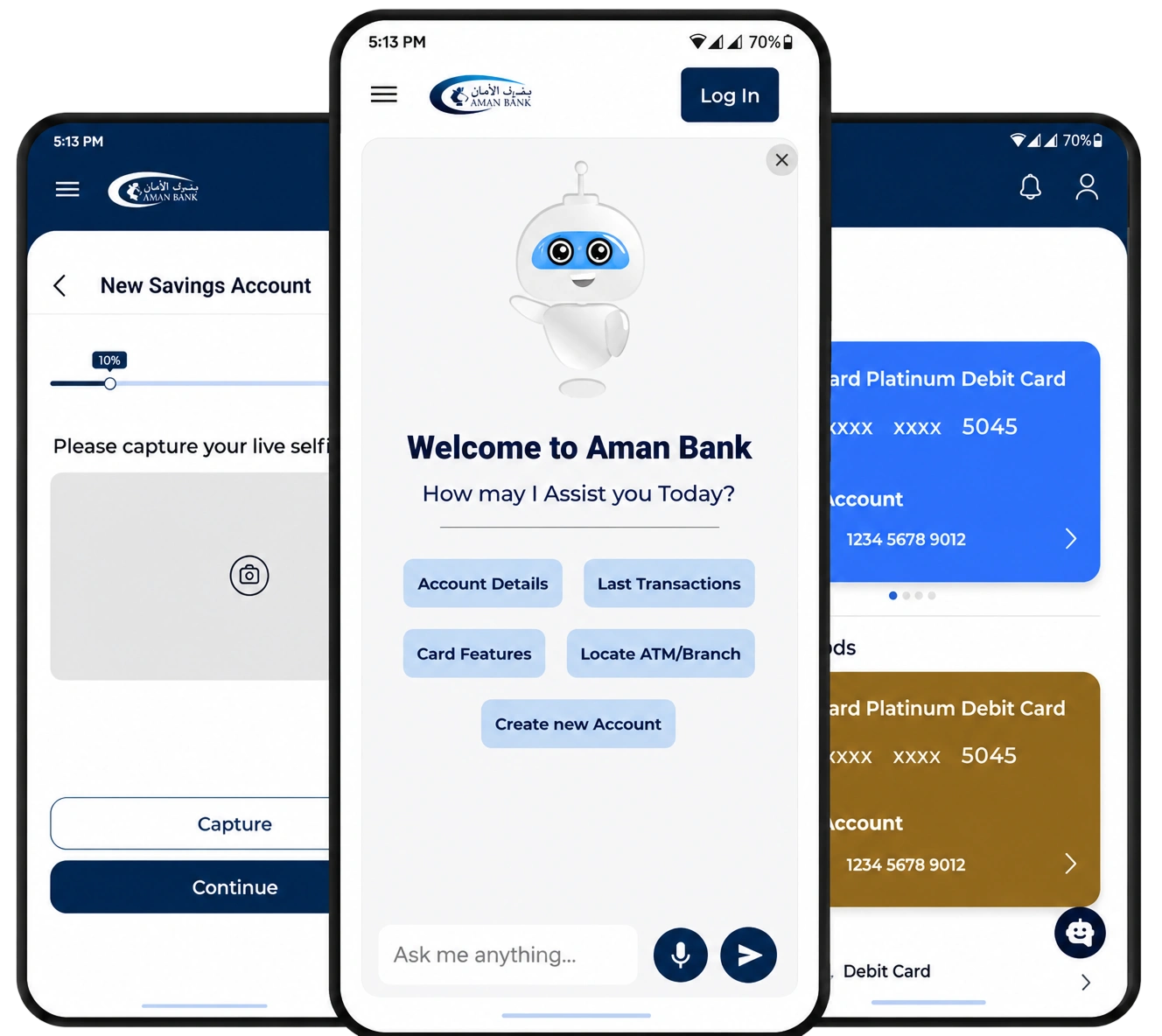
Generative AI Mobile Banking Platform
Amanbank, a Libyan bank serving about 750,000 customers, had slow manual onboarding and support that only worked during office hours. SoluLab automated onboarding with digital KYC, OCR document capture, and digital signing, and added a generative AI chatbot and voice agent for balances, transfers, card requests, and bill payments.
Read the full generative AI banking case study ➥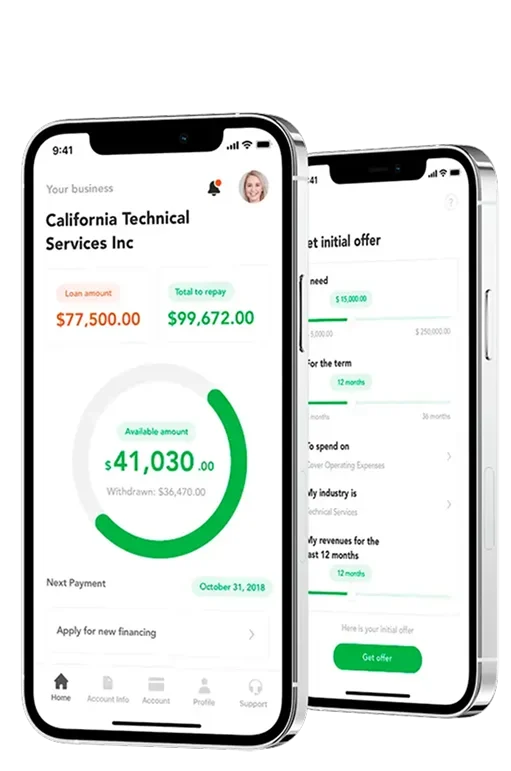
Instant Loans App for Small Businesses
An online lending platform that lets small businesses apply for and receive quick funding from a mobile app, replacing paperwork-heavy loan applications with an automated application and approval workflow.
Read the full instant loans app case study ➥SoluLab builds workflow automation with the tool that fits each step: Zapier, Make, n8n or Power Automate for simple app-to-app flows, UiPath or Automation Anywhere for RPA, LangGraph and OpenAI or Anthropic models for AI agents, and custom Python or Node.js services for complex processes. We stay tool-agnostic, so you don't pay for licenses you don't need.
 Zapier
 Make
 n8n
 Microsoft Power Automate
 UiPath
 Automation Anywhere
 Power Automate Desktop
 LangGraph
 LangChain
 CrewAI
 OpenAI APIs
 Anthropic APIs
 AWS Textract
 Azure AI Document Intelligence
 Google Document AI
 Camunda
 Temporal
 Apache Airflow
 Python (FastAPI)
 Node.js
 PostgreSQL
 Redis
 AWS
 Azure
 Google Cloud
 Docker
 Kubernetes
 Grafana
Our workflow automation services help businesses across industries reduce manual work, improve process accuracy, streamline operations, and scale efficiently with intelligent automation solutions.


Automate patient onboarding, appointment scheduling, claims processing, medical documentation, and billing workflows.

Streamline KYC verification, transaction monitoring, loan processing, compliance checks, and financial reporting.


Automate order processing, inventory updates, returns management, customer notifications, and sales reporting.


Optimize production scheduling, quality control, inventory tracking, procurement, and supply chain coordination.

Automate shipment tracking, dispatch scheduling, delivery notifications, invoice processing, and fleet documentation.


Simplify lead management, property listing updates, document verification, contract workflows, and tenant communications.

Automate employee onboarding, ticket routing, software deployment workflows, incident management, and customer support operations.


Streamline resume screening, interview scheduling, employee onboarding, leave approvals, payroll inputs, and performance reporting.
Workflow automation helps businesses simplify routine operations, connect business applications, and reduce manual intervention. Here are six practical use cases that improve productivity and operational efficiency.
Automate invoice data extraction, payment approvals, reconciliation, and payment reminders to reduce processing delays and manual accounting errors.

Streamline employee document collection, account provisioning, training assignments, leave approvals, and HR record updates through connected workflows.

Automatically capture incoming leads, assign them to sales representatives, update CRM records, and trigger personalized follow-ups based on customer activity.
Automate document classification, information extraction, contract reviews, approval routing, and secure storage to accelerate document-heavy business processes.
Automatically categorize support tickets, assign priorities, route requests to relevant teams, and escalate unresolved issues to improve response times.
Connect business applications to synchronize records, eliminate duplicate entries, generate scheduled reports, and deliver timely operational insights to decision-makers.
Workflow automation services cost roughly $4,000 to $8,000 for a single rule-based workflow, $12,000 to $26,000 for an AI-powered workflow with document processing, and $45,000 to $80,000 for a department-wide program of five or more workflows, with an offshore team. Tool licenses are billed separately by each vendor.
$4,000 to $8,000
Lead routing from forms to CRM and Slack
1 engineer, part-time QA
About 3 to 4 weeks
$12,000 to $26,000
Invoice processing with AI extraction and human review
2 engineers incl. AI engineer
About 6 to 8 weeks
$45,000 to $80,000
5+ workflows across ERP, CRM and HR, with AI agents
4 engineers, QA and PM
About 3 to 4 months
Agreed price per automated workflow
A defined process with clear inputs and outputs
Monthly fee for a dedicated team
Automating several departments over time
Monthly retainer
Monitoring, fixes and updates after go-live
SoluLab suits teams that need RPA, AI and integration skills together, with assessment, testing and monitoring included. An in-house automation team gives the most control but takes months to hire across those skills. Freelancers can build single Zapier or Make flows cheaply but rarely cover AI agents, RPA and long-term monitoring.

Share the tasks that slow your team down. Our free assessment scores your workflows and returns the five worth automating first, with hours saved and an estimated cost for each.
Get My Free Automation AssessmentOur workflow automation roadmap identifies repetitive tasks, maps existing processes, and implements scalable automation to improve efficiency, accuracy, and business performance.

Analyze existing business processes, identify repetitive tasks, document bottlenecks, and evaluate automation opportunities based on operational impact and feasibility.

Map current workflows, define business rules, identify system dependencies, and establish clear automation requirements, success metrics, and implementation priorities.
Select suitable automation technologies, design workflow logic, plan system integrations, and establish security controls, exception handling, and approval mechanisms.
Build automated workflows using appropriate platforms, connect business applications and databases, configure triggers, and implement AI capabilities where required.
Validate workflow logic, test integrations, simulate exceptions, verify data accuracy, and confirm that automated processes meet operational and security requirements.
Deploy workflows into production, configure monitoring, document operating procedures, and train teams to manage automated processes effectively.
Track workflow performance, analyze failures and processing times, refine automation rules, and expand successful workflows as business requirements evolve.
Teams choose SoluLab for workflow automation because it starts with a scored assessment rather than a tool pitch, combines RPA, AI agents and integrations under one team, and measures every workflow against a before baseline. SoluLab has delivered 500+ projects since 2014 and holds 4.9 ratings on Clutch and GoodFirms.
We score your workflows first, so budget goes to the five with the clearest return, not the easiest demo.

APIs, low-code, RPA or AI agents are picked per step, which keeps license costs down.

Our team has shipped multi-agent systems like UpdateIA's 14-agent platform, not just chatbots. See our AI agent development company page.

Confidence thresholds and approval steps stop AI from acting alone on risky decisions.

Every workflow launches with a before baseline and a dashboard showing hours saved and error rates.
Audit trails, role-based access and GDPR-ready data handling come standard, with experience in regulated areas such as banking and generative AI in tax.

We serve clients in the US, Europe and the Middle East, including teams working with our AI development company in Saudi Arabia.
SoluLab helped us bring AI directly into the banking experience. From customer onboarding and account assistance to money transfers and card requests, the AI chatbot and voice agents gave customers a much faster way to complete everyday banking tasks. The solution helped us reduce onboarding time while taking significant pressure off our support teams.

CEO, Amanbank
SoluLab successfully delivered the AI automation system we needed for our FinTech platform. Their team understood how to translate complex business workflows into practical AI agents and worked closely with us throughout development. The result was a much more streamlined approach to automating tasks that previously required significant manual effort.

Co-Founder, FinTech Platform
SoluLab turned our verified tax forms into records we can actually prove. Every form, every change and every approval now has evidence behind it, which has made audit preparation and client conversations far more straightforward.

CEO, ComplyExchange
Intelligent workflow automation draws on several services working together: process assessment, AI and machine learning development, RPA, document processing, system integration, and monitoring. Together they let workflows read unstructured data, make decisions and act across tools, while humans review the cases that carry risk.
The best AI workflow automation tools depend on the job. Zapier and Make suit simple app-to-app flows, n8n suits self-hosted control, Microsoft Power Automate suits Microsoft 365 teams, UiPath leads enterprise RPA, and LangGraph suits custom AI agents. Many businesses combine two or more tools.
AI agent workflow automation uses autonomous AI agents that plan and complete multi-step tasks across your tools, like reading an email, updating the CRM and drafting a reply. Unlike fixed workflows, agents adapt to each case, while orchestration and human review steps keep them within set limits.
AI workflow automation combines rule-based workflows with machine learning and large language models, so automation can handle unstructured inputs such as emails, documents and chat messages. It classifies, extracts and decides where fixed rules fall short, and routes uncertain cases to a person for review.
Traditional workflow automation in insurance follows fixed rules, such as routing a claim by type or amount. Agentic AI reads claim documents, checks policy terms, asks for missing information and recommends a decision, adapting to each case. Most insurers combine both, with adjusters approving agent recommendations on complex claims.
Workflow automation automates a sequence of tasks within one process, like routing an approval. Business process automation is broader: it redesigns and automates an end-to-end process across departments and systems, often linking many automated workflows together. Most BPA programs are built from several workflow automations.
In financial services, RPA uses bots to mimic human clicks in systems without APIs, such as legacy core banking screens. Workflow automation orchestrates the whole process, like loan approval, across people and systems. RPA is often one step inside a larger automated workflow, not a replacement for it.
AI workflow automation reduces insurance processing times by extracting data from claim forms and documents instantly, validating it against policies, flagging fraud signals and routing straightforward claims for fast approval. Adjusters spend their time on complex cases instead of data entry, which shortens the queue for everyone.
With an offshore team, a single rule-based workflow costs roughly $4,000 to $8,000, an AI-powered workflow with document processing $12,000 to $26,000, and a department-wide program of five or more workflows $45,000 to $80,000. Tool licenses such as UiPath or Power Automate are billed separately.
A single workflow usually takes about four to six weeks to implement, including assessment, design, build, testing and a pilot. AI-powered workflows with document processing take about six to eight weeks, and a department-wide program of several workflows takes three to four months.
Start with workflows that run often, follow clear rules, cost money when errors happen, take 15 minutes or more per run and touch only a few systems. Invoice processing, employee onboarding, support ticket triage and KYC onboarding are common first choices because they score high on all five.