Key Takeaways
- Using AI in the workplace means embedding it into how work already happens, not handing staff a tool and hoping.
- Giving people access is the easy half. Most organisations have done it. Getting daily habitual use is where the gap is.
- The strongest use cases share three traits: high volume, clear rules, and a fast way to check whether the output was right.
- Insufficient skills, not insufficient technology, is what leaders name as the main barrier to integrating AI into workflows.
- Banning tools does not stop usage. It moves it somewhere you cannot see, audit, or protect.
- Measure time returned and rework rates, not licences purchased or tools adopted.
- Start with one workflow, run it alongside the existing process, and expand only when the numbers hold for a few weeks.
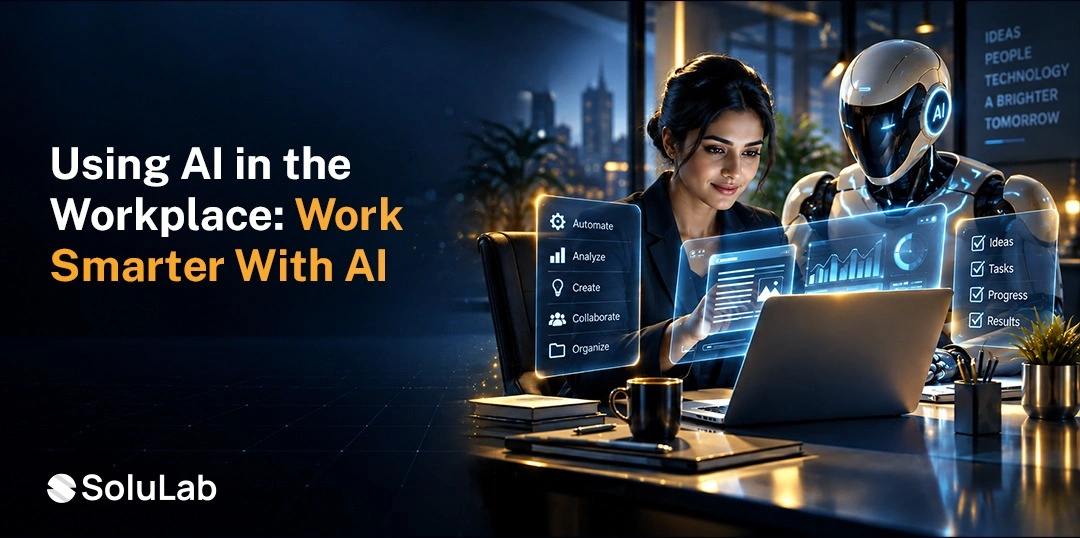
Using AI in the workplace means applying machine learning and language models to everyday business work: drafting documents, summarising meetings, analysing data, answering customer questions, screening applications and automating multi-step processes.
Done properly, the AI development solutions sit inside an existing workflow with defined boundaries and a human accountable for the output.
Deloitte’s State of AI in the Enterprise 2026, drawn from 3,235 leaders across 24 countries, found workforce access to sanctioned AI tools grew by 50% in a single year, from under 40% to around 60% of workers.
This guide covers where AI genuinely helps at work, where it should not be used at all, how to roll it out responsibly, and how to tell whether any of it is actually working.
What Does Using AI in the Workplace Mean?
Using AI at work means a model is doing part of a real job: reading something, drafting something, deciding something, or triggering an action in another system. The test is whether removing it would change how the work gets done.
1. Three Levels of Workplace AI
Assistive comes first. A person opens a tool, asks for something, and decides what to do with the answer. Almost all current workplace AI sits here.
Embedded comes next. The AI lives inside software people already use, summarising a ticket or drafting a reply without anyone opening a separate window. Adoption is far higher at this level because nobody has to remember to use it.
Autonomous is the third. The system acts across systems with permission, completing a task end to end and escalating what it cannot handle. Real, but far rarer than the coverage suggests.
2. Why the Level Changes Your Risk
An assistive tool producing a bad draft wastes ten minutes. An autonomous system with write access to your CRM producing a bad action creates a record someone has to unwind. Scope your governance to the level you are actually deploying, not to the level in the vendor deck.
3. Tools Versus Integration
Buying licences for generative AI tools is procurement. Connecting a model to your own data and workflows is integration, and it is where the durable advantage sits, because anyone can buy the same subscription you did.
Why Are Businesses Using AI in the Workplace?
Because the returns show up in time and cost before they show up anywhere else, in Deloitte’s research, two-thirds of organisations reported productivity and efficiency gains as the benefit achieved so far, while only 34% said they were using AI to deeply transform the business.
1. Productivity on Work People Dislike Anyway
The first wins are almost always in drafting, summarising, formatting, and searching. Nobody is sentimental about writing meeting notes. Removing that work is popular internally, which matters more for adoption than any efficiency calculation.
2. Automation of Repetitive Tasks
Rule-based, high-volume work moving off human queues entirely. This is the most measurable category and often does not need a language model at all, which is why serious AI in business process automation programmes mix deterministic automation with models rather than defaulting to the model.
3. Lower Operating Cost Per Transaction
Support, review, and processing costs traditionally scaled with headcount. Once a model handles the routine tier, the cost curve flattens. That changes how you plan for a demand spike.
4. Faster Decisions With Better Inputs
Not AI making decisions. AI assembling the inputs faster so a person decides sooner. The distinction matters both legally and practically.
5. Better Employee and Customer Experience
Staff spend less time on administration and more on the work they were hired for. Customers wait less. Both are real, and both are harder to put on a spreadsheet than a cost saving, which is why they get undersold internally.
6. Competitive Pressure, Honestly
Worth naming. A substantial share of workplace AI spend exists because competitors are spending. That is not a bad reason to start, but it is a bad reason to skip the scoping work.
10 Practical Ways to Use AI in the Workplace
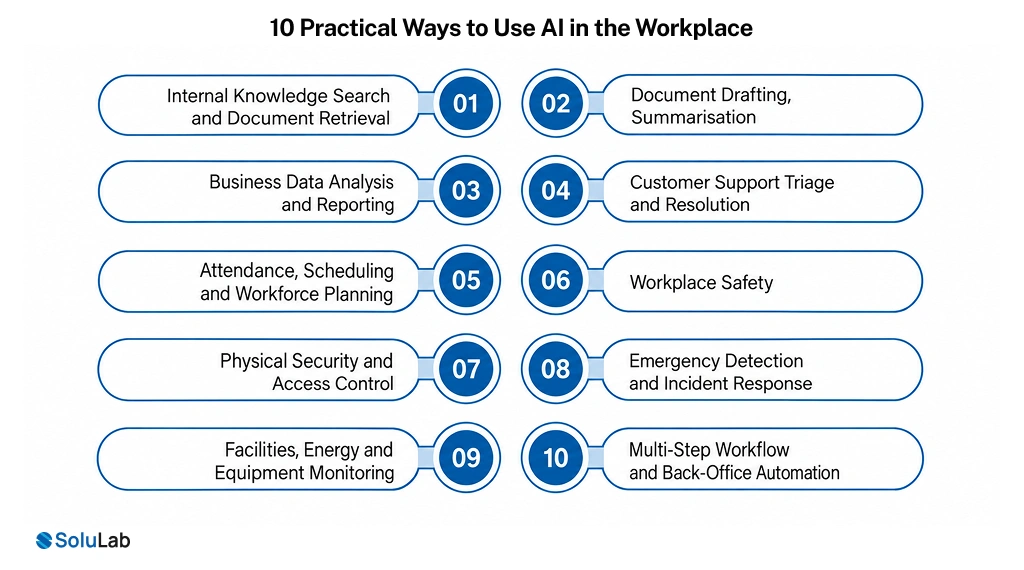
Most coverage of workplace AI stops at knowledge work, which leaves out the frontline, facilities and safety teams where computer vision and sensor models have been running quietly for years.
1. Internal Knowledge Search and Document Retrieval
The most underrated item on this list. Employees waste enormous time hunting for documents, policies and prior work. Retrieval over your own content answers the question instead of returning ten links, which is why building a RAG platform is often the highest-value first project in a knowledge-heavy business.
2. Document Drafting, Summarisation
First drafts of reports, proposals and policies, summaries of long documents, and transcription with structured extraction of decisions, owners and deadlines. At scale this becomes intelligent document processing, pulling structured data out of invoices, contracts and forms. Meeting capture in particular has near-universal adoption, because it is embedded rather than assistive and nobody has to remember to switch it on.
3. Business Data Analysis and Reporting
Natural language questions against your own data, generating queries, charts and written commentary. Useful precisely because it removes the analyst bottleneck on simple questions and leaves them the hard ones.
4. Customer Support Triage and Resolution
Classifying tickets, drafting replies grounded in your documentation, and resolving routine requests outright. The mature version is covered in our work on AI in customer service, and the key design decision is where the model stops, and a person takes over.
5. Attendance, Scheduling and Workforce Planning
Biometric or badge-based attendance without manual timesheets, shift rostering that respects skills, certifications and rest rules, absence forecasting ahead of a shift, and automatic backfill when someone calls in. For multi-site operations, this is one of the clearest returns available, because manual rostering consumes supervisor hours every single week.
On the joining side, an HR chatbot handles the repetitive policy and leave questions that fill an HR inbox. Selection decisions are a different matter, covered in the next section.
6. Workplace Safety
Computer vision on existing camera feeds checks whether personal protective equipment is being worn, whether someone has entered an exclusion zone, whether a forklift route is blocked, or whether a spill has appeared. Manufacturing, warehousing, construction and logistics sites were among the earliest serious adopters of this, well before anyone was talking about chat assistants.
Two things make it work. The camera infrastructure usually already exists, and the verification loop is immediate because an alert is either right or obviously wrong.
7. Physical Security and Access Control
Anomaly detection across door logs and camera feeds, tailgating detection at secure entries, unattended object alerts, and after-hours movement flagging. Security teams adopted AI early for the same reason support teams did: alert volume exceeded what humans could review, and most of what they were reviewing was nothing.
8. Emergency Detection and Incident Response
Smoke and fire detection from video ahead of a conventional alarm, leak and gas detection from sensor arrays, automated mass notification to staff, and evacuation routing that accounts for where the incident actually is. The value here is measured in minutes of earlier warning, which is a different calculation from productivity and usually an easier one to get signed off.
Design this with a deliberately low tolerance for missed detections and an accepted rate of false alarms, not the other way round.
9. Facilities, Energy and Equipment Monitoring
Predictive maintenance on lifts, HVAC and building plant, occupancy sensing that adjusts heating and lighting to real use, and space utilisation analysis that tells you how much of your floor plate is actually occupied. Sensor data most buildings were already collecting, finally being used for something.
10. Multi-Step Workflow and Back-Office Automation
Data entry between systems, form filling, status updates and routine approvals, plus longer processes spanning several systems where a model handles the variation that fixed rules cannot anticipate. Simple cases belong under AI workflow automation rather than a chat interface. The harder end is where AI agent development work concentrates, and it is the hardest of the ten to make reliable.
What Should AI Not Be Used For at Work?
Four categories, and getting these wrong creates legal and reputational exposure that no productivity gain offsets. This section is missing from most workplace AI content and it is the one your legal team will ask about.
1. Final Hiring, Promotion and Termination Decisions
Use AI to summarise applications and schedule interviews. Do not use it to decide. Several jurisdictions now regulate automated employment decision tools specifically, with audit and notification requirements attached. Keep a human as the decision-maker and document that they were.
2. Anything Nobody Can Verify
If the reviewer cannot tell whether the output is correct, there is no review happening. This applies to code nobody on the team can read, legal language nobody can assess, and technical claims outside your expertise. The problem is not model accuracy. It is the absence of a check.
3. Regulated Advice and Client Deliverables Without Review
Medical, legal, financial, and safety-critical output carries professional liability that does not transfer to a vendor. Draft with AI, sign off as a human, and record who signed.
4. Anything Involving Data You Cannot Put Into That Tool
Customer records, unreleased financials, source code, personal data, and anything under NDA. Which tool matters here, because a consumer account and an enterprise agreement carry entirely different data handling terms.
How to Use AI Responsibly at Work?
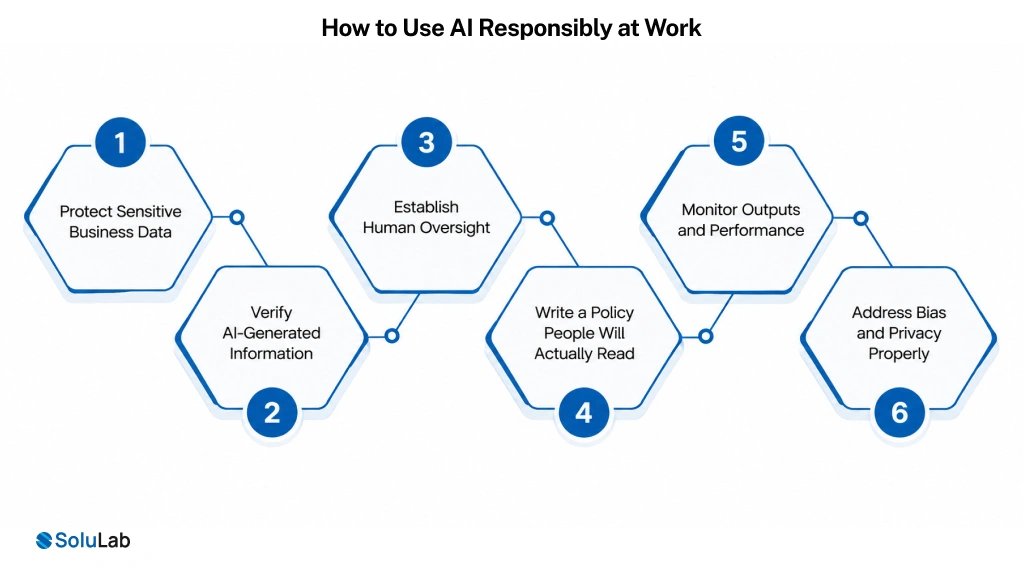
Responsible use is mostly a set of clear, enforceable rules rather than a philosophy. Six practices cover the majority of real risk.
1. Protect Sensitive Business Data
Name which tools are approved and what categories of data may never go into a prompt. Be specific. Use good judgment” produces either paralysis or shadow usage, usually both in different departments.
2. Verify AI-Generated Information
Anything factual, numerical, legal, or cited gets checked before it leaves the building. Build the check into the workflow rather than relying on individual diligence, because diligence decays under deadline pressure.
3. Establish Human Oversight
Define which outputs a person must approve and give that person the authority and the interface to actually intervene. An override nobody is trained to use is decoration.
4. Write a Policy People Will Actually Read
One page. Approved tools by name, prohibited data categories, a disclosure rule for AI-assisted work, and who to ask when unsure. Require acknowledgement and record it. A policy in a shared drive is not a control.
5. Monitor Outputs and Performance
Sample review of AI-assisted work, and tracking of where errors cluster. Quality drifts quietly when a model handles work a person used to do, because the informal supervision that caught problems disappears with the task.
6. Address Bias and Privacy Properly
Anything touching people needs testing for disparate outcomes and a documented privacy basis. This is where a responsible AI framework earns its cost, and it is considerably cheaper to build in than to retrofit after a complaint.
How to Implement AI in the Workplace
Eight steps. The sequence matters more than the pace, and teams that start at step three usually redo steps one and two later.
1. Identify Repetitive and High-Value Processes
Find where work queues. Waiting is where cost hides. Count volume, time the steps, and calculate a rough cost per transaction so you have a baseline to beat.
2. Define Measurable Goals
Hours returned per week. Tickets resolved without escalation. Days to produce a report. Pick two or three before you choose a tool, because retrofitting a measurement story to a running project convinces nobody.
3. Select Suitable Tools or Build
Off-the-shelf for generic workflows, custom for anything where your data or process is the advantage. Most organisations need both, and the split usually falls along whether a vendor could serve your competitor equally well.
4. Prepare Your Business Data
Output quality is capped by data quality. Stale documentation, duplicate records, and inconsistent formats all degrade results. This is the least glamorous phase, and skipping it is why accuracy plateaus.
5. Integrate With Existing Workflows
Embedded beats assistive every time on adoption, because nobody has to change their habits. Connecting to the systems people already work in is the bulk of the effort in most AI integration services engagements.
6. Run a Pilot Alongside the Existing Process
Two to four weeks, with the AI output compared against what your team actually did. This gives a real accuracy baseline before anything is at stake, and it is the single highest-value step here.
7. Train People Properly
Leaders in the Deloitte research named insufficient worker skills as the biggest barrier to integrating AI into existing workflows, and the most common response was raising general AI fluency across the workforce. Training is not a launch-day email. Budget for it as a workstream.
8. Measure, Then Scale One Workflow at a Time
Review the numbers against step two, fix what is not working, then add the next workflow. Organisations that launch ten at once cannot diagnose which is failing.
What Is the Future of AI in the Workplace?
The direction is from tools people open toward systems that operate inside workflows. Five shifts are already visible, and the honest framing is that the first two are here and the rest are arriving unevenly.
1. Assistants Embedded Everywhere
The separate chat window disappears. AI shows up inside the document, the ticket, the spreadsheet, and the inbox. Adoption rises sharply when nobody has to remember to use it.
2. Agents Handling Whole Tasks
Systems that complete multi-step work with permission to act, escalating what they cannot resolve. Deloitte reports 85% of companies expect to customise agents to their own needs. Expectation is running well ahead of production deployment, so treat timelines with care.
3. Multi-Agent Systems
Specialised agents coordinating on complex workflows. Genuinely more capable than a single agent on hard problems, and genuinely harder to debug. Build these behind an interface you can swap.
4. Decision Support Rather Than Decision Making
Models assembling evidence, surfacing options and flagging risk, with a person deciding. This is where most regulated industries will settle, and it is a more defensible design than automation for its own sake.
5. Roles Rebuilt Around the Work That Remains
The real change is not headcount. It is that job descriptions get rewritten around judgement, exception handling and oversight, while routine execution moves. Organisations running mature enterprise AI programmes are already redesigning career paths rather than layering tools onto old ones.
How SoluLab Can Help With Workplace AI
We work at the integration layer, which is where most workplace AI projects actually succeed or stall.
1. Custom AI Development
Models and applications built around your data and your processes, for the workflows where an off-the-shelf tool would give you exactly what it gives your competitors.
2. AI Agent Development
Multi-step systems with scoped permissions, audit logging and defined escalation, built for the workflows where variation defeats rules.
3. Generative AI Solutions
Document generation, summarisation, retrieval, and content workflows grounded in your own knowledge base rather than general web knowledge.
4. AI Integration and Workflow Automation
Connecting models to the systems your teams already use, which is consistently the largest and most underestimated part of any workplace AI budget.
5. Enterprise AI Consulting
Process scoring, readiness assessment and roadmap work. An AI consulting engagement can run the process-identification exercise in a couple of weeks and will tell you which workflows are not ready.
Conclusion
Using AI in the workplace is less a technology decision than an operations one. The organisations getting real value spent their first month watching where work queues, picked one boring high-volume process, ran the AI alongside the existing one for a few weeks, and only then expanded. The ones that struggle bought licences and called it a rollout.
If you are starting, resist the roadmap of twenty use cases. Pick the workflow with the most waiting, the clearest rules, and the fastest way to check whether the output was right. What you learn in three weeks of running it in parallel will reshape everything else you planned.
SoluLab, an AI development company, can help your business identify which workflows are genuinely ready, build the integration into the systems you already run, and put measurement and governance in place before go-live rather than after. We will also tell you plainly when a subscription would serve you better than a custom build.
FAQs
Neha is a curious content writer with a knack for breaking down complex technologies into meaningful, reader-friendly insights. With experience in blockchain, digital assets, and enterprise tech, she focuses on creating content that informs, connects, and supports strategic decision-making.