


Turn on AI in an existing tool
What changes
A new feature inside a system you already use
Typical effort
Low

AI integration in business means connecting AI models and agents to the systems your team already uses, such as your CRM, ERP, help desk, and shared drives, so routine work gets done faster and with fewer errors. SoluLab plans and builds these integrations for startups and SMBs, starting with a readiness check that sizes the first pilot.













AI integration is the process of adding AI capabilities, such as language understanding, prediction, or task automation, to software and workflows you already run. The AI reads your data, helps with a decision or completes a step, and the result shows up inside the tool your team already opens every morning.
Most companies don't need a new platform. They need AI inside the systems they already pay for. In practice, that looks like a support assistant that reads tickets in your help desk, a model that scores leads inside your CRM, or a document reader that posts invoices straight to your accounting tool.
Our AI integration services cover the full build. This page is the planning view: the options, the steps, the risks, and the costs, so you can decide where to start before you spend anything.
A new feature inside a system you already use
An AI service reads from and writes to several systems
An agent completes multi-step tasks across systems, with approvals
The workflow is rebuilt with AI at the centre
For SMBs, AI integration in business pays off fastest in customer support, sales operations, finance, operations and reporting. The winning use cases share three traits: the task repeats many times a week, the rules are reasonably clear, and the data already sits in one system.

Classify tickets, draft replies, answer "where is my order?" questions from your order system.

Score leads, summarise calls and update CRM fields automatically. See our guide to integrating AI into CRM.

Read invoices, match them to purchase orders, flag unusual payments for review.
Route internal requests, forecast demand, run quality checks.
Let managers ask questions about their data in plain language instead of waiting for a dashboard.
SoluLab's AI integration services connect AI to the systems SMBs already run: CRM, help desk, ERP and accounting, document workflows, data warehouses and custom apps. We build the connectors, permissions and approval steps, so AI works inside your current tools rather than in a separate platform your team has to learn.
We add lead scoring, call summaries and automatic record updates to Salesforce, HubSpot or your CRM, so reps spend time selling instead of typing. It builds on our CRM and ERP AI integration work.

AI agents read tickets, pull order and account data, and draft or send answers inside Zendesk, Freshdesk or Intercom, with escalation to a person when confidence is low. This is the pattern behind the One Wallet copilot.

Document AI reads invoices and receipts, matches them to orders, and posts them to your ERP or accounting tool, flagging exceptions for review. Your finance team approves instead of keying in data.
OCR and language models pull fields from PDFs, scans and email attachments, then validate them against your records. It's the same approach that cut manual document review by 70% in our aircraft engine valuation platform.
We connect AI agents to your tools with least-privilege access, approval steps and logging, so agents can complete multi-step tasks safely. UpdateIA runs 14 agents this way.

We connect a language model to your database or warehouse so managers can ask questions in plain English and get charts back, with access limited to the data each person is allowed to see.
We add generative AI features such as chat, search and summaries to your web or mobile app through APIs, without a rebuild.
Where old systems lack APIs, we place an integration layer or RPA bots between the AI and the legacy software, so you get AI benefits without a risky migration.

Not sure which process to start with? Map your first AI use case in a 30-minute call with an AI architect, not a salesperson.
Book Your Call NowTo integrate AI into your business, pick one process, check your data, choose the integration method, build a pilot, test with a person in the loop and measure results before expanding. A narrow pilot beats a broad program. Most SMB pilots reach a go or no-go decision in 4 to 8 weeks.
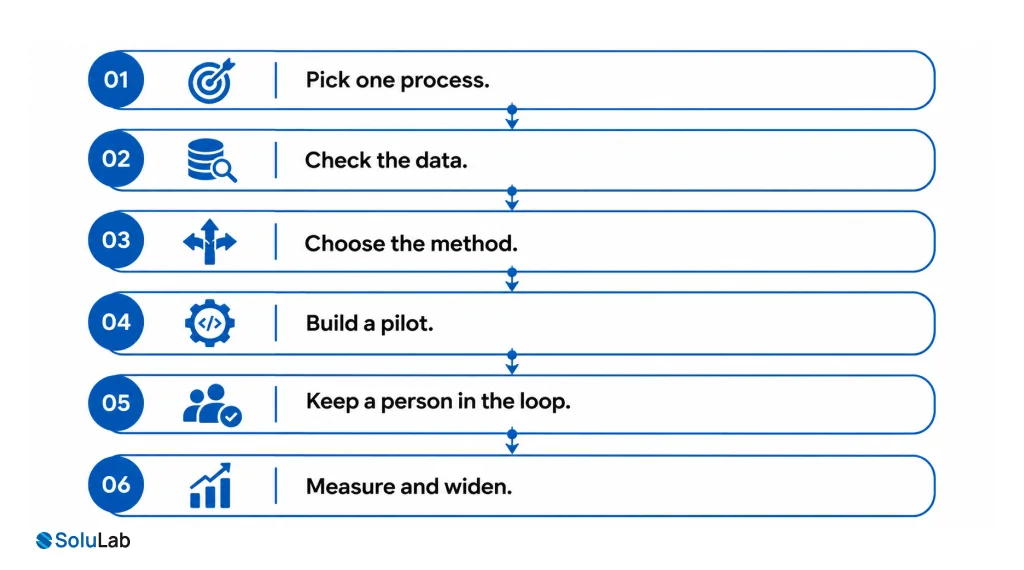
Choose a task with high volume and a clear measure, such as minutes per ticket.
Find where it lives, who owns it and how clean it is.
API call, agent, document reader or a feature inside an existing tool.
Limit it to one team and one workflow.
Staff approve outputs at first.
Compare time, errors and cost against the baseline, then add the next process.
A typical first pilot runs 4 to 8 weeks from kickoff to a go or no-go decision, and 2 to 3 months to production for a single system.
Run the AI beside the current process first. Let staff compare results. Switch over only when the AI matches or beats the human result on a sample of real cases.
Small businesses should start with one repeatable task, use AI features built into tools they already pay for, and add custom integration only where the saving is clear. Set a budget cap and a review date before the first sprint begins.
A small team has little spare time, which makes the first project more important. Pick a task that eats at least a few hours a week, such as answering the same customer questions or typing data between systems. Use this table to decide where AI integration for small business makes sense:
Try it first
Consider light integration
Good candidate
Wait
Easier to connect
Fix data first
Use a person to approve
Can run with spot checks
Not sure whether you need outside help? Read why your business needs AI integration consulting .
To build an app with AI integration, define the user job, choose a model and hosting approach, connect the AI through an API, design for slow or wrong answers, protect user data and test with real inputs. The AI is one feature, not the whole product.
Define what the AI does for the user and what happens when it's wrong.
Choose a hosted model API or a model you run yourself, based on cost, speed and data rules.
Keep API keys on the server, never in the app.
Add fallbacks for timeouts and low-confidence answers.
Log prompts and results, with personal data masked.
Test with real inputs, including odd and hostile ones.
Our step-by-step guide on how to integrate AI into an app goes deeper, and if your product is a mobile app, see our AI mobile app development guide .
↗AI agent integration services connect agents to your tools, set permissions, add approval steps and monitor actions. Providers of AI integration services, including SoluLab, usually bundle agent work with data connection and security review. That bundle matters, because an agent with broad access and no logs is a liability.
If you're asking which service includes AI agent integration services, look for three items in the scope: tool connection with limited access, approval and logging, and monitoring after launch. Our guide to AI agents integration explains each part, and our AI agent development company page covers building the agents themselves.
 01
APIs, webhooks, database access
Connected systems 02
Least-privilege accounts for each agent
Controlled access 03
Human sign-off on risky actions
Human oversight 04
Logs, alerts and weekly review
Ongoing visibilityAI integration in business typically costs $10,000 to $15,000 for a basic single-system integration and $40,000 to $100,000+ for multi-system, company-wide work, based on SoluLab's published ranges. Cost depends on the number of systems, data quality, security needs, human review and model usage. Most projects take 4 weeks to 6 months.
| Engagement | What you get | Typical cost | Typical timeline |
|---|---|---|---|
|
01
AI readiness check
|
Score across 8 dimensions | Free | 3 minutes |
|
02
AI readiness assessment
|
Use-case shortlist, data review, integration plan | $5,000 to $20,000 | 2 to 4 weeks |
|
03
Single-system AI integration
|
One process, one system, person-in-the-loop pilot | $10,000 to $15,000 | 4 to 8 weeks |
|
04
Multi-system integration
|
AI or agents across CRM, ERP, help desk and data | $40,000 to $100,000+ | 3 to 6 months |
|
05
Support and tuning
|
Monitoring, prompt and model updates | $20,000+ | Ongoing |
SoluLab integrates AI using the models, connectors and platforms that fit your stack and data rules: OpenAI, Anthropic and open-source models; LangChain and LangGraph for agents; REST APIs, webhooks and RPA for connections; and AWS, Azure or Google Cloud hosting, with common SMB tools such as Salesforce, HubSpot, Zendesk and QuickBooks.
 GPT-4o
 Claude
 Gemini
 Llama
 Mistral
 LangChain
 LangGraph
 Function calling
 Pinecone
 pgvector
 REST APIs
 Webhooks
 Kafka
 RPA bots
 Salesforce
 HubSpot
 Zendesk
 Google Ads
 Meta Ads
 QuickBooks
 SAP
 Tesseract OCR
 Hugging Face Transformers
 spaCy
 AWS
 Azure
 Google Cloud
 Kubernetes
 Datadog
AI integration carries risks in data privacy, accuracy, bias and accountability. Use clear ownership, approval steps for risky decisions, logging and a review cycle. In the EU, the AI Act sets legal duties based on the risk level of each use.
The EU AI Act, Regulation (EU) 2024/1689, entered into force on August 1, 2024, with its obligations applying in stages. If you serve EU customers, check which of your uses count as high risk. The NIST AI Risk Management Framework, published in January 2023, gives a structure for assigning ownership and reviewing risk.
Gartner predicted that 40% of enterprise applications would include task-specific AI agents by the end of 2026, up from fewer than 5% in 2025. Adoption is moving fast, so set your controls before the pilot, not after.
| Control | What we build in |
|---|---|
| 01 Data protection | PII masking before data reaches a model, encryption, role-based access |
| 02 Accuracy | Test sets from real cases, confidence thresholds, fallbacks to a person |
| 03 Accountability | One named owner per integration, audit logs of every AI action |
| 04 Compliance | GDPR, CCPA, HIPAA or SOC 2 controls where they apply; NIST AI RMF and EU AI Act mapping |
SoluLab integrates AI into the systems that run fintech, banking, healthcare, SaaS and marketing, retail, manufacturing, logistics and professional services businesses. Each integration respects the sector's data rules, from payment and KYC data in finance to patient records in healthcare, and connects to the tools that industry already relies on.
Each integration starts from the systems and rules your sector already runs on.

Support copilots and transaction agents wired into payment, wallet and CRM systems, as with One Wallet.

AI chat, voice assistants and digital KYC integrated into mobile banking, as with Amanbank.


Intake, scheduling and documentation AI connected to practice systems with HIPAA-grade data controls.

AI reporting and campaign automation linked to Google Ads, Meta Ads and analytics tools, as in CyberHulk.


Order-status agents, product content and demand forecasts connected to your store and inventory systems.


Vision inspection and predictive maintenance alerts integrated with production and quality systems.


Shipment exception handling and document processing connected to TMS and ERP platforms.


Document review, knowledge search and time-entry automation inside the tools firms already use.
SoluLab has integrated AI into live business systems across fintech, banking, enterprise operations and marketing. Published results include a 72% cut in support ticket load from an AI copilot connected to 10+ systems, 80% fewer manual workflows with UpdateIA's 14 agents, and 50% fewer manual tasks on the CyberHulk marketing platform.
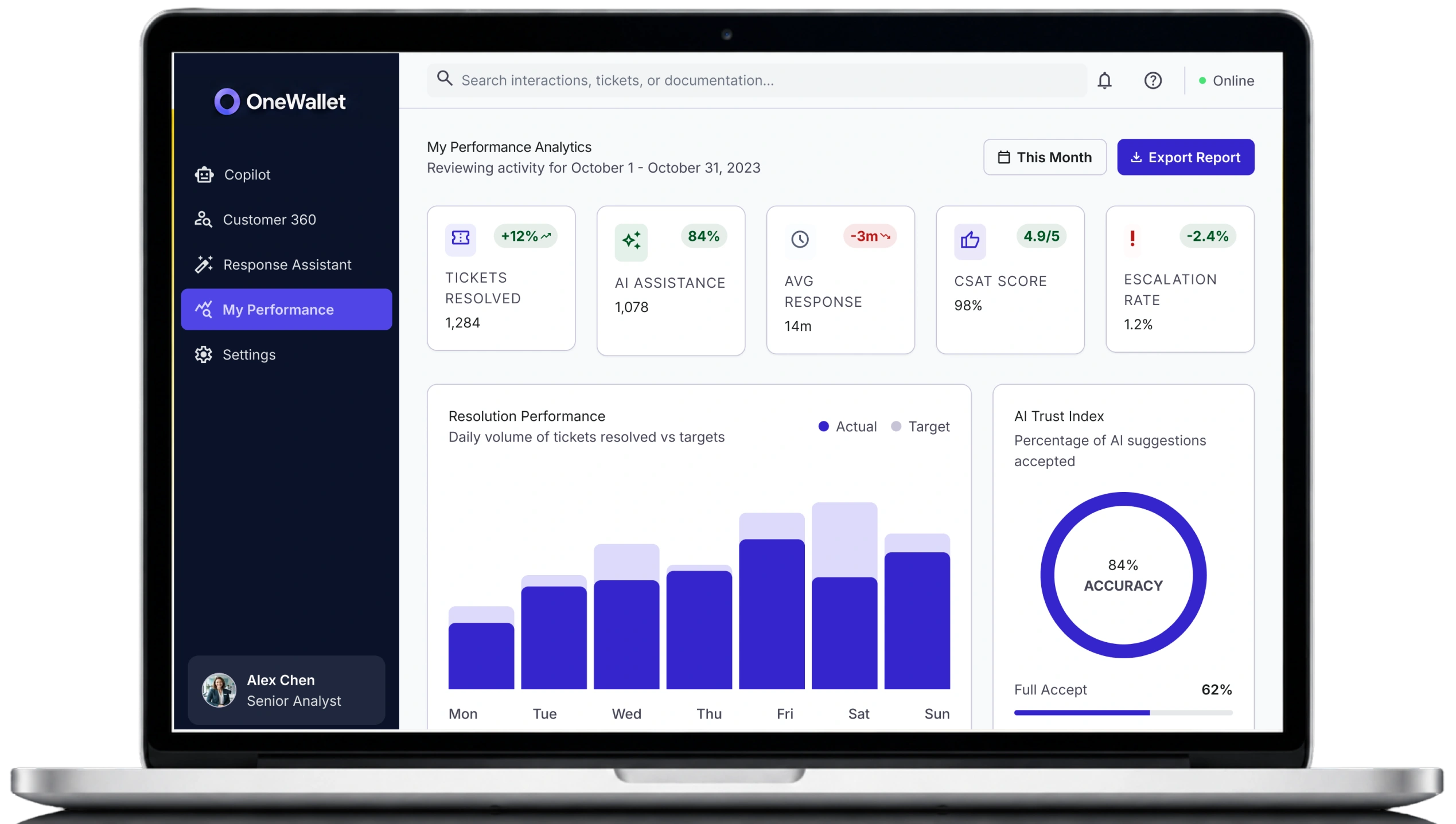
One Wallet, a digital payments platform with 1.8M+ users, had support agents switching between ticketing, payment and CRM tools for 60K+ monthly requests. SoluLab integrated an AI support and operations copilot with live access to transaction APIs, CRM, wallet and payment engines, plus Zendesk, with PII masking before data reaches the model and full audit logs.
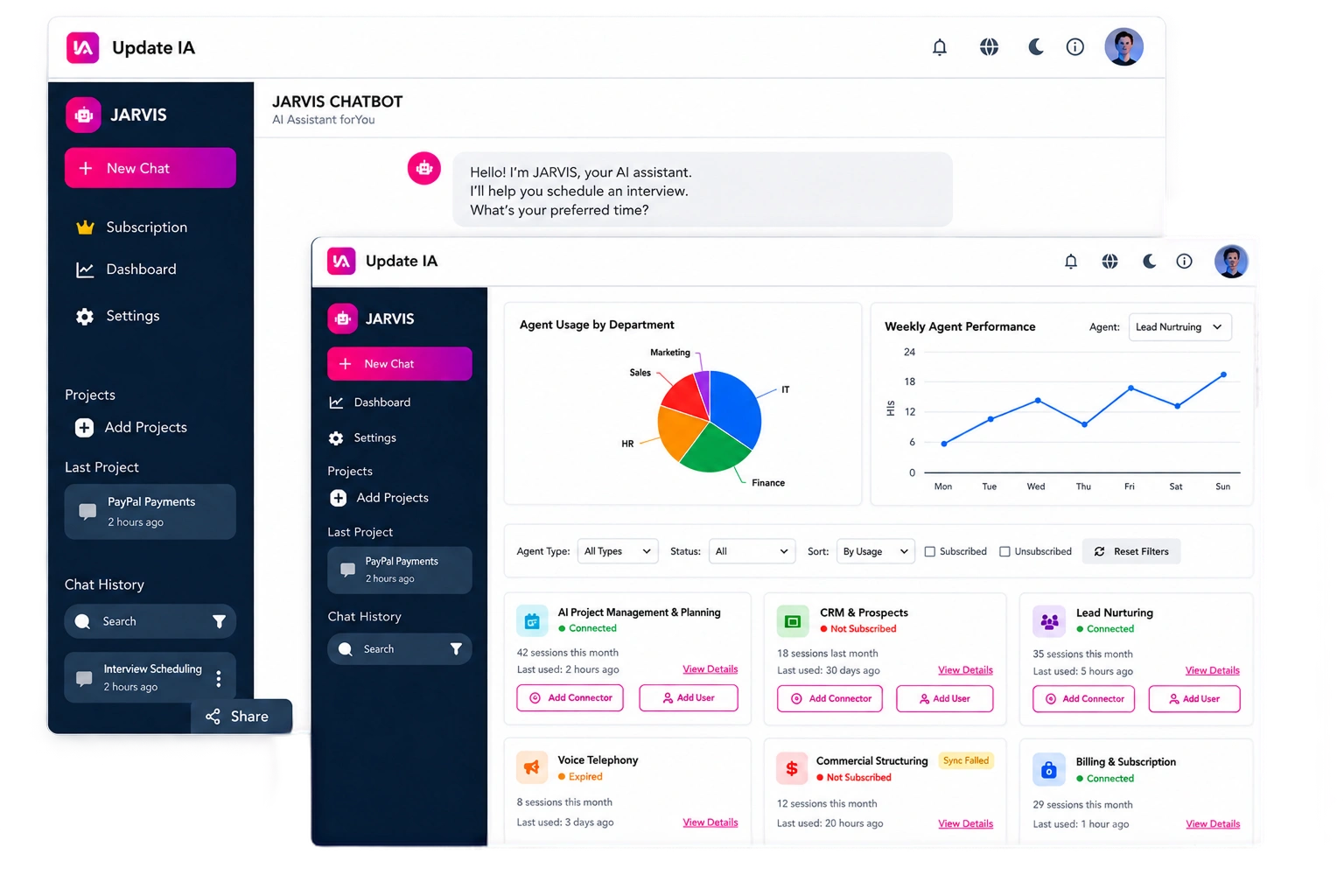
UpdateIA wanted repetitive, multi-step work taken off its teams without losing control over execution. SoluLab scoped the workflows worth automating, then integrated a coordinated system of autonomous AI agents with the client's tools, with people reviewing outcomes instead of doing each step.
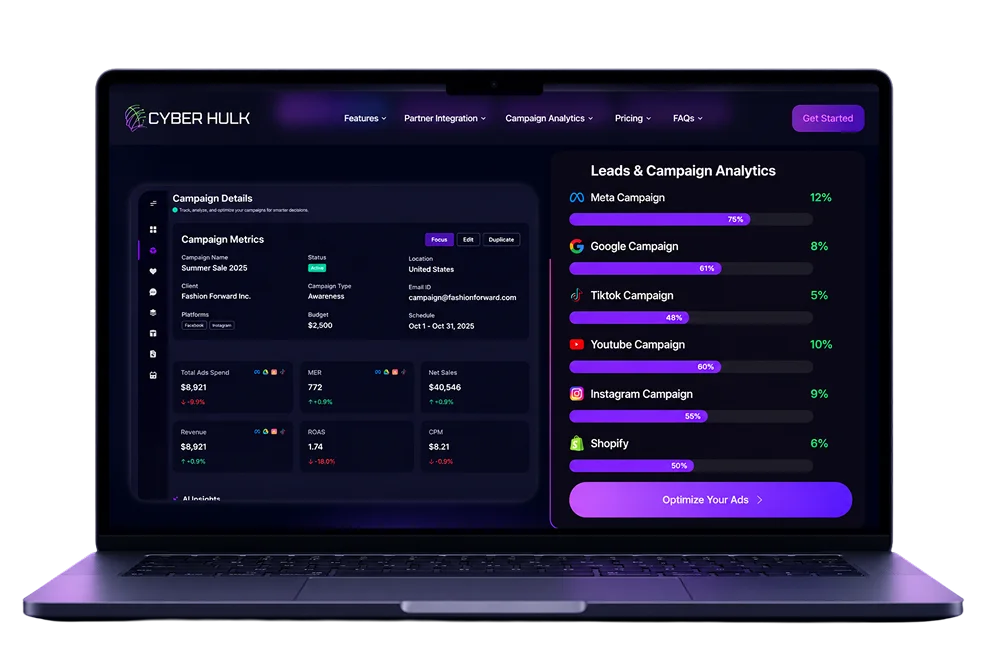
Marketers were running leads, ads and analytics in separate tools with manual campaign management. SoluLab built CyberHulk, an AI-driven platform integrated with Google Ads, Meta Ads and analytics platforms for real-time data sync, with AI-generated reports and campaign suggestions.
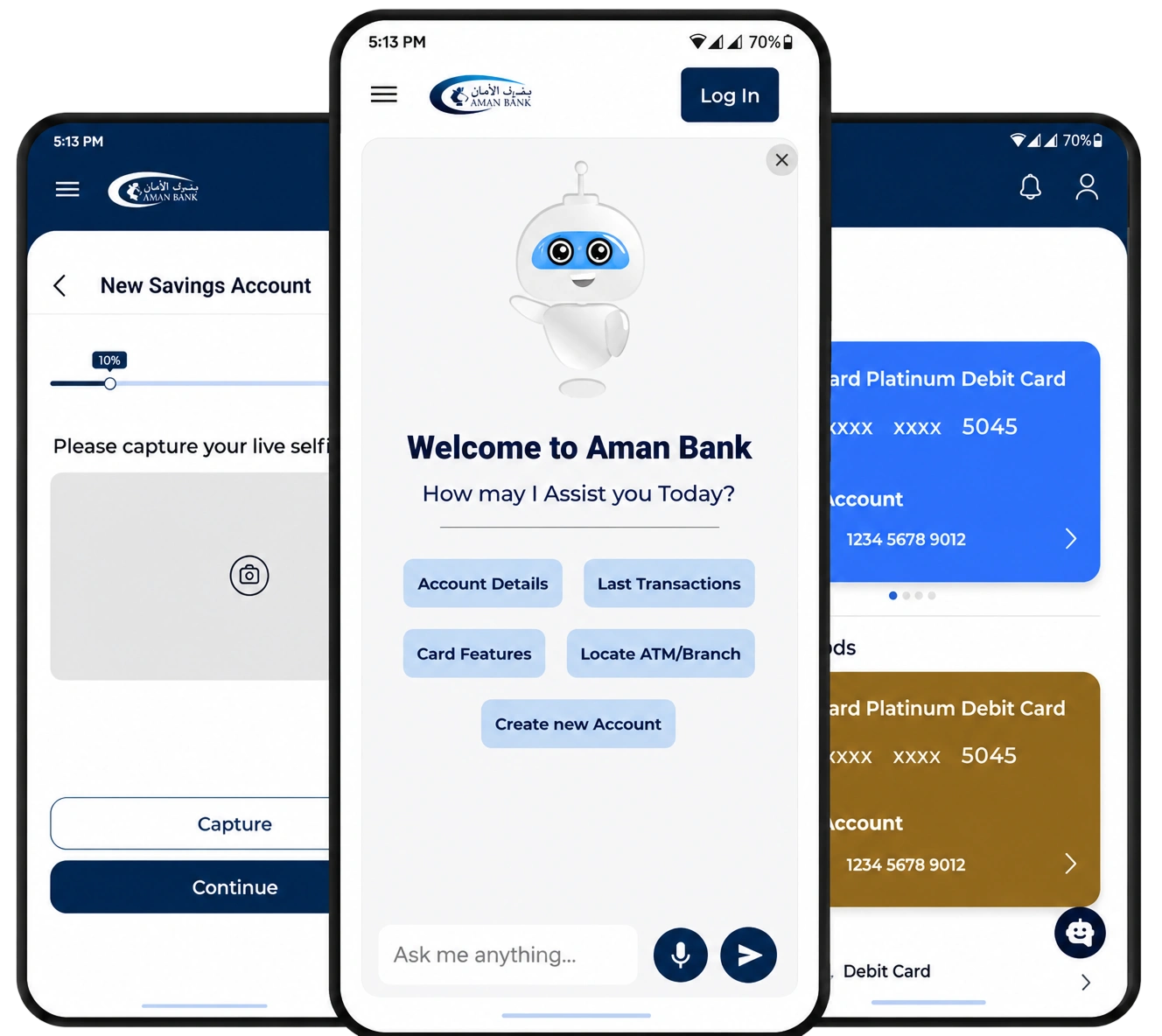
Amanbank, with about 750,000 customers, lost applicants to slow manual onboarding and offered support only in set hours. SoluLab integrated a generative AI chatbot, a voice assistant and AI-powered digital KYC with OCR into the bank's iOS and Android apps.

The simplest way to start AI integration in business is a readiness check. In about 3 minutes it scores your data, systems and processes, and we can scope pilot process for you.
Get Free AI Readiness AssessmentChoose an AI integration partner by checking live examples with written outcomes, their experience with your systems, how they handle your data, who maintains the work after launch and how their price changes. Ask for references from companies with a similar stack, and a fixed price for the first pilot.
Large consulting firms, software vendors and specialist developers all sell prebuilt AI applications. Prebuilt tools launch quickly but fit only common cases. Custom integration costs more and fits your process. Many projects combine both: SoluLab reuses proven building blocks from past projects, such as RAG pipelines, support copilot patterns and agent orchestration, then fits them to your systems.
Our list of top generative AI integration services can help you compare providers.
SMBs choose SoluLab for AI integration because we connect AI to the tools they already use, publish our price ranges, start every project with a narrow pilot and a person in the loop, and keep security controls such as PII masking and audit logs in scope from day one. We're rated 4.9 on Clutch from 55 reviews.
 01
AI goes into your CRM, help desk, ERP and apps, so your team keeps working in the tools it knows.
 02
Single-system integrations from about $10,000 to $15,000; multi-system work from $40,000, with a fixed quote after discovery.
 03
Every project starts with one process, a baseline and a go or no-go decision.
 04
The One Wallet copilot reads ticketing, payment, wallet and CRM data and cut ticket load by 72%.
 05
PII masking, least-privilege access, approval steps and audit logs come standard.
 06
NDA plus an MSA assigning IP from the first commit, including prompts and configurations.

"Rajat has spent more than 14 years building platforms used by millions of people. Before co-founding SoluLab he was a principal software architect at Citrix, where he led enterprise mobile engineering. He now heads SoluLab's 50+ member technical organization and reviews every AI integration architecture for data access, security and fit with the client's existing systems. "
SoluLab helped us bring AI directly into the banking experience. From customer onboarding and account assistance to money transfers and card requests, the AI chatbot and voice agents gave customers a much faster way to complete everyday banking tasks. The solution helped us reduce onboarding time while taking significant pressure off our support teams.

CEO, Amanbank
SoluLab successfully delivered the AI automation system we needed for our FinTech platform. Their team understood how to translate complex business workflows into practical AI agents and worked closely with us throughout development. The result was a much more streamlined approach to automating tasks that previously required significant manual effort.

Co-Founder, FinTech Platform
Working with the SoluLab team completely changed how we handle marketing. CyberHulk turned from a simple idea into a powerful AI-driven marketing platform that runs our entire process. Everything works smoothly, and it feels like having a 24/7 AI marketing team that constantly drives growth, improves conversions, and saves time.

CEO, CyberHulk
SoluLab didn't approach AI as a feature; it became part of the product experience. Their team helped translate our vision into an AI-powered platform that feels intelligent while remaining intuitive for users. The combination of technical execution and genuine understanding of wellness made a meaningful difference.

Founder, Mendle
AI integration adds AI capabilities such as language understanding, prediction or automation to existing software and workflows. The AI uses your data and acts inside the tools your team already works in, such as your CRM, help desk or ERP, so people get faster answers and fewer manual steps without switching to a new platform.
Pick one process with high volume and a clear measure, check where its data lives and how clean it is, choose an integration method, and build a pilot with a person approving outputs. Measure time, errors and cost against a baseline, then expand to the next process once the pilot proves its value.
Start with AI features already built into tools you pay for, then add light integration for one repeatable task. Set a spending cap and a review date, and widen only if the saving is clear. With SoluLab, single-system integrations start at around $10,000 to $15,000, and the readiness check is free.
Choose a task that takes hours each week, such as answering repeat customer questions or typing data between systems. Use built-in AI features first. Add custom integration only when a clear saving justifies it, and keep a person approving outputs where a mistake could cost money or customers.
Large consultancies, software vendors and specialist developers all offer them. Prebuilt tools suit common needs and launch fast, while custom integration fits unusual processes and data. Many projects mix both: a prebuilt model or tool, connected to your systems with custom integration, permissions and approval steps.
Keep a person approving risky outputs, give the AI only the access it needs, log every action, mask personal data before it reaches a model, and review accuracy on a schedule. Assign one owner for results. If you serve EU customers, check your uses against the EU AI Act's risk levels.
Ask for live examples with written outcomes, experience with your specific systems, a clear data policy, post-launch support and transparent pricing for changes. Check references from companies with a similar stack before signing, and ask for a fixed price on the first pilot so you can judge delivery before committing more.
Define what the AI does for the user and what happens when it fails. Connect a model through an API, keep keys on the server, add fallbacks for timeouts and low-confidence answers, mask personal data in logs and test with real inputs, including odd and hostile ones. Treat AI as one feature, not the whole product.
AI integration services from specialist developers often include agent work: connecting agents to your tools, setting least-privilege permissions, adding approval steps and monitoring actions after launch. SoluLab includes all four in its AI integration scope and has put 14 autonomous agents into production for UpdateIA.
Use APIs where they exist, RPA bots where they don't, and place an integration layer between the AI and the old system so neither has to change much. Start with one process and run the AI beside the existing workflow until results match or beat the current process in real cases.
With SoluLab, a basic single-system AI integration typically costs $10,000 to $15,000, and multi-system, company-wide integrations run $40,000 to $100,000 or more. A paid readiness assessment costs $5,000 to $20,000. Cost depends on the number of systems, data quality, risk level and model usage volume.
Most AI integration projects take 4 weeks to 6 months. A single-system pilot usually reaches a go or no-go decision in 4 to 8 weeks, while multi-system integrations across CRM, ERP and help desk typically take 3 to 6 months, depending on data quality, interfaces and the amount of human review required.