


You want an answer now. Not Monday, not after your ticket ages quietly in a queue. Nobody is patient about support anymore, and honestly, why would they be?
Meeting that expectation with a support team of eight people is where the trouble starts. Reputation follows experience. Slow replies, queries that fall through a crack, two agents giving two different answers to the same question: each one chips away at trust, and some of those people were about to buy something. That is expensive.
So businesses have pointed AI at the pile of customer data they were already sitting on. It reads patterns nobody had time to read. What a customer is likely to want next, which segment to target, where a service should bend to fit a person instead of the other way around. Better inputs, better calls, and conversations that feel like somebody was paying attention.
Per Business Insider, AT&T and others have gone the open-source AI route and landed at 91% of ChatGPT’s accuracy, with daily processing dropping from 15 hours to under 5.
This piece walks through what AI actually does inside a support function, and how to put it to work without the whole thing turning into a science project.
What is AI in Customer Service?
Strip away the marketing and it comes down to three ingredients: machine learning, natural language processing, and plain automation, wired together with artificial intelligence so that support gets faster and less painful for everyone involved. Volume stops being the enemy. Nights and weekends stop being a gap. Here is where it shows up in practice:
- Chatbots and Virtual Assistants: Zendesk AI, Intercom, Freshchat and the rest answer the questions you have answered nine hundred times already.
- Sentiment Analysis: the system reads the mood behind a message and sends the angry ones to someone who can handle angry.
- Predictive Analytics: behavior patterns get spotted early, so support can reach out first instead of waiting for the complaint.
- Voice Assistants: Google Dialogflow and Amazon Lex power IVRs you can actually talk to.
- Auto-tagging and Ticket Routing: tickets get classified and handed to the right desk without a human triaging the inbox all morning.
DO YOU KNOW?
AI chatbots can handle up to 80% of routine customer service tasks, which leaves your human agents with the hard, interesting cases.
How Does AI in Customer Service Benefit Customers?
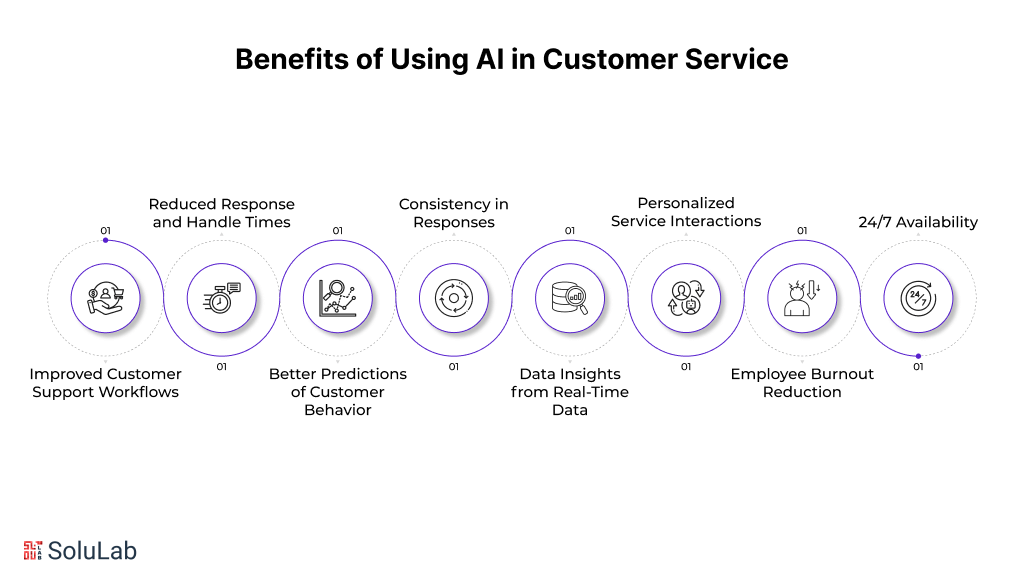
The shape of a support conversation is changing. Faster, yes, but also more specific to the person on the other end. And the gains land on both sides of the desk: your agents get their day back, your customers stop waiting. The big ones:
- Improved Customer Support Workflows
Friction hides everywhere in a customer journey, and AI sands most of it down. A new customer asks something basic, a bot answers it in four seconds. Behind the curtain, the routing and the record-keeping tidy themselves. A big chunk of incoming work finishes itself, and what needs a person gets handed to a person with the history already attached. That handoff is the part worth getting right.
- Reduced Response and Handle Times
Research puts it at 64% of service leaders saying AI cuts the time reps spend closing tickets. You can feel why. A chatbot replies to a live chat the instant it lands, so first response time collapses to almost nothing, and average handle time follows it down. Tickets close sooner. Queues stop growing overnight.
- Better Predictions of Customer Behavior
Ask any service leader what keeps them up: knowing what customers want before they say it, and catching problems while they are still small. Purchase history, buying rhythm, stated preferences, all of it live. Predictive models find the pattern in that and flag the account that is about to have a bad week. You call them. They were not expecting that.
- Consistency in Responses
Two agents, same question, two different answers. Customers notice, and they remember. AI holds the line on what gets said, whether the question comes in at 10am on a Tuesday or 2am on a holiday. Same answer, every time.
- Data Insights from Real-Time Data
Every support conversation is evidence about your product. Nobody has time to read ten thousand of them, but voice of customer tools do, and what comes back is a list of recurring complaints and the places your product quietly fails people. Teams then fix the product, not just the ticket. HubSpot’s Breeze Intelligence is one version of this: real-time data feeding the CRM, lifting form conversion and flagging who is actually in a buying mood. Pair those insights with GPU inference infrastructure and the models keep up with live traffic without you paying for compute you never use.
- Personalized Service Interactions
Breeze Intelligence also enriches your records, which sounds dull until you see what it does to an email. Company details, recent news, context a rep would have had to dig for. Marketing and sales write to a real situation instead of a name in a field. Reply rates go up. And the attention continues after the purchase, which is where most companies stop trying.
- Employee Burnout Reduction
Burnout in support is rarely about hard problems. It is about the same problem, forty times a day, plus the copy-pasting of information between five tabs. Hand that to a machine. What is left for your team is the messy, human, genuinely difficult work, and that work is a lot easier to stay awake for. Quality does not drop. Morale does not either.
- 24/7 Availability
Your office closes. Your customers do not. A bot can take the basics at 3am, start the fix, and have everything ready for whoever logs on in the morning, so nobody is stuck waiting nine hours to be told which form to fill in. Round-the-clock coverage is close to table stakes now, and it is one of the strongest arguments for AI in customer service automation operations.
💡Pro Tip:
Use omnichannel chatbots that carry customer details across every touchpoint. Nobody should have to explain their order number three times in one afternoon. That single change does more for perceived service quality than most redesigns.
Examples of AI For Customer Service
Contact center, field service, somewhere in between: the applications look different but the payoff rhymes. Five that earn their keep:
1. Content Generation: AI for content creation reads the conversation, pulls out what matters, and drafts a reply that sounds like a person wrote it. Fast, and accurate too, provided you feed it your CRM data and your knowledge base rather than leaving it to guess.
2. Chatbots: AI-powered chatbots take the routine stuff: where is my order, which size should I buy, why is this thing blinking. They never sleep, they answer instantly, and they make support reachable for people who will never pick up a phone.
3. Sentiment Analysis: AI-driven sentiment analysis tools read feedback, reviews and social posts and tell you how people actually feel, not how your NPS survey says they feel. Useful for two things: finding what to fix, and catching the customer who is one bad reply away from leaving.
4. Recommendation Systems: Behavior, past orders, stated preferences go in; a suggestion the customer might genuinely want comes out. Cross-sell and upsell stop feeling like a pitch when the recommendation is right.
5. Predictive Analytics: AI-based predictive analytics read customer data to anticipate what is coming: the need, the behavior, the problem brewing. Staff your shifts around that and you stop over-hiring for a Tuesday and under-staffing a Friday.

How AI in Customer Service Enhances Business Operations?
Pull the camera back to the operation itself. Four places AI and ML change how the work gets done:
- Increase Productivity: With generative AI tools, an agent gets a personalized draft reply in seconds. Not a template with a name dropped in. The model pulls from customer records, knowledge articles and third-party sources across whichever channel the question arrived on, and writes something that fits this customer. The agent edits and sends.
- Create Work Summaries: Wrap-up notes are the tax nobody wants to pay. AI writes them from the case history instead. Field teams get the same thing in reverse: a short brief on what happened before, read in the van, before knocking on the door.
- Share Knowledge: Wire AI into the service console and it will draft knowledge base articles out of real conversations and CRM data, ready for an agent to check. Your docs stop rotting. Customers find their own answers in the self-service portal, which is the cheapest ticket you will ever handle.
- Search for Answers: Agent or customer types a question, and the relevant answer surfaces on the search page itself. No hunting through twelve results that all look right.
Read Also: AI In Marketing
Use Cases of AI in Customer Service for Businesses
1. AI-Supported Human Customer Service
The pairing works because the two are good at different things. AI takes case admin and call routing off the table; your agents take the calls that need judgment. Four jobs it does well:
- Maintaining Context: AI pulls the customer’s record from CRM, sales and marketing and puts it in front of the agent before they say hello, so the conversation picks up mid-sentence instead of starting over. Omnichannel AI chatbots in customer service make that work across platforms, which is the whole point: a customer who started on chat and called an hour later should not have to recap.
- Answering Routine Queries Independently: Send the simple questions to an FAQ chatbot and call volume drops immediately. Agents get their attention back for work that deserves it, and resolution time improves without anyone working harder.
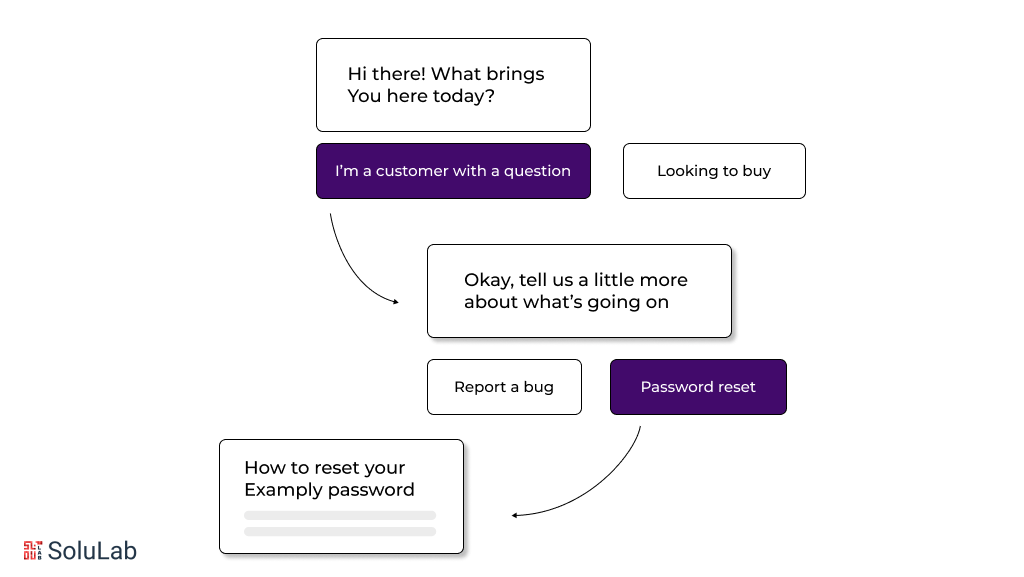
- Intelligent Routing: Not just who knows the answer, but who is free and who is already buried. AI weighs expertise against availability and workload, then sends the ticket. Fewer transfers, faster fixes.
- Timely Recommendations: Mid-call, the right article or the right product appears on the agent’s screen. They stop stalling for time while they search.
💡Pro Tip
Pick chatbots that can reach into every touchpoint in the customer’s history and retrieve the details themselves. Asking a customer to repeat information your system already has is the fastest way to sound like you do not care. Fix that and the rest gets easier.
2. AI-Organized Email Inquiries
Shared inboxes get ugly fast. AI keeps them survivable by:
- Reading and tagging every email so it lands with the team that can actually close it.
- Suggesting a reply drawn from the ones that worked before.
- Sweeping out spam and promo noise, so agents open the inbox and see real work.
Put AI on email management and two things move at once: replies go out sooner, and they sound like they were written for the person who wrote in.
3. AI-Enhanced Call Management
Voice was the hard one. Speech analytics and AI voice tech have made it workable anyway. This is where an AI receptionist earns its place: picking up the call, working out what the caller wants, and putting them through to the right department without the menu tree. Connect that to a modern business phone system and call handling stops being the bottleneck it usually is. The MightyCall handles intelligent routing, scales inbound and outbound without drama, and keeps support running while the volume spikes.
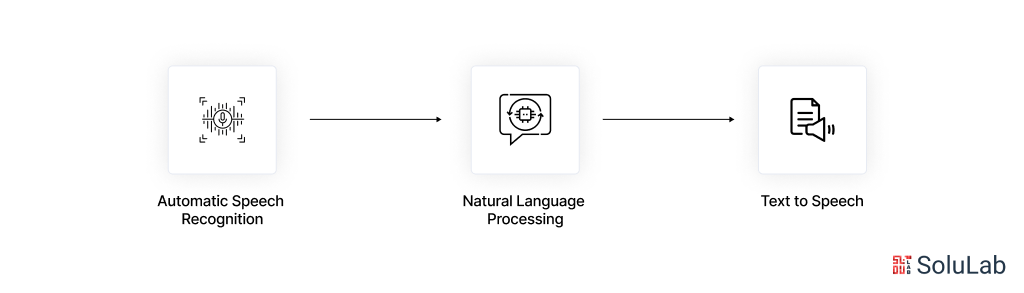
Mechanically, here is what happens on a call:
- Speech comes in and neural networks strip out the dog, the traffic, the open-plan office.
- NLP and NLU models work out what the caller means, which is rarely what they literally said.
- Text-to-speech says the answer back out loud, in something close to a normal voice.
Three steps, and the caller never hears a menu. That loop is one of the clearest wins for AI use cases in customer service.
4. Visual Recognition for Product Support
Try describing a broken part in words. Now just photograph it. Visual recognition lets customers send an image or a short video, and the system identifies the fault and sends back visual instructions for fixing it. Most people solve it themselves at that point. Less back-and-forth over text, and far kinder to anyone who struggles to put a technical problem into a sentence.
Read Also: Generative AI In CRM & ERP
How to Integrate Artificial Intelligence and Customer Service?
Now the part people skip. Bringing generative AI in customer service into a support org, with Machine Learning and Computer Vision behind it, pays off in both efficiency and satisfaction, but only if you do the unglamorous work first. Seven steps, in order:
1. Understand Data Types
Support data comes from three places: interactions, transactions and feedback. It arrives as text, images, video and numbers, and it sorts into three buckets:
- Structured data: CSAT scores, analytics, anything that already sits in neat columns and can be processed without a fight.
- Unstructured data: call audio, screen recordings, free-text answers. No fixed shape, and much harder to analyze.
- Semi-structured data: CRM messages, mostly. Half field, half free text, and they need their own handling.
2. Perform Data Structuring and Labeling
Garbage in, garbage out, and support data is usually a mess. Clean it, format it, sort it by the things that matter to you: demographics, purchase history, whatever your segments run on. This step is boring and it decides whether the model is any good.
3. Best Practices for Data Collection
Training quality tracks data quality almost exactly. So:
Do’s:
- Go for accurate and relevant over plentiful. A smaller clean set beats a huge dirty one.
- Hold the line on data privacy standards. Client information is not yours to be casual with.
Don’ts:
- Do not collect from a skewed slice of your customers. The model will learn the skew and hand it back to you as a result.
- Do not hoard. Every extra field costs storage and widens the blast radius if sensitive data leaks or gets misused.
4. Build Support-Specific Intents
Read your own tickets. The themes are already there, repeating. Build intents around those recurring issues and around the paths customers actually take, not the paths your org chart assumes.
💡Pro Tip:
Platforms like Sprinklr AI+ ship pre-built intents for over 150 industries, so you are not starting from a blank page.
5. Train the AI Model on Proprietary Data
Your own data is what makes the model yours rather than generic.
- Spend real time on feature engineering. Picking the right signals matters more than adding more of them.
- Use transfer learning to fine-tune a pre-trained model on your proprietary data instead of training from scratch.
- Keep humans in the loop while it trains. Somebody who knows the domain should be grading the model’s predictions.
6. Integrate the AI Model with Workflows
A trained model sitting outside your workflow is a demo, not a system. Drop it into the flow your agents already use. Put a data management layer underneath it so queries get organized and processed rather than queued. Then add the customer-facing pieces, chatbots included, for the questions that deserve an instant answer.
7. Test and Update AI Models Regularly
Test both faces of it, the one your agents see and the one your customers see:
- Agent-side Testing: Does it actually help them handle a query and find data faster, or is it one more window to ignore? Ask them. They will tell you bluntly.
- Customer-side Testing: Watch how people submit questions and whether the answers land. Then keep updating the AI model against what they tell you, because a model you shipped and forgot gets worse every quarter.
Work those seven in order and the AI use cases in customer service stop being slideware. The automation holds, and the operation runs cheaper.
What Are The Latest Trends In AI For Customer Service?
Where is this going? Generative AI, Natural Language Processing (NLP) in customer service and Machine Learning are all moving quickly, and support is one of the first functions to feel it. Six shifts worth watching:
1. Hyper-Personalization
Personalization today mostly means using someone’s first name. That bar is about to move. Platforms will chew through customer data in real time and answer a question with the customer’s entire history in view, not just the sentence they typed. Which changes the shape of the reply: recommendations that fit, offers that make sense, and support that arrives before the complaint does.
2. AI-Driven Omnichannel Support
Channels keep multiplying. Social, voice, live chat, and now augmented reality on top. AI is learning to hold one conversation across all of them, so the thread survives when a customer switches from DM to phone call. Consistent answers at every touchpoint, and nobody starts from scratch twice.
3. AI-Powered Emotional Intelligence
Emotion is still the weak spot. Today’s systems read words well and read mood badly, which is why a bot can sound cheerful at exactly the wrong moment. Sentiment analysis and emotional AI are closing that gap: reading how upset someone is, how urgent the situation feels, then changing tone accordingly. Not empathy, exactly. Close enough that the interaction stops grating.
4. Autonomous Support Systems
Generative AI keeps raising the ceiling on what a system can close without a human. Deep learning models will not only resolve the issue in front of them but spot the one forming behind it and head it off. Fewer escalations. Your agents end up working almost entirely on high-value and critical cases, which is a different job from the one they have today.
5. Augmented Human Agents
The other direction is the agent’s own screen getting smarter. Real-time insight, suggested answers from the knowledge base, live translation mid-conversation. As AI and ML in data integration mature, the agent carries less in their head and handles harder cases with more confidence. That cognitive load matters more than most managers think.
6. Voice and Visual Recognition
Text will stop being the default. Voice and visual recognition are getting good enough that support can arrive as video: point a camera at the thing, get a walkthrough back. Product tutorials and troubleshooting driven by what the system sees and hears rather than what you manage to type.

Conclusion
Support is getting faster and sharper, and the cost line is going the other way. Chatbots absorb the routine, sentiment analysis tells you who is unhappy before they say so, and personalization stops being a manual effort.
What your team gets back is time for the complex cases, plus faster replies and coverage that does not stop at 6pm. The companies moving on this now are building customer relationships their competitors will spend years trying to catch.
AI-Build is a construction technology company, and they came to SoluLab to push their CAD product further with generative AI and machine learning. Automating the design steps gave them optimized, intelligent output and a noticeable lift in productivity. We built it on a modular, scalable architecture, which tightened the workflows and the accuracy, and kept the interface customizable and intuitive because the people using it had to actually like it.
SoluLab is an AI development company. If you have a support operation that is straining, talk to us about what AI can take off its plate.
FAQs
Shipra Garg is a tech-focused content strategist and copywriter specializing in Web3, blockchain, and artificial intelligence. She has worked with startups and enterprise teams to craft high-conversion content that bridges deep tech with business impact. Her work translates complex innovations into clear, credible, and engaging narratives that drive growth and build trust in emerging tech markets.


![Top 10 Examples of AI Being Integrated in the Real World [2026 Edition]](https://www.solulab.com/wp-content/uploads/2026/09/Examples-of-AI-Being-Integrated-in-the-Real-World.webp)