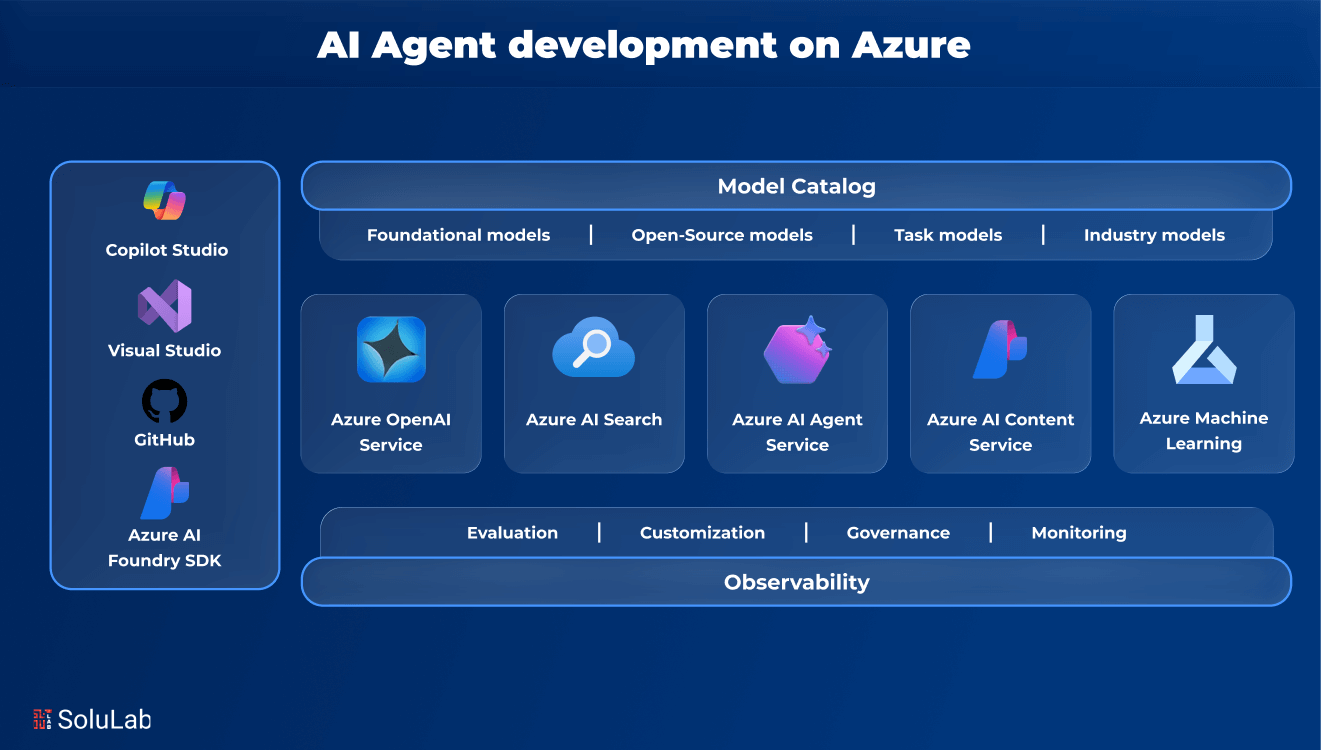
Generative AI changed what developers build. Basic chatbots are old news; teams are now creating AI agents, systems that reason, act and work through problems on their own. The hard part is the jump from a promising prototype to something real. So how do you get to secure, scalable AI agent development?
This is the gap Azure’s AI Agent Service is built to fill. You get what you need to build capable AI agents, and you don’t have to babysit infrastructure or orchestration while you do it. Live Bing Search, sandboxed Python execution and more: the tooling is designed for agents that need to grow.
Below, we break down the core building blocks of AI agent development on Azure and show how to turn an idea into a working agent with JavaScript, Azure Foundry and a handful of other tools.
Why Azure AI Agent Service Simplifies Everything?
Build an agent the traditional way and you end up owning a lot of plumbing: orchestration, state, tools, scaling, all by hand. Most developers reach for a framework such as LangChain, AutoGen or Semantic Kernel to cope. Azure AI Agent Service takes a different route. It’s fully managed, so that complexity moves off your plate. You get faster development, tighter security and scale that holds up in an enterprise. In practical terms, teams can:
- Spend their time on agent logic, while Azure quietly takes care of orchestration, hosting, security and scaling.
- Plug in built-in tools such as File Search, Bing integration and Function Calling, and give the agent real-world reach right away.
- Swap one model for another without touching the backend architecture or redeploying the whole application.
The net effect: you build faster, test with more confidence and deploy at scale, without giving up reliability.
Step-by-Step Guide For Building AI Agents on Azure
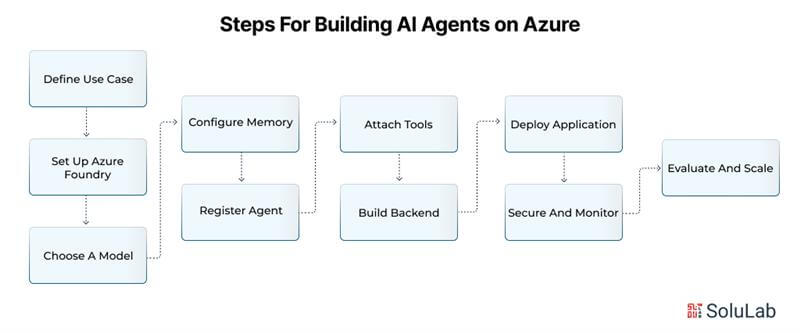
- Define Use Case: Decide what the agent is for. Support? Automation? Information retrieval? Be specific.
- Set Up Azure Foundry: Spin up an Azure AI Foundry instance. It’s where agents, tools and model orchestration get managed.
- Choose a Model: Pick GPT-4o when you need advanced reasoning, or 4o-mini when speed and low cost matter more.
- Configure Memory: Go with Cosmos DB for global storage, Redis for fast access, or AI Search for RAG and embeddings.
- Register Agent: With the Azure SDK, define how the agent behaves, connect its models and attach memory and tools.
- Attach Tools: Function Calling handles actions. Code Interpreter does analysis. File Search reaches your documents, and Bing Search brings in real-time data.
- Build Backend: Route user inputs to the agent through Node.js or Express, and add a frontend such as React if you want one.
- Deploy Application: App Service suits web hosting, Container Apps suits dynamic AI workloads, and AKS gives you full control over containers.
- Secure and Monitor: GenAI Gateway controls traffic, Content Safety filters output, and Defender guards against threats.
- Evaluate and Scale: Watch things in Azure Monitor, test prompts with Prompt Flow, then scale when you need to.
Choosing the Right Models for Your AI Agent Development on Azure
Pick the wrong model and even a well-designed AI agent will disappoint. Azure’s catalog is broad, covering everything from small, quick models to heavy multimodal ones. A rough guide to matching model to job:
Models Based on Use Case
- Multimodal Reasoning (Text + Image): Reach for GPT-4 or Llama models when a task mixes input types
- Latency-Sensitive Applications: Go small, with something like 4o-mini, for quicker responses and lower cost
- Embeddings for Search or Classification: OpenAI’s text-embedding-3 or Cohere embeddings handle semantic matching well
- Image Understanding: Pair Azure OpenAI’s CLIP model with AI Search for retrieval based on images
- Advanced Reasoning: o1-preview for problem-solving that relies on reflection, o1-mini for leaner reasoning
Every model trades off performance, reasoning depth and cost differently. The good news is that Azure’s Model Catalog makes it easy to experiment and change your mind later.

Storage Options on Azure AI Agent Memory
An agent that forgets everything is not much of an agent. Memory sits at the heart of modern AI agents, and Azure gives you several storage options for different kinds of data:
- Azure AI Search: The pick for semantic search, translation, OCR and image analysis
- Cosmos DB: A strong fit for data you hit often and for global distribution
- Azure Redis Cache: A fast memory layer when latency has to stay low
- PostgreSQL with Graph Extensions: Handles relational, graph-based memory
- MongoDB vCore: Fully managed vector search plus the flexibility of documents
With these, an agent can keep its interaction history, pull the right documents and keep knowledge graphs up to date without wasted effort.
Running Your AI Agent: Deployment Environments
Where the agent runs depends on your workload and architecture. Azure gives you options:
| Requirement | Azure Solution |
| Web Apps | Azure App Service, with CI/CD and load balancing |
| Serverless Compute | Azure Functions and Container Apps |
| Container Control | Azure Kubernetes Service (AKS) for orchestration |
| Communication | Azure Communication Services (voice, SMS, chat) |
A standard web app? App Service. AI-specific workloads that gain from serverless GPU support or dynamic sessions belong on Functions or Container Apps. And for enterprise-scale deployments, AKS is usually the natural home.
Core Tools: Bringing Your AI Agent to Life With Azure Services
Azure AI Agent Service ships with a set of key tools that sharpen how your agent reasons and let it actually do things.
Key Tools and What They Enable:
1. Function Calling: Agents call pre-defined functions to kick off APIs and workflows
2. Code Interpreter: Executes Python in a secure sandbox to crunch data and produce visual output
3. File Search: Lets agents read business files and documentation, so answers get more accurate
4. Bing Search: Hooks agents up to live web data for real-time updates and grounding in outside knowledge
Put together, these let an agent do more than think. It acts, and it acts on context.
Practical Demo: Building AI Agents with JavaScript
In a recent developer session, participants built and deployed an AI agent with JavaScript and Azure. Here is what the architecture looked like:
- A terminal or a frontend (React, for instance) for talking to the agent.
- A Node.js backend with Express or Fastify handling API communication.
- Azure SDKs (azure/ai-projects) for registering, configuring and managing the agent.
- AI Foundry, keeping models, tools and data in one place.
Creating the agent, wiring in tools, running it: the session covered all three, using nothing more than simple JavaScript commands.
Backend Setup: Node.js with AI Foundry Integration
The flow in a typical AI agent app is short. The backend exposes APIs that send messages to the agent. The agent picks up the task, reasons about it and fires off whatever tools it needs. Underneath, AI Foundry looks after execution, monitoring and security. So nobody on your team is hand-rolling orchestration; they are writing logic.
Tools That Make the Agent Smarter
Built straight into Azure AI Agent Service, these tools make richer and safer interactions possible:
Highlighted Features
- Code Interpreter runs dynamic code safely, so the agent can analyze data and pull out insight.
- Function Calling connects agents to APIs and lets them trigger actions across systems.
- Azure AI Search brings semantic RAG capabilities right into your agent.
- Bing Search keeps agents anchored to current facts and trends from the web.
A few lines of code switch on any of them. That alone cuts a surprising amount of development work.
Read Also: How to Build AI Agents with LangGraph?
Azure Advanced Security, Monitoring, and Quality Control of AI Agents
Skip security, safety checks and monitoring, and your AI application isn’t finished. Simple as that. Enterprise-grade AI agents have to be reliable, trustworthy and hard to misuse. Azure gives you a solid toolkit for this from the first day.
1. API Management with GenAI Gateway
Think of it as a secure checkpoint between users and AI models. It tracks token usage, watches traffic and supports semantic caching. Requests can be routed across multiple models with load balancing. Rate limiting is built in, which protects you from overuse and from attacks. It also plugs cleanly into Logic Apps and Azure Functions, so tool execution runs without friction.
2. Azure Event Hubs and Service Bus
Components need to talk to each other reliably, and these two services handle that. Event Hubs shines at telemetry and event streaming. It moves high volumes of data between agents and services. Service Bus is the queue, and it comes with delivery guarantees. Use it for workflows where order matters and each step needs confirmation before the next one runs.
3. Azure Monitor
Azure Monitor gives you deep observability into how the application performs. Latency, errors and response times show up in real time. Custom metrics, dashboards and alerts are all supported. Thanks to built-in integrations, you can watch your AI agents right next to your databases, APIs and storage. When something breaks, you find it fast, and uptime stays high.

4. Azure AI Agents Content Safety
Everything going into and coming out of your agents gets scanned here. The tool catches harmful content in text and images, such as violence, hate speech or sensitive material. You can set custom safety categories and thresholds. Prompt Shield comes along too, defending against prompt injection. Between them, misuse and accidental unsafe output become much less likely.
5. Microsoft Defender for Cloud
Defender brings advanced protection built with AI workloads in mind. It spots suspicious behavior, attempts to exfiltrate data and poisoned model interactions. It works alongside GenAI Gateway and AI Content Safety. Expect real-time alerts, policy enforcement and threat analytics. It also protects against identity misuse and data leaks while your AI is running.
6. Prompt Flow for Evaluation
Prompts drift. Prompt Flow gives you continuous testing and performance evaluation for prompts and workflows, so you can track changes, measure accuracy and keep an eye on safety responses as time goes on. For tuning prompts in production, and for making sure the agent behaves the way you expect across different scenarios, it’s hard to do without.
7. Managed Identity and Secure Access
Secure connections between services run through Microsoft Entra Managed Identity. What that means for you: your AI agents reach databases, APIs and azure cloud development tools without a single credential stored in code. Less risk. Easier compliance.
Taken end to end, this security model is what makes agents safe, compliant and ready for enterprise use.
Development Tips
- Reach for GPT-4o when the task calls for advanced reasoning or image processing.
- Combine an embedding model such as text-embedding-3 with retrieval tools for effective RAG workflows.
- Run Redis Cache alongside Cosmos DB: you get fast memory and dependable persistence.
- Begin with Logic Apps for orchestration, and bring in Function Calling later for custom tools.
- Use AI Content Safety and GenAI Gateway as a pair to hold quality up and keep unsafe output out.
Follow these and you strike a sensible balance between capability, performance and cost.
Quick Reference Guide for Azure AI Agent Components
| Component | Purpose |
| Azure AI Foundry | One hub for models, tools and controls |
| Function Calling | Lets agents carry out real-world tasks |
| Code Interpreter | Runs dynamic scripts safely |
| AI Search + Embeddings | Drives semantic RAG and document insights |
| GenAI Gateway | Keeps API management safe and efficient |
Conclusion
Azure AI Agent Service frees developers to work on the part that matters: agents that solve real problems. Model selection, memory design, secure deployment; Azure takes on the heavy lifting in each. You build, test and scale without reinventing anything. JavaScript or Python, terminal or UI, it doesn’t much matter. Building an AI agent is now a realistic project, not a research effort.
Maybe you’re building a customer support tool. Maybe you’re automating internal workflows. Either way, the platform gets AI-first apps running quickly, securely and reliably. But a platform is not a plan, and getting from vision to production still takes the right technical guidance and development skill. That’s where SoluLab, a trusted AI agents development company, comes in, building secure, scalable, high-performing solutions on platforms like Azure.
Contact SoluLab today to get started with your custom AI agent development on Azure.
FAQs
Shipra Garg is a tech-focused content strategist and copywriter specializing in Web3, blockchain, and artificial intelligence. She has worked with startups and enterprise teams to craft high-conversion content that bridges deep tech with business impact. Her work translates complex innovations into clear, credible, and engaging narratives that drive growth and build trust in emerging tech markets.