Natural Language Processing is quietly rewriting the rules for how machines read us. It sits inside artificial intelligence. Chatbots that carry a real conversation. AI that drafts essays, or paints a photo-realistic image from a single line of text.
Analysts expect this market to compound at 27.55% a year between 2024 and 2030, reaching a total value of USD 156.80 billion by the time the forecast window closes.
AI models now chews through human language, programming code, even strands of biological data like DNA. Machines are getting sharper at conversational AI , both reading text and producing it.
This guide walks through NLP in customer service: how it works, why it matters, and where it’s already reshaping different fields. Whether you’re new to the topic or just filling in gaps, you should walk away with a clear picture. Let’s get into it.
What is Natural Language Processing (NLP)?
Natural Language Processing in customer service is a branch of artificial intelligence (AI) built around one job: getting computers to understand and respond to human language. It’s the reason a machine can read a sentence, figure out what it actually means, and write something sensible back. Mix linguistics with machine learning and you get a system that can chew through mountains of natural language data, closing the gap between how people talk and how computers process information.
Every time you ask Siri or Alexa a question, NLP is doing the work behind the scenes. Translation tools run on it. So do chatbots and spam filters. It shows up almost everywhere we lean on technology day to day, quietly making communication faster and workflows less painful.
How Does Natural Language Processing Work?
Under the hood, NLP blends machine learning with linguistic rules. Break a sentence down into its smaller pieces and you can actually see how meaning gets built. Here’s the rundown:
1. Tokenization: chop the text into smaller units, words, phrases, whole sentences.
2. Part-of-Speech Tagging: tag each word with its grammatical job, noun, verb, adjective, whatever it happens to be.
3. Named Entity Recognition (NER): pull out the proper nouns, people’s names, places, companies, the specifics.
4. Parsing: map how the words in a sentence connect to each other.
5. Sentiment Analysis: read the emotional tone, positive, negative, flat neutral.
Why Does Natural Language Processing Matter in Customer Service?
NLP in customer service has slipped into daily life without most people noticing, and it keeps spreading into new industries. Retail, healthcare, you name it, it’s cutting down effort and making the experience less clunky. Here’s why that matters:
- Ubiquitous in Technology: Alexa and Siri run on it. Every time one of them understands your query and fires back an answer in real time, NLP did the heavy lifting.
- Advancing Conversational AI: newer models like GPT-4 write prose that reads uncannily human across almost any topic, and they’re what let chatbots hold a conversation that actually makes sense.
- Improving Search Engines: Google leans on NLP to sharpen its results, so what you get back actually matches what you typed.
- Tackling Online Issues: Facebook and similar platforms use it to catch and filter hate speech and other harmful content before it spreads.
- Healthcare: hospitals use NLP to read and summarize electronic health records, so doctors spend less time hunting for the one detail that matters. Still, even with how far it’s come, NLP trips over real problems.
Today’s systems can be biased. They can ramble incoherently, or just behave oddly with no warning. But the upside is real: NLP in customer service has genuine potential to reshape whole industries, and each round of improvement opens doors that weren’t there a year ago.
Applications of Natural Language Processing in Customer Service
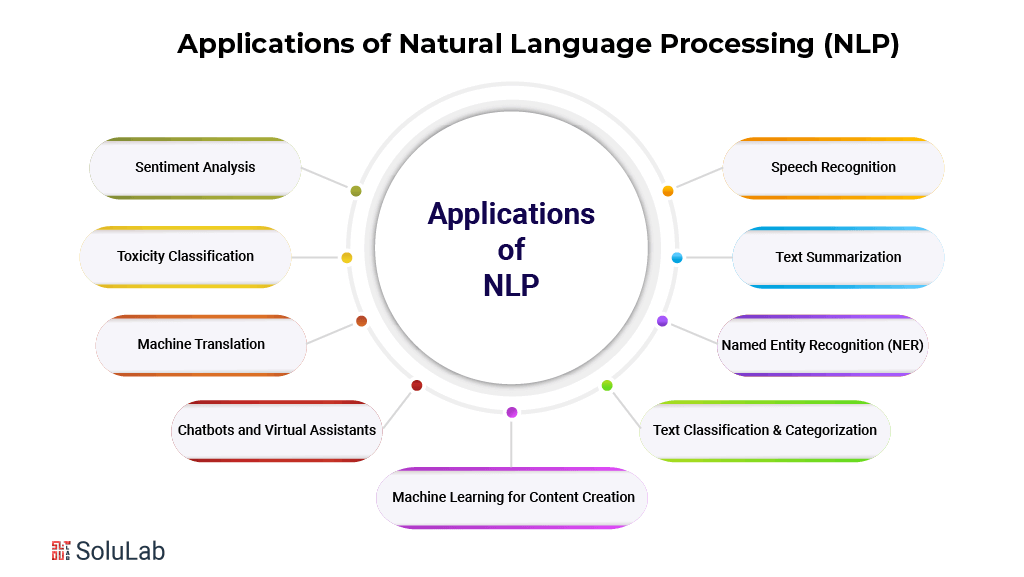
With applications of NLP in customer service stretching across nearly every industry and every piece of technology we touch daily, NLP keeps chasing one goal: close the gap between how humans talk and how machines understand it. It’s improving customer service, sharpening communication more broadly, and cracking language problems that used to look flat-out impossible for a computer to solve. Here’s a sample of what NLP actually does in customer service:
- Sentiment Analysis
Sentiment analysis is NLP’s most common trick: figure out the emotion sitting inside a piece of text. Feed it customer feedback, a tweet, a product review, and it sorts the tone into positive, negative, or neutral. Businesses use it to track customer satisfaction. Healthcare providers use a version of it to catch emotional distress in online conversations. Underneath, the models are parsing tiny shifts in language, enough to tell cheerful from angry from just plain flat.
- Toxicity Classification
Toxicity classification is the next step up from sentiment analysis. It hunts for insults, threats, hate speech, the stuff that shouldn’t be public. Once the system tags a statement as offensive, platforms can pull it automatically, no human moderator required for every single post. Social networks and online communities lean on this constantly to keep spaces livable.
- Machine Translation
Translation is probably the most visible NLP application there is. Google Translate runs on it, turning one language into another and closing gaps between people who’d otherwise have no common tongue. The better models go further: they catch context, so a translation isn’t just word-for-word but actually fits the culture it lands in. In a world where business and relationships both depend on real-time communication, that distinction matters a lot.
- Chatbots and Virtual Assistants
Natural Language Processing (NLP) powered virtual assistants and chatbots have changed conversational AI by making human-like interaction feel natural instead of scripted. Siri, Alexa, and a long list of customer service chatbots use NLP to parse a question and answer it, often in real time and tailored to the person asking. The payoff shows up as instant answers, lighter loads on support teams, and better accessibility, small things that add up to systems businesses now depend on.
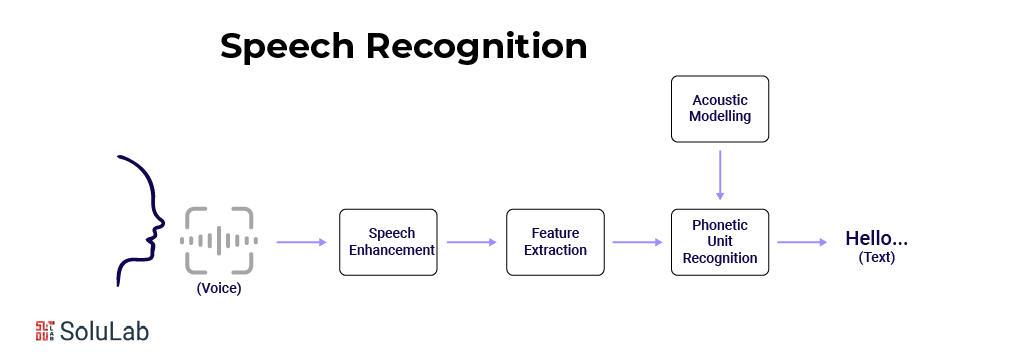
- Speech Recognition
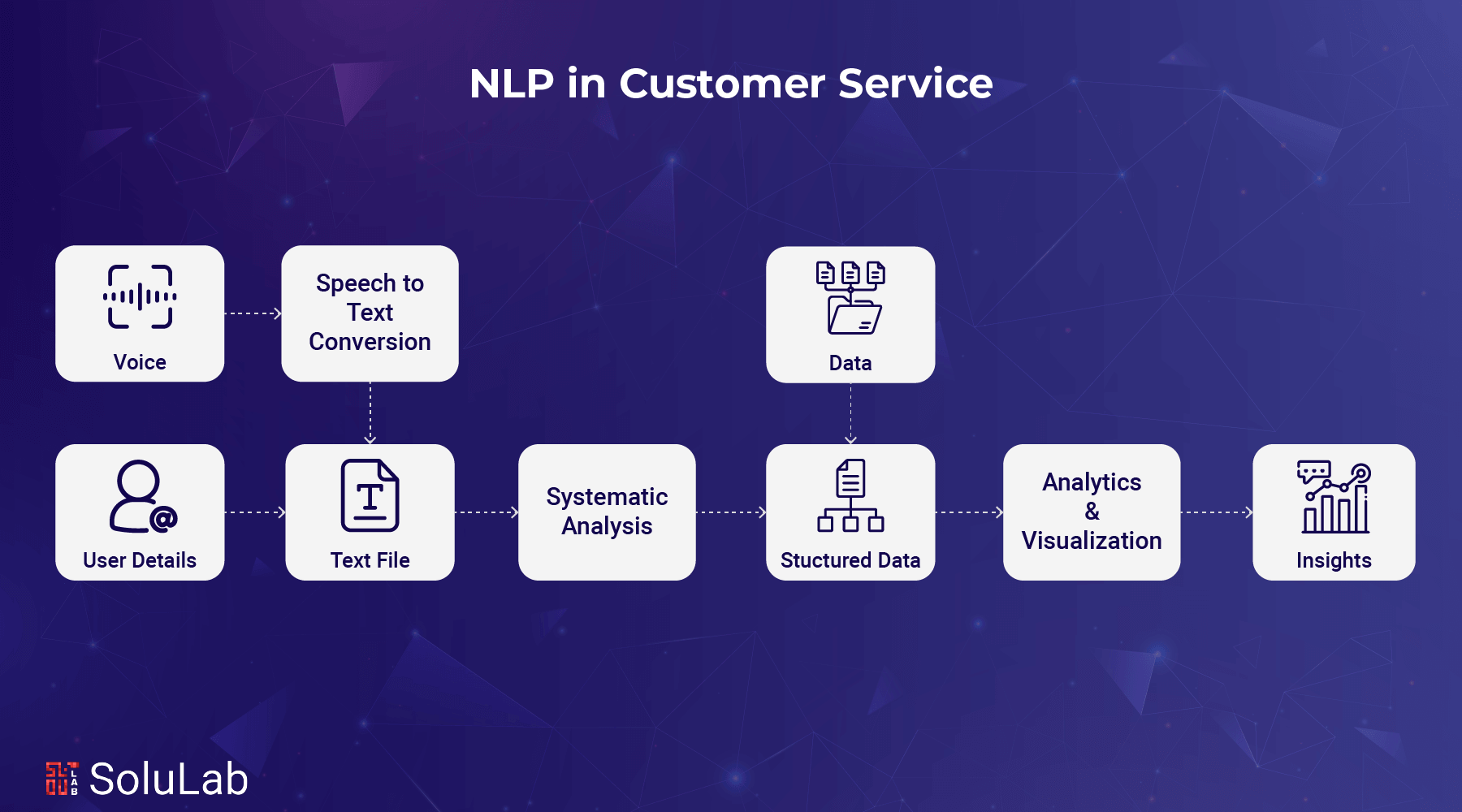
Siri, Alexa, Google Assistant, all of them lean hard on NLP to make sense of a spoken command. The spoken words get turned into text, and that text is what the system actually acts on.
- Text Classification and Categorization
NLP also sorts through mountains of unstructured data. Emails get tagged by urgency or subject. News articles get grouped by topic. Legal documents get filed by case type. None of that requires a human to read every line first, which is the point: organizations move through huge volumes of text without drowning in it.
- Named Entity Recognition (NER)
Named Entity Recognition pulls the useful bits out of text: names, places, organizations, dates, dollar figures. Law and finance rely on this heavily, since pulling structured data out of dense documents by hand is slow and error-prone.
- Text Summarization
We’re drowning in text, so the ability to compress a long document into something readable in under a minute matters more than it used to. NLP models do exactly that, shrinking articles and reports down without losing the point. Journalism especially benefits: turning around a summary fast can decide who gets read first.
- Machine Learning for Content Creation
Give an NLP model a prompt and it can generate content from scratch, essays, articles, even a poem or short story if you push it that way. GPT-4 and its peers do this well enough that marketing teams and entertainment studios are now automating chunks of content creation that used to sit entirely with humans.
Components of Natural Language Processing in Customer Service
It sounds complicated, but strip it down and Natural Language Processing (NLP) in customer service is just a way to get computers to understand and use human words. A handful of parts do the actual work: breaking words apart, figuring out what they mean, then shaping a response. AI-powered chatbots, for instance, lean on exactly these components to hold a conversation. Here’s what’s running underneath:
1. Morphological and Lexical Analysis
Analysis of Morphology: morphemes are the smallest chunks of meaning inside a word. Split “uncooked” and you get “un-,” “cook,” and “-ed”: not, to prepare, past tense. That breakdown is how a computer figures out what a word is actually built from.
Analyzing Words: this looks at how words in a sentence sit next to each other. Say, “I want to address the manager about this,” and the system learns “address” means to speak to, not to walk toward. Context decides everything here.
2. Syntactic Analysis
Syntactic analysis is grammar, plain and simple. It maps out subject, verb, object, take “The cat sat on the mat” and it can tell you exactly which word is doing what. That structure is what lets a computer keep up even when a sentence gets genuinely tangled.
3. Semantic Analysis
Semantic analysis handles both the literal meaning and the figurative one. “He’s on the ball” has nothing to do with standing on anything, it means he’s alert. Context decides which reading is right, and this layer is what makes translation, sentiment work, and question-answering possible. One method researchers actually use to measure attitudes toward a concept is the semantic differential scale, which pits opposing descriptive terms against each other to gauge meaning and sentiment.
4. Discourse Integration
Reading one sentence in isolation only gets you so far. Sometimes meaning depends on everything said before it, if the conversation’s about due dates and someone drops in “this task is urgent,” that urgency ties straight back to the deadline already on the table. Discourse integration is what keeps a computer tracking that thread across a whole conversation or document, which is exactly what makes good summarization possible.
5. Pragmatics Analysis
Pragmatics is reading between the lines. “Can you pass the cup?” isn’t a question about your physical abilities, it’s just a polite ask. Get this right and a computer starts catching sarcasm, indirect requests, all the subtle stuff that makes conversation feel human instead of robotic.
Natural Language Processing (NLP) Techniques in Customer Service
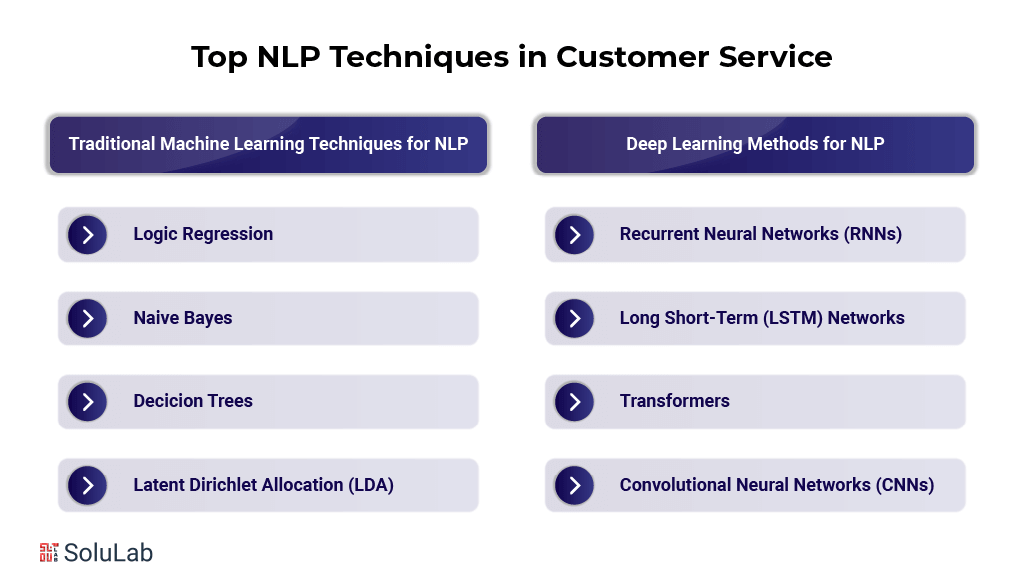
Two broad approaches dominate Natural Language Processing (NLP) in customer service tasks: standard machine learning methods, and deep learning techniques. Each one is built for a different flavor of language problem. Below are the techniques you’ll run into most often:
Using Traditional Machine Learning Methods NLP in Customer Service
- Logistic Regression: a supervised learning method that’s good at sorting things into buckets, spam or not spam, safe or dangerous content, positive or negative sentiment. Feed it data and it estimates the probability of an outcome. In sentiment work, that might mean weighing the specific words in a review to decide whether it reads as good or bad.
- Naive Bayes: built on Bayes’ Theorem, this method calculates the odds of a given label for a piece of text, treating every word as if it appeared independently of the rest. That assumption is, admittedly, naive. It still works remarkably well for spam detection and document sorting, especially once the dataset gets large.
- Decision Trees: decision trees split data into branches based on features, and each node in an NLP tree represents something like a word or phrase. Part-of-speech tagging and language identification both lean on this structure.
- Latent Dirichlet Allocation (LDA): a topic-modeling method that surfaces the themes buried in a large text dataset. Because LDA treats a document as a mix of topics rather than a single subject, it’s useful for content recommendations, document organization, and digging through customer feedback.
Methods for Deep Learning in NLP
Here are some methods of deep learning in NLP in customer service:
- RNNs, or Recurrent Neural Networks: built for sequential data, speech, text, anything with an order that matters. RNNs carry context forward from earlier inputs, which is exactly why they’re solid at machine translation and text generation.
- Long Short-Term Memory (LSTM) Network: a variant of RNN purpose-built to handle long-range dependencies, cases where something early in a sequence still matters much later. That long memory is why LSTMs are strong at summarization and sentiment analysis on lengthy text.
- Transformers: the architecture that broke from the pack by reading an entire sequence of words at once instead of one at a time. That parallel processing, plus a sharper grip on context, is what powers BERT and GPT-3. Language generation and summarization both run best on this backbone.
- Convolutional Neural Networks (CNNs): originally built for image processing, CNNs found a second life in NLP handling named entity recognition and text classification. They work by spotting local patterns, small clusters of word order or sentence structure, and building understanding up from there.
Programming Languages, Frameworks for Natural Language Processing in Customer Service
Natural Language Processing (NLP) in customer service pulls from a wide toolbox, programming languages, libraries, frameworks, all working together to process, analyze, and model language. Here’s what practitioners actually reach for.
1. Programming Languages for NLP
- Python: easy syntax, deep library support, Python is far and away the most popular language for NLP work. Most NLP packages, frameworks, and deep learning tools are written in it, which more or less settles the question of what to reach for first.
- R: still a favorite among analysts and data scientists for data work. It has NLP libraries of its own, TidyText and Word2Vec among them, mostly suited to research and smaller-scale projects.
- Java: fast and built to scale, which is why large enterprise NLP applications often land here. JavaScript trails behind Python and R in popularity for this kind of work, but libraries like Natural and Compromise still make it workable for NLP running in the browser.
2. NLP Libraries and Frameworks
Natural Language Toolkit (NLTK)
It covers word vectors, lemmatization, entity linking, and a long list beyond that.
It handles heavier NLP jobs well, text classification and named entity recognition especially.
Hugging Face earned its name in NLP through sheer volume, over 135 pre-trained models including GPT, BERT, and RoBERTa, all sitting in one library. That makes it straightforward to tweak, fine-tune, and train models across a wide range of natural language processing jobs.
Key Features:
- Pre-trained models plus the tooling to fine-tune them yourself.
- Plays well with PyTorch and TensorFlow, no friction there.
- An active community that keeps pushing updates.
Python and TensorFlow
TensorFlow and PyTorch are the two deep learning frameworks people reach for when building custom NLP models. Both matter a great deal once a project needs to scale in complexity, language generation and machine translation lean on them heavily.
Features:
- TensorFlow is built for deploying and scaling NLP solutions, cloud environments especially.
- PyTorch trades a bit of that for flexibility and ease of use, which is why so much research and experimentation happens on it instead.
Gensim
Gensim is built for unsupervised tasks, document similarity, topic modeling, that sort of thing. It’s best known for its Word2Vec implementation, which represents words as vectors in a high-dimensional space.
Key Features:
- Solid vector space modeling out of the box.
- A go-to for large datasets and any job that doesn’t need labeled data.
TextBlob
TextBlob is another Python library, aimed at making text data approachable. It handles the standard natural language processing (NLP) tasks, part-of-speech tagging, noun phrase extraction, sentiment scoring, without much setup.
Key Features:
- Friendly enough for someone brand new to NLP.
- Fits small jobs and fast prototypes better than big production systems.
3. Online NLP APIs
Language API for Google Cloud: Google Cloud’s NLP API reads text for entities, sentiment, and syntax, across a wide range of languages. It’s a solid shortcut for bolting natural language processing (NLP) onto a web app without building models from the ground up.
Features:
- Sentiment analysis, entity recognition, content classification.
- Pre-trained models, ready out of the box.
Watson NLP API from IBM: IBM’s Watson NLP API is a toolkit for pulling meaning out of unstructured text: translation, sentiment, entity recognition, all bundled in.
It also plugs into other Watson AI services, which spreads AI usage further across an organization.
Text classification, intent recognition, and emotion analysis rank among its strongest features.
Text Analytics API for Microsoft Azure: Azure’s Text Analytics API covers language detection, sentiment analysis, key phrase extraction, and named entity recognition, a reasonable default for cloud-based applications.
Features:
- Multi-language support with strong entity recognition.
- Real-time text analytics across fields as different as healthcare and general business.
4. Other Notable NLP Tools and Resources
- NLP at Stanford
Stanford NLP offers a solid toolkit spanning sentiment analysis, named entity recognition, and dependency parsing. Stanford University built it, and it shows up constantly in both academic research and commercial products.
- ANLP Allen
AllenNLP is an open-source research library sitting on top of PyTorch, aimed at making it easier to build and test deep learning models across different NLP jobs.
- SpacyR
SpacyR bridges spaCy into R, letting R users tap spaCy’s features without switching languages. Handy if you’re a data scientist who’s built your workflow around R.
How to Get Started with NLP in Customer Service?
NLP in customer service looks intimidating from the outside. It isn’t, not really, given the right steps it’s a skill anyone can pick up, beginner or veteran. Here’s a simple roadmap to get moving:
Start with the fundamentals. Learn what a token actually is, how it differs from a word, and get comfortable with parts of speech and sentence structure. If you don’t know Python yet, now’s the time, it’s the default language for this entire field.
1. Get Familiar with NLP Libraries
NLTK, spaCy, Hugging Face, these three alone will save you weeks. They make text data manageable, from cleaning it up to building classification or sentiment models. Spend real time poking around what each one offers.
2. Move Into Deep Learning
Once the basics are solid, push into neural networks, transformers, and models like BERT. This is where the current state of the art lives, and it’s what separates a toy NLP system from one that handles genuinely hard tasks.
3. Work on Real-World Projects
Theory only gets you so far. Build a chatbot. Put together a recommendation system. Try your hand at a text summarizer. Projects like these are what actually cement the concepts, in a way reading never quite manages.
4. Stay Updated
NLP moves fast, faster than most fields. Read the research papers. Follow the industry blogs. Keep an eye on new tools as they show up. If you want depth, specialize, conversational AI or information retrieval are both worth going deep on.
It’s a genuinely hard field, no way around that. But patience and steady practice actually work here. Start small. Keep experimenting. Follow whatever question you’re curious about next.
Conclusion
Natural Language Processing (NLP) in customer service has fundamentally changed how computers deal with words. It’s become a core piece of AI, reshaping customer service, healthcare, banking, e-commerce, the list keeps growing. Chatbots, virtual assistants, sentiment analysis, translation, all of it is getting sharper, and that sharpness is translating into better decisions for the people using these tools.
That said, real problems remain, ambiguity, bias, and a set of ethical questions nobody’s fully answered. Using NLP responsibly matters here, both for fixing these issues and for making sure the technology treats people fairly. Deep learning and pre-trained models are already pushing toward systems that read context better, so the trajectory looks promising even with the rough edges.
Companies that adopt NLP for customer service tend to see real growth and fresh approaches to old problems. Working with people who actually know how to implement it properly is usually what separates the wins from the wasted budget. Built carefully and used honestly, NLP genuinely has the potential to change how we communicate and solve problems together.
SoluLab helped InfuseNet sharpen its data handling by weaving in advanced AI models like GPT-4 and FLAN. The team worked through real obstacles with InfuseNet, tricky AI model integration, flow design that needed to feel intuitive, and data processing that had to stay secure. The result: a platform businesses can use to build personalized, secure, data-driven applications without the usual friction. At SoluLab, our AI development company team has the experts to solve your business problems, contact us today to talk it through.
FAQs
Shipra Garg is a tech-focused content strategist and copywriter specializing in Web3, blockchain, and artificial intelligence. She has worked with startups and enterprise teams to craft high-conversion content that bridges deep tech with business impact. Her work translates complex innovations into clear, credible, and engaging narratives that drive growth and build trust in emerging tech markets.

![Top 10 Examples of AI Being Integrated in the Real World [2026 Edition]](https://www.solulab.com/wp-content/uploads/2026/09/Examples-of-AI-Being-Integrated-in-the-Real-World.webp)