ChatGPT is OpenAI’s language model, built on the GPT-3.5 architecture and carrying a reported 175 billion parameters. That scale shows. It writes prose that sounds like a person wrote it, and it turns up useful answers in fields that have little to do with each other.
OpenAI built ChatGPT to read and write the way people do. So it holds a real conversation. It answers questions. It picks up all sorts of jobs with no extra training at all. And now, paired with the Stable Diffusion method, it reaches past words into something else entirely: making pictures.
Below, we walk through how to add plugins to ChatGPT, and the nuts and bolts of building a ChatGPT plugin that generates images with Stable Diffusion.
Introducing ChatGPT and its NLP Capabilities
What makes ChatGPT a standout language model? Mostly the sheer pile of internet text it learned from. Webpages, papers, books, forum threads and plenty more went into a model with billions of parameters.
All that reading gives it a working grasp of a huge range of topics, plus a feel for the small context cues people drop without thinking. The part that actually impresses, though, is generation. You hand it language. It hands back text that fits.
Talking to it feels oddly human. That is why people use it to draft content, translate, write code and even tutor. Zero-shot and few-shot learning are the surprising bit: it can tackle a task it was never specifically trained on. Give it an instruction, maybe an example or two, and it adjusts on the spot.
ChatGPT Plugin Development -The Fusion of Language and Image Generation
This is where plugins come in. A ChatGPT plugin can wire the model’s natural language processing skills to the Stable Diffusion method, so one conversation produces both words and images. That pairing opens a lot of creative doors. Stable Diffusion itself is a modern image synthesis technique, and it is very good at pictures that look polished and believable.
How does it work? A neural network refines an image over and over, taking it from a rough, noisy draft to a finished piece. Noise and diffusion are the tools. The result is an image that looks sharp but still carries a little controlled randomness, which is often where the artistic character comes from.
Read Our Blog: Top 10 ChatGPT Development Companies In 2025
The Significance of Combining Language and Image Generation
Plugins change what a chat can be. Picture this: you type a prompt, and the Artificial Intelligence answers with a thoughtful reply plus an image that matches what you are talking about. Words and pictures together land harder. People understand more, and they tend to care more, too.
The uses are wide. Take e-commerce. A store can run a ChatGPT plugin that answers product questions in plain language and shows images alongside. Shoppers get the full picture, literally, and buy with more confidence.
Education is another obvious fit, and this integration of ChatGPT could reshape course material. Think of a virtual tutor that explains a hard idea step by step and then sketches a diagram to go with it. Students follow along better. They also stay awake.
Then there are storytelling and games. Writers can bounce plot twists off ChatGPT. Game studios can build characters that talk back and show up with visuals of their own. Plugin development is what makes those characters and worlds feel alive.

The Stable Diffusion Method
People have chased realistic, striking images for as long as there have been images. Getting ChatGPT to generate them is just the newest chapter. Progress in AI and deep learning, has produced fresh image generation techniques, and Stable Diffusion is one of the best known. This section looks at what is actually going on under the hood.
The core idea is diffusion. In physics, it describes how molecules spread out and mix. Stable Diffusion borrows that principle and uses diffusion equations to build an image a little at a time, pixel by pixel, until something recognisable appears.
So what is different here? Traditional image generation AI models usually spit out a result in one pass. Stable Diffusion works through many intermediate steps instead, a sort of “melt-and-recover” cycle. You can watch each stage, and that sequence tells its own small story about how the final image came to be.
The Artistry of Image Synthesis
Start with random noise. That is the blank canvas. From there, the model applies diffusion equations and lets the pixels push against each other and settle. Each pass sharpens things a bit more. Details show up gradually, the way a painting fills in stroke by stroke.
Every step moves the image into a new phase. What stands out is how steady the whole process stays. The picture does not lurch or fall apart halfway through; it changes smoothly, and you can see the finished work taking shape.
Advantages of the Stable Diffusion Method
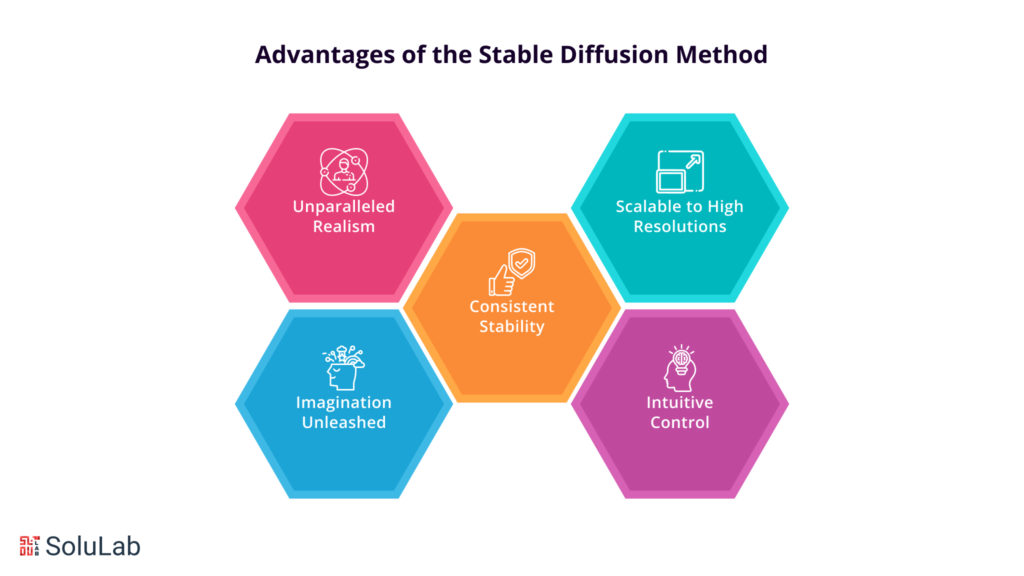
There is no shortage of image generation methods. Stable Diffusion still earns its place. Here is why it tends to beat the older approaches:
1. Unparalleled Realism: Because the image evolves slowly, the output looks real. Fine detail and texture survive, and the digital canvas stops looking flat.
2. Imagination Unleashed: Diffusion is fluid by nature. That looseness lets the method wander past the limits of older techniques and produce art that a person might never have thought to sketch.
3. Consistent Stability: Some models warp faces or produce results that do not hang together. Stable Diffusion stays coherent from the first step to the last, and each step builds cleanly on the one before.
4. Scalable to High Resolutions: Going bigger is usually where image generation gets painful. This method copes with larger dimensions well, which makes it useful for both art projects and practical, everyday work.
5. Intuitive Control: Multiple steps mean multiple places to intervene. Artists can tweak parameters at each diffusion step and steer the result, which invites a lot of experimenting.
Read Our Blog: Google Gemini Vs ChatGPT
How to Create a ChatGPT Plugin via the Stable Diffusion Method?
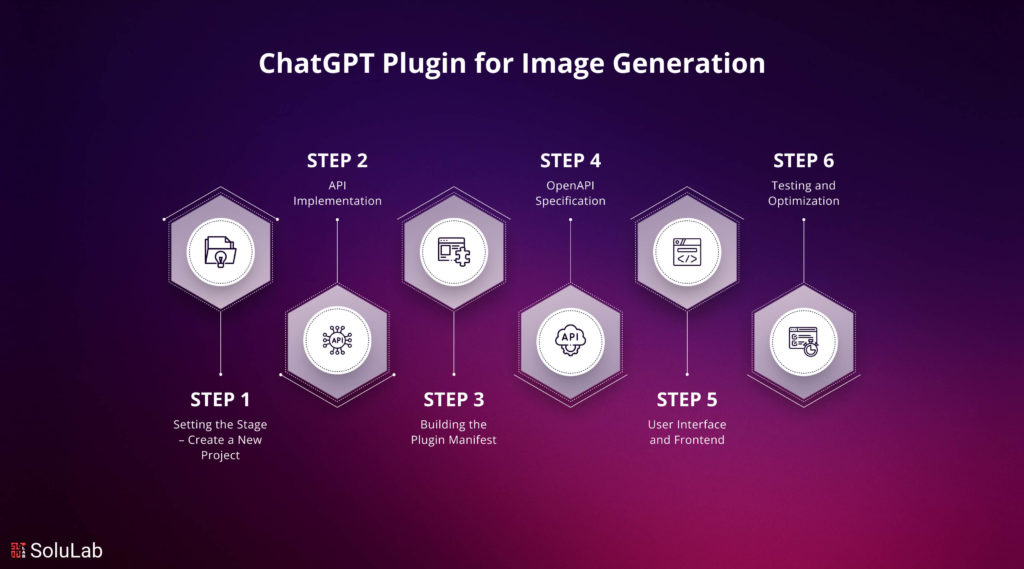
A ChatGPT plugin for image generation built on Stable Diffusion is a fun project, and it merges art in AI. Follow the steps below and you end up with something users can actually watch at work, turning a prompt into an image in front of them. It is not magic. It is a series of sensible engineering choices, made in the right order.
Step 1: Setting the Stage – Create a New Project
- Conceptualize the Vision: Decide what the plugin is for before you write a line of code. Pin down its goals, its features, and exactly where Stable Diffusion fits in.
- Choose the Programming Language: Pick a language that suits the project. Most teams go with Python, since its AI libraries are mature and well supported.
- Setup Environment and Dependencies: Install the libraries and tools you need, such as TensorFlow or PyTorch, so image generation and the heavy AI math run efficiently.
Step 2: API Implementation
- Explore OpenAI API: Read through the OpenAI API documentation so you know how to reach the GPT model. Get your API keys sorted for authentication early; it saves a frustrating afternoon later.
- Implement Image Generation Functions: Bring Stable Diffusion into your API layer. Write the functions that run image synthesis and manage the step-by-step evolution of pixels.
- Add User Interactivity: Let users feed in their own parameters and nudge the generation as it runs. Control should feel obvious, not buried in settings.
Read Also: Top 10 AI Development Companies in 2025
Step 3: Building the Plugin Manifest
- Define the Plugin Manifest: Write a manifest file with the basics about your plugin: its name, description, version and dependencies.
- Incorporate Image Generation: Name Stable Diffusion as a headline feature in the manifest. Say plainly what it can do and what it adds to image synthesis.
Step 4: OpenAPI Specification
- Design the API Specification: Draft a detailed OpenAPI spec covering every endpoint and the input and output formats the plugin expects. Get this right and integration with the API goes smoothly.
- Document the Image Generation Process: Write thorough docs on how people use the plugin, and on how Stable Diffusion changes the pixels at each diffusion step.
Step 5: User Interface and Frontend
- Intuitive User Interface (UI): Build a simple interface where users type a prompt, set a few parameters and kick off generation. It should match the creative feel of the plugin, not fight it.
- Real-time Image Preview: Show a live preview that updates at every diffusion step. Watching the image form is half the fun for users.
Step 6: Testing and Optimization
- Rigorous Testing: Test the plugin hard until it behaves reliably. Fix whatever bugs and odd edge cases turn up along the way.
- Performance Optimization: Tune the image generation pipeline for speed and scale so it keeps running smoothly, even at higher resolutions.
Best Practices and Optimization
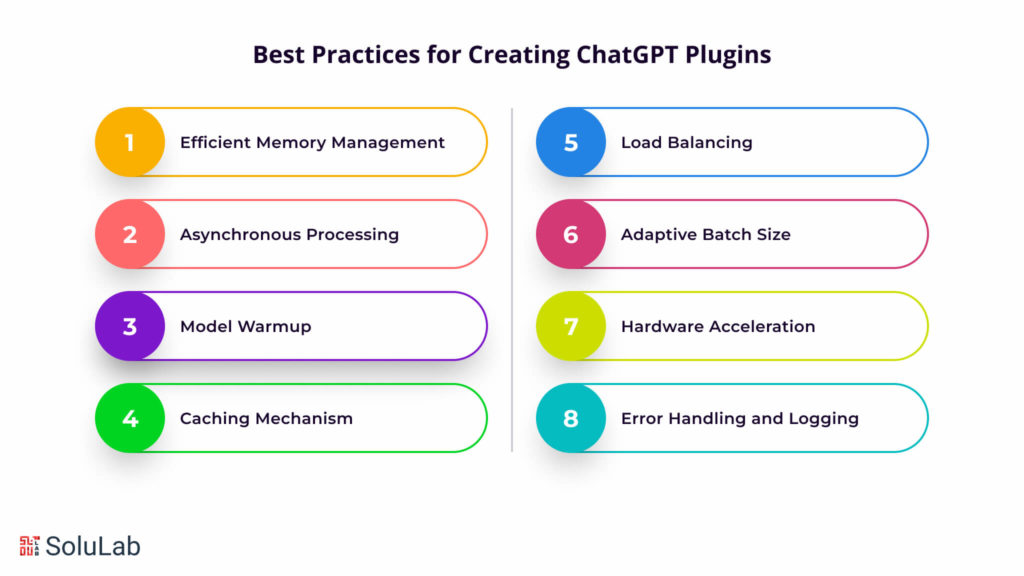
Want a plugin that stays fast once real users show up? These are the practices worth building in from day one:
1. Efficient Memory Management:
Cut needless allocations and free resources the moment you are done with them. Image generation eats memory, and careless handling is usually the first thing that breaks under large requests.
2. Asynchronous Processing:
Go async. When requests are handled concurrently, the plugin can serve many users at once instead of making them queue during busy periods.
3. Model Warmup:
Warm the model up when the plugin starts. Preloading the Stable Diffusion model means the first user prompt does not sit waiting on a cold start, and every response after that feels quicker.
4. Caching Mechanism:
Cache intermediate results from the diffusion process. Similar prompts then skip work that has already been done. Generation gets faster, and your servers get a break.
5. Load Balancing:
Spread requests across several server instances. Load balancing keeps any single machine from choking and makes better use of the hardware you are already paying for.
6. Adaptive Batch Size:
Batch size is a trade-off between memory and speed. Let it adapt to the load rather than hardcoding one number, and you keep response times short without wasting resources.
7. Hardware Acceleration:
Run the heavy lifting on GPUs or TPUs. The speed-up on AI computation is large, and it matters most for complex image synthesis, where CPUs simply crawl.
8. Error Handling and Logging:
Handle errors properly and log generously. When something breaks at 2 a.m., good logs are the difference between a quick fix and a long night.
Exploring Real-World Applications of ChatGPT Plugins
So where does an image generation plugin built on Stable Diffusion actually get used? A few places:
- Artistic Expression and Visual Storytelling: Artists and designers get a tool for chasing odd ideas, producing striking artwork and building visual narratives. One practical snag: ChatGPT sometimes refuses HEIC files, so users may still need to convert heic to png before uploading.
- Content Creation and Marketing: Writers and marketers can make articles, blog posts and social posts more visual, with images that stop people mid-scroll.
- Graphic Design and Prototyping: Designers can mock up layouts, draw custom illustrations and test strange visual concepts far faster than doing everything by hand.
- Video Game Development and Game Assets: Studios can generate original character designs, in-game assets and whole environments to fill out their worlds.
- Virtual and Augmented Reality (VR/AR): In virtual and augmented reality apps, the plugin can produce believable textures, objects and surroundings, which is exactly what makes those experiences feel real.
Concluding Remarks
A ChatGPT plugin that draws with Stable Diffusion sits right where art and AI overlap, and it pushes what a chat window can produce. Tune it for performance, test it against real use cases, and developers get a very flexible creative tool. ChatGPT plugins are built to scale and to stay secure. Implement and test them properly and performance keeps up as users arrive. Security still needs deliberate attention, though: ChatGPT developers should put protecting user data and closing vulnerabilities near the top of the list. Get those basics right and the fun part takes over: a prompt goes in, and you watch noise turn into a picture, step by step.
SoluLab has a team of skilled, experienced people who build custom ChatGPT clones shaped around what each business actually needs. As a well-known ChatGPT development company, SoluLab keeps sharpening its skills and adopting new technology so its services stay current. The aim is simple: give businesses capable AI chatbot solutions and help them figure out what ChatGPT can realistically do for them. Working with SoluLab’s ChatGPT developers can help a company stand out in a crowded AI market. If you have an AI project in mind, you can hire ChatGPT developers from SoluLab and see what they bring to it. Contact SoluLab now to find out what ChatGPT could do for your business.
FAQs
Bhavya is driving growth through data-backed demand generation for AI and Web3 solutions. With 9+ years in digital marketing, he has spearheaded initiatives that led to a 40% increase in qualified inbound leads. Bhavya shares insights on marketing ROI and scaling a digital presence via AI workflows. He is open to connecting with startups and enterprise teams to help them overcome their challenges.