Customers expect more than they used to. A lot more. Quick, dependable service isn’t a nice extra anymore; it’s the baseline. The old way of doing support came with familiar headaches: long waits, service that swung from great to awful depending on who picked up, and a heavy dependence on manual work. Those problems don’t just annoy clients and drag satisfaction down. They burn through resources and slow the whole operation.
| Recent statistics make the point plainly: customers want an instant solution. Almost 46% think their queries should be answered within 4 hours, and 12% expect a reply inside 15 minutes. |
So what actually fixes this? For a growing number of businesses, the answer is automation. Automate the right parts of your support operation and those old obstacles start to shrink, while the experience you give customers gets better. Happier customers stay. Loyal ones bring others.
Below, we’ll cover what customer service automation is, why it matters, how it works, and where it pays off. Let’s get started!
What is Customer Service Automation?
Put simply, customer service automation means letting technology handle customer questions and support tasks so a person doesn’t have to. Think chatbots, artificial intelligence, and self-service portals.
It used to be all people. Support reps fixed problems over email and on the phone. But the business grows, the ticket volume grows with it, and you need more reps. Costs climb.
Automation breaks that link. It’s a comparatively cheap way to scale support without letting quality slip. And the upside isn’t only cost: engagement goes up too, and you can offer genuinely useful help 24/7.
How Does Customer Service Automation Work?
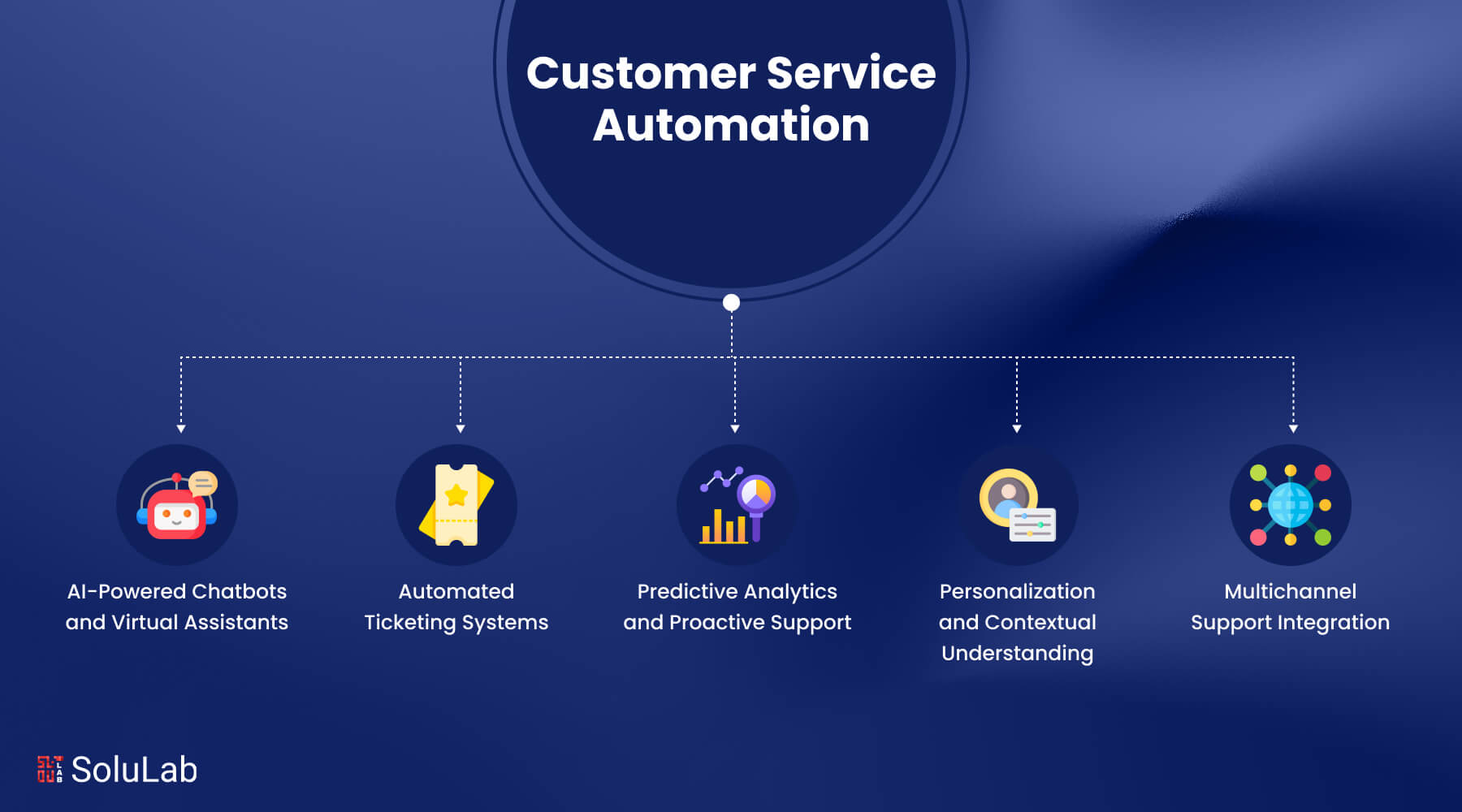
Under the hood, most of it runs on artificial intelligence (AI). The idea is to take the repetitive, time-eating tasks out of human hands so every conversation between a business and its customers moves faster and goes better. Done well, that means more efficiency, lower costs, and service that stays good day after day. Here’s how the pieces fit together:
1. AI-Powered Chatbots and Virtual Assistants
AI-powered chatbots and virtual assistants are usually the first thing a customer meets. They rely on natural language processing (NLP) and machine learning to work out what someone is asking and reply in real time. The range is wide: answering FAQs, taking orders, working through basic troubleshooting. And they get better. Every interaction teaches the system something, so its answers become sharper over time.
2. Automated Ticketing Systems
Automated ticketing systems streamline the way inquiries get handled. A customer sends a query, and the system tags it and ranks its priority based on what’s being asked. AI reads the content and decides what should happen next: send the ticket to the right department, or suggest an automated reply. The result? Urgent problems jump the queue, and the routine ones get cleared without anyone babysitting them.

3. Predictive Analytics and Proactive Support
AI doesn’t have to wait for a complaint. By studying historical data and how customers behave, it can see some problems coming. Picture a product that tends to fail after a certain amount of use. The system can contact those customers first, with maintenance tips or a replacement offer. Customers like being looked after before things break. And fewer of them end up filing support requests at all.
Related: Generative AI Automation
4. Personalization and Contextual Understanding
This is where AI really pulls ahead. Hook it up to your customer relationship management (CRM) platform and it can see a customer’s past conversations, what they’ve bought, and what they prefer. With that context, its answers and suggestions fit the actual person. The conversation stops feeling like a form letter.
5. Multichannel Support Integration
Today’s automation systems are built to span channels: email, live chat, social media, phone. Some companies pair automation with outside help, such as live chat outsourcing, to cope with live chat volume and still keep every channel consistent. The practical win is continuity. A customer can open a conversation on social media, pick it back up over email, and never repeat themselves, because the AI system carries the context across.
Use Cases of Customer Service Automation

Where does automation actually earn its place? Here are the use cases that come up again and again:
1. Order Tracking
“Where’s my order?” is probably the most common question in retail support. Automated tracking answers it before it’s asked, giving customers live delivery status and estimated arrival times. Email or SMS updates keep them posted the whole way, so they rarely need to reach out manually.
Two things happen at once. It boosts operational efficiency by cutting down support requests, and it builds customer confidence because people can see exactly where their order is. Buying feels smoother, and that visibility quietly builds loyalty to the brand.
2. Appointment Scheduling
No more phone tag. With AI-driven scheduling, customers book online in a few clicks. They see real availability and pick a slot that works, without any back-and-forth.
For the business, the admin load drops and staff can do other work. The system can also send confirmations and reminders on its own, which means fewer no-shows. Put together, customers get a seamless and convenient way to book, and they’re happier for it.
3. Basic Troubleshooting
Plenty of customers would rather fix a problem themselves than wait for an agent. Virtual assistants make that possible. They read the query, then offer step-by-step instructions, tips, and fixes matched to the specific problem.
Good self-service options mean fewer tickets and less pressure on the support team. Customers are happier too, since their issue gets solved fast. Over time, the whole support process runs leaner, and customers get used to helping themselves.
Related Blog: A Guide to AI Workflow Automation
4. Product Information
Put full product details behind a self-service portal or a chatbot and customers can pull up specs, usage guidance, and troubleshooting tips the moment they want them.
They make better buying decisions, on their own schedule, with no one needing to help. Decisions come faster and with more confidence. That tends to show up in retention, too.
5. Returns and Exchanges
Returns are tedious for everyone. Automation takes most of the pain out by giving customers pre-filled forms, shipping labels, and clear instructions. From the first request to the finished return, the process gets simpler, and far less admin and manual work lands on your team.
Less friction, happier customers. It’s that direct. People remember an easy return, think better of the brand, and are more likely to buy again.
6. Billing and Payment Assistance
Billing questions can run on autopilot. Automated systems answer the usual queries about charges, process payments securely, and sort out problems like invoice mismatches or failed payments without a person stepping in.
Financial transactions get faster and more accurate, manual intervention drops, and the customer experience improves. There’s also the clock. These systems are available 24/7, so customers can get billing and payment help whenever they need it, and that availability pays back in satisfaction and loyalty.
7. Technical Support and Maintenance
Automated tech support uses AI-powered diagnostic tools to find and fix common technical problems remotely. It reads error codes, log files, and system configurations, narrows down the root cause, and recommends a fix in real time.
Issues get resolved quickly, without someone having to step in. Downtime shrinks. Service keeps running.
Taken together, these automation methods tighten up a business’s day to day operations, make the team more efficient, and give customers a noticeably better experience.
What are the Advantages of Automated Customer Service?

The benefits split neatly in two: what the business gets, and what the customer gets. Here’s each side:
A. For Businesses
- Enhanced Efficiency
Routine work, like answering FAQs, processing orders, and booking appointments, gets handled automatically. That frees your people for work machines can’t do well: solving hard problems, coming up with new ideas, planning ahead. Productivity rises, and so does the business.
- Cost Savings
Automate the repetitive tasks and you spend much less on hiring and training support staff. AI automation also makes fewer human errors, which means fewer expensive fixes after the fact and a smoother operation overall. McKinsey puts the potential cost reduction from automation at 20-40% [SOURCE NEEDED].
- Scalability
Inquiries spike. Your headcount doesn’t have to. AI-powered systems flex with demand, rising and falling as volume does, so service quality and customer satisfaction hold steady even during the busy stretches.
- Consistency
Monday morning or Saturday midnight, the answer is the same. Automated systems follow predefined rules and protocols every time, which protects the brand and keeps service standards where they should be. Customers notice that reliability, and it builds their trust and loyalty.
- Data Insights
Every automated conversation leaves data behind, and AI can collect and analyze large amounts of it in real time. From it, you learn how customers behave, what they prefer, and which trends are starting to form. Those insights feed strategy, product development, and marketing, and they help you keep pace with competitors and with what customers want next.
B. For Customers
- 24/7 Availability
Nobody likes hearing “our office opens at 9.” With AI-powered automation, help is there around the clock. Late at night, early in the morning, whenever: customers can count on a timely answer.
- Faster Response Times
No queue. Automated systems reply and fix issues right away, skipping the delays that come with purely human support. Using natural language processing (NLP) and machine learning, the AI reads a customer’s question correctly and answers with something relevant in real time, so issues close faster and customers leave happier.
- Personalization
AI looks at what each customer likes, what they’ve bought, and how they browse. It then shapes its replies, suggestions, and promotions around that individual. The interaction feels relevant, and people engage more when it does.
- Convenience
Customers reach you wherever they like: email, chat, phone, social media. AI-driven automation ties those channels into one connected experience, so someone can jump from one to another and the context comes with them. No repeating the story from the start. That kind of ease makes the whole experience better and keeps people coming back.
- Improved Satisfaction
Timely, accurate, personal support makes customers happier and more loyal. They value how convenient, quick, and consistent automated systems are, and they trust the business more because of it. For the company, that shows up as better retention, good word-of-mouth, and growth that lasts.
How Can AI be Used to Automate Customer Service?
Bringing AI into customer service automation involves several moving parts. Here’s the order most teams work through them:
- Determine the Use Cases: Start by finding the support processes that would gain the most from AI and automation. Typical picks: chatbots for simple questions, sentiment analysis for handling feedback, and predictive analytics for getting ahead of problems.
- Gathering and Preparing Data: Pull together the relevant information from wherever it lives: transaction history, past client conversations, feedback. Then clean it and organize it so it’s ready for analysis. Bad data in, bad answers out.
- Select the Appropriate AI Technologies: Choose AI solutions that fit your business goals and the use cases you picked. That could mean natural language processing (NLP) for chatbots, machine learning for predictive analytics, and sentiment analysis.
- Create AI Models: Build and train your models on the data you’ve prepared. For chatbots, that means training NLP models on old chat logs. For predictive analytics, train machine learning models on historical customer behavior so they can forecast what comes next.
- Connectivity With Systems for Customer Service: Plug the AI into the channels and systems your support team already uses. In practice, that could be chatbots on your website or messaging apps, predictive analytics inside your CRM, and sentiment analysis tools inside your feedback platform.
- Optimization and Testing: Try your AI-powered automation in real customer service situations to confirm it does what you intended. Watch how it performs and ask users what they think. That’s where the improvement ideas come from.
- Scaling and Deployment: Roll the system out for real. As usage grows, keep watching performance and scalability, and adjust as needed so it keeps running at its best and clients stay satisfied.
- Instruction and Assistance: To make sure both customers and your support reps know how to work with the AI-powered systems, give them training and support. And keep it going: update them on new features and best practices as things change.
Follow these steps and AI can slot into your customer service properly, making teams more productive, customers more satisfied, and the business more successful.
How Does SoluLab Help With Customer Service Automation?
Automating customer service changes how companies deal with their clients in a real way. Problems that have dragged on for years get solved, and support finally becomes both effective and efficient.
SoluLab, a top AI development company, helps companies automate their routine work and give customers personalized support. We help integrate newer automation tools like AI-powered chatbots, predictive analytics, and sentiment analysis. The payoff for our clients: better operational efficiency, shorter response times, and service that stays consistent.
Our work in AI integration solutions has made SoluLab a recognized name in the industry. We’ve helped on multiple business projects by bringing AI-powered chatbots into day-to-day operations. Want faster customer service too? Our experienced team is ready to build around exactly what you need.
Still on the fence? Talk to our experts NOW!

FAQs
Shipra Garg is a tech-focused content strategist and copywriter specializing in Web3, blockchain, and artificial intelligence. She has worked with startups and enterprise teams to craft high-conversion content that bridges deep tech with business impact. Her work translates complex innovations into clear, credible, and engaging narratives that drive growth and build trust in emerging tech markets.