Key Takeaways
- An OpenAI AI agent is different from a chatbot because it can execute workflows, use tools, and decide the next step.
- Businesses should build an AI agent with OpenAI when workflows involve judgment, unstructured data, or rules that keep breaking.
- A reliable agent needs three foundations: model, tools, and instructions.
- The OpenAI Agent SDK tutorial approach should focus on workflow design, not only code setup.
- SoluLab helps startups, CTOs, innovation teams, and SMBs with custom AI agent development, OpenAI integration, and enterprise deployment.
Most businesses are looking forward to finding ways of integrating an AI agent that can handle work without creating new operational risk. They may need an agent that connects with CRM, support tools, or internal databases, or may want to reduce manual follow-ups, document review, or customer support load. But an OpenAI AI agent is not useful just because it can answer questions.
It becomes valuable when it can follow business logic, utilize approved tools, work with company data, trigger the right actions, and halt when human review is required. This guide explains how to build an AI agent with OpenAI, what architecture matters, where most builds go wrong, and when SoluLab can help with custom AI agent development.
What Is an OpenAI AI Agent?
An OpenAI AI agent is a system that uses an LLM to complete a workflow on behalf of a user. A chatbot responds to a prompt, but OpenAI agent development works through a task. It can gather context, choose tools, take actions, check whether the workflow is complete, and hand control back when the situation becomes risky or unclear.
For example, a chatbot can explain a refund policy. An AI agent can check the order, verify eligibility, ask for missing details, trigger the refund process, and escalate high-value cases for approval. When it comes to OpenAI agent development, the architecture, risk level, and business value are different.
OpenAI AI Agent vs Chatbot: Why the Difference Matters
Many teams call everything an agent now. That creates confusion and bad project scoping. A simple chatbot does not control workflow execution. It may answer FAQs, summarize documents, or classify sentiment. Useful, yes. But it is not an agent if it cannot decide the next step or use tools to complete a task.
An OpenAI agent development caters to more responsibilities. It manages steps. It calls systems. It handles exceptions. It knows when to stop. This extra capability is powerful, but it also raises risk. A bad chatbot gives the wrong answer. A bad agent may update the wrong record, send the wrong email, approve the wrong refund, or expose the wrong data. AI Agent Development with OpenAI needs design discipline from the start.
When Should You Build an AI Agent With OpenAI?
You should build AI agents with OpenAI API when the workflow has complexity that normal rules cannot handle well. If the process is simple, stable, and predictable, a deterministic workflow may be cheaper and easier to maintain. Go for Open AI Development when:
Complex Decision-Making
Agents make sense when the workflow depends on context. A fixed rule engine may miss the nuance. An agent can evaluate the situation, retrieve context, and choose the next step within defined guardrails.
Rules Are Too Hard to Maintain
A support process may begin with five rules and turn into fifty. At that point, the business is not really automated. It is just maintaining fragile logic. An agent can help when the rules set become too complex, too expensive to update, or too easy to break.
Build an Agent for Unstructured Data
OpenAI AI assistant development can read, interpret, extract, compare, and act on unstructured information instead of waiting for humans to translate everything into fields.
Read More: AI Assistants in Business
Do Not Build an Agent When Simple Automation Works
If your task is predictable, low-risk, and rule-based, you may not need an AI agent. You may need a workflow automation tool, API integration, or a better internal process. Good AI consulting services should tell you when not to build an agent. That advice can save more money than development itself.
Steps To Build an AI Agent With OpenAI
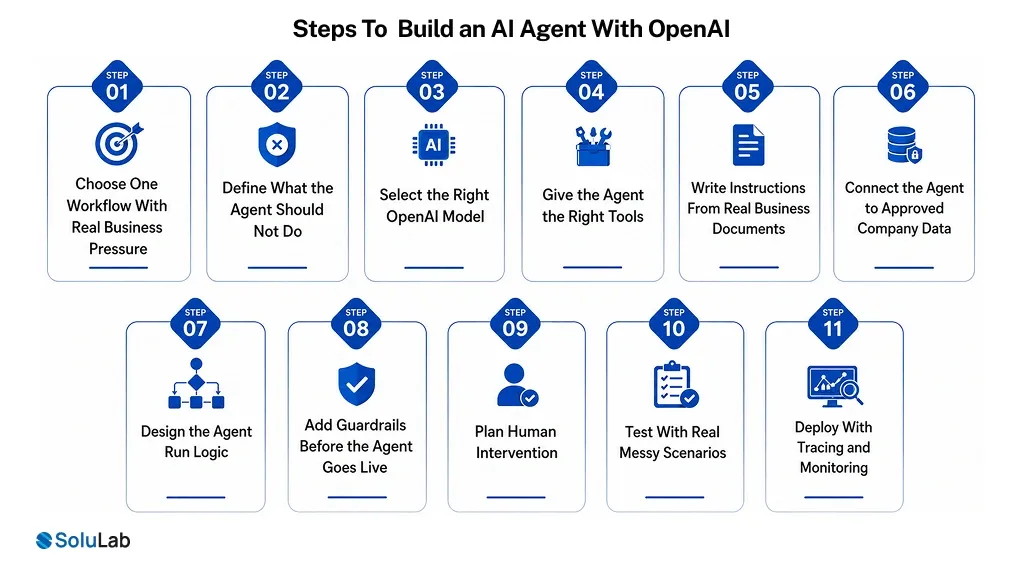
A strong OpenAI AI Agent Development Guide starts with the workflow. The technology stack matters, but the first question is simpler: what work should the agent perform, and how will the business know it worked?
Step 1: Choose One Workflow With Real Business Pressure
Do not start with “an agent for the whole company.” This idea sounds impressive in a meeting and usually collapses during implementation. Pick one workflow that is slow, repetitive, expensive, or difficult to scale. One workflow gives your team a clear owner, clear data, clear tools, and clear ROI.
Step 2: Define What the Agent Should Not Do
Before AI development starts, decide where the agent must stop. A production agent needs boundaries. Without them, the agent may behave well during a demo and fail in real operations.
Step 3: Select the Right OpenAI Model
Start with the most capable model needed to establish a quality baseline. Test whether the agent can complete the workflow with acceptable accuracy. Then optimize cost and latency by testing smaller or faster models for simpler tasks.
This approach protects both quality and budget. It also gives CTOs a better way to defend model choices to finance and leadership.
Step 4: Give the Agent the Right Tools
A model with tools can retrieve data, search files, update systems, trigger workflows, create tickets, send messages, and hand off tasks. For business use, tools usually fall into three categories:
- Data tools help the agent retrieve context from CRMs, databases, PDFs, knowledge bases, product documents, or web sources.
- Action tools allow the agent to update systems, send messages, create records, schedule tasks, or trigger approvals.
- Orchestration tools allow agents to coordinate with other agents or specialized workflows.
Step 5: Write Instructions From Real Business Documents
Use existing SOPs, support scripts, policy documents, onboarding guides, help center articles, and internal workflows. Then convert them into agent instructions. This step is less glamorous than model selection. It is also where most of the agent’s business logic lives.
Step 6: Connect the Agent to Approved Company Data
If your agent supports customers, connect it to approved help documents, order data, CRM records, and support history. If it supports sales, connect it to account records, pricing rules, product data, and engagement history.
For document-heavy workflows, file search and retrieval systems help the model find relevant information before responding. This is especially useful for contracts, claims, invoices, manuals, internal policies, and compliance documents.
Step 7: Design the Agent Run Logic.
The agent should know when it has completed the task. It should know when a tool fails. It should know when it has tried too many times. It should know when the risk level is too high. Without exit conditions, agents can repeat steps, increase costs, or create poor user experiences.
Step 8: Add Guardrails Before the Agent Goes Live
Guardrails protect the business from off-topic requests, unsafe inputs, prompt injection, data leakage, wrong tool calls, poor outputs, and actions that should require approval. A practical guardrail setup may include relevance checks, safety classifiers, PII filters, moderation, input limits, blocklists, output validation, and tool-level safeguards.
Step 9: Plan Human Intervention
Human intervention should trigger when the agent fails too many times, lacks enough information, reaches a risky decision, or attempts a high-impact action. For customer support, that may mean escalating to a live agent.
For finance, it may mean pausing for approval. For internal operations, it may mean sending a task to a manager.
Step 10: Test With Real Messy Scenarios
Real users give incomplete information. Documents have missing fields. CRM records conflict. Customers ask off-policy questions. Tools fail. People try to jailbreak the system.
Testing should include edge cases, tool failures, prompt injection attempts, privacy checks, and business-specific scenarios. If an agent only works when the input is perfect, it is not ready.
Step 11: Deploy With Tracing and Monitoring
Your team should track prompts, outputs, tool calls, handoffs, guardrail triggers, response time, errors, cost, user feedback, and human override rates.
Without tracing, the agent becomes another black box. That is not acceptable when it touches customers, money, operations, or internal systems. For broader architecture planning, read SoluLab’s guide on how to build an AI agent system.

OpenAI Agent SDK Tutorial: What Business Teams Should Understand
An OpenAI Agent SDK Tutorial should not only show how to install a package. It must help developers structure agents around real workflow behavior: agents, tools, handoffs, guardrails, structured outputs, and tracing.
Agents
A support agent may classify tickets and search help documents. A sales agent may qualify leads and update CRM fields. A finance agent may review invoices and flag exceptions. The role should be narrow enough to evaluate.
Tools
Tools give the agent access to business systems.
Without tools, the agent is mostly a conversational layer. With tools, it can search data, retrieve files, call APIs, update systems, or trigger workflows. Tool quality directly affects agent reliability.
Handoffs
Handoffs allow one agent to delegate work to another agent. This matters when different specialists should take over different parts of the workflow. A triage agent may route a refund request to a refund agent, a technical issue to a support agent, or a billing question to a finance agent.
Handoffs are useful, but they add complexity. Use them when specialization improves reliability.
Guardrails
Guardrails control what the agent can process, produce, or execute. For production systems, guardrails should be tied to actual risks: privacy, brand reputation, compliance, unsafe requests, high-value transactions, and tool misuse.
Tracing
Tracing helps teams see what happened during an agent run. This is useful for debugging, monitoring, QA, compliance review, and post-launch improvement. For enterprise AI development, tracing is not just a developer feature. It is an operating requirement.
Single-Agent vs Multi-Agent Systems: Which One To Choose?
Many teams jump into multi-agent architecture too early. Start with one strong agent. Add more only when the workflow becomes too complex for one agent to handle cleanly.
1. When a Single Agent Is Enough
A single agent can handle many workflows if its tools are clear and its instructions are well-structured. This works for customer support triage, internal knowledge search, simple document processing, sales qualification, and lightweight workflow automation.
A single-agent system is easier to test, easier to debug, and easier to maintain. For many SMBs and funded startups, this is the right first version.
2. When to Add Multiple Agents
Multi-agent systems make sense when one agent starts struggling with complex logic or too many similar tools. This structure improves specialization, but it also increases testing, monitoring, and orchestration effort. Use multiple agents only when the workflow justifies the added complexity.
3. Manager Pattern
In the manager pattern, one central agent coordinates specialized agents. The manager decides which agent should handle each task, collects results, and keeps the user experience consistent. This works well when the business wants one control point over the workflow.
4. Decentralized Handoff Pattern
The specialist agent takes over the conversation or task. This works well for support flows, issue routing, sales operations, and domain-specific workflows where the next agent needs full ownership.
This pattern is powerful, but the handoff logic must be clear. Otherwise, users get bounced between agents without progress.
Architecture Needed to Build AI Agents With OpenAI API
A business-ready agent needs an architecture that supports data access, tool use, permission control, monitoring, and improvement.
Model Layer
This layer handles reasoning, language understanding, classification, summarization, and decision support. Do not assume one model should handle every task. Some steps need reasoning depth. Some need speed. Some need a lower cost. A strong architecture routes work based on task complexity.
Tool Layer
This layer connects the agent to the systems where work actually happens. CRM, ERP, helpdesk, databases, product platforms, email systems, document stores, analytics tools, and workflow engines may all become part of the tool layer. The business value of an agent often depends more on this layer than on the model alone.
Instruction Layer
This layer turns business policy into agent behavior. Instructions should include workflow steps, approved data sources, decision rules, output formats, escalation logic, and edge cases.
Guardrail Layer
This layer protects the business. It checks whether inputs are safe, outputs are acceptable, tool calls are allowed, and sensitive data is protected.
Human Review Layer
This layer defines where humans stay in control. For regulated workflows, customer-impacting actions, payments, refunds, legal responses, healthcare support, or financial decisions, human review should be designed before launch.
Monitoring Layer
This layer tracks performance after deployment. It helps teams measure usage, accuracy, failures, costs, response time, user feedback, and business impact.
Best Use Cases for AI Agent Development With OpenAI
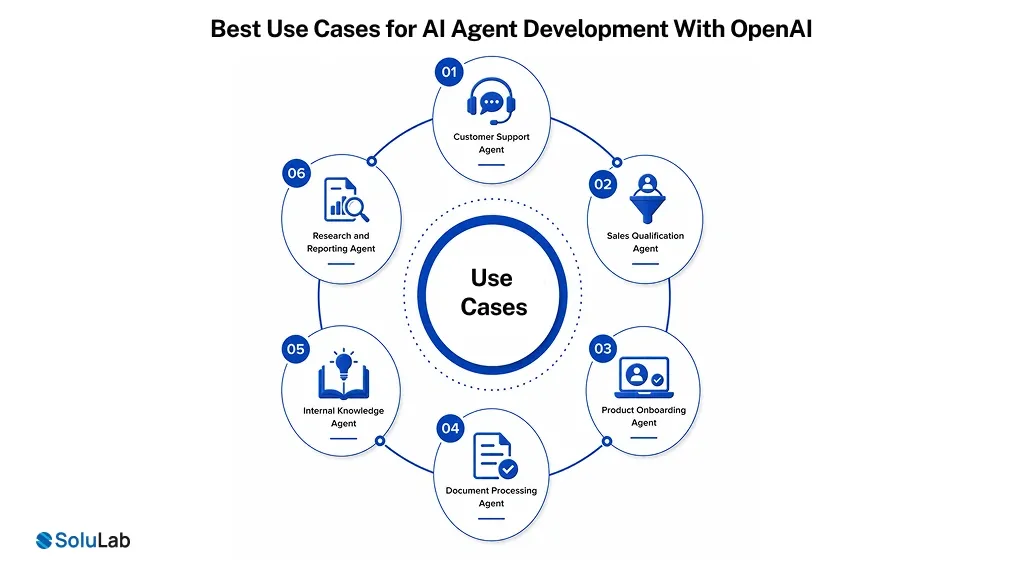
The best AI Agent use cases are close to business pain.
1. Customer Support Agent
A support agent can classify tickets, search approved knowledge, summarize conversations, draft replies, and route urgent issues to humans. It helps support teams handle volume without lowering quality.
2. Sales Qualification Agent
A sales agent can research leads, enrich accounts, qualify prospects, summarize conversations, update CRM records, and recommend next actions. For startups and SMBs, this reduces admin work and helps sales teams focus on qualified opportunities.
3. Product Onboarding Agent
A product onboarding agent can guide users through setup, answer product questions, suggest next steps, and flag accounts that may need human help. For SaaS companies, this can support activation and retention.
4. Document Processing Agent
A document agent can read invoices, claims, contracts, forms, reports, or applications. It can extract fields, check missing data, compare against policies, and route exceptions for review. This is one of the strongest use cases for teams buried in manual review.
5. Internal Knowledge Agent
An internal knowledge agent can answer employee questions from SOPs, HR policies, IT guides, training documents, and internal knowledge bases. An Enterprise AI assistant can make this information easier for employees to find across the tools they use. This is useful for growing teams where information is spread across too many tools.
6. Research and Reporting Agent
A research agent can collect information, compare findings, summarize documents, and create structured reports. This helps founders, analysts, innovation leaders, and strategy teams move faster without spending hours on repetitive research.
Common Mistakes To Avoid In OpenAI Agent Development
Discipline plays an important role in Open AI Agent Development.
1. Building a General Agent Too Early
A broad OpenAI AI agent may look impressive, but a focused workflow is easier to test, control, and scale.
2. Confusing an Assistant With an Agent
OpenAI AI assistant development supports conversations, while OpenAI agent development handles tools, workflow actions, and business execution.
3. Giving the Agent Too Many Tools
Too many similar tools can confuse the agent; strong custom AI agent development keeps tool access clear and controlled.
4. Skipping Edge Cases
Real users break perfect flows, so AI Agent Development with OpenAI must plan for missing data, exceptions, and failed tools.
5. Adding Guardrails Late
Guardrails should be built before launch because enterprise AI agent development cannot rely on post-deployment safety fixes.
6. Ignoring Cost Until Usage Grows
OpenAI model usage, tool calls, retrieval, and monitoring costs should be planned before your OpenAI AI agent scales.
How Much Does It Cost to Build an AI Agent With OpenAI?
The cost to build an AI Agent depends on workflow complexity, integrations, data readiness, guardrails, testing, and deployment requirements. A simple assistant-like agent costs less. A production-grade agent connected to CRM, ERP, documents, databases, monitoring, and approval workflows costs more.
Common cost drivers include model usage, number of tools, API integrations, data preparation, retrieval setup, backend development, UI design, security controls, guardrails, testing, and ongoing optimization

Final Word
Building an OpenAI AI agent is not about adding a smarter chat layer to your business. It is about giving the system enough context, tools, guardrails, and workflow logic to complete real tasks without creating new risk.
The safest way to start is simple. Develop a focused agent that solves one painful workflow, and then move forward to a multi-agent approach. If your team wants to build an AI agent with OpenAI, SoluLab can help validate the use case, design the architecture, integrate business systems, add guardrails, and move the agent from prototype to production.
Partner With SoluLab for AI Agent Development with OpenAI!
SoluLab helps businesses move from idea to deployment with custom ChatGPT development services. Our team can help validate whether an agent is worth building. The work includes use case selection, workflow mapping, data readiness, risk assessment, cost planning, and ROI definition.
We develop OpenAI-powered agents for customer support, product onboarding, sales, internal operations, document processing, research, and enterprise workflows. Build custom reasoning AI agents with SoluLab that can manage multi-step logic, tool use, guardrails, and production workflows.
FAQs
Shipra Garg is a tech-focused content strategist and copywriter specializing in Web3, blockchain, and artificial intelligence. She has worked with startups and enterprise teams to craft high-conversion content that bridges deep tech with business impact. Her work translates complex innovations into clear, credible, and engaging narratives that drive growth and build trust in emerging tech markets.