Key Takeaways
- Software integration connects different applications, systems, and data sources for seamless workflows.
- Common integration types include API, cloud, data, application, and third-party integrations.
- A structured integration process helps ensure better performance, security, and scalability.
- Choosing the right integration partner requires evaluating technical expertise, industry experience, security practices, and support.
- A reliable integration strategy can reduce manual work, improve data accuracy, and enhance operational efficiency.
- Businesses should prioritize scalable and flexible integration solutions that can adapt to future needs.
Most integration work fails or overruns for the same reason: teams control only one end of the connection and have to work against systems someone else designed. SoluLab scopes that reality first, then builds. If you are consolidating a fragmented stack, our enterprise software development services team maps the integration surface before quoting a build.
What are software integration services?
Software integration services are engineering engagements that connect two or more software systems so they exchange data and trigger actions automatically, instead of forcing people to copy information between them. A provider designs the connection layer, builds the connectors, handles authentication and error handling, then monitors the flow in production.
The service covers three things at once: the data (what moves and in what shape), the transport (APIs, webhooks, files, or a message bus), and the failure handling (what happens on a timeout, a rate limit, or a schema change at the far end). Teams buy integration when a manual handoff between tools has become a bottleneck, when the same record has to live in three systems, or when a new application has to talk to an ERP or CRM it was never designed for.
The honest framing SoluLab uses is that integration is different from greenfield development because you control only one end of the wire. The other system was designed by someone else, sometimes years earlier, against standards the rest of your stack now assumes. That constraint, not the code, shapes the architecture.
What are the main types of software integration?
There are five common integration methods: point-to-point, middleware or ESB, iPaaS, API-led integration, and fully custom integration. They differ in how connections are structured and how well they scale as you add systems.
- Point-to-point integration wires two systems directly. It is the fastest way to connect a handful of modern applications and the cheapest to start. The problem is that connections multiply: ten systems fully connected need up to 45 links, and each one is a separate thing to maintain.
- Middleware / ESB (enterprise service bus) puts a central hub between systems. Each application talks to the hub instead of to every other application, which cuts the connection count and centralizes logic, routing, and transformation. It suits large or hybrid estates with many systems.
- iPaaS (integration platform as a service) is a vendor-managed cloud service for building and running integrations without hosting the infrastructure yourself. Gartner defines iPaaS as a service that lets users implement integrations between cloud and on-premises applications and data (Gartner). It fits estates that are mostly SaaS.
- API-led integration structures connections around reusable, purpose-built APIs organized in layers (system, process, and experience APIs). Salesforce, through MuleSoft, describes API-led connectivity as a method that connects data to applications through reusable and purposeful APIs across an organization’s ecosystem (Salesforce).
- Custom integration is bespoke code written for a specific connection, usually when an off-the-shelf connector does not exist, a legacy system exposes no clean API, or the transformation logic is unusual.
Which software integration method should you choose? (comparison table)
For most mid-size teams running a mostly-SaaS stack, iPaaS or API-led integration is the sensible default; point-to-point is fine for a few modern systems, and middleware earns its cost once the connection count climbs. The table below compares the five methods across the factors that actually decide the pick.
| Method | Best for | Scalability | Cost profile | Maintenance | Time to deploy |
| Point-to-point | 2 to 4 modern systems | Low (links multiply) | Low upfront [VERIFY] | High as systems grow | Fast |
| Middleware / ESB | Many or hybrid systems | High | High upfront [VERIFY] | Centralized, moderate | Slow |
| iPaaS | Mostly-SaaS estates | High | Subscription-based [VERIFY] | Low (vendor-managed) | Fast to moderate |
| API-led integration | Reusable enterprise APIs | High | Moderate to high [VERIFY] | Moderate, reusable assets | Moderate |
| Custom integration | No connector, legacy, odd logic | Depends on design | Variable [VERIFY] | You own all of it | Slow |
The trade-off is consistent: cheap-and-fast methods create maintenance debt as the estate grows, and the more scalable methods cost more to stand up. The real driver of cost is the number of connections, not the number of systems, because point-to-point links multiply faster than teams expect. That growth is what eventually forces a move from direct API integration to middleware or an event bus. All cost signals above are directional and should be confirmed against a scoped quote.
How does the software integration process work?
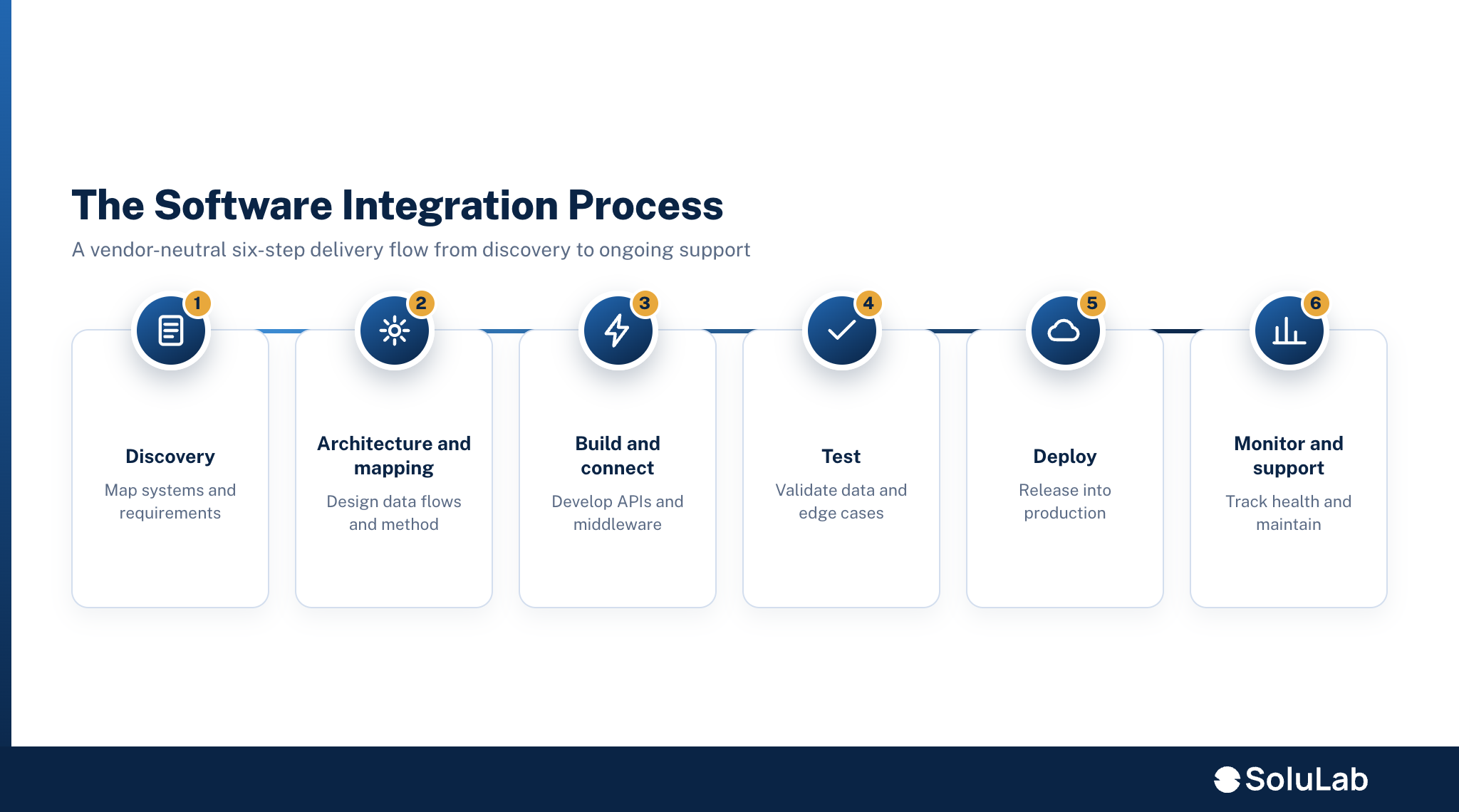
The short version: discover what the systems actually support, map the data between them, build and connect, test the failure paths, deploy, then monitor. Skipping discovery is the most common reason projects overrun. Below is a vendor-neutral six-step process.
- Discovery and system mapping. Inventory every system, endpoint, and data owner. Confirm what each API actually supports versus what its documentation claims. This step decides the cost, and a fixed quote offered before mapping is a guess.
- Architecture and data mapping. Choose the pattern (point-to-point, middleware, iPaaS, API-led, or event-driven), define the system of record for each entity, and map fields, formats, and transformations between systems.
- Build and connect. Develop connectors, transformation logic, and authentication. Store secrets in a managed vault and apply least privilege per connection.
- Test. Validate the happy path, then the failure modes that are the real work: timeouts, rate limits, partial responses, duplicate events, and schema drift at the far end.
- Deploy. Roll out in stages, often with a parallel run against the old manual process before cutover.
- Monitor and support. Watch throughput, error rates, and latency in production, alert on failures, and keep the connectors current as the connected systems change.
The pattern SoluLab sees repeatedly is teams over-engineering the integration pattern while under-investing in monitoring. The monitoring layer is what catches schema drift before it corrupts downstream data.
What are the benefits of software integration services?
The core benefit is one source of truth with far less manual work: data entered once flows everywhere it is needed. That single change removes a category of copy-paste errors and reconciliation meetings. The concrete gains break down as follows.
- Unified data. A customer record, order, or invoice lives in one authoritative place and syncs to the rest, instead of drifting apart across tools.
- Automation. Events in one system trigger actions in another, so onboarding, billing, or fulfillment steps run without a person moving data.
- Fewer errors. Removing manual re-entry removes typos, missed updates, and stale records.
- Scalability. Adding a new tool means adding one connection to a hub or platform, not rebuilding every workflow around it.
- Better reporting. When systems share clean data, analytics and dashboards reflect the whole business rather than one silo.
What are common software integration challenges?
Most integration failures trace back to two things: data mapping that was rushed and legacy systems that do not behave like their documentation says. The rest of the difficulty clusters into a few named categories.
- Data quality and mapping. Fields that look equivalent are not (a “customer” in the CRM is not the “account” in billing). Bad mapping produces silent, compounding errors.
- Legacy and API limits. Older systems may expose no API, enforce tight rate limits, return partial responses, or predate the standards everything else assumes. These get wrapped with an adapter or middleware layer, not replaced.
- Security exposure. The integration layer holds credentials to everything it connects. That makes it a high-value target and a single point of failure if secrets are mishandled.
- Change management. A connected system that changes its schema or endpoint can break every downstream flow. Someone has to own version awareness and keep connectors current.
The consistent lesson is that a proposal describing only the happy path is incomplete. The failure modes are the project.
How do you integrate AI and modern services into existing software?
AI features connect to existing software the same way any modern service does: through APIs and data pipelines, not by rebuilding the host application. You expose the data the model needs, call the model or agent through an API, and feed the result back into the workflow.
Three things decide whether it works. First, data readiness: an LLM or ML model is only as good as the data it can reach, so the integration has to surface clean, current records, which is why AI and ML work in data integration matters before any model is called. Second, the API contract: LLM and GenAI features are consumed over REST or streaming APIs, and increasingly, AI agents call your internal APIs directly to retrieve information, trigger workflows, and update records under defined governance. Third, event handling and idempotency: webhooks and callbacks let a system notify another when an event occurs, and standards like the Standard Webhooks specification aim to make those callbacks consistent and verifiable across services (Standard Webhooks).
This is the honest angle SoluLab brings: modern integration is increasingly about connecting AI into a stack that was never built for it. For the model side of that work, see our AI integration services and broader AI development company capabilities.
How much do software integration services cost and how long do they take?
Cost and timeline scale with connection count, custom versus off-the-shelf connectors, data volume, and compliance requirements, not with a single list price. Discovery and system mapping are where the real number gets set, because what the APIs actually support, versus what the docs claim, is the biggest source of overrun.
The cost drivers, in order of impact:
- Number of connections, not systems. Point-to-point links multiply, so ten loosely connected tools can cost less than five tightly coupled ones.
- Custom vs off-the-shelf. A supported iPaaS connector is far cheaper than bespoke code for a legacy system with no clean API.
- Data volume and real-time needs. Batch nightly syncs are cheaper than sub-second event streaming.
- Compliance. SOC 2, GDPR, or HIPAA handling adds audit, access-control, and data-residency work.
Anyone offering a fixed quote before the discovery and mapping step is guessing. For a scoped range, talk to SoluLab’s integration team with your system list.
How do you choose a software integration partner?
Choose a partner on evidence of relevant integration delivery, a security posture that fits your compliance needs, and a stated process that includes discovery before pricing. A vendor who quotes a fixed price before mapping your systems is the first thing to screen out. Use this checklist.
- Relevant experience. Ask for integrations they have shipped against systems like yours, especially any legacy platforms you run.
- Security posture. Confirm how they handle credentials (managed vault, least privilege per connection), audit logging, and the certifications they hold.
- Delivery process. A credible partner maps and discovers before quoting, and their proposal describes failure handling, not just the happy path.
- Support model. Integrations break when connected systems change. Confirm who monitors production and keeps connectors current.
- References. Named engagements and a real author or architect behind the work beat anonymous service copy.
SoluLab scopes the integration surface, names a system of record for each entity, and designs for the failure modes before writing connector code. To start with a mapping conversation, reach our custom software development team. If your build also touches cloud hosting, delivery pipelines, or a SaaS product, our cloud computing consulting, DevOps consulting services, and SaaS product development teams work alongside integration.
Frequently Asked Questions
2. What is the difference between software integration and system integration?
5. How long does a software integration project take?
Chintan leads SoluLab's highest-level AI consulting conversations, assessing whether a client's business problem actually justifies an AI investment before any solutioning begins.