Key Takeaways
- Kubernetes handles self-healing and known failure states, but does not always identify root causes.
- AI agents can improve diagnostics by analyzing metrics, logs, traces, events, and deployment history.
- AI-driven remediation should be controlled with RBAC, policies, approvals, and audit logs.
- The best starting point is read-only diagnostics before moving to automated remediation.
- Enterprises can use AIOps Kubernetes workflows to reduce alert noise and improve incident response.
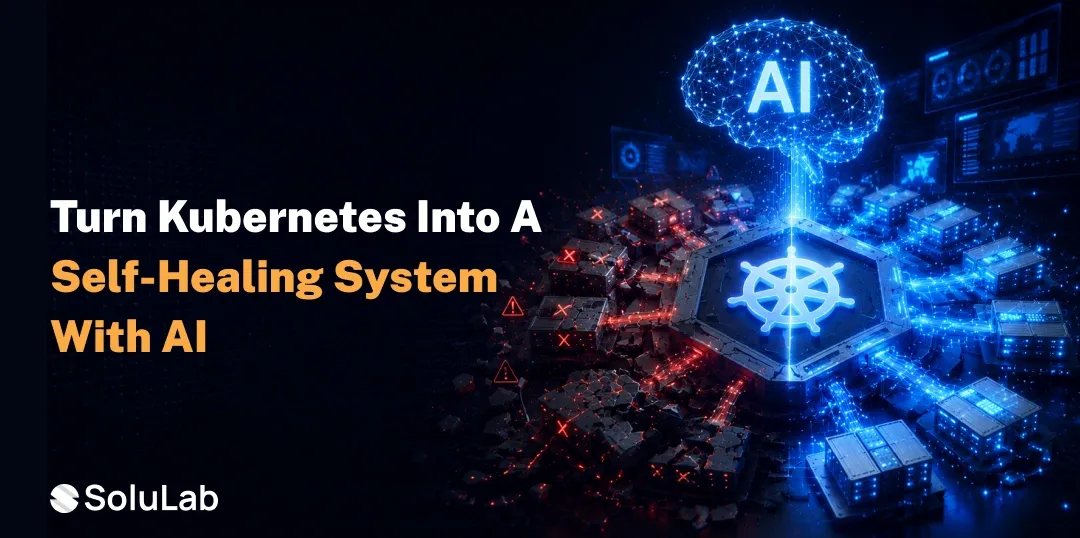
Kubernetes is good at keeping applications alive, but, in case the container crashes, the entire process restarts, which could cause issues like poor images, a database timeout, or a faulty release. Native Kubernetes self-healing may figure out the reason for failure, but may not find the root cause. Here, the AI agents for Kubernetes become valuable. With AI-Driven Kubernetes Self-Healing, DevOps teams can use AI integration solutions to analyze logs, metrics, traces, and Kubernetes events and take the necessary action to fix the problem.
This guide explores how to build the self-healing infrastructure in Kubernetes with AI agents.
How Does Kubernetes Handle Self-Healing?
Kubernetes self-healing works in the desired state. Teams can define how the system should run, and Kubernetes makes sure, continuously, that it runs as per the set desired state.
Let’s understand with an example: If a Deployment is configured to run five replicas and only three are available, Kubernetes tries to create two more. If a container fails its liveness probe, Kubernetes can restart it. If a Pod is not ready, Kubernetes can remove it from service traffic until it becomes healthy again.
| Native Kubernetes Feature | What It Does |
| Liveness probes | Restart unhealthy containers |
| Readiness probes | Stop traffic from reaching unready Pods |
| ReplicaSets | Maintain the required number of Pods |
| Deployments | Manage updates and workload state |
| Node rescheduling | Move workloads when nodes fail |
| Controllers | Reconcile the actual state with the desired state |
The limitation appears when the problem is deeper than a failed container. A repeated crash loop back off may not need another restart. It may need a rollback. An OOMKilled pod may need resource tuning. A readiness failure may be caused by a downstream service, not the application itself.
Why Use AI Agents for Kubernetes?
AI agents help Kubernetes operations become more context-aware. Instead of checking one alert in isolation, an AI agent can review several signals together. It checks:
- Cluster metrics
- Application logs
- Distributed traces
- Kubernetes events
- Recent deployments
- Config changes
- Resource usage
- Historical incidents
- Service dependencies
AI agent self-healing infrastructure in Kubernetes helps teams to get answers to questions like issues that come after AI deployment, or reasons for slow response time, and external dependencies.
Kubernetes Self-Healing Architecture With AI Agents
Kubernetes’s self-healing architecture provides limited-access AI agents so that they are inside a controlled system with clear permissions, policies, and audit trails.
| Layer | Purpose |
| Observability layer | Collects metrics, logs, traces, and events |
| Detection layer | Finds anomalies, failures, and abnormal trends |
| Diagnostic layer | Uses AI to investigate possible causes |
| Policy layer | Defines what actions are allowed |
| Remediation layer | Executes approved recovery actions |
| Audit layer | Records decisions and changes |
| Feedback layer | Learns from incident outcomes |
The AI agent should first diagnose, then recommend, and only execute when the action is low-risk or policy-approved.
For example, creating an incident summary is low risk. Restarting a staging workload may also be acceptable. Rolling back a production release or changing resource limits should usually require approval.
Key Benefits vs. Native Kubernetes
Kubernetes already provides a strong recovery foundation. AI adds a layer of artificial intelligence on top of it.
| Area | Native Kubernetes | AI-Driven Kubernetes Self-Healing |
| Response style | Rule-based | Context-aware |
| Main action | Restart, replace, reschedule | Diagnose, recommend, remediate |
| Root cause analysis | Limited | Stronger through log, metric, and trace correlation |
| Release awareness | Basic | Can connect incidents to recent deployments |
| Remediation | Fixed actions | Policy-based action selection |
| Human effort | Manual investigation required | Faster triage and incident summaries |
| Prevention | Limited | Can detect early warning signals |
| Learning | Minimal | Can improve from previous incidents |
How to Deploy AI Agents on Kubernetes?
AI agents can run as Kubernetes workloads, but they should be deployed with limited permissions and clear operating boundaries. A process includes:
- Agent service—The AI agent runs as a deployment inside the cluster or in a connected control environment.
- Telemetry connectors: The agent reads data from monitoring, logging, tracing, and Kubernetes event systems.
- Service account and RBAC—The agent receives only the permissions it needs. Read-only access is a good starting point.
- Policy engine—This defines what the agent can do automatically and what requires approval.
- Remediation executor—Approved actions are executed through Kubernetes APIs, CI/CD tools, or incident management systems.
- Human approval workflow—Production-impacting actions should route through Slack, Jira, PagerDuty, ServiceNow, or another approval process.
- Audit trail—Every recommendation and action should be logged.
This setup keeps automation useful without making it unsafe.
Step-by-Step Process to Build Self-Healing Infrastructure in Kubernetes
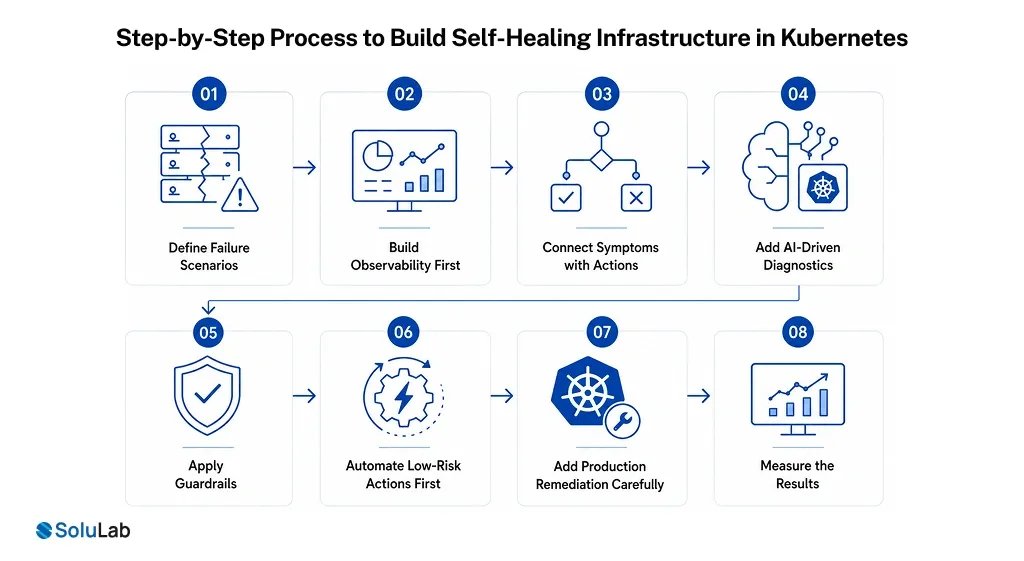
1. Define the failure scenarios
Start with real operational problems. Clear failure scenarios help you avoid vague automation. Common examples include:
- CrashLoopBackOff
- OOMKilled Pods
- ImagePullBackOff
- Failed readiness probes
- CPU throttling
- Node NotReady
- Failed rollouts
- DNS resolution issues
- Storage latency
- Service dependency failures
2. Build observability first
AI agents need reliable data. Without good telemetry, they will make weak recommendations. The observability layer should include application metrics, infrastructure metrics, logs, traces, Kubernetes events, deployment history, and service maps.
3. Connect symptoms with possible actions
Each failure type should map to a safe set of responses. The AI agent should not guess blindly. It should evaluate context before choosing an action.
4. Add AI-driven diagnostics
The AI agent can compare logs, metrics, traces, and deployment data to identify the likely cause. It can also summarize the incident for engineers, which saves time during on-call response.
5. Apply guardrails
AI agents should work within strict boundaries.
Use:
- Minimal RBAC permissions
- Namespace restrictions
- Read-only mode during early rollout
- Approval flows for risky changes
- Policy-as-code
- Audit logs
- Rollback controls
This keeps the system predictable.
6. Automate low-risk actions first
Do not begin with full production remediation. Start small, and once the system proves reliable, you can expand automation. Good first actions include:
- Alert enrichment
- Incident summaries
- Ticket creation
- Restart recommendations
- Staging environment remediation
- Runbook suggestions
- Root cause summaries
7. Add production remediation carefully
Production changes should be gradual. Allow the agent to execute only specific actions under specific conditions. You may allow automatic pod restarts in noncritical namespaces but require approval for production rollbacks or resource changes.
8. Measure the results
Track whether the system actually improves operations. If the numbers do not improve, the automation needs refinement. Useful metrics include:
- Mean time to detect
- Mean time to resolve
- Alert noise reduction
- False positive rate
- Successful remediation rate
- Rollback accuracy
- Engineer intervention rate
Best Practices for AI-Enhanced Self-Healing Kubernetes
Following practices makes self-healing systems with AI in DevOps safer and easier to manage.
- Start with read-only diagnostics.
- Avoid giving AI agents cluster-admin access.
- Keep humans involved for high-risk production actions.
- Require explainable recommendations.
- Connect the agent to CI/CD history.
- Maintain audit logs for every action.
- Prevent repeated failed remediation loops.
- Review policies regularly as the infrastructure changes.
When Should Enterprises Implement AIOps in Kubernetes?
Enterprises should implement AIOps in Kubernetes when manual incident response starts slowing down operations. This usually happens when teams manage:
- Multiple Kubernetes clusters
- Frequent releases
- Microservices with many dependencies
- High-volume production workloads
- Complex observability data
- Repeated incident patterns
- Noisy alerting systems
At that point, native Kubernetes self-healing is still useful, but it is not enough. Teams need better diagnostics, smarter automation, and safer remediation workflows. Here, an AI development company can help to overcome these limitations.
How SoluLab Helps Build AI-Driven Kubernetes Automation?
SoluLab, #1 AI agent development company, helps enterprises design and build AI-powered infrastructure automation for Kubernetes and cloud-native environments. Our team supports self-healing infrastructure development in Kubernetes, AI agent development, AIOps workflow design, Kubernetes automation, diagnostic systems, and remediation architecture.
Whether you want to deploy AI agents for Kubernetes automation, build a Kubernetes self-healing system, or create an enterprise AIOps layer, SoluLab can help you define the architecture, integrations, policies, and implementation roadmap.
FAQs
Shipra Garg is a tech-focused content strategist and copywriter specializing in Web3, blockchain, and artificial intelligence. She has worked with startups and enterprise teams to craft high-conversion content that bridges deep tech with business impact. Her work translates complex innovations into clear, credible, and engaging narratives that drive growth and build trust in emerging tech markets.