Key Takeaways
- AI model deprecation is a vendor’s formal end-of-life notice for a specific model version. You usually get a fixed window, often 3-12 months, before the API stops answering.
- Retirement cycles keep shrinking. Providers now ship new model generations every few months, and keeping old ones alive costs compute they’d rather spend elsewhere.
- A working model retirement planning habit, built on ownership, monitoring, and internal deadlines, turns a scramble into routine engineering work.
- Avoiding LLM vendor lock-in starts on day one: an abstraction layer, prompts kept out of hardcoded strings, and a fallback model you’ve actually tested.
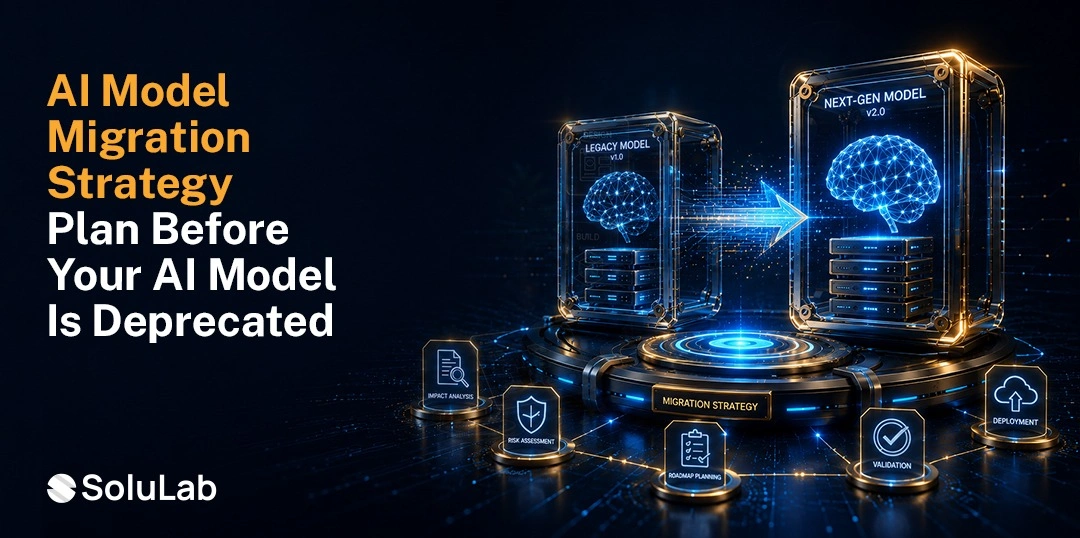
- Migration goes smoother as a repeatable ten-step process, tested side by side with the old model before that model actually goes dark.
Every team that built on GPT-3, Claude 2, or PaLM found out the same way. An email. A changelog entry buried three paragraphs down. Sometimes just a support ticket nobody answers until the API starts returning 404s.
AI model deprecation isn’t rare anymore. It’s a routine part of running production AI, and the teams that treat it that way, as maintenance instead of a crisis, are the ones who keep shipping without the 2 a.m. Slack thread.
This guide covers what deprecation actually does to a production system, why the retirement clock has gotten shorter across every major provider, and how to build a plan that turns a vendor’s sunset notice into a scheduled task instead of a fire drill.
What Is AI Model Deprecation?
AI model deprecation is a vendor’s formal announcement that a specific model version will stop getting support, updates, or eventually, API access at all. It’s not the same as a model quietly falling out of fashion. Deprecation comes with a hard date. After that date, calls to the model ID either fail outright or get silently redirected to a newer model that behaves differently.
Providers tend to move through three stages before a model disappears for good.
- Deprecation notice. The vendor announces an end date, typically 3 to 12 months out depending on how widely used the model is.
- Legacy or restricted access. The model still works, but it might cost more, run slower, or need an opt-in flag to keep calling.
- Full retirement. The endpoint returns an error. The model ID stops being callable, period.
Here’s where most teams get caught off guard: they assume deprecation only touches flagship chat models. It hits embedding models, fine-tuned checkpoints, and older API versions just as often, and any one of those can be quietly powering a feature nobody on the current team remembers building.
Why Are Model Retirement Cycles Getting Shorter?
Three years ago, a model could stay in general availability for two years, sometimes longer. Now a new flagship release can push the previous generation into deprecation within six to nine months. A few things are driving that.
- Release pressure. OpenAI, Anthropic, and Google now ship major model updates every few months instead of once a year. Running five generations of infrastructure in parallel gets expensive fast, so the oldest tier gets retired as soon as the newest one stabilizes.
- Gartner’s 2025 Hype Cycle for AI points to a related shift: enterprise attention is moving away from chasing the newest model and toward the operational discipline, ModelOps and AI engineering, needed to manage AI across its full lifecycle. That’s a tell. The industry itself now expects faster model turnover as the default, not the exception.
- Infrastructure cost. Serving an older model architecture on current hardware isn’t free. Providers would rather point those computers at models people are actually adopting.
- Safety and compliance pressure. Newer models usually ship with tighter guardrails. Vendors have a real incentive to move traffic off older, less-controlled versions, especially as regulatory scrutiny on AI systems only increases.
How Do You Avoid LLM Vendor Lock-In?
Lock-in doesn’t happen in one decision. It happens gradually. A team picks one provider’s SDK, tunes prompts to that model’s specific quirks, and builds business logic around response formats that don’t transfer cleanly to anywhere else. None of that looks like a mistake on day one. It becomes one the day a deprecation notice lands and migrating turns into a multi-month project instead of a config change.
Avoiding LLM vendor lock-in comes down to a handful of habits, not one clever tool.
- Build an abstraction layer between your application code and the provider’s SDK.
- Keep prompts and system instructions in version-controlled files, not hardcoded strings.
- Test against at least one alternative provider on a recurring basis, even if switching isn’t on the roadmap.
- Skip provider-specific features, like proprietary fine-tuning pipelines, unless the business case for that coupling is genuinely strong.
- Track cost and performance across providers so a switch, if it ever happens, is a data decision rather than a guess.
None of this means avoiding deep integration with a provider that’s the right fit. It means keeping that choice a choice, not a dependency you discover the hard way when a sunset email shows up.
How Model Deprecation Affects Production AI Applications?
A deprecated model rarely fails cleanly. It fails in ways that slip past most monitoring dashboards until a customer complains or an auditor flags something odd. Six areas deserve a look before a sunset date arrives.
1. API Availability Changes
The obvious one: the endpoint stops responding, or throws an error code your error handling was never built to catch. Applications without a fallback path go down entirely for that feature, sometimes without anyone noticing right away.
2. Performance and Quality Differences
The replacement model a provider auto-routes you to is rarely a clean swap. Tone shifts. Output formatting changes. Reasoning quality can move in either direction, and not always the one you’d hope. Deloitte’s 2025 State of Generative AI in the Enterprise survey, which polled 3,235 business and IT leaders across 24 countries, found that 74% of organizations expect to deploy AI agents at least moderately within two years.
Only 21% reported having a mature governance model in place. That gap matters here: unmonitored quality drift during a forced migration is exactly the kind of thing weak governance misses until it’s already shipped to users.
3. Pricing Changes
Newer models don’t always cost the same per token as the ones they replace. Some run cheaper. Reasoning-heavy models are often considerably more expensive. Budgets built around last year’s pricing can quietly break.
4. Security and Compliance Considerations
A model retirement can retire the compliance paperwork right along with it, the data residency guarantees, the certifications that made the original model usable in a regulated workflow. Healthcare, finance, and legal teams need to re-verify all of that for any replacement. Don’t assume it carries over. It usually doesn’t.
5. SDK/API Compatibility
Request formats, token limits, function-calling schemas- they all shift between model generations. Code that worked fine against the old model can throw quiet errors against the new one if the response structure changed even slightly.
6. Increased Operational Risk
Every item above compounds. A team migrating under a hard deadline, with no fallback tested, no budget re-forecast, and no compliance re-check, is basically the textbook definition of risk stacking up in a single release window. We’ve seen this play out on real teams: the migration itself was fine, but the compliance re-check that got skipped came back to bite six weeks later.
How Do You Build an AI Model Deprecation Readiness Plan?
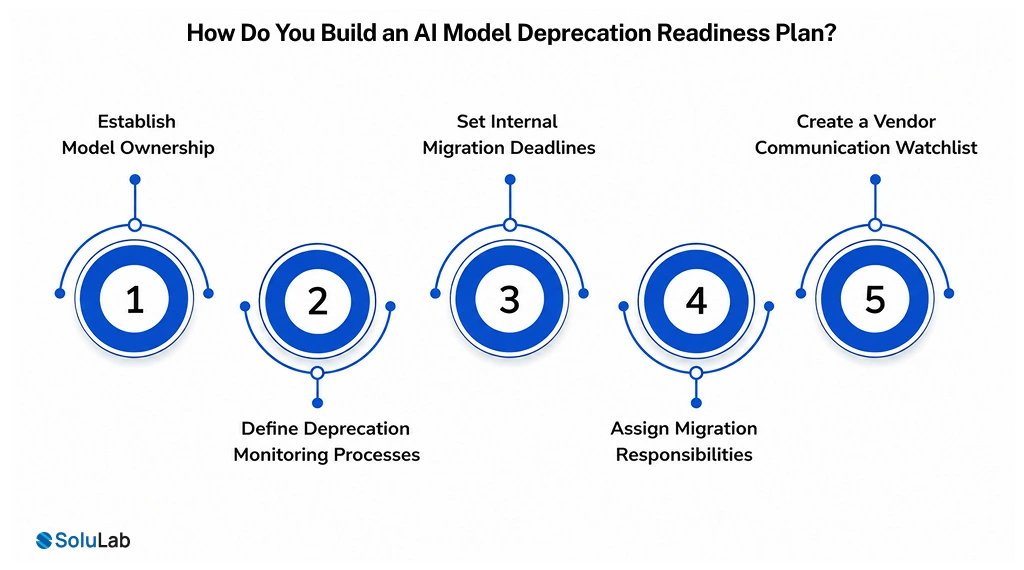
The businesses that handle deprecation without drama aren’t the ones with the biggest engineering teams. They’re the ones with a documented model sunset policy that turns a vendor notice into a known process. Five practices form the core of it.
1. Establish Model Ownership
Every model in production needs a named owner, someone whose job includes tracking that model’s status, not just building the feature that uses it. Skip this step and deprecation notices land in a shared inbox and get missed. It happens more often than you’d think.
2. Define Deprecation Monitoring Processes
Subscribe to provider changelogs, status pages, developer newsletters, whatever channel each vendor actually uses. A quarterly audit of “which model IDs are we actually calling” catches dependencies that shipped years ago and never got revisited.
3. Set Internal Migration Deadlines
Don’t wait for the vendor’s final cutoff. Set an internal deadline 30 to 60 days ahead of the provider’s date, so testing and rollback aren’t happening the same week the old model disappears for good.
4. Assign Migration Responsibilities
Name who tests the replacement, who updates the prompts, who signs off on quality, and who owns the rollback call if something breaks. Migration projects that stall almost always stall because nobody owns the next step.
5. Create a Vendor Communication Watchlist
Track each provider’s deprecation policy, notice period, and history of past sunsets. A vendor that’s given 12 months’ notice deserves less urgency than one with a track record of surprising everyone with 90-day windows.
How Do You Choose a Replacement AI Model?
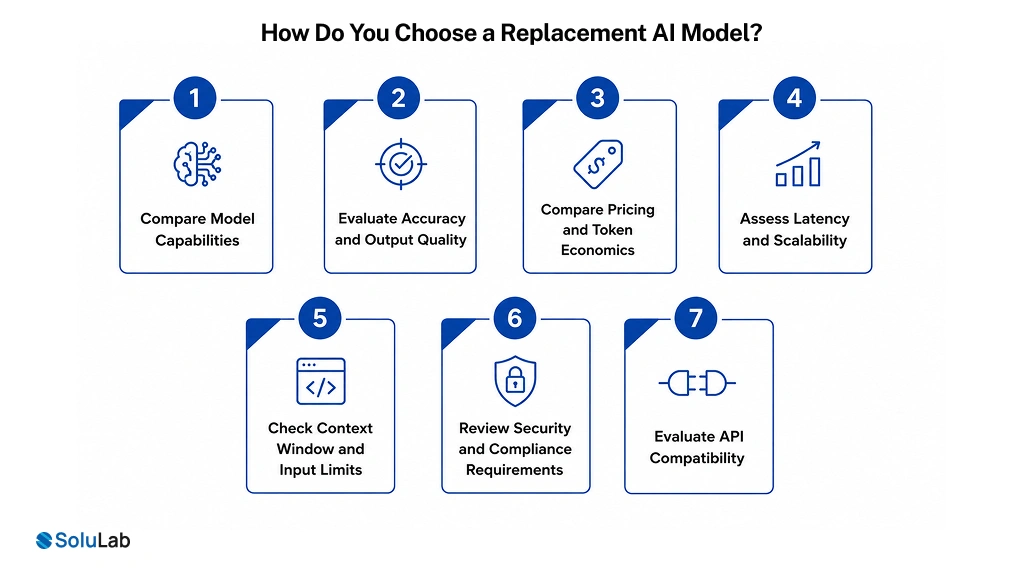
Picking a replacement is where teams either fix long-standing technical debt or repeat the exact lock-in they’re trying to escape. A structured comparison, run against your actual workload rather than published benchmarks, makes the decision defensible when someone asks why later.
1. Compare Model Capabilities
Match the replacement’s strengths, reasoning, coding, multilingual support, tool use, against what your application actually needs. Not what the provider’s landing page claims it’s great at.
2. Evaluate Accuracy and Output Quality
Run your real prompts against real production data samples before committing. Published benchmark scores rarely predict how a model behaves on your specific, slightly weird use case.
3. Compare Pricing and Token Economics
Model a full month of expected volume against the new pricing tier, including whatever premium gets charged for larger context windows or reasoning modes.
4. Assess Latency and Scalability
A model that scores well on quality but adds 400ms of latency per call can quietly wreck the experience in something real-time, like chat or voice.
5. Check Context Window and Input Limits
Confirm the replacement can actually handle your longest real documents or conversation histories. Not the typical case. The longest one.
6. Review Security and Compliance Requirements
Re-verify SOC 2, HIPAA, GDPR, or industry-specific certifications for the new model. Compliance status doesn’t transfer automatically between versions, even from the same provider.
7. Evaluate API Compatibility
Check whether the new model’s request and response formats are close enough to your existing integration to limit rework, or whether this is the moment an abstraction layer would’ve saved you the whole headache.
What Is the Best Process for Migrating From a Deprecated AI Model?
A structured, ten-step process turns migration into repeatable engineering work instead of a one-time crisis. Each step below covers what it involves and the concrete actions it takes.
1. Inventory Existing Model Dependencies
Find every place a deprecated model touches your systems, including the hidden dependencies nobody remembers building.
- List every model ID in use
- Map each model to owning team
- Flag any undocumented integrations
2. Define Migration Requirements
Set the non-negotiables the replacement model has to meet before evaluation even starts.
- Document required accuracy thresholds
- Define budget and latency limits
- Note compliance must-haves
3. Select Replacement Models
Narrow the field to two or three candidates actually worth testing against real workloads.
- Shortlist two to three candidates
- Match capabilities to use case
- Confirm provider support windows
4. Build a Migration Environment
Create an isolated space to test the new model without touching production traffic.
- Stand up a staging environment
- Mirror production configurations
- Isolate from live user traffic
5. Update APIs and Integrations
Rework the actual code paths, SDK calls, response parsing, whatever the new model changed, to match its format.
- Update SDK and endpoint calls
- Adjust request and response parsing
- Refactor function-calling schemas
6. Re-Test Prompts and Workflows
Prompts tuned for one model rarely perform identically on another. This step earns real testing time, not a quick glance.
- Re-run prompts against new model
- Compare outputs to baseline results
- Adjust wording for tone and format
7. Validate Production Performance
Confirm the new model holds up under realistic load and edge cases. Clean test inputs won’t tell you that.
- Test with real production samples
- Check latency under expected load
- Verify edge cases and failure modes
8. Run Parallel Testing
Run both models side by side, even briefly, to catch quality gaps before fully committing.
- Route a small traffic percentage
- Compare quality against old model
- Log discrepancies for review
9. Deploy With a Rollback Plan
Ship the migration with a tested, actually-usable way to revert if something goes sideways after launch.
- Define clear rollback triggers
- Keep old integration code ready
- Set a rollback decision owner
10. Monitor Post-Migration Performance
Watch closely for the first few weeks. Drift and edge-case failures tend to surface after launch, not during it.
- Track quality and error rates
- Monitor cost against forecast
- Review user feedback closely
DIY Migration or a Partner: How to Decide
Some teams run this whole process in-house without much trouble, especially when the model touches one or two features, and the engineering team already owns the integration end to end. Others get more value from bringing in a team that’s run this migration before, particularly when a deprecated model powers multiple products or sits inside a regulated workflow where mistakes are expensive.
If you’re weighing that decision right now, an AI development services partner can run the model inventory, replacement evaluation, and parallel testing in weeks instead of months, while your internal team stays focused on the roadmap instead of firefighting an API cutover.
Conclusion
Model deprecation isn’t a rare disruption anymore. It’s a predictable part of building on fast-moving AI infrastructure, and the businesses that plan for it ahead of time spend a lot less time firefighting and a lot more time shipping.
A named model owner. A monitoring habit. An internal deadline ahead of the vendor’s. A tested replacement-evaluation process. Put those four things in place and what used to be a scramble becomes routine maintenance.
SoluLab, an LLM development company, helps businesses build that readiness in from the start, from architecture that avoids unnecessary lock-in to hands-on migration support the day a vendor sets a sunset date. If a deprecation notice just landed in your inbox, or you’d rather get ahead of the next one, before the deadline turns urgent.
FAQs
Neha is a curious content writer with a knack for breaking down complex technologies into meaningful, reader-friendly insights. With experience in blockchain, digital assets, and enterprise tech, she focuses on creating content that informs, connects, and supports strategic decision-making.