Key Takeaways
- Integration code sits at the seam. It talks to servers you do not control, which is exactly why it breaks.
- You rarely need all six categories on day one. A single-player puzzle game ships with IAP, ads and analytics. A competitive title needs a backend before anything else.
- The store billing split is a rejection risk. Digital goods must use store billing; physical goods and some off-app flows can use an outside processor.
- Validate receipts server-side, not only on the device. Device-only validation is the most common IAP fraud gap.
- Mediation is the step teams skip and regret. Auctioning each impression across networks lifts revenue per user over hardwiring one network.
- Rewarded ads protect retention better than forced interstitials. Ads earn money, but badly placed ones cost you the player.
- Web3 friction is onboarding, not chains. Embedded wallets created through social login keep mainstream players from ever seeing a seed phrase.
Game app integration development is the engineering work that connects a game to outside services: payments, ads, analytics, social login and multiplayer backends, through SDKs and APIs. A team plans the integrations, wires each SDK into the build, tests in sandbox, passes store review, then monitors live performance. Done well, it turns a playable prototype into a revenue-earning product.
SoluLab builds these integrations across mobile, Web3 and NFT games. When ownership, tokens or on-chain assets are part of the plan, our NFT game development company team connects wallets, smart contracts and marketplaces to the same game that already runs your ads and in-app purchases.
On this page: what integration work actually covers, the six categories a game needs, the five-stage process, payments and IAP, ads and analytics, multiplayer and backend, Web3 and NFTs, cost drivers, and how to choose a studio.

What Is Game App Integration Development?
Game app integration development connects a finished or in-progress game to the external services it needs to run as a business. An SDK bundles the code, libraries and tools you drop into your project. An API is the contract your game calls to exchange data with a service. Most integrations use both, because an SDK wraps the API so you write less low-level code.
A raw game build renders graphics and handles input. However, it does not by itself charge a player, show an ad, log a funnel event, save progress to the cloud or mint an NFT. Every one of those capabilities arrives as an integration.
Core game code. Rendering, physics, input and game logic, built in an engine such as Unity or Unreal.
Integration code. Payments, ads, analytics, backend, social and blockchain, wired in through third-party SDKs and APIs.
The seam. Integration code sits at the edges of your game and talks to servers you do not control, which is exactly why it breaks.
What Integrations Does a Game App Usually Need?
Most commercial games need five categories: payments, advertising, analytics, backend and multiplayer, plus social or login. Web3 games add a sixth. The table maps each category to a common SDK and the job it does.
| Category | Example SDK / API | What it does |
| Payments / IAP | Apple StoreKit, Google Play Billing, Stripe | Sell in-app purchases, subscriptions and off-store goods |
| Ads | Google AdMob, Unity Ads, AppLovin | Serve rewarded, interstitial and banner ads |
| Analytics | Firebase, GameAnalytics | Track sessions, funnels, retention and monetisation |
| Backend / multiplayer | PlayFab, Nakama, Amazon GameLift | Accounts, matchmaking, leaderboards, cloud saves |
| Social / login | Sign in with Apple, Google, platform SDKs | Player accounts, friends, sharing, invites |
| Blockchain / Web3 | Wallet SDKs, smart contract APIs | Wallet connect, on-chain assets, NFT ownership |
You rarely need all six on day one. Therefore pick the categories your game model actually depends on, then sequence the rest.
How Does the Game App Integration Process Work?
The process runs in five stages, from planning through live monitoring. Skipping the sandbox and store-review stages is the most common reason an integration passes on a developer’s device but fails for real users.
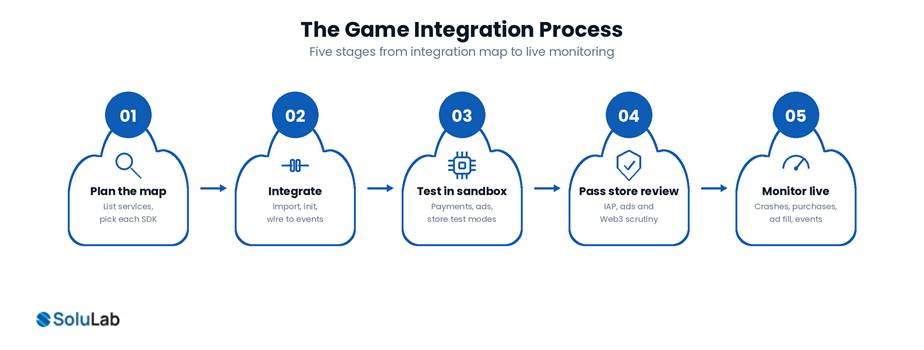
1. Plan the integration map. First, list every service the game needs, then pick the SDK for each, and check the SDKs coexist. Two ad networks fighting over the same hook is a real problem.
2. Integrate into the build. Next, import each SDK, initialise it, then wire it to your game events. Keep credentials out of source control.
3. Test in sandbox. Because payments, ads and store services all offer test modes, because behaviour differs from a developer build.
4. Pass store review. Then App Store and Play Store review integrations closely, especially payments and ads. Web3 features draw extra scrutiny.
5. Monitor live. Finally, watch crash rates, purchase success, ad fill and event delivery. Integrations break when a third party changes an API.
How Do You Integrate Payments and In-App Purchases?
You integrate payments through the platform’s own billing system for digital goods, and through a processor such as Stripe for physical goods or off-store sales. On iOS, digital purchases run through Apple’s StoreKit framework, which prompts for and processes payment then notifies your app (Apple). On Android, the same job goes through Google Play Billing.
The split matters because the stores require their billing system for digital content and take a commission on it. Get it wrong and store review rejects the build.
Define products first. So set them up in App Store Connect and Google Play Console, since the SDK reads them from there.
Handle the full lifecycle. This means purchase, receipt validation, restore, refund and subscription renewal.
Validate receipts server-side. Otherwise device-only validation becomes the common fraud gap.
Test every path in sandbox. Before submission, not after rejection.
For blockchain titles an in-app purchase can also settle on-chain. However, mixing store IAP with crypto value triggers strict store policy, so the two flows usually stay separate.

How Do You Integrate Ads and Analytics?
You integrate ads through an ad SDK, usually behind a mediation layer, and analytics through an event SDK that fires on the moments you care about.
Mediation is the part teams skip and regret. Instead of hardwiring one network, you run a mediation stack that auctions each impression across several networks to lift revenue per user. Unity’s own documentation shows Unity Ads slotting into a mediation stack alongside AdMob and AppLovin (Unity).
Analytics is the other half. A game-specific SDK such as GameAnalytics, or a general one like Firebase, tracks sessions, levels, funnels, retention and revenue. The rule of thumb: instrument the events you will actually act on, not every tap. Otherwise you slow the game and bury the signal.
The tension worth naming is that ads earn money but hurt retention when they interrupt play badly. Consequently, rewarded ads the player opts into usually protect retention better than forced interstitials.
How Do You Add Multiplayer, Social and Backend?
You add these through a game backend, either a managed platform or a self-hosted server, that handles accounts, matchmaking, leaderboards and cloud saves. PlayFab and Nakama are the two names that come up most.
Pick managed, such as PlayFab. Choose this when you want speed, do not want to run servers, and are fine building on a vendor’s stack.
Pick open-source, such as Nakama. Conversely, choose this when you need to self-host, want source control over game logic, or expect scale where per-user pricing bites.
Add social and login. Additionally, Sign in with Apple, Google and platform SDKs let players keep one identity across devices.
The choice between managed and open-source usually comes down to control and cost. Managed gets you live faster; self-hosted gives you ownership of the data and the bill. Meanwhile real-time multiplayer adds authoritative servers, matchmaking and latency handling on top, which is a bigger build than turn-based features.
How Do You Integrate Web3, NFTs or Crypto?
You integrate Web3 by connecting the game to a player wallet, then representing in-game items as on-chain assets and reading or writing them through smart contract APIs. The player owns the asset, so a sword, skin or character becomes a token they can hold, trade or sell.
The friction is onboarding. Traditional players do not have wallets and do not want seed phrases. Modern Web3 games therefore use embedded wallets created through social login, so the player never sees crypto mechanics up front.
Wallet connect or embedded wallet. This decides how the player holds assets, ideally created via social login for mainstream users.
On-chain asset contracts. Then NFTs or tokens encode items, on a chain chosen for low fees and fast confirmation.
Marketplace and trading. Also, a way for players to buy, sell and transfer owned assets.
Off-chain and on-chain split. Finally, heavy gameplay stays off-chain while ownership and settlement go on-chain.
This is where SoluLab’s own work connects. Our NFT game development covers on-chain asset design and marketplaces, alongside our Web3 development and blockchain development practices for the wallet, contract and chain layers.
What Drives Game App Integration Cost?
Cost depends on how many integrations you need, how complex each is, and whether you build managed or self-hosted. A single-player game with IAP, ads and analytics costs far less to integrate than a real-time multiplayer Web3 title with a custom backend and on-chain assets.
Number of integrations. Naturally, each SDK adds build, test and maintenance work.
Backend model. Similarly, managed platforms bill per user or per feature; self-hosting trades that for server and DevOps cost.
Real-time versus asynchronous. In practice, authoritative multiplayer servers cost more than leaderboards and cloud saves.
Web3 complexity. Equally, wallet UX, smart contracts, audits and store-policy work all add scope.
Ongoing maintenance. Moreover, SDKs and store policies change, so integrations need budget after launch, not just before.
Scope these against your engine, target platforms and integration list rather than a published range.
How Do You Choose a Game Integration Studio?
Choose a studio on three things: engine expertise, store and platform experience, and post-launch support. A studio that ships Unity and Unreal builds, has passed store review with payments and ads, and stays on to maintain the integrations will save you the failures that only appear after launch.
Engine fit. First, do they work in your engine and on your target platforms?
Store track record. Next, have they shipped IAP and ad integrations through review, not just built demos?
Integration depth. Can they name the SDKs, mediation setup and backend they would use, and explain why?
Web3 capability. If you need blockchain, do they have wallet, contract and marketplace experience rather than claims?
Maintenance. Finally, will they monitor and update integrations as third-party APIs change?
SoluLab covers app, SaaS and blockchain builds in one team, which matters when a game app integration spans several stacks. See our SaaS product development and cloud application development services for the wider platform work behind a game.
Frequently Asked Questions
Shipra Garg is a tech-focused content strategist and copywriter specializing in Web3, blockchain, and artificial intelligence. She has worked with startups and enterprise teams to craft high-conversion content that bridges deep tech with business impact. Her work translates complex innovations into clear, credible, and engaging narratives that drive growth and build trust in emerging tech markets.