RETAIL · WORKFORCE LEARNING · WEB · MOBILE

Branchline: The Distributed Operations Learning Hub

A learning platform for a multi-location retail organization, where head office builds a programme once, assigns it by role and branch, employees complete it on their phones and branch managers see exactly who needs follow-up.

PublishProgrammes built once by head office
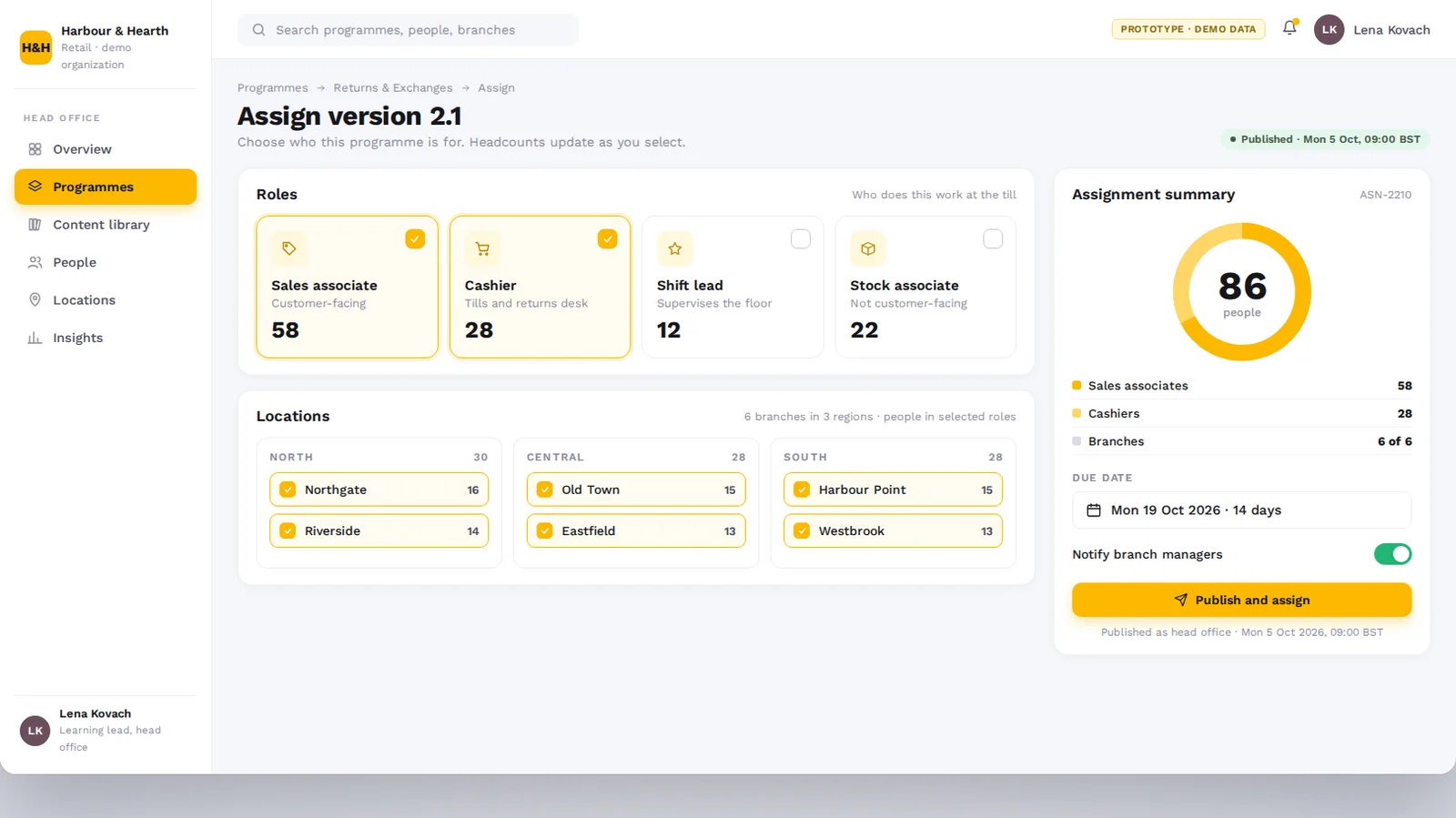
AssignTargeted by role, branch and region
LearnLessons and quick checks on mobile
Follow upManagers act on overdue learning

Project at a Glance

Industry
Retail · Consumer Services
Engagement
Web and Mobile Learning Platform
Platform
Web Administration + Manager Workspace + Mobile Learner
Learning Model
Publish, Assign, Learn, Follow Up
Core Use Case
Role-Based Programmes and Branch-Level Visibility
Users
Head Office Learning Team, Branch Managers, Employees

Challenge and solution

The Business Challenge

A retail organization with branches across several regions needed every location to work to the same standard, while each branch manager kept their own team on track.

  • ✕Updates left head office as files and emails, so each branch taught its own version of the standard.
  • ✕Cashiers, sales associates, shift leads and stock teams received the same generic training.
  • ✕Branch managers had no simple view of who had finished, who was overdue or who had failed a check.
  • ✕Employees learn on the shop floor and between tasks, not at a desk.
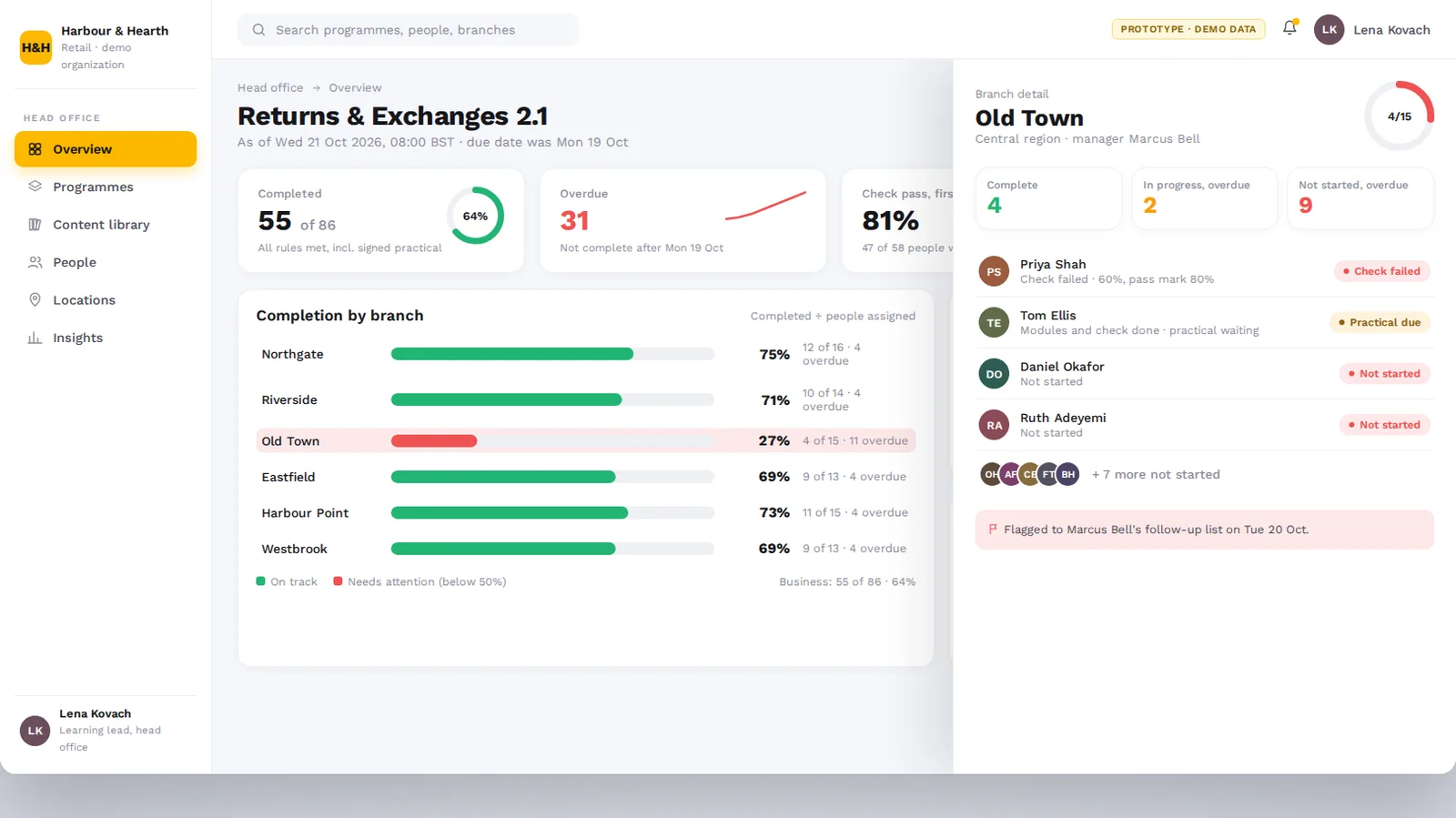
  • ✕Head office could not see which branches or regions needed attention.
The SoluLab Solution

SoluLab built Branchline around one signature workflow: head office publishes, assigns by role and location, employees learn, branch managers follow up.

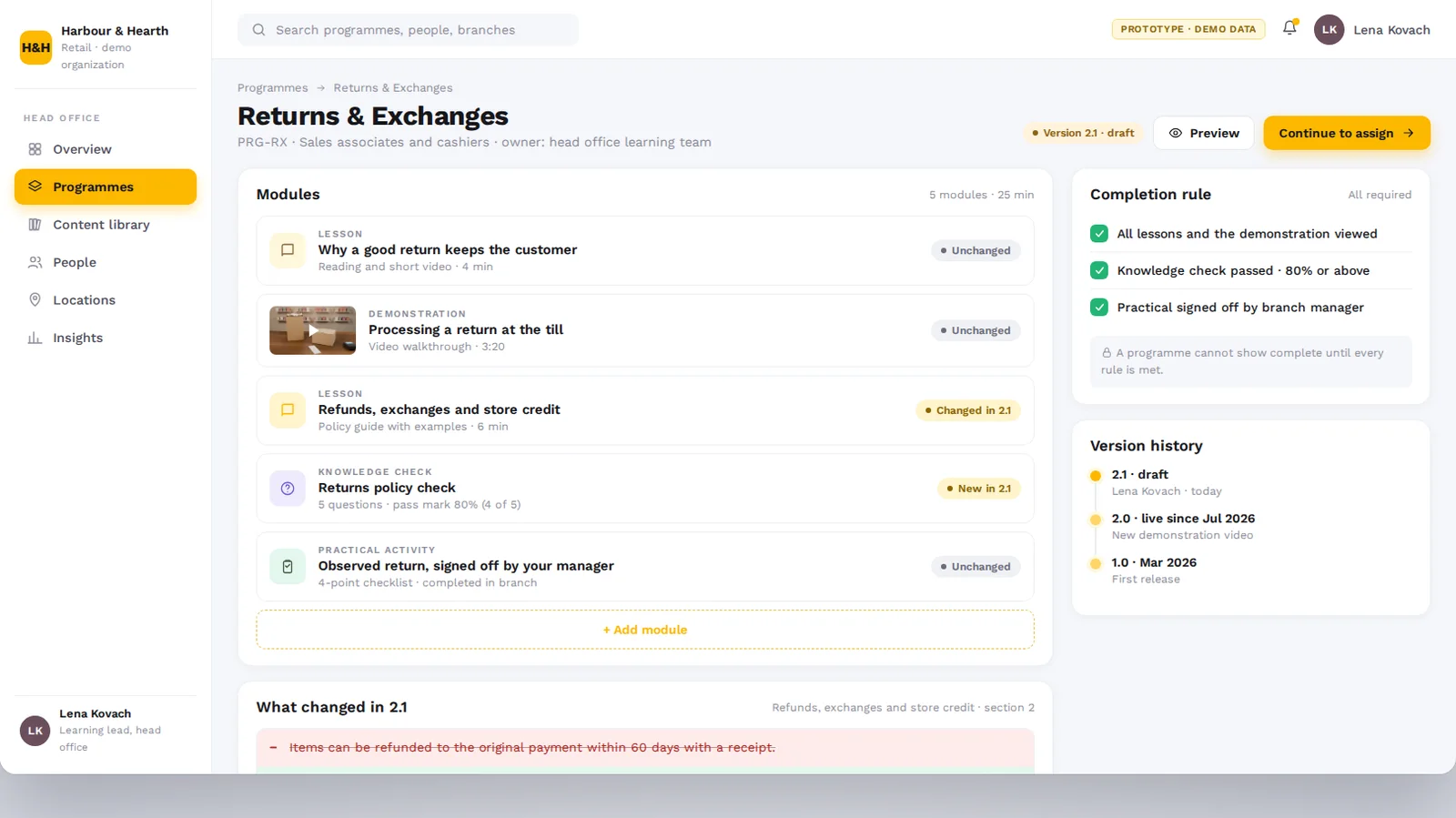
  • ✓Programme builder to assemble lessons, demonstrations, knowledge checks and practical activities.
  • ✓Role and location targeting, so each programme reaches the people whose job it describes.
  • ✓Branch and region structure that filters people and learning views by location.
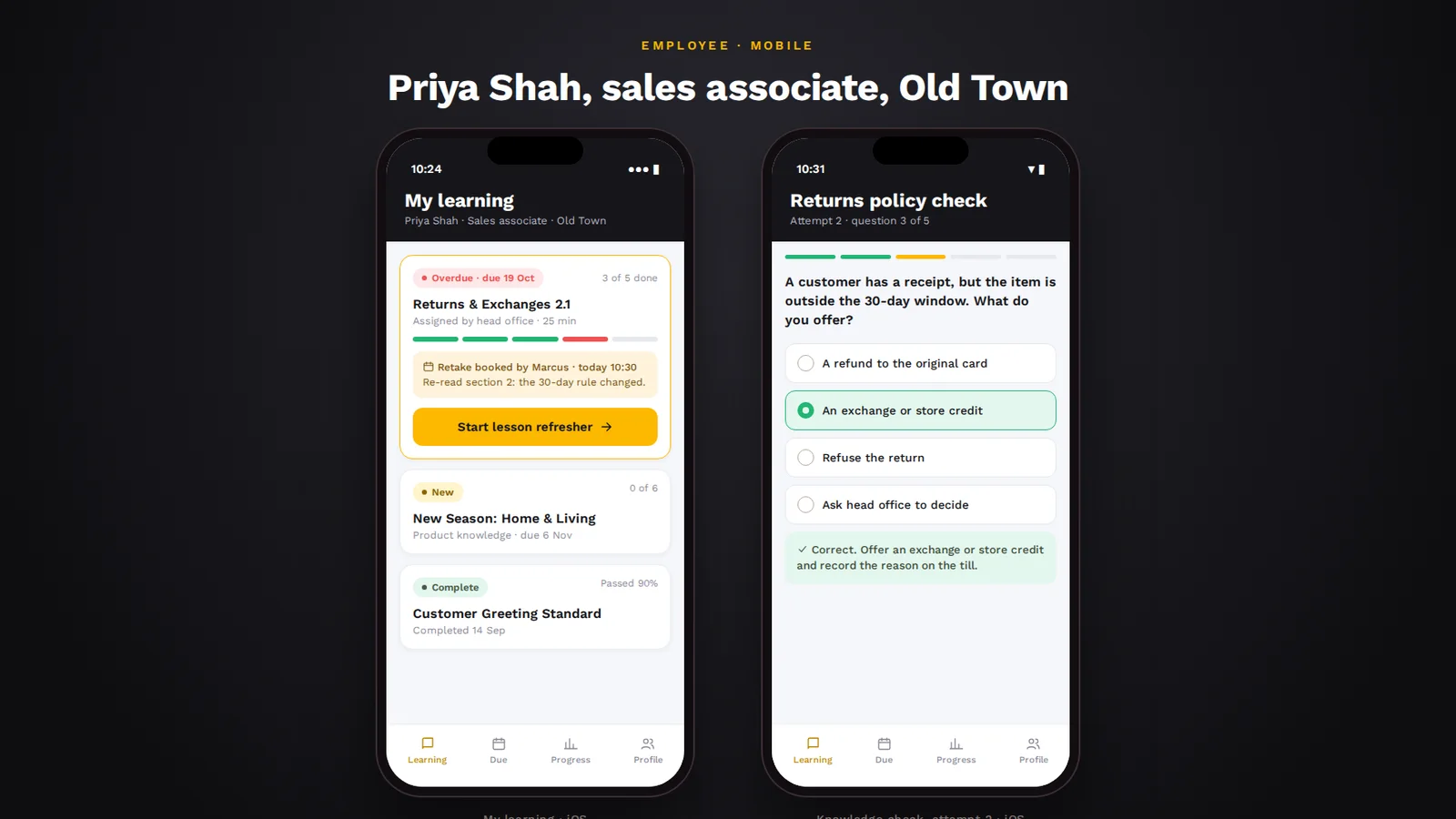
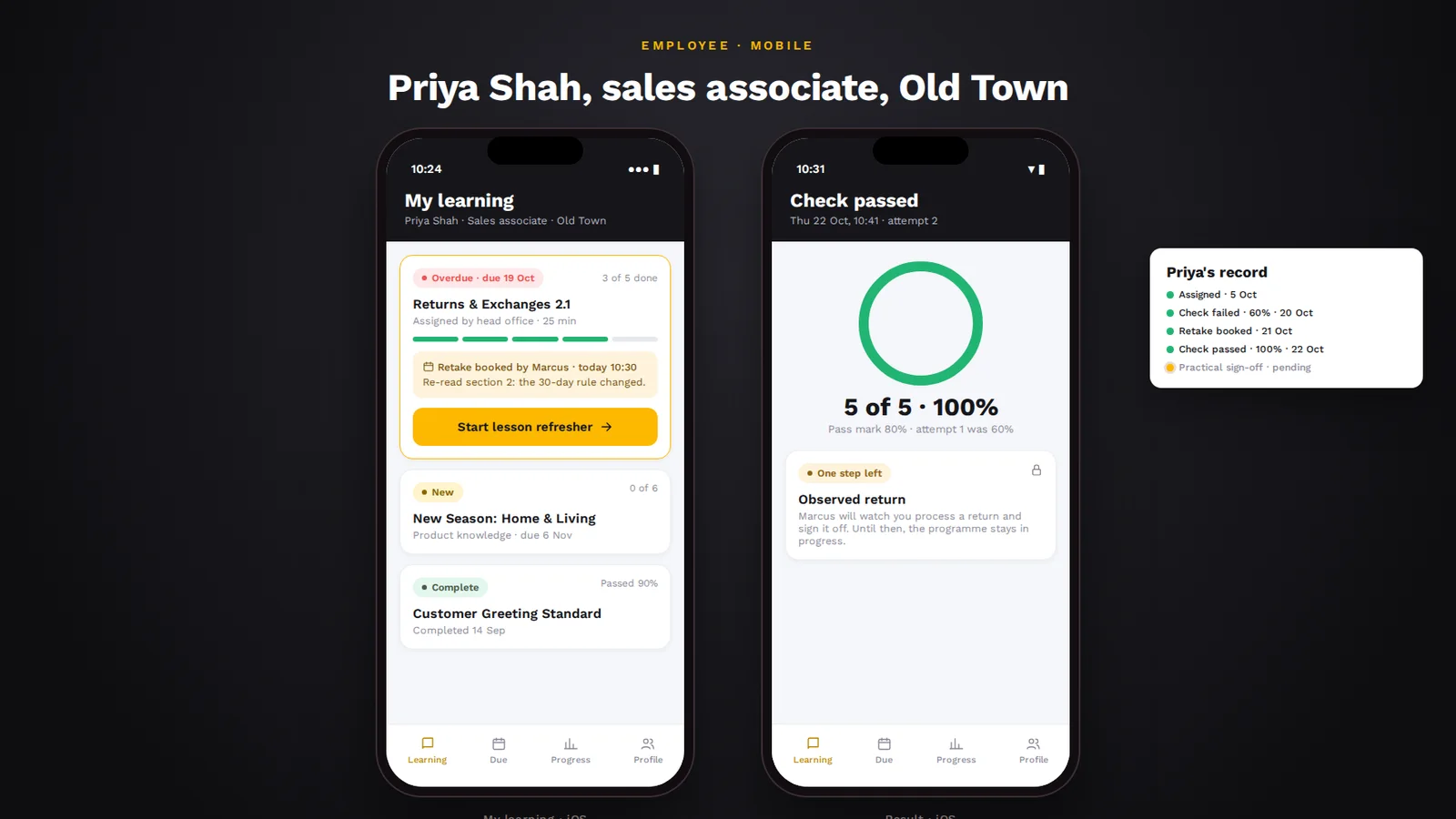
  • ✓Mobile learner experience with assigned learning, lesson media, a short knowledge check and clear progress.
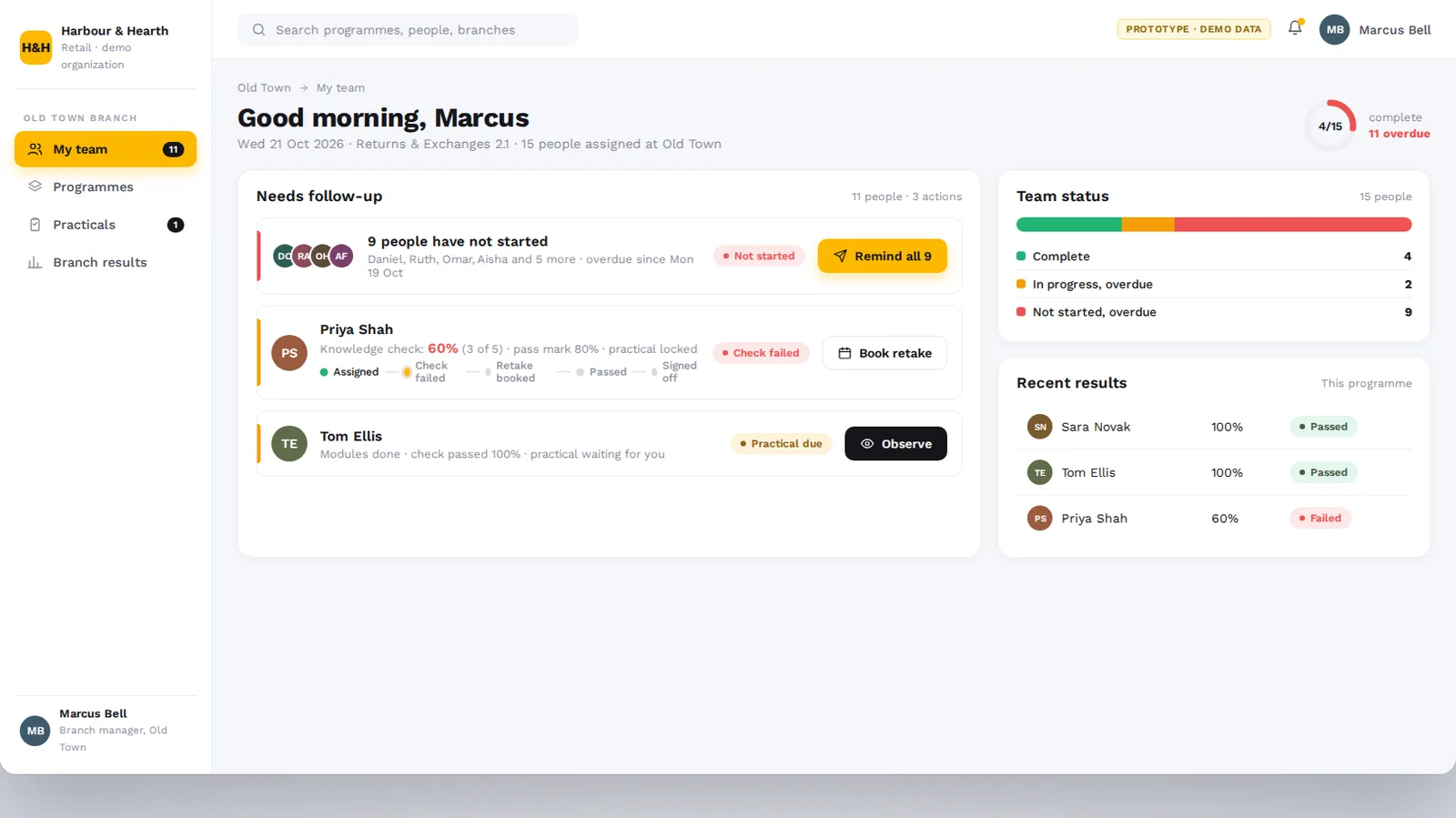
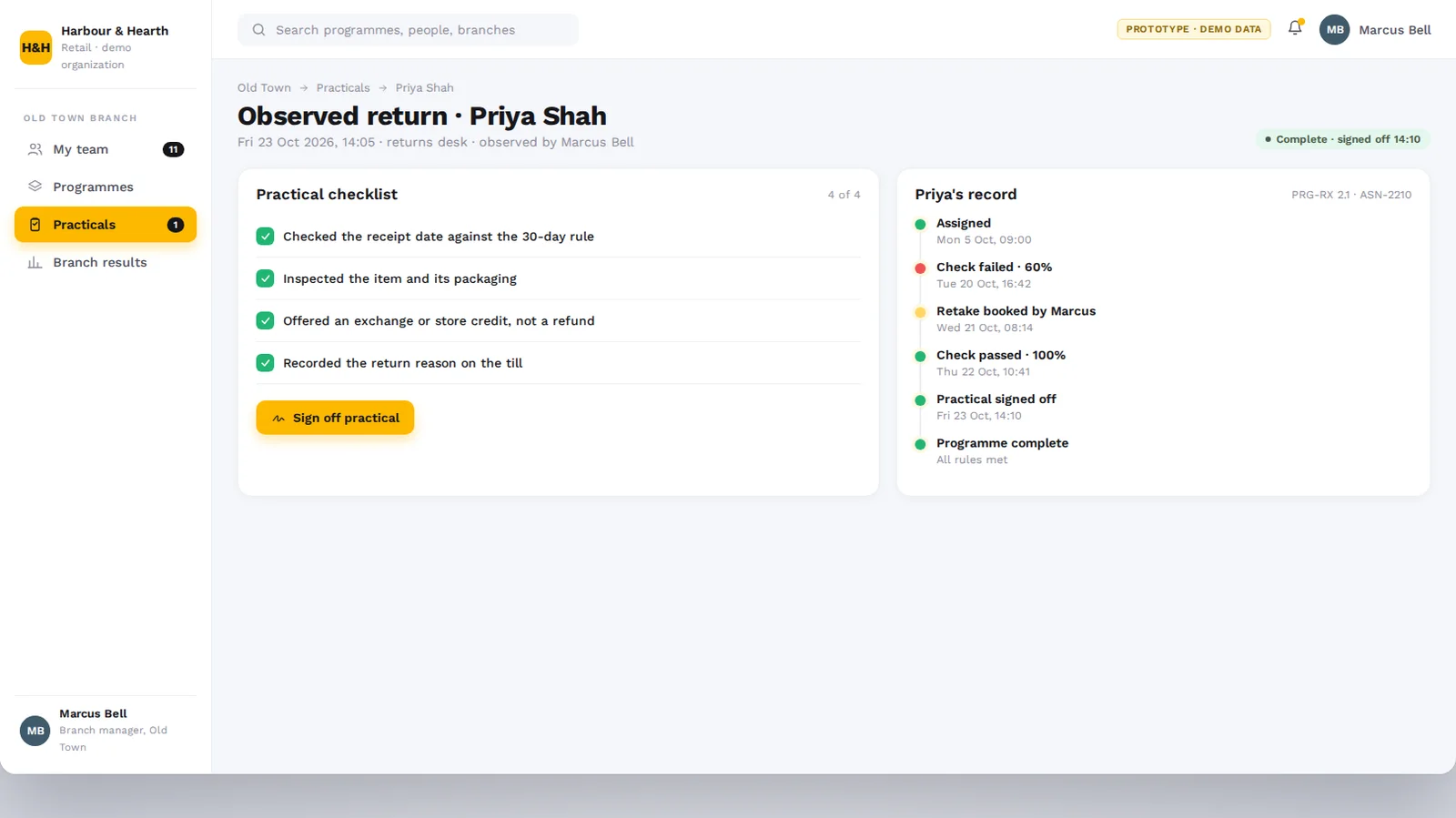
  • ✓Branch manager workspace listing overdue learning, retakes and practical sign-offs, each with a next action.
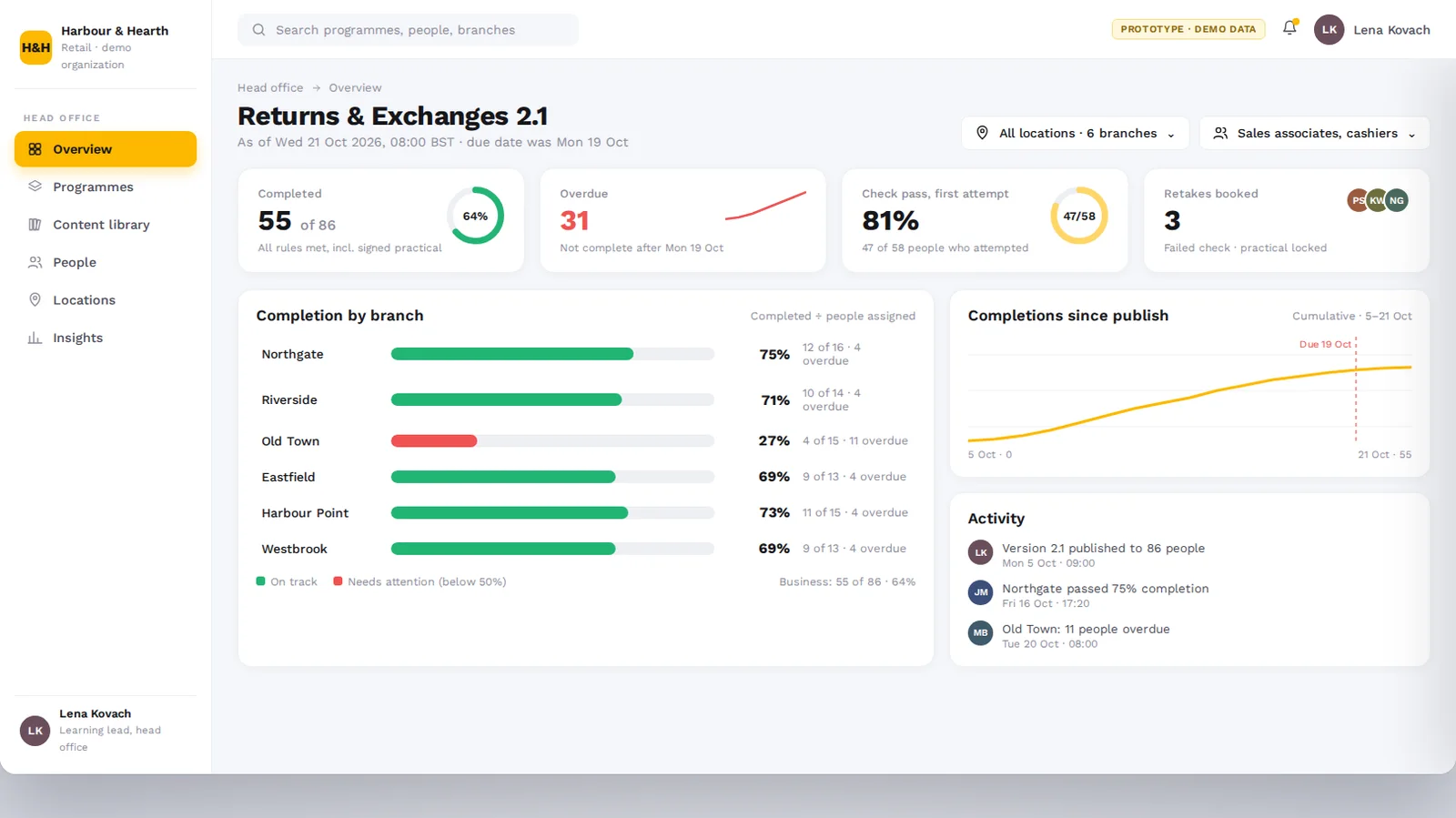
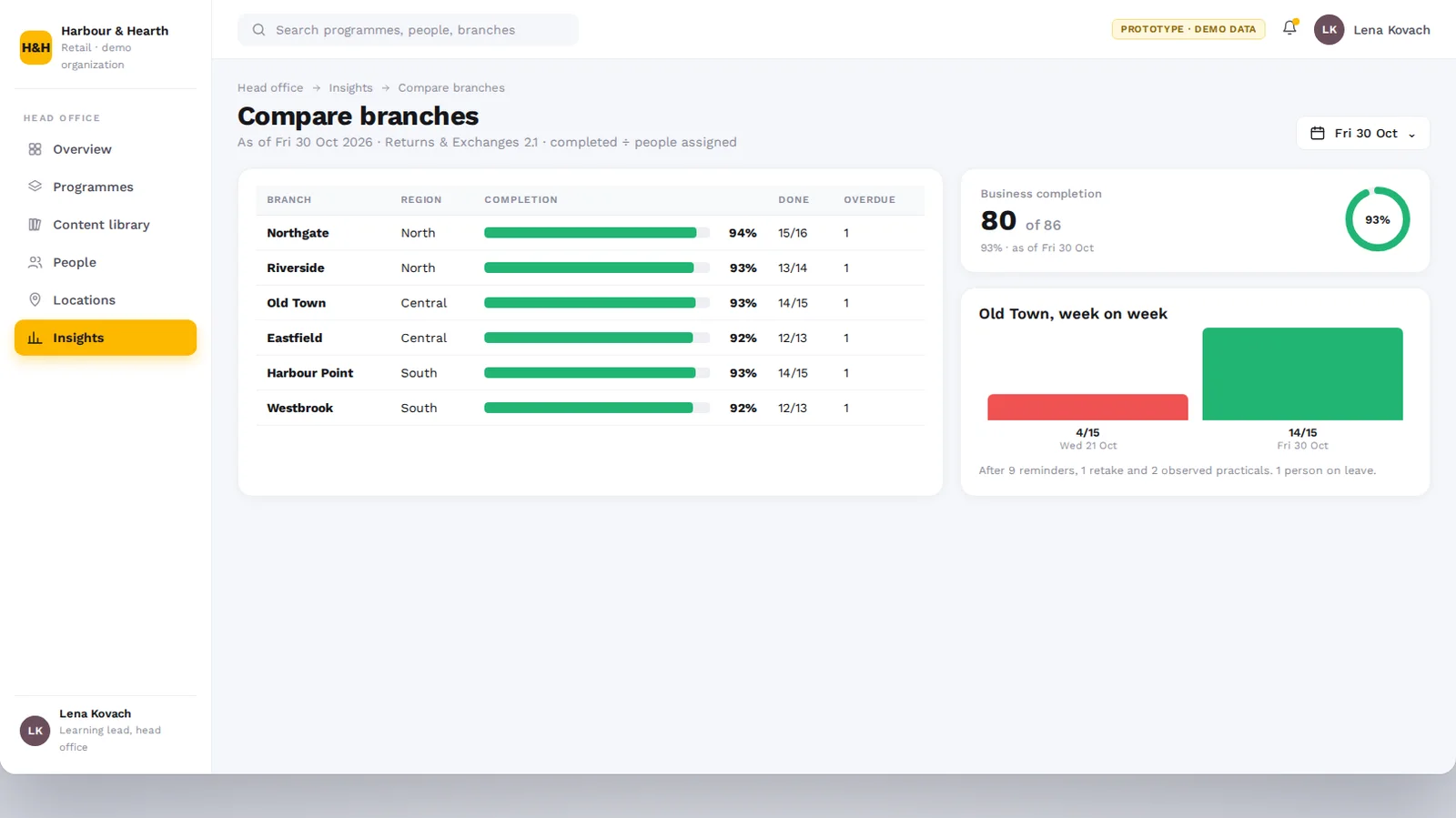
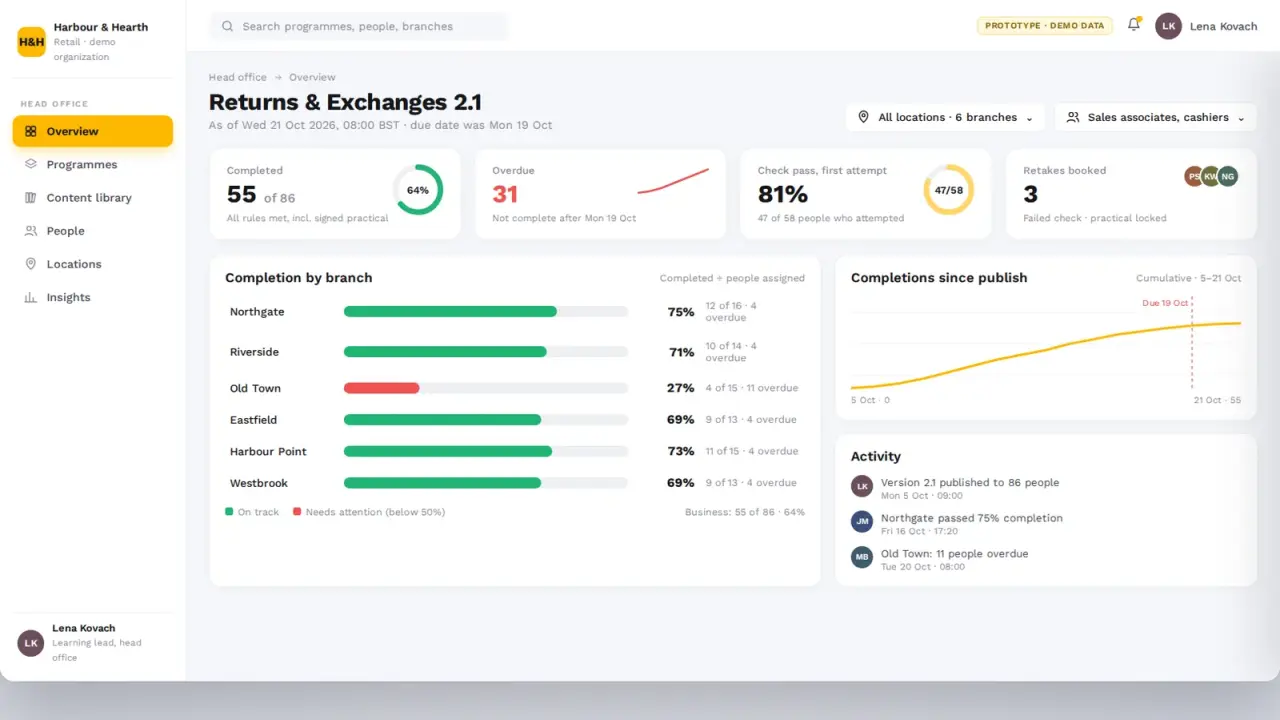
  • ✓Headquarters overview of programme status across every branch, with a location filter.
  • ✓Branch comparison of completion, assessment results and overdue learning.

Solution Architecture

Why Central Consistency, Local Follow-Through: Our Product Decisions

A distributed organization needed more than a course catalogue. Every design decision in Branchline connects what head office publishes to what each branch manager can act on.

One standard, built once

Every branch should learn the same version of the standard.

Central programme builder
Head office assembles lessons, demonstrations, checks and practicals in one place.
Targeted by role and location
Programmes reach the roles and branches they are written for.
Versioned content
When a programme changes, every assigned branch sees the update.

Follow-through in the branch

Visibility only helps if a manager can act on it today.

A short list, not a dashboard
Managers see who is overdue, who needs a retake and what to sign off.
A next action on every row
Send a reminder, book a retake or observe a practical, straight from the list.
Learning that fits the shift
Employees get short lessons and quick checks on their phone, with a clear next step.

Key product choices

DecisionWhy we made it
Mobile-first learner experienceEmployees learn between tasks on the shop floor, so learning had to work on a phone.
Location as a real controlBranch and region filters shape every head office view, reflecting how the organization is run.
Manager scope by branchManagers see and act on their own team, while head office sees across all locations.
Warm, operational interfaceClear lists and comparisons instead of a wall of KPI cards, in a retail identity rather than generic enterprise blue.

The result: head office keeps every branch on one standard, and every branch manager knows exactly who needs follow-up.

Product Experience

What SoluLab Delivered

BuildProgramme builder for lessons, demos, checks and practicals
TargetAssignment by role, branch and region
LearnMobile learner experience with knowledge checks
ActBranch manager workspace with follow-up actions
SeeHeadquarters overview and branch comparison

Technology & Integrations

Web ApplicationHeadquarters AdministrationManager WorkspaceMobile Learner ExperienceShared REST APIRole-Based AccessLocation & Region ModelVideo LessonsNotifications

Frequently Asked Questions

1. What is Branchline?

Branchline is a learning platform for a multi-location retail organization. Head office builds programmes, assigns them by role and branch, employees complete them on mobile and branch managers follow up.

2. Who uses it?

The head office learning team, branch managers and employees in customer-facing, cashier, shift lead and stockroom roles.

3. What can a programme include?

Lessons, video demonstrations, knowledge checks with a pass mark and practical activities that a branch manager observes and signs off.

4. How is learning targeted?

Each programme is assigned to selected roles and selected branches or regions, with a due date. Branch managers are notified when their team is assigned.

5. What does the employee see on mobile?

Their assigned learning with due dates, the lesson and its media, a short knowledge check and their progress, with a clear next step.

6. What does a branch manager see?

A short list of people who need follow-up, such as overdue learning, failed checks and practicals waiting for sign-off, each with a next action, plus team progress and recent results.

7. What can head office see?

Programme status across every branch, filtered by location or region, and a comparison of completion, pass rates and overdue learning between branches.

8. How does it handle different branches?

Branches are grouped into regions. Head office views can be filtered by location, and each manager works with their own branch team.

9. Which surfaces were built?

Headquarters web administration, a branch manager workspace and a mobile learner experience, all on one shared backend.

10. Who can see what?

Access is role-based: employees see their own learning, managers see their branch and head office sees across the organization.