Home › Case Studies › AI Finance Copilot
AI · FINANCE COPILOT · ENTERPRISE FINANCE

AI Finance Copilot: How SoluLab Built a Natural-Language Finance Assistant with a Human in Control

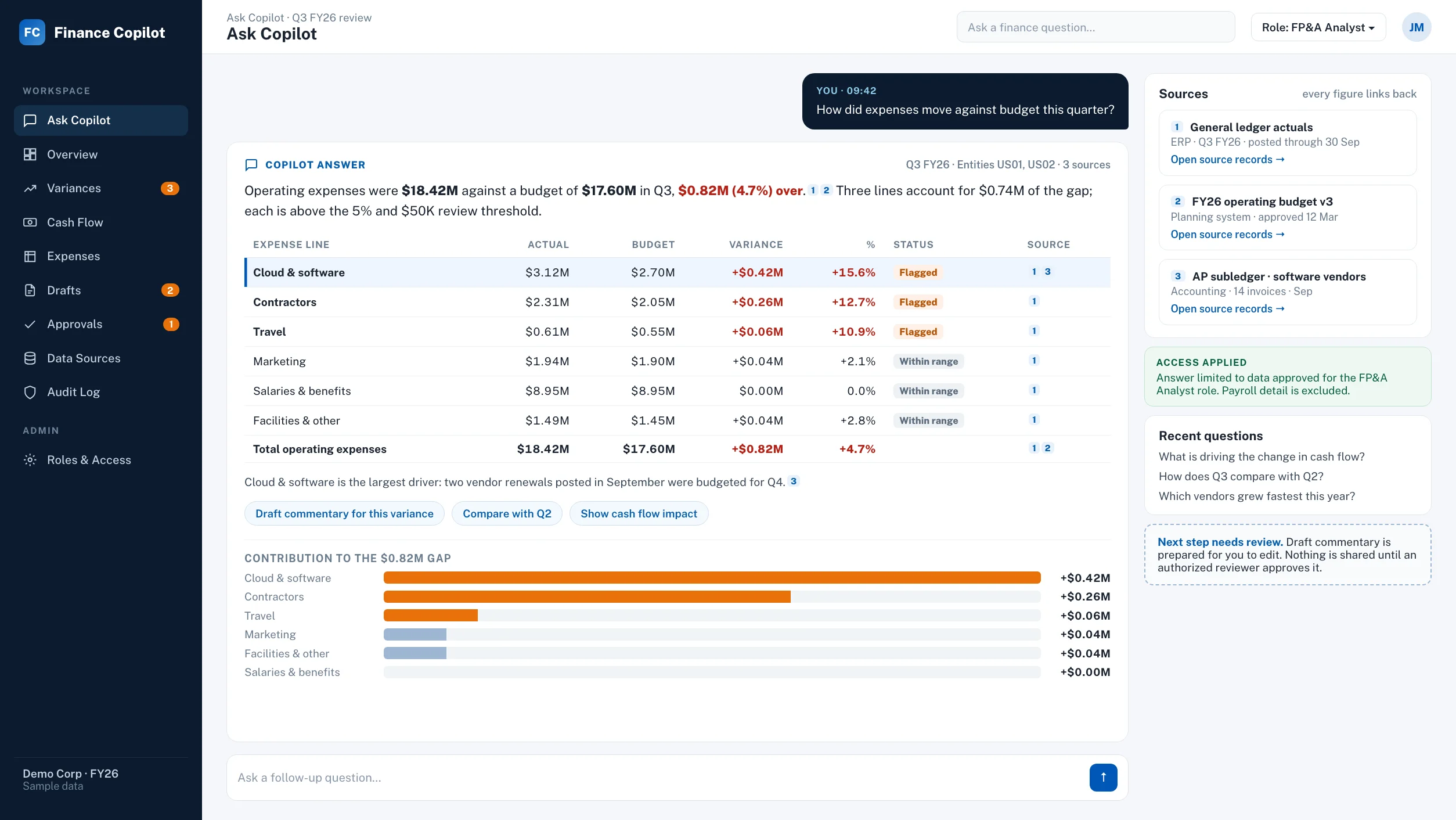
AI finance copilot answering a plain-language question about expenses against budget, with each figure linked to its source data

AI Finance Copilot at a Glance

An AI finance copilot lets finance teams ask questions about performance, cash flow, expenses and budgets in plain language, and get answers linked back to the underlying data. SoluLab built this copilot for an enterprise finance team to cut manual searching and speed up variance reviews, with people approving every consequential action.

Client
Confidential enterprise, finance and financial operations
The problem
Time lost searching for numbers, slow variance reviews and manual drafting of summaries and commentary
What we built
A natural-language finance assistant connected to approved finance data sources
Core capabilities
Plain-language questions, variance and trend detection, draft summaries and management commentary
AI approach
AI interprets questions and drafts outputs. Every answer links to its source data for human verification
Control model
Role-based access, source-linked outputs, and human review before any consequential action
Starting point
One high-value finance use case, expanded after validation

Business Overview

Finance teams sit on plenty of data. The hard part is getting to the right number, quickly, and explaining what it means.

Budget-versus-actuals sits in one place, cash flow in another, expense detail somewhere else. Each question turns into a hunt.

The client wanted a faster way to answer everyday finance questions and spot what had changed, without handing decisions over to a black box. Finance is a field where an unexplained number is worse than no number.

So the brief to SoluLab was clear: build an assistant that speeds up analysis and drafting, keeps people in control, and shows its working.

The Challenges: Why Finance Teams Lose Time Before the Analysis Even Starts

  1. 01

    Manual searching.

    Answering a simple question about expense trends or period comparisons meant pulling data from several sources and reassembling it by hand.

  2. 02

    Slow variance reviews.

    Spotting a significant variance or unusual movement depended on someone looking in the right place at the right time.

  3. 03

    Repetitive drafting.

    Financial summaries, management commentary and follow-up questions for the team were written from scratch each cycle.

  4. 04

    Trust in AI.

    A finance team can’t act on an answer it can’t verify. Any assistant had to respect who’s allowed to see what, show its sources, and stop short of acting alone.That last point shaped everything else we built.

Our Solution: How the AI Finance Copilot Works

The copilot follows a simple four-step workflow, and a person stays in the loop at the end of it.

  1. 1

    Connect to Approved Finance Data Sources

    The copilot connects only to finance data sources the client has approved. It sees what the user’s role allows and nothing more.

  2. 2

    Ask in Plain Language

    Team members ask questions the way they’d ask a colleague.

    How did expenses move against budget this quarter?What’s driving the change in cash flow?How does this period compare with last?

    No query language, no report request.

  3. 3

    Review a Source-Linked Answer

    Every answer comes with supporting context and links back to the source data. A reviewer can check where a number came from before relying on it. That’s the difference between a useful answer and a guess.

  4. 4

    Act on a Human-Reviewed Next Step

    The copilot prepares the next action, and a person reviews and approves it before anything consequential happens.
What the Copilot Does for the Finance Team

Answers performance, cash flow and expense questions.
It covers budget-versus-actuals and period comparisons in plain language.
Surfaces what changed.
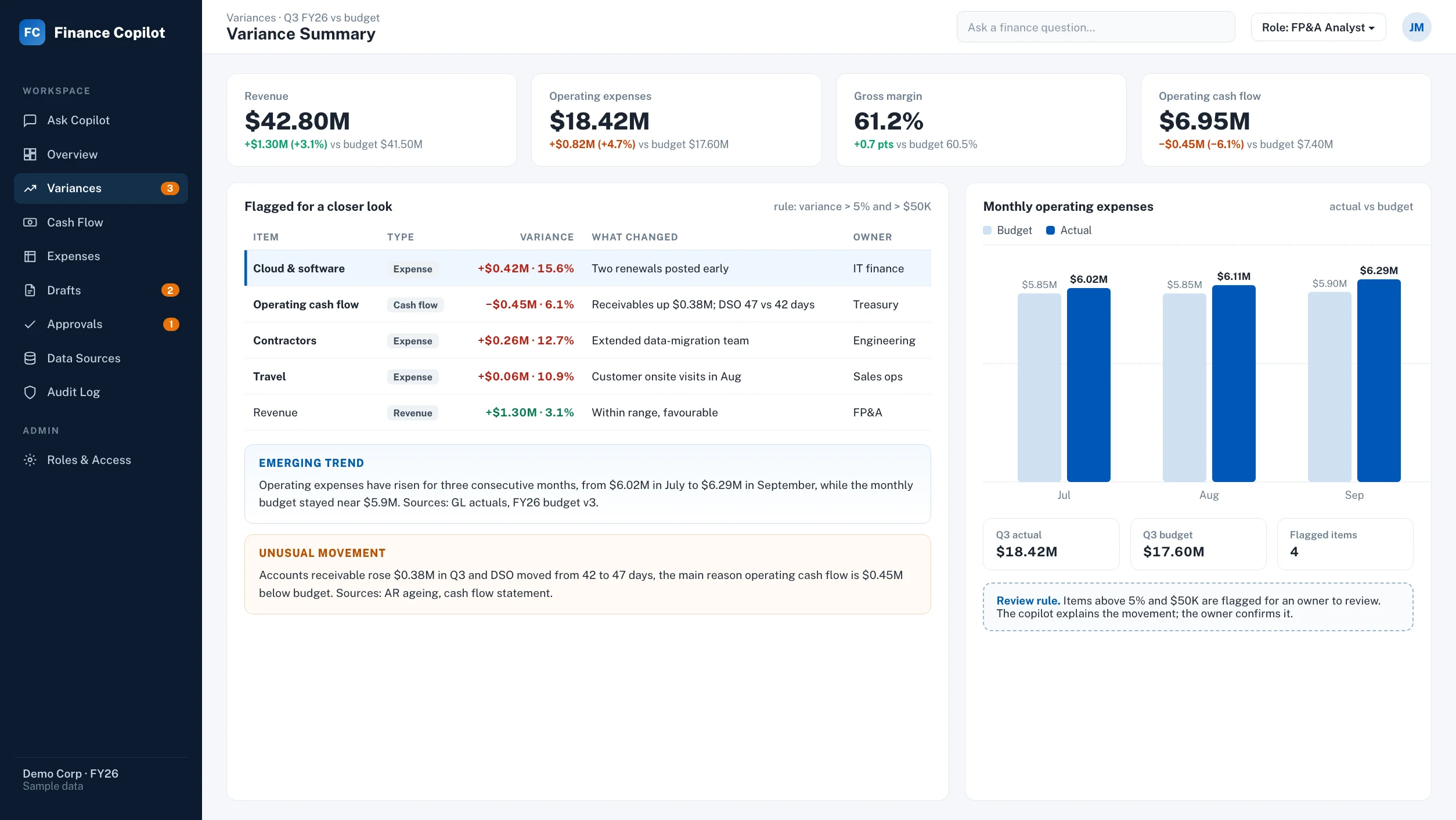
It highlights significant variances, unusual movements and emerging trends, and flags items that deserve a closer look.
Prepares the next action.
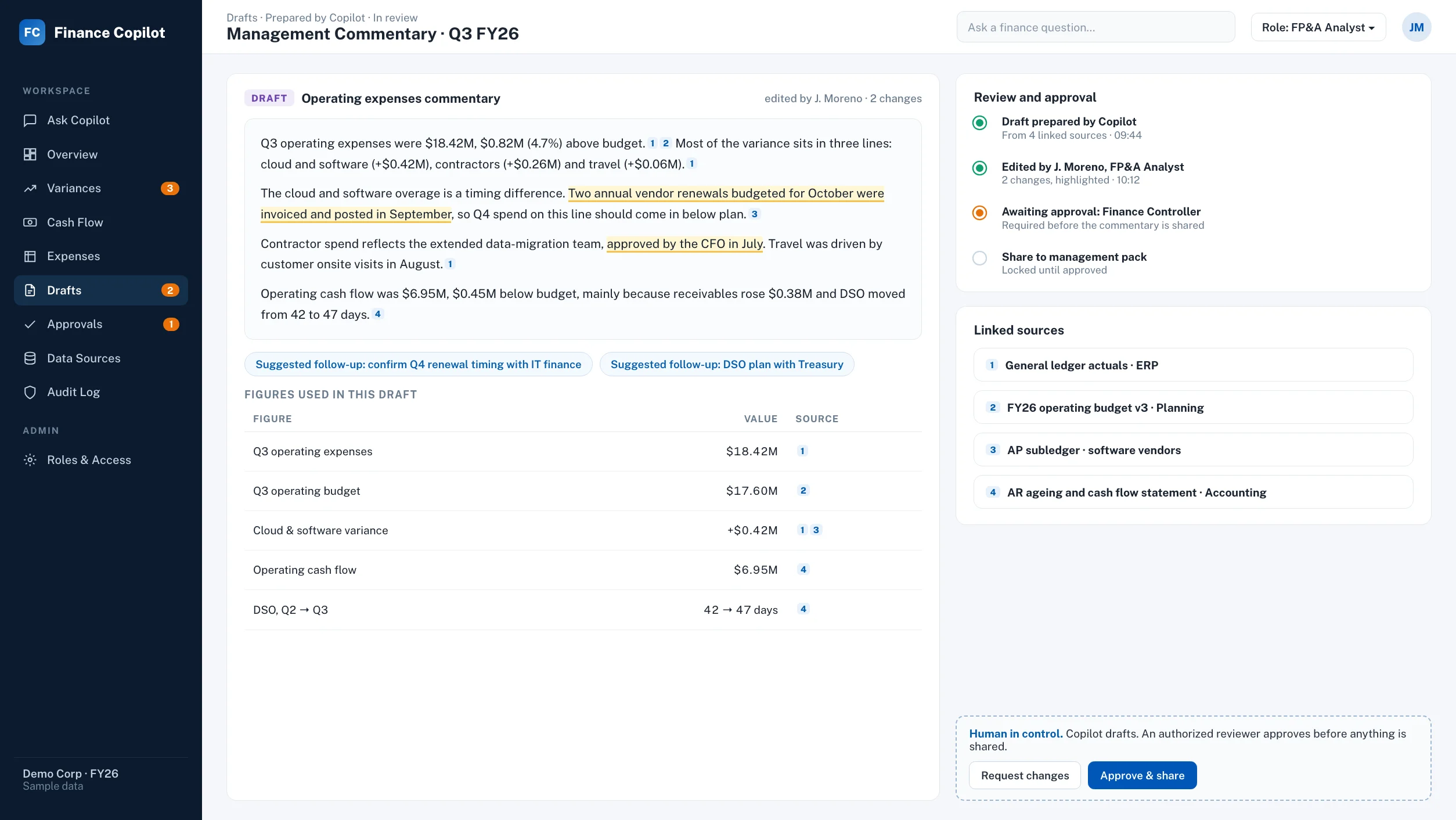
It drafts financial summaries, management commentary and follow-up questions for the team to review and edit.
Variance summary screen flagging cloud and software, contractors, travel and operating cash flow for a closer look, with owners and a monthly actual-versus-budget chart

Product Experience

Source-linked answer: the copilot explains operating expenses against budget, flags three lines above the review threshold and links each figure to the general ledger, budget and AP subledger
Source-Linked Answer
Variance summary screen with revenue, operating expenses, gross margin and operating cash flow against budget, flagged variances with owners and a monthly actual-versus-budget chart
Variance Summary
Draft management commentary prepared by the copilot, with analyst edits highlighted, linked sources and an approval step that locks sharing until a finance controller approves
Draft Commentary Review

Built-In Controls for Finance

We designed the controls first, then the features around them.

Role-based access.
Users see approved data only, based on their role.
Source-linked outputs.
Answers point back to their sources, so people can verify them.
Human review and approval.
Nothing consequential happens until an authorized person signs off.

Final controls depend on the agreed architecture and the client’s requirements, and they’re confirmed during design.

Solution Architecture

We built the copilot in layers, so data access, language understanding, review and governance can each be adjusted on their own.
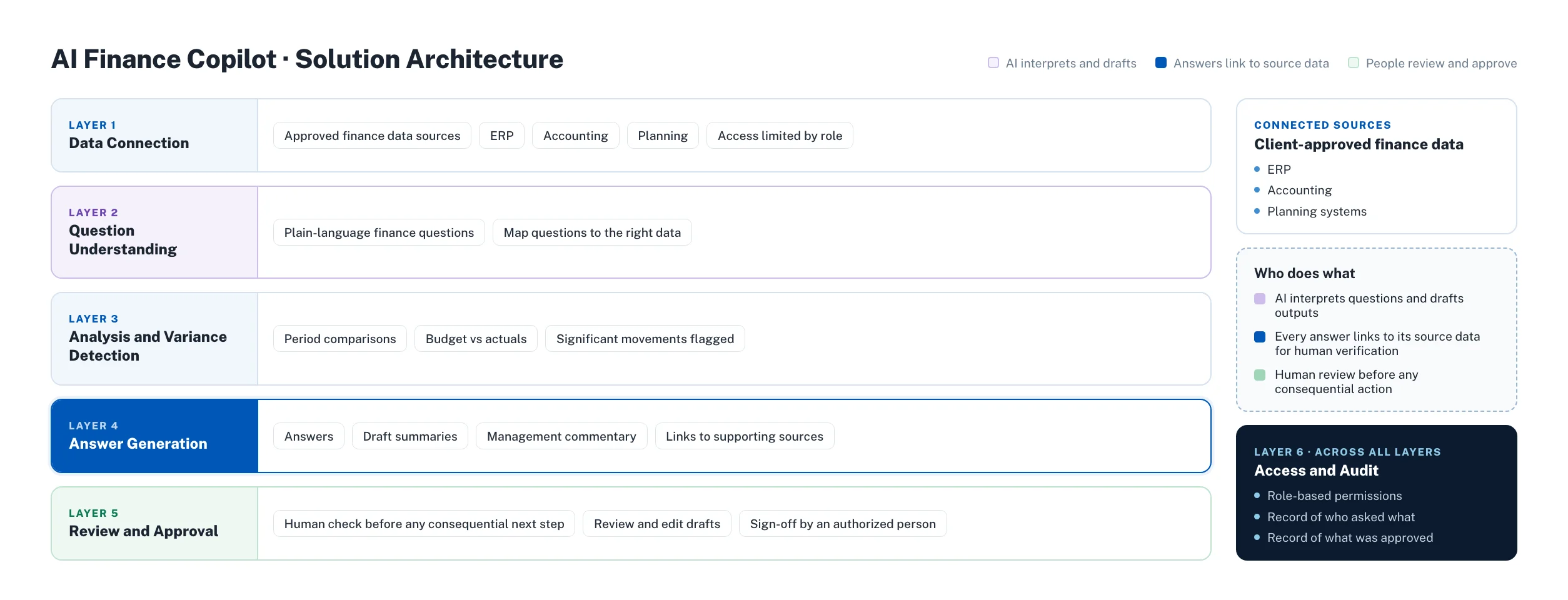
AI finance copilot solution architecture: data connection, question understanding, analysis and variance detection, answer generation, and review and approval, with access and audit across all layers
Scroll the diagram sideways on small screens, or click it to view full size.
What each layer does ⌄
Layer
What it does
Data Connection
Connects to approved finance data sources with access limited by role
Question Understanding
Interprets plain-language finance questions and maps them to the right data
Analysis and Variance Detection
Compares periods, budgets and actuals and flags significant movements
Answer Generation
Produces answers and draft summaries with links to supporting sources
Review and Approval
Puts a human check in front of any consequential next step
Access and Audit
Applies permissions and keeps a record of who asked what and what was approved

Why We Built a Copilot, Not an Autopilot

We get asked why the assistant doesn’t just act on its own findings.

Honestly, because in finance the person who signs off needs to understand what they’re signing.

The copilot

AI is good at the slow parts: searching, comparing, drafting.

Your team

It’s not a substitute for accountability. So the copilot does the legwork and shows its sources, and your team makes the call.

That keeps the speed without giving up control, and it’s the reason finance leaders can say yes to it.

Business Value and How to Measure It

The copilot is built to deliver three things: less manual searching, faster variance reviews and clearer management insight.

We don’t publish a number we can’t stand behind.

How much time a team saves depends on data quality, source systems, access controls and integrations. So we agree the KPIs up front with the client’s finance team, set a baseline, and measure against it once the copilot is live.

A good first set of measures looks like this: time to answer a routine finance question, time to complete a variance review, and time spent drafting summaries and commentary.

Frequently Asked Questions

1.What is an AI finance copilot?⌄
An AI finance copilot is an assistant that answers finance questions in plain language using approved company data. It highlights variances and trends, and drafts summaries and commentary, while a person reviews and approves any consequential action.
2.What can a finance copilot help a team do?⌄
A finance copilot helps a team ask about performance, cash flow, expense trends and budget-versus-actuals, surface significant changes, and draft management commentary and follow-up questions. Finance staff review and edit the output before it’s used.
3.How does the copilot keep finance data secure?⌄
The copilot uses role-based access, so each user sees only approved data. Final security controls, including encryption and logging, are set during design based on the client’s architecture and requirements.
4.Can I trust the answers the copilot gives?⌄
The copilot links every answer to its source data so that finance staff can verify it. Answers are meant to support human judgment, not replace it, and consequential actions require review and approval.
5.Does the finance copilot make decisions on its own?⌄
No. The copilot prepares answers and next steps, and a person reviews and approves before anything consequential happens. That human-in-control design is central to how SoluLab builds finance AI.
6.What data sources can the copilot connect to?⌄
The copilot connects to finance data sources the client approves, such as ERP, accounting and planning systems. Feasibility depends on data quality, source systems, access controls and integrations, which are confirmed in discovery.
7.Where do the copilot’s figures come from?⌄
Every figure comes from the finance data sources the client approved for the copilot, and each answer links back to that source. Reviewers can open the supporting data to check a number before they use it in a report or decision.
8.What happens when data is restricted or unavailable?⌄
The copilot only answers from data the user’s role is approved to access. If the relevant data isn’t connected or the user isn’t permitted to see it, the copilot can’t draw on it. How gaps are surfaced to users is agreed during discovery and design.
9.How should a finance team get started with an AI copilot?⌄
Start with one high-value finance use case. Define the priority workflow, data sources, permissions, KPIs and integration requirements with SoluLab, validate it, then expand to more workflows.

Related Services and Case Studies

AI Invoice Reconciliation Platform

How SoluLab built an AI invoice reconciliation platform with three-way matching, duplicate detection and ERP integration for an enterprise finance team.

View Case Study →

Kavach: AI Regulatory Change Management for Banking Compliance

SoluLab developed an AI and knowledge-graph platform that transforms every RBI circular into traced requirements, verified code changes and inspection-ready board evidence.

View Case Study →

Aman Bank: Generative AI Mobile Banking

A generative AI mobile banking platform case study showcasing AI-driven fintech innovation, automation and a better user experience in banking apps.

View Case Study →

Rajat Lala, Co-Founder, SoluLab
About the Technical Reviewer

Rajat Lala

Co-Founder, SoluLab

Rajat Lala is a Co-Founder of SoluLab and a former principal software architect at Citrix. He provided the technical review for this case study, including the architecture and the human-in-control design described above. Meet the SoluLab team.

About SoluLab

SoluLab is an AI-native product development partner for enterprises and high-growth startups, building production-grade AI, blockchain and software products. With 250+ developers and 11+ years of experience, SoluLab serves clients across North America, Europe, the Middle East and APAC, including in finance, healthcare, logistics, retail and education.

Build Your Finance Copilot with SoluLab

You don’t need to automate the whole finance function at once. Pick one high-value use case, tell us where the data lives, and we’ll show you how an AI copilot can take the searching and drafting off your team’s plate, with your people still in control.

Let’s discuss your unique project. Talk to SoluLab: sales@solulab.com | www.solulab.com

AIFinance CopilotVariance AnalysisNatural-Language QueriesHuman in Control